
KLR
New member
Hello,
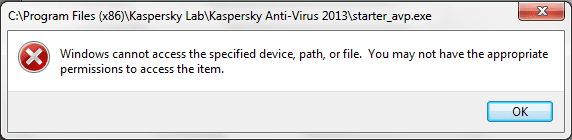
I have a little problem with Kaspersky antivirus, I had Avast antivirus for the past year, but I uninstalled it because I think I have some viruses and it doesn't help protecting my computer, I installed Kaspersky antivirus instead, but after installation it didn't run automatically, so I tried to open it by myself, and when I open it, this message pops up:
"windows cannot access the specified device, path, or file. you may not have the appropriate permission to access the item.".
Is there anything I can do about it? maybe a firewall settings or something with users permission?
Thanks in advance.
I have a little problem with Kaspersky antivirus, I had Avast antivirus for the past year, but I uninstalled it because I think I have some viruses and it doesn't help protecting my computer, I installed Kaspersky antivirus instead, but after installation it didn't run automatically, so I tried to open it by myself, and when I open it, this message pops up:
"windows cannot access the specified device, path, or file. you may not have the appropriate permission to access the item.".
Is there anything I can do about it? maybe a firewall settings or something with users permission?
Thanks in advance.
Attachments
My Computer
- Computer Manufacturer/Model Number
- Acer
- OS
- Windows 7 Ultimate 32-bit (6.1, Build 7600)
- CPU
- Inel Core i3 CPU
- Memory
- 4096MB RAM
- Graphics Card(s)
- Intel HD Graphics 1051MB
- Sound Card
- Speakers
- Monitor(s) Displays
- HP Laptop Monitor, Built in, Full HD
- Screen Resolution
- 1366 x 768
- Hard Drives
- 500 GB Hard Drive
- Mouse
- Touch Pad
- Internet Speed
- 28.8 Mbps


