Solved Error: Boot and System on different drives

GMS Group

New member
Local time
5:50 AM
Messages
26
I was just trying to install FarStone Restore IT 2014 when it gave me an error that my PC`s Boot and System files are on different drives.

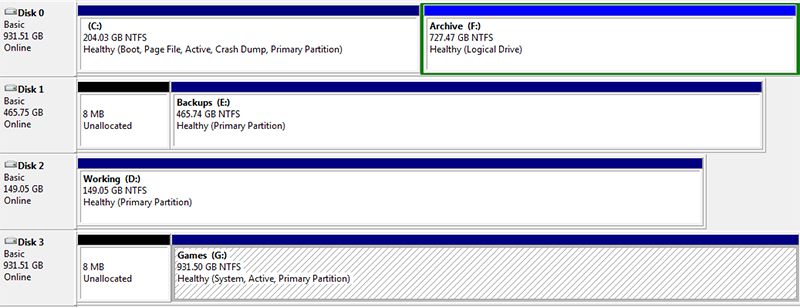
I had a look and Boot is in drive C: and System is in drive G:
( No idea how that happened )


C: Boot, Page File, Active, Crash Dump, Primary Partition
D: Primary Partition
E: Primary Partition
F: Logical Drive
G: System, Active, Primary Partition


vJTkAxj
vJTkAxj.jpg


i tried http://www.sevenforums.com/tutorials/209885-bootmgr-move-c-easybcd.html but that made no difference.

Any help will be much appreciated

Regards

PS. All my system files are on drive C:
 

My Computer My Computer

Computer type
PC/Desktop
Computer Manufacturer/Model Number
Gigabyte Technology Co., Ltd. Q87M-D2H
OS
Windows 7 Professional (x64) Service Pack 1 (build 7601)
CPU
Intel(R) Core(TM) i5-4460 CPU @ 3.20GHz
Motherboard
Gigabyte Technology Co. Ltd Q87M-D2H
Memory
16384MB RAM
Graphics Card(s)
ATI Radeon HD 5700 Series
Sound Card
Realtek High Definition Audio
Monitor(s) Displays
LG IPS FULLHD
Screen Resolution
1920x1080
PSU
Gigabyte GE-P585A-C2
Case
Cooler Master
Keyboard
KAI-9 Sentinel
Mouse
Genius Mouse
Antivirus
Emsisoft Anti-Malware
Browser
Firefox

My Computer My Computer

Computer type
Laptop
Computer Manufacturer/Model Number
ACER ASPIRE 5742G
OS
Microsoft Windows 7 Home Premium 64-bits 7601 Multiprocessor Free Service Pack 1
CPU
Intel(R) Core(TM) i3 CPU M 370 @ 2.40GHz
Motherboard
Acer Aspire 5742G
Memory
4,00 GB
Graphics Card(s)
ATI Mobility Radeon HD 5400 Series
Sound Card
(1) AMD High Definition Audio Device (2) Realtek High Defi
Screen Resolution
1366 x 768 x 32 bits (4294967296 colors) @ 60 Hz
Hard Drives
WDC WD5000BEVT-22ZAT0
Yes, EasyBCD finished running with no errors.


Code:
bcdedit /store  C:\boot\bcd  /enum all
C:\Windows\system32>bcdedit /store C:\boot\bcd /enum all

Windows Boot Manager
--------------------
identifier {bootmgr}
device boot
description Windows Boot Manager
locale en-US
inherit {globalsettings}
default {default}
resumeobject {c5a9343b-54b3-11e3-9f30-c6094ed444cf}
displayorder {default}
toolsdisplayorder {memdiag}
timeout 30

Windows Boot Loader
-------------------
identifier {default}
device partition=C:
path \Windows\system32\winload.exe
description Windows 7
locale en-US
inherit {bootloadersettings}
recoverysequence {c5a9343d-54b3-11e3-9f30-c6094ed444cf}
recoveryenabled Yes
osdevice partition=C:
systemroot \Windows
resumeobject {c5a9343b-54b3-11e3-9f30-c6094ed444cf}
nx OptIn

Windows Boot Loader
-------------------
identifier {c5a9343d-54b3-11e3-9f30-c6094ed444cf}
device ramdisk=[C:]\Recovery\c5a9343d-54b3-11e3-9f30-c6094ed444
cf\Winre.wim,{c5a9343e-54b3-11e3-9f30-c6094ed444cf}
path \windows\system32\winload.exe
description Windows Recovery Environment
inherit {bootloadersettings}
osdevice ramdisk=[C:]\Recovery\c5a9343d-54b3-11e3-9f30-c6094ed444
cf\Winre.wim,{c5a9343e-54b3-11e3-9f30-c6094ed444cf}
systemroot \windows
nx OptIn
winpe Yes

Resume from Hibernate
---------------------
identifier {c5a9343b-54b3-11e3-9f30-c6094ed444cf}
device partition=C:
path \Windows\system32\winresume.exe
description Windows Resume Application
locale en-US
inherit {resumeloadersettings}
filedevice partition=C:
filepath \hiberfil.sys
debugoptionenabled No

Windows Memory Tester
---------------------
identifier {memdiag}
device boot
path \Boot\memtest.exe
description Windows Memory Diagnostic
locale en-US
inherit {globalsettings}
badmemoryaccess Yes

EMS Settings
------------
identifier {emssettings}
bootems Yes

Debugger Settings
-----------------
identifier {dbgsettings}
debugtype Serial
debugport 1
baudrate 115200

RAM Defects
-----------
identifier {badmemory}

Global Settings
---------------
identifier {globalsettings}
inherit {dbgsettings}
{emssettings}
{badmemory}

Boot Loader Settings
--------------------
identifier {bootloadersettings}
inherit {globalsettings}
{hypervisorsettings}

Hypervisor Settings
-------------------
identifier {hypervisorsettings}
hypervisordebugtype Serial
hypervisordebugport 1
hypervisorbaudrate 115200

Resume Loader Settings
----------------------
identifier {resumeloadersettings}
inherit {globalsettings}

Device options
--------------
identifier {c5a9343e-54b3-11e3-9f30-c6094ed444cf}
description Ramdisk Options
ramdisksdidevice partition=C:
ramdisksdipath \Recovery\c5a9343d-54b3-11e3-9f30-c6094ed444cf\boot.sdi



Code:
bcdedit /store  G:\boot\bcd  /enum all
Windows Boot Manager
--------------------
identifier {bootmgr}
device boot
description Windows Boot Manager
locale en-US
inherit {globalsettings}
default {default}
resumeobject {c5a9343b-54b3-11e3-9f30-c6094ed444cf}
displayorder {default}
toolsdisplayorder {memdiag}
timeout 30

Windows Boot Loader
-------------------
identifier {default}
device partition=C:
path \Windows\system32\winload.exe
description Windows 7
locale en-US
inherit {bootloadersettings}
recoverysequence {c5a9343d-54b3-11e3-9f30-c6094ed444cf}
recoveryenabled Yes
osdevice partition=C:
systemroot \Windows
resumeobject {c5a9343b-54b3-11e3-9f30-c6094ed444cf}
nx OptIn

Windows Boot Loader
-------------------
identifier {c5a9343d-54b3-11e3-9f30-c6094ed444cf}
device ramdisk=[C:]\Recovery\c5a9343d-54b3-11e3-9f30-c6094ed444
cf\Winre.wim,{c5a9343e-54b3-11e3-9f30-c6094ed444cf}
path \windows\system32\winload.exe
description Windows Recovery Environment
inherit {bootloadersettings}
osdevice ramdisk=[C:]\Recovery\c5a9343d-54b3-11e3-9f30-c6094ed444
cf\Winre.wim,{c5a9343e-54b3-11e3-9f30-c6094ed444cf}
systemroot \windows
nx OptIn
winpe Yes

Resume from Hibernate
---------------------
identifier {c5a9343b-54b3-11e3-9f30-c6094ed444cf}
device partition=C:
path \Windows\system32\winresume.exe
description Windows Resume Application
locale en-US
inherit {resumeloadersettings}
filedevice partition=C:
filepath \hiberfil.sys
debugoptionenabled No

Windows Memory Tester
---------------------
identifier {memdiag}
device boot
path \Boot\memtest.exe
description Windows Memory Diagnostic
locale en-US
inherit {globalsettings}
badmemoryaccess Yes

EMS Settings
------------
identifier {emssettings}
bootems Yes

Debugger Settings
-----------------
identifier {dbgsettings}
debugtype Serial
debugport 1
baudrate 115200

RAM Defects
-----------
identifier {badmemory}

Global Settings
---------------
identifier {globalsettings}
inherit {dbgsettings}
{emssettings}
{badmemory}

Boot Loader Settings
--------------------
identifier {bootloadersettings}
inherit {globalsettings}
{hypervisorsettings}

Hypervisor Settings
-------------------
identifier {hypervisorsettings}
hypervisordebugtype Serial
hypervisordebugport 1
hypervisorbaudrate 115200

Resume Loader Settings
----------------------
identifier {resumeloadersettings}
inherit {globalsettings}

Device options
--------------
identifier {c5a9343e-54b3-11e3-9f30-c6094ed444cf}
description Ramdisk Options
ramdisksdidevice partition=C:
ramdisksdipath \Recovery\c5a9343d-54b3-11e3-9f30-c6094ed444cf\boot.sdi
 

My Computer My Computer

Computer type
PC/Desktop
Computer Manufacturer/Model Number
Gigabyte Technology Co., Ltd. Q87M-D2H
OS
Windows 7 Professional (x64) Service Pack 1 (build 7601)
CPU
Intel(R) Core(TM) i5-4460 CPU @ 3.20GHz
Motherboard
Gigabyte Technology Co. Ltd Q87M-D2H
Memory
16384MB RAM
Graphics Card(s)
ATI Radeon HD 5700 Series
Sound Card
Realtek High Definition Audio
Monitor(s) Displays
LG IPS FULLHD
Screen Resolution
1920x1080
PSU
Gigabyte GE-P585A-C2
Case
Cooler Master
Keyboard
KAI-9 Sentinel
Mouse
Genius Mouse
Antivirus
Emsisoft Anti-Malware
Browser
Firefox
Easybcd doesn't move the bootmanager and bootmenu.... but copies it. Also it marks the new partition ACTIVE. The old partition is automatically INACTIVE if that partition is on same physical disk because only 1 partition can be active on a physical disk.

It has copied the bootmenu succesfully from G to C. I assume bootmanager as well.
Mark G drive inactive. In elevated command prompt:
Code:
diskpart
select  volume  G
inactive
exit
Now reboot. Problem solved? Otherwise do a "startup repair". Post results
 

My Computer My Computer

Computer type
Laptop
Computer Manufacturer/Model Number
ACER ASPIRE 5742G
OS
Microsoft Windows 7 Home Premium 64-bits 7601 Multiprocessor Free Service Pack 1
CPU
Intel(R) Core(TM) i3 CPU M 370 @ 2.40GHz
Motherboard
Acer Aspire 5742G
Memory
4,00 GB
Graphics Card(s)
ATI Mobility Radeon HD 5400 Series
Sound Card
(1) AMD High Definition Audio Device (2) Realtek High Defi
Screen Resolution
1366 x 768 x 32 bits (4294967296 colors) @ 60 Hz
Hard Drives
WDC WD5000BEVT-22ZAT0
Mark G drive inactive. In elevated command prompt:
Code:
diskpart
select  volume  G
inactive
exit
Now reboot. Problem solved? Otherwise do a "startup repair". Post results


I was going to try that but if the PC doesn`t reboot do you think running "startup repair" will fix it. I really don`t want to have to reinstall everything?

Thanks
 

My Computer My Computer

Computer type
PC/Desktop
Computer Manufacturer/Model Number
Gigabyte Technology Co., Ltd. Q87M-D2H
OS
Windows 7 Professional (x64) Service Pack 1 (build 7601)
CPU
Intel(R) Core(TM) i5-4460 CPU @ 3.20GHz
Motherboard
Gigabyte Technology Co. Ltd Q87M-D2H
Memory
16384MB RAM
Graphics Card(s)
ATI Radeon HD 5700 Series
Sound Card
Realtek High Definition Audio
Monitor(s) Displays
LG IPS FULLHD
Screen Resolution
1920x1080
PSU
Gigabyte GE-P585A-C2
Case
Cooler Master
Keyboard
KAI-9 Sentinel
Mouse
Genius Mouse
Antivirus
Emsisoft Anti-Malware
Browser
Firefox
You have a win7 repair disc or win7 install disk? You can enter "recovery environment" from there. And do a "startup repair" from there. Startup repair fixes many boot problems but there are no problems at all now afaik!

You can even enter "command prompt" from there and mark G active again (it's not called G there!).

I expect no problems at all!! bootmenu has been transfered. C partition is ACTIVE. No problem at all
 

My Computer My Computer

Computer type
Laptop
Computer Manufacturer/Model Number
ACER ASPIRE 5742G
OS
Microsoft Windows 7 Home Premium 64-bits 7601 Multiprocessor Free Service Pack 1
CPU
Intel(R) Core(TM) i3 CPU M 370 @ 2.40GHz
Motherboard
Acer Aspire 5742G
Memory
4,00 GB
Graphics Card(s)
ATI Mobility Radeon HD 5400 Series
Sound Card
(1) AMD High Definition Audio Device (2) Realtek High Defi
Screen Resolution
1366 x 768 x 32 bits (4294967296 colors) @ 60 Hz
Hard Drives
WDC WD5000BEVT-22ZAT0
Dude... you are so awesome...

I made drive G: inactive and rebooted and everything works. I even managed to install Restore IT 2014

xLFAP3h.jpg


Thank you so much
 

My Computer My Computer

Computer type
PC/Desktop
Computer Manufacturer/Model Number
Gigabyte Technology Co., Ltd. Q87M-D2H
OS
Windows 7 Professional (x64) Service Pack 1 (build 7601)
CPU
Intel(R) Core(TM) i5-4460 CPU @ 3.20GHz
Motherboard
Gigabyte Technology Co. Ltd Q87M-D2H
Memory
16384MB RAM
Graphics Card(s)
ATI Radeon HD 5700 Series
Sound Card
Realtek High Definition Audio
Monitor(s) Displays
LG IPS FULLHD
Screen Resolution
1920x1080
PSU
Gigabyte GE-P585A-C2
Case
Cooler Master
Keyboard
KAI-9 Sentinel
Mouse
Genius Mouse
Antivirus
Emsisoft Anti-Malware
Browser
Firefox
Back
Top