Error Code 99 on New Build with MSI M7 Motherboard

TDKMate

New member
Member
VIP
Local time
12:24 PM
Messages
335
With the motherboard on the bench, I put in the CPU with heatsink/fan, and RAM and installed it into the case. Then after hooking up the bare minimum (onboard video, mouse, keyboard, case connections) the dang thing would not boot, giving me an error code of 99 and No beeps. (it's a beeper, not speaker, and I don't even know if it works...) And nothing on the monitor. I took the motherboard out of the case to see if that would make a difference: it didn't.

I tried all I could think of, but nothing changed: I took out all the RAM and tried several sticks one at a time in the primary slot the manual said to use if using only one stick. I tried both onboard HDMI slots. I installed the video card, still nothing on the screen. I tried the working power supply from the old build. No change. Cleared the CMOS several times. Even removed all case connections (front panel, USB cables, Power/Rest switches, and LED lights).

Something is going on, though. Sometimes takes only 3-4 seconds for the Debug Code LED to run thru a bunch of numbers before stopping at 99. On at least one occasion, however, it took several minutes as it cycled thru a bunch of numbers, stopping at 18 for a moment, then repeated a hand full of times. And the onboard HDD LED sometimes goes nuts like you're defragging a mechanical drive, though the one hooked up is an SSD. I didn't think of letting it run until the 18-cycle stopped or the HDD LED stopped as it was many minutes.

The heatsink and case fan both spin up.

That's all I know on what to do... What's my next step??

Any and all help, tips, and comments will be appreciated :)
 

My Computer My Computer

At a glance

Win 7 Pro 64 SP1i7 6700K SkyLake32 GBnVidia GTX 970
Computer type
PC/Desktop
Computer Manufacturer/Model Number
home built
OS
Win 7 Pro 64 SP1
CPU
i7 6700K SkyLake
Motherboard
MSI Gaming M7
Memory
32 GB
Graphics Card(s)
nVidia GTX 970
Sound Card
onboard
Monitor(s) Displays
DELL U2711
Screen Resolution
2560x1440
Hard Drives
1 SSD OS, 2 WD Black Caviar data harddrives
PSU
EVGA Super Nova 850W G2 'Gold'
Case
Thermaltake Soprano Snow Edition
Cooling
Cooler Master Hyper 212 evo
Keyboard
Logitech K350
Mouse
Mad Kats RATT
Antivirus
Avast
Browser
Firefox
From what I read that's an input device code, pull everything but the keyboard and try again !
 

My Computer My Computer

At a glance

Windows 7 Ultimate 64i7 3770k OC'd 4.6 @ 1.17v, also FX 8120 & i5 ...32 gb G.Skill Sniper DDR3 10-12-12-31 @ 2133XFX Radeon 7870 2GB DDR5
Computer type
PC/Desktop
Computer Manufacturer/Model Number
A blend of brains, brawn and dumb luck.
OS
Windows 7 Ultimate 64
CPU
i7 3770k OC'd 4.6 @ 1.17v, also FX 8120 & i5 miniITX
Motherboard
MSI P67A-GD80 b3
Memory
32 gb G.Skill Sniper DDR3 10-12-12-31 @ 2133
Graphics Card(s)
XFX Radeon 7870 2GB DDR5
Sound Card
Sound Blaster Z Series Card
Monitor(s) Displays
(2) LG LED 23" 1920 x 1080 2ms Monitors via mini d-port
Screen Resolution
1680 X 1050 p
Hard Drives
Samsung 256 gb 830 SSD sata III
(1) 1 tb WD Black
(2) 1 tb Hitachi deskmates/sata II
(2) 1 tb WD green/sata II
(2) 3 tb Seagate Barracuda
(1) 120 gb OCZ Vertex SS
(1) Drobo 5N w/5 Seagate 3tb
PSU
EVGA modular 1000G2 80% gold rating & APC 1200 RS
Case
CoolerMaster Storm Styker
Cooling
7 case fans 140mm & 120mm, NZXT Kraken X60
Keyboard
(2) Logitech Illuminated Keyboards (1) usb (1) wireless
Mouse
Logitech G700 & T-BC21 - nano nx for the laptop
Internet Speed
Basic 120mbps down
Antivirus
Trend Micro Titanium Max Security & Malwarebytes Premium
Browser
Chrome and IE 10
Other Info
5 Noctua case fans + 3 Noctua in p/p on NZXT cooler
Integrated hot swap drive bays for 2.5" Drives
(2) Lite-on dvd/cd/Blu Ray optical 22X
Integrated fan controller and led on/off
HP Officejet Pro 8630 all-n-one
Hot-swappable 3.5" hard drive bay
Netgear Nighthawk router
Asus USB 3 & sata 6 PCIe card
Vantec IDE to sata adptr./Ultra sata adptr
Lenovo L420 i5 lappy with m sata
Drobo 5N advanced NAS
From what I read that's an input device code, pull everything but the keyboard and try again !
You hit the nail on the head, linnemeyerhere!

Short version:
It turned out to be an ID-Ten-T error...

Long version:
* I did as you suggested, and the error code changed to 64.
* I then plugged in the HDMI cable: still 64
* Then I hit the onboard restart switch and now got 39 (with a slight flicker of 38, and an occasional flicker of 40)
* Plugged in the mouse: now a solid 40.
* Restart: still 40.
* This is where it gets interesting. My monitor at this location was hooked up via VGA cable, which I didn't think would matter if the other end just dangled off to the side when I plugged in the the HDMI cable to the monitor, but I disconnected it anyway. And then instead of a monitor still in sleep mode, I got a little icon saying HDMI, but nothing else. I jumped for joy as at least there was a change!!
* Then I turned off then on the monitor and got an actual screen!! I was able to even get into BIOS!!

WooHoo!!

The ID-Ten-T part is when I remembered that the other end of the VGA cable wasn't just hanging there, it was attached to an A-B switch so apparently the monitor was still expecting a VGA signal since the A-B switch was still powered on.

Dang...

Thank you for the tips, linnemeyerhere! Now I have the confidence to put it back into the case, which I did.
.
 

My Computer My Computer

At a glance

Win 7 Pro 64 SP1i7 6700K SkyLake32 GBnVidia GTX 970
Computer type
PC/Desktop
Computer Manufacturer/Model Number
home built
OS
Win 7 Pro 64 SP1
CPU
i7 6700K SkyLake
Motherboard
MSI Gaming M7
Memory
32 GB
Graphics Card(s)
nVidia GTX 970
Sound Card
onboard
Monitor(s) Displays
DELL U2711
Screen Resolution
2560x1440
Hard Drives
1 SSD OS, 2 WD Black Caviar data harddrives
PSU
EVGA Super Nova 850W G2 'Gold'
Case
Thermaltake Soprano Snow Edition
Cooling
Cooler Master Hyper 212 evo
Keyboard
Logitech K350
Mouse
Mad Kats RATT
Antivirus
Avast
Browser
Firefox
Not sure if there is a work around, but in my testing in the above, I used a clone backup of this computer's 'C' drive. Yes, I bought a fresh, legal copy of Win 7, but I want to test things before I get that far. I booted into Safe mode and had a keyboard but no mouse. I tried other USB ports but no luck. Using the Tab and Arrow keys I got to the Device Manager and Uninstalled all problem devices and USB ports, too. But still no mouse.

Any ideas?
 

My Computer My Computer

At a glance

Win 7 Pro 64 SP1i7 6700K SkyLake32 GBnVidia GTX 970
Computer type
PC/Desktop
Computer Manufacturer/Model Number
home built
OS
Win 7 Pro 64 SP1
CPU
i7 6700K SkyLake
Motherboard
MSI Gaming M7
Memory
32 GB
Graphics Card(s)
nVidia GTX 970
Sound Card
onboard
Monitor(s) Displays
DELL U2711
Screen Resolution
2560x1440
Hard Drives
1 SSD OS, 2 WD Black Caviar data harddrives
PSU
EVGA Super Nova 850W G2 'Gold'
Case
Thermaltake Soprano Snow Edition
Cooling
Cooler Master Hyper 212 evo
Keyboard
Logitech K350
Mouse
Mad Kats RATT
Antivirus
Avast
Browser
Firefox
Normally the generic mouse drivers are built into windows so you shouldn't be having difficulties. Try unplugging the usb mouse and then plugging it into the upper most usb port on the IO panel and wait as windows locates and loads it's drivers. Also when you have a chance double check in the bios that all your settings regarding your USB are activated. Do you have an old ps2 mouse or a ps2 to usb adapter you could try? Seems like you are so close to just loading the m7's mobo drivers and putting in your new Windows key that you can taste it!
 

My Computer My Computer

At a glance

Windows 7 Ultimate 64i7 3770k OC'd 4.6 @ 1.17v, also FX 8120 & i5 ...32 gb G.Skill Sniper DDR3 10-12-12-31 @ 2133XFX Radeon 7870 2GB DDR5
Computer type
PC/Desktop
Computer Manufacturer/Model Number
A blend of brains, brawn and dumb luck.
OS
Windows 7 Ultimate 64
CPU
i7 3770k OC'd 4.6 @ 1.17v, also FX 8120 & i5 miniITX
Motherboard
MSI P67A-GD80 b3
Memory
32 gb G.Skill Sniper DDR3 10-12-12-31 @ 2133
Graphics Card(s)
XFX Radeon 7870 2GB DDR5
Sound Card
Sound Blaster Z Series Card
Monitor(s) Displays
(2) LG LED 23" 1920 x 1080 2ms Monitors via mini d-port
Screen Resolution
1680 X 1050 p
Hard Drives
Samsung 256 gb 830 SSD sata III
(1) 1 tb WD Black
(2) 1 tb Hitachi deskmates/sata II
(2) 1 tb WD green/sata II
(2) 3 tb Seagate Barracuda
(1) 120 gb OCZ Vertex SS
(1) Drobo 5N w/5 Seagate 3tb
PSU
EVGA modular 1000G2 80% gold rating & APC 1200 RS
Case
CoolerMaster Storm Styker
Cooling
7 case fans 140mm & 120mm, NZXT Kraken X60
Keyboard
(2) Logitech Illuminated Keyboards (1) usb (1) wireless
Mouse
Logitech G700 & T-BC21 - nano nx for the laptop
Internet Speed
Basic 120mbps down
Antivirus
Trend Micro Titanium Max Security & Malwarebytes Premium
Browser
Chrome and IE 10
Other Info
5 Noctua case fans + 3 Noctua in p/p on NZXT cooler
Integrated hot swap drive bays for 2.5" Drives
(2) Lite-on dvd/cd/Blu Ray optical 22X
Integrated fan controller and led on/off
HP Officejet Pro 8630 all-n-one
Hot-swappable 3.5" hard drive bay
Netgear Nighthawk router
Asus USB 3 & sata 6 PCIe card
Vantec IDE to sata adptr./Ultra sata adptr
Lenovo L420 i5 lappy with m sata
Drobo 5N advanced NAS
Normally the generic mouse drivers are built into windows so you shouldn't be having difficulties. Try unplugging the usb mouse and then plugging it into the upper most usb port on the IO panel and wait as windows locates and loads it's drivers. Also when you have a chance double check in the bios that all your settings regarding your USB are activated. Do you have an old ps2 mouse or a ps2 to usb adapter you could try? Seems like you are so close to just loading the m7's mobo drivers and putting in your new Windows key that you can taste it!
Yeah, I kind of figured Windows would see a generic mouse. I tried all the rear USB ports, no change and not a hint of Windows searching for drivers. I didn't think of trying the front case ports which are now connected.

I have some time off so I'll get the time to check BIOS (I did figure USB would be on by default but I'll double check).

I'll see if I have a PS2 mouse. I just recently gave Goodwill about 12 mice...hopefully I kept one or two. But now that you mention it, my spare USB keyboard didn't work but the PS2 one does. I guess I thought it was a bad keyboard...

Yep, real anxious to get this thing running. Hopefully with some time off I can get to it.
 

My Computer My Computer

At a glance

Win 7 Pro 64 SP1i7 6700K SkyLake32 GBnVidia GTX 970
Computer type
PC/Desktop
Computer Manufacturer/Model Number
home built
OS
Win 7 Pro 64 SP1
CPU
i7 6700K SkyLake
Motherboard
MSI Gaming M7
Memory
32 GB
Graphics Card(s)
nVidia GTX 970
Sound Card
onboard
Monitor(s) Displays
DELL U2711
Screen Resolution
2560x1440
Hard Drives
1 SSD OS, 2 WD Black Caviar data harddrives
PSU
EVGA Super Nova 850W G2 'Gold'
Case
Thermaltake Soprano Snow Edition
Cooling
Cooler Master Hyper 212 evo
Keyboard
Logitech K350
Mouse
Mad Kats RATT
Antivirus
Avast
Browser
Firefox
I finally got a couple of hours to play with it yesterday, and it was no fun.

Before I forget, are there any adapters to take two USB devices (mouse and keyboard) and adapt to One PS2 port at a reasonable price? There are tons of single units out there for a few bucks (and I already have one) but it’s a one-to-one adapter. The only two, two USB to one PS2 units I found were for $75 and $125!!! OUCH!

Apparently either the M7 is not compatible during a Win 7 install, or Win 7 is not new enough to provide support for the latest chipsets/controllers. The USB ports simply don’t work (more on this below).

Here’s some of what I did:

Tried Win 7 repair: failed on multiple attempts, with or without the fresh copy of Win 7 in the DVD player. It keeps telling me I have some sort of incompatible ‘device’ connected.

I tried loading the motherboard drivers but couldn’t as I need both a keyboard and mouse: the motherboard has only one PS2, so I can’t have both hooked up at one time. And my understanding is that PS2 is Not hot swappable so I didn’t want to risk damaging the motherboard to try.

So I tried a fresh OS install. Still no USB support, but at least it was now working good enough that I was able to install the motherboard drivers. After that, then things worked as normal. Oh, except Windows tells me it’s not a legit copy: rest assured it’s a fresh, brand new legal copy I bought from Newegg when I bought the motherboard and other parts.

And, naturally, I lost all my programs and data, which is exactly what I’m trying to avoid.

So how do I get the motherboard drivers loaded on an existing copy of Windows when I can’t have a mouse and keyboard at the same time?

Can I re-clone this drive, boot from the fresh clone, leaving it in this machine with the original drive pulled, then install the drivers? Then move it to the new machine and use the new product code to activate?

Any and all help will be appreciated!!!
 

My Computer My Computer

At a glance

Win 7 Pro 64 SP1i7 6700K SkyLake32 GBnVidia GTX 970
Computer type
PC/Desktop
Computer Manufacturer/Model Number
home built
OS
Win 7 Pro 64 SP1
CPU
i7 6700K SkyLake
Motherboard
MSI Gaming M7
Memory
32 GB
Graphics Card(s)
nVidia GTX 970
Sound Card
onboard
Monitor(s) Displays
DELL U2711
Screen Resolution
2560x1440
Hard Drives
1 SSD OS, 2 WD Black Caviar data harddrives
PSU
EVGA Super Nova 850W G2 'Gold'
Case
Thermaltake Soprano Snow Edition
Cooling
Cooler Master Hyper 212 evo
Keyboard
Logitech K350
Mouse
Mad Kats RATT
Antivirus
Avast
Browser
Firefox
another update

Short version: why can’t I get the motherboard drivers loaded?

Long version:

- Reluctant to believe the motherboard or Windows couldn’t handle generic mouse, I recloned the drive and started over.
- Booted in Safe Mode: still no USB support.
- Rebooted in Normal mode: no USB support, but after while Windows wanted to reboot as it detected something. I thought finally! After another reboot into Normal mode, no change, but did have the PS2 keyboard plugged in. I removed the Windows password so I could navigate with a PS2 mouse. Shut down again and rebooted with the mouse hooked up.
- I loaded the motherboard CD. It took AutoRun about 3-4 minutes to come up.
- Clicked on the setup program. No dialog window appeared, and had an icon in the Task Bar. After a while I opened Task Manager and it said Setup was running. I gave it 45 minutes and nothing happened (including no HDD light) and no window popped up. Rebooted, no change.
- I used Windows Explorer to ‘manually’ run Setup but it still would not do anything. So I tried installing things one at a time, first being the USB drivers. That worked. Got the onboard video drivers to install, too. But got error messages of “could not find ….” on each other driver install attempts.
- In Device Manager there are all kinds of items with an Exclamation mark, saying the drivers are not loaded.

That’s all I had time for because that all took about 5 hours to do.

Any ideas??
 

My Computer My Computer

At a glance

Win 7 Pro 64 SP1i7 6700K SkyLake32 GBnVidia GTX 970
Computer type
PC/Desktop
Computer Manufacturer/Model Number
home built
OS
Win 7 Pro 64 SP1
CPU
i7 6700K SkyLake
Motherboard
MSI Gaming M7
Memory
32 GB
Graphics Card(s)
nVidia GTX 970
Sound Card
onboard
Monitor(s) Displays
DELL U2711
Screen Resolution
2560x1440
Hard Drives
1 SSD OS, 2 WD Black Caviar data harddrives
PSU
EVGA Super Nova 850W G2 'Gold'
Case
Thermaltake Soprano Snow Edition
Cooling
Cooler Master Hyper 212 evo
Keyboard
Logitech K350
Mouse
Mad Kats RATT
Antivirus
Avast
Browser
Firefox
I would reach out to the good people at MSI for suggestions @ 626.271.1004
 

My Computer My Computer

At a glance

Windows 7 Ultimate 64i7 3770k OC'd 4.6 @ 1.17v, also FX 8120 & i5 ...32 gb G.Skill Sniper DDR3 10-12-12-31 @ 2133XFX Radeon 7870 2GB DDR5
Computer type
PC/Desktop
Computer Manufacturer/Model Number
A blend of brains, brawn and dumb luck.
OS
Windows 7 Ultimate 64
CPU
i7 3770k OC'd 4.6 @ 1.17v, also FX 8120 & i5 miniITX
Motherboard
MSI P67A-GD80 b3
Memory
32 gb G.Skill Sniper DDR3 10-12-12-31 @ 2133
Graphics Card(s)
XFX Radeon 7870 2GB DDR5
Sound Card
Sound Blaster Z Series Card
Monitor(s) Displays
(2) LG LED 23" 1920 x 1080 2ms Monitors via mini d-port
Screen Resolution
1680 X 1050 p
Hard Drives
Samsung 256 gb 830 SSD sata III
(1) 1 tb WD Black
(2) 1 tb Hitachi deskmates/sata II
(2) 1 tb WD green/sata II
(2) 3 tb Seagate Barracuda
(1) 120 gb OCZ Vertex SS
(1) Drobo 5N w/5 Seagate 3tb
PSU
EVGA modular 1000G2 80% gold rating & APC 1200 RS
Case
CoolerMaster Storm Styker
Cooling
7 case fans 140mm & 120mm, NZXT Kraken X60
Keyboard
(2) Logitech Illuminated Keyboards (1) usb (1) wireless
Mouse
Logitech G700 & T-BC21 - nano nx for the laptop
Internet Speed
Basic 120mbps down
Antivirus
Trend Micro Titanium Max Security & Malwarebytes Premium
Browser
Chrome and IE 10
Other Info
5 Noctua case fans + 3 Noctua in p/p on NZXT cooler
Integrated hot swap drive bays for 2.5" Drives
(2) Lite-on dvd/cd/Blu Ray optical 22X
Integrated fan controller and led on/off
HP Officejet Pro 8630 all-n-one
Hot-swappable 3.5" hard drive bay
Netgear Nighthawk router
Asus USB 3 & sata 6 PCIe card
Vantec IDE to sata adptr./Ultra sata adptr
Lenovo L420 i5 lappy with m sata
Drobo 5N advanced NAS

My Computer My Computer

At a glance

Win 7 Pro 64 SP1i7 6700K SkyLake32 GBnVidia GTX 970
Computer type
PC/Desktop
Computer Manufacturer/Model Number
home built
OS
Win 7 Pro 64 SP1
CPU
i7 6700K SkyLake
Motherboard
MSI Gaming M7
Memory
32 GB
Graphics Card(s)
nVidia GTX 970
Sound Card
onboard
Monitor(s) Displays
DELL U2711
Screen Resolution
2560x1440
Hard Drives
1 SSD OS, 2 WD Black Caviar data harddrives
PSU
EVGA Super Nova 850W G2 'Gold'
Case
Thermaltake Soprano Snow Edition
Cooling
Cooler Master Hyper 212 evo
Keyboard
Logitech K350
Mouse
Mad Kats RATT
Antivirus
Avast
Browser
Firefox
Sometimes the best course of action and I've had to contact them in a couple of situations like this and they're very good.
 

My Computer My Computer

At a glance

Windows 7 Ultimate 64i7 3770k OC'd 4.6 @ 1.17v, also FX 8120 & i5 ...32 gb G.Skill Sniper DDR3 10-12-12-31 @ 2133XFX Radeon 7870 2GB DDR5
Computer type
PC/Desktop
Computer Manufacturer/Model Number
A blend of brains, brawn and dumb luck.
OS
Windows 7 Ultimate 64
CPU
i7 3770k OC'd 4.6 @ 1.17v, also FX 8120 & i5 miniITX
Motherboard
MSI P67A-GD80 b3
Memory
32 gb G.Skill Sniper DDR3 10-12-12-31 @ 2133
Graphics Card(s)
XFX Radeon 7870 2GB DDR5
Sound Card
Sound Blaster Z Series Card
Monitor(s) Displays
(2) LG LED 23" 1920 x 1080 2ms Monitors via mini d-port
Screen Resolution
1680 X 1050 p
Hard Drives
Samsung 256 gb 830 SSD sata III
(1) 1 tb WD Black
(2) 1 tb Hitachi deskmates/sata II
(2) 1 tb WD green/sata II
(2) 3 tb Seagate Barracuda
(1) 120 gb OCZ Vertex SS
(1) Drobo 5N w/5 Seagate 3tb
PSU
EVGA modular 1000G2 80% gold rating & APC 1200 RS
Case
CoolerMaster Storm Styker
Cooling
7 case fans 140mm & 120mm, NZXT Kraken X60
Keyboard
(2) Logitech Illuminated Keyboards (1) usb (1) wireless
Mouse
Logitech G700 & T-BC21 - nano nx for the laptop
Internet Speed
Basic 120mbps down
Antivirus
Trend Micro Titanium Max Security & Malwarebytes Premium
Browser
Chrome and IE 10
Other Info
5 Noctua case fans + 3 Noctua in p/p on NZXT cooler
Integrated hot swap drive bays for 2.5" Drives
(2) Lite-on dvd/cd/Blu Ray optical 22X
Integrated fan controller and led on/off
HP Officejet Pro 8630 all-n-one
Hot-swappable 3.5" hard drive bay
Netgear Nighthawk router
Asus USB 3 & sata 6 PCIe card
Vantec IDE to sata adptr./Ultra sata adptr
Lenovo L420 i5 lappy with m sata
Drobo 5N advanced NAS
Hi All. I got the motherboard drives to install and the system is up and running. A very long story short, it turned out to be I have the Windows PATH for TMP/TEMP set to a different physically drive, which was not installed yet. Apparently, the CD needed to find it and couldn't. I installed the hard drive and things worked just like they should.
 

My Computer My Computer

At a glance

Win 7 Pro 64 SP1i7 6700K SkyLake32 GBnVidia GTX 970
Computer type
PC/Desktop
Computer Manufacturer/Model Number
home built
OS
Win 7 Pro 64 SP1
CPU
i7 6700K SkyLake
Motherboard
MSI Gaming M7
Memory
32 GB
Graphics Card(s)
nVidia GTX 970
Sound Card
onboard
Monitor(s) Displays
DELL U2711
Screen Resolution
2560x1440
Hard Drives
1 SSD OS, 2 WD Black Caviar data harddrives
PSU
EVGA Super Nova 850W G2 'Gold'
Case
Thermaltake Soprano Snow Edition
Cooling
Cooler Master Hyper 212 evo
Keyboard
Logitech K350
Mouse
Mad Kats RATT
Antivirus
Avast
Browser
Firefox
That's great news and when you can take some pictures of your build and post them on "show us your rig" !
 

My Computer My Computer

At a glance

Windows 7 Ultimate 64i7 3770k OC'd 4.6 @ 1.17v, also FX 8120 & i5 ...32 gb G.Skill Sniper DDR3 10-12-12-31 @ 2133XFX Radeon 7870 2GB DDR5
Computer type
PC/Desktop
Computer Manufacturer/Model Number
A blend of brains, brawn and dumb luck.
OS
Windows 7 Ultimate 64
CPU
i7 3770k OC'd 4.6 @ 1.17v, also FX 8120 & i5 miniITX
Motherboard
MSI P67A-GD80 b3
Memory
32 gb G.Skill Sniper DDR3 10-12-12-31 @ 2133
Graphics Card(s)
XFX Radeon 7870 2GB DDR5
Sound Card
Sound Blaster Z Series Card
Monitor(s) Displays
(2) LG LED 23" 1920 x 1080 2ms Monitors via mini d-port
Screen Resolution
1680 X 1050 p
Hard Drives
Samsung 256 gb 830 SSD sata III
(1) 1 tb WD Black
(2) 1 tb Hitachi deskmates/sata II
(2) 1 tb WD green/sata II
(2) 3 tb Seagate Barracuda
(1) 120 gb OCZ Vertex SS
(1) Drobo 5N w/5 Seagate 3tb
PSU
EVGA modular 1000G2 80% gold rating & APC 1200 RS
Case
CoolerMaster Storm Styker
Cooling
7 case fans 140mm & 120mm, NZXT Kraken X60
Keyboard
(2) Logitech Illuminated Keyboards (1) usb (1) wireless
Mouse
Logitech G700 & T-BC21 - nano nx for the laptop
Internet Speed
Basic 120mbps down
Antivirus
Trend Micro Titanium Max Security & Malwarebytes Premium
Browser
Chrome and IE 10
Other Info
5 Noctua case fans + 3 Noctua in p/p on NZXT cooler
Integrated hot swap drive bays for 2.5" Drives
(2) Lite-on dvd/cd/Blu Ray optical 22X
Integrated fan controller and led on/off
HP Officejet Pro 8630 all-n-one
Hot-swappable 3.5" hard drive bay
Netgear Nighthawk router
Asus USB 3 & sata 6 PCIe card
Vantec IDE to sata adptr./Ultra sata adptr
Lenovo L420 i5 lappy with m sata
Drobo 5N advanced NAS
That's great news and when you can take some pictures of your build and post them on "show us your rig" !

Thanks. Really not much to see and I got so 'consumed' with the problems I was having, I didn't take many shots. Well, I took a lot of shots of the error messages I got, LOL.

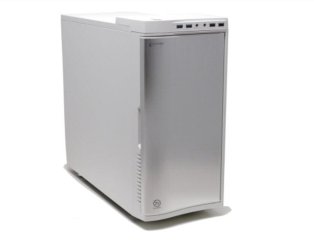
The box is stuffed on the shelf so no case shot. I did attach a Web shot of the same case so you can see what it looks like. I like the Thermaltake Soprano case so much, I have two of them. That hump on top is a SATA hot swap bay; pretty handy!

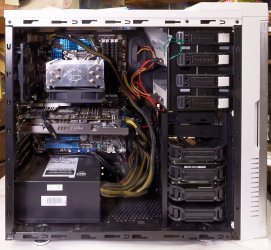
I did take a shot of the inside of the old system. It's almost identical to the new build as it's in the same case. The visual differences are the motherboard is MSI red instead of Asus blue, the video card, and the PS. Even the heat/sink fan is the same model.

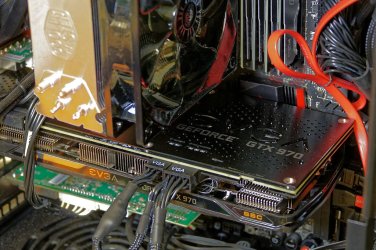
Oh, and in a different thread on video card back plates, Lady Fitzgerald wanted a shot of the back plate, so I'll include that here, too.
.
 

Attachments

  • Thermaltake Soprano Case.jpg
    Thermaltake Soprano Case.jpg
    9.9 KB · Views: 15
  • -Jan16-16=FZ1K-P1010071-EditLowRes.jpg
    -Jan16-16=FZ1K-P1010071-EditLowRes.jpg
    141.5 KB · Views: 1
  • Vid Card Back Plate 2-25-16.jpg
    Vid Card Back Plate 2-25-16.jpg
    135.5 KB · Views: 1

My Computer My Computer

At a glance

Win 7 Pro 64 SP1i7 6700K SkyLake32 GBnVidia GTX 970
Computer type
PC/Desktop
Computer Manufacturer/Model Number
home built
OS
Win 7 Pro 64 SP1
CPU
i7 6700K SkyLake
Motherboard
MSI Gaming M7
Memory
32 GB
Graphics Card(s)
nVidia GTX 970
Sound Card
onboard
Monitor(s) Displays
DELL U2711
Screen Resolution
2560x1440
Hard Drives
1 SSD OS, 2 WD Black Caviar data harddrives
PSU
EVGA Super Nova 850W G2 'Gold'
Case
Thermaltake Soprano Snow Edition
Cooling
Cooler Master Hyper 212 evo
Keyboard
Logitech K350
Mouse
Mad Kats RATT
Antivirus
Avast
Browser
Firefox
Nice systems and you may consider adding a 120mm quiet fan next to the PSU on the floor pulling cool air up to the GPU and CPU as well as the front case fans.
 

My Computer My Computer

At a glance

Windows 7 Ultimate 64i7 3770k OC'd 4.6 @ 1.17v, also FX 8120 & i5 ...32 gb G.Skill Sniper DDR3 10-12-12-31 @ 2133XFX Radeon 7870 2GB DDR5
Computer type
PC/Desktop
Computer Manufacturer/Model Number
A blend of brains, brawn and dumb luck.
OS
Windows 7 Ultimate 64
CPU
i7 3770k OC'd 4.6 @ 1.17v, also FX 8120 & i5 miniITX
Motherboard
MSI P67A-GD80 b3
Memory
32 gb G.Skill Sniper DDR3 10-12-12-31 @ 2133
Graphics Card(s)
XFX Radeon 7870 2GB DDR5
Sound Card
Sound Blaster Z Series Card
Monitor(s) Displays
(2) LG LED 23" 1920 x 1080 2ms Monitors via mini d-port
Screen Resolution
1680 X 1050 p
Hard Drives
Samsung 256 gb 830 SSD sata III
(1) 1 tb WD Black
(2) 1 tb Hitachi deskmates/sata II
(2) 1 tb WD green/sata II
(2) 3 tb Seagate Barracuda
(1) 120 gb OCZ Vertex SS
(1) Drobo 5N w/5 Seagate 3tb
PSU
EVGA modular 1000G2 80% gold rating & APC 1200 RS
Case
CoolerMaster Storm Styker
Cooling
7 case fans 140mm & 120mm, NZXT Kraken X60
Keyboard
(2) Logitech Illuminated Keyboards (1) usb (1) wireless
Mouse
Logitech G700 & T-BC21 - nano nx for the laptop
Internet Speed
Basic 120mbps down
Antivirus
Trend Micro Titanium Max Security & Malwarebytes Premium
Browser
Chrome and IE 10
Other Info
5 Noctua case fans + 3 Noctua in p/p on NZXT cooler
Integrated hot swap drive bays for 2.5" Drives
(2) Lite-on dvd/cd/Blu Ray optical 22X
Integrated fan controller and led on/off
HP Officejet Pro 8630 all-n-one
Hot-swappable 3.5" hard drive bay
Netgear Nighthawk router
Asus USB 3 & sata 6 PCIe card
Vantec IDE to sata adptr./Ultra sata adptr
Lenovo L420 i5 lappy with m sata
Drobo 5N advanced NAS
Nice systems and you may consider adding a 120mm quiet fan next to the PSU on the floor pulling cool air up to the GPU and CPU as well as the front case fans.
Hi linnemeyerhere. I kind of have that, but in reverse. The case has two 120mm fans, one in one out. Notice the shot of the old build: the PSU is mounted with the fan down. I don't really like that, even though it might be best for the PSU, as I have long haired dogs. So sucking up all that hair can't be too good, either.

Also, I remember when PSUs were on top, sucking air out of the case and that just seems right to me. It's hard to see, but in the 2nd shot, of the back plate, you'll notice that the new PSU is mounted with the fan on the inside, sucking air out of the case, hopefully drawing it in from the front filter. So that's one 120mm fan on top, and one on the bottom pulling air thru the case.

Also I went with what I thought was overkill on the PSU, too. I'm not going to SLI or anything like that, so my power demands are kind of low. Still, I got a EVGA 850W Gold Plus PSU. For what I have stuffed in my box, that should just be barely off idle, sort to speak. Heck, the 'old' build was running just a 650W PSU and I didn't have any issues.

If my thinking on this is off, please don't hesitate to let me know. How else does someone learn? :D
.
 

My Computer My Computer

At a glance

Win 7 Pro 64 SP1i7 6700K SkyLake32 GBnVidia GTX 970
Computer type
PC/Desktop
Computer Manufacturer/Model Number
home built
OS
Win 7 Pro 64 SP1
CPU
i7 6700K SkyLake
Motherboard
MSI Gaming M7
Memory
32 GB
Graphics Card(s)
nVidia GTX 970
Sound Card
onboard
Monitor(s) Displays
DELL U2711
Screen Resolution
2560x1440
Hard Drives
1 SSD OS, 2 WD Black Caviar data harddrives
PSU
EVGA Super Nova 850W G2 'Gold'
Case
Thermaltake Soprano Snow Edition
Cooling
Cooler Master Hyper 212 evo
Keyboard
Logitech K350
Mouse
Mad Kats RATT
Antivirus
Avast
Browser
Firefox
Back
Top