Error code

CLAIRE39

New member
Member
Local time
8:50 AM
Messages
25
My samsung N150 running windows 7 starter. will not update some important updates I get the error code 800B0100. And every time I shut down it says it needs to update.
Also when I run a scan it said there are registry errors.
Can anyone help solve these problems.
Claire
 

My Computer

Computer type
Laptop
Computer Manufacturer/Model Number
samsung N150
OS
WINDOWS 7 STARTER
Antivirus
AVAST
Browser
CHROME
Hi CLAIRE39,

First off, let's get your system specifications sorted out in your UserCP > Edit System Spec setup. This will enable us to give you better advice!

The tutorial below [Published by Brink and written by CyberZeus] let's you easily see all of your system information, along with the option of making filling out your system specifications here at Seven Forums easier.

How to See Your System Specs with "System Info"

I hope this helps!
 

My Computer

Computer type
Laptop
Computer Manufacturer/Model Number
Fujitsu LIFEBOOK
OS
Win 7 HP SP1 64-bit Vista HB SP2 32-bit Linux Mint 18.3
CPU
Intel(R) Pentium(R) CPU P6200 @ 2.13GHz
Motherboard
FUJITSU FJNBB06
Memory
4.00 GB
Graphics Card(s)
Intel(R) Graphics Media Accelerator HD
Sound Card
[1] Realtek High Definition Audio [2] Intel(R) Display Audio
Screen Resolution
1366 x 768 x 32 bits (4294967296 colors) @ 59 Hz
Hard Drives
TOSHIBA MK5076GSX
Antivirus
AVG FREE
Hi CLAIRE39,
When did you WU issue begin? A few months ago M$ botched a cert and win update was broken.
If you would, please follow Windows Update Posting Instructions
At C:\Windows\Logs\CBS
post:
CheckSUR.log after running SURT, it's temporary in this location
CBS.log
At C:\Windows
post:
WindowsUpdate.log

Nic
 

My Computer

Computer type
PC/Desktop
Computer Manufacturer/Model Number
HP Desktop & Compaq Laptop
OS
Win 10 x64, Linux Lite, Win 7 x64, BlackArch, & Kali
Hard Drives
Samsung 850 Pro 256Gb,
Hitachi HDD 1Tb,
Crucial MX SSD 250Gb
Segate 3Tb USB 3.0 Ext. Backup HDD
Internet Speed
150Mbps dn, 20Mbps up
Antivirus
Avast Free, Malwarebytes Anti-Exploit & Anti-Ransomware
Browser
Firefox, Chrome, Opera, & VPN
Hi Paul
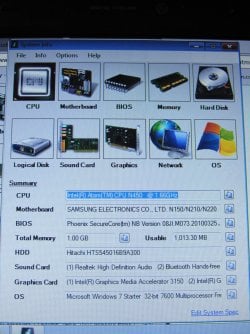
My internet exp don,t work so I have attached a pic of the system as described in your reply.
In my computer it also shows 2 local disk drives (1 local C )Main) & (2 local D )Which has 1.3gb files.
This is how I purchased this computer.
Have not tried Snicks reply as I don't understand how to do what is suggested. Sorry.
Hope you can help.
Claire
 

Attachments

  • IMG_8200.JPG
    IMG_8200.JPG
    1.1 MB · Views: 0

My Computer

Computer type
Laptop
Computer Manufacturer/Model Number
samsung N150
OS
WINDOWS 7 STARTER
Antivirus
AVAST
Browser
CHROME
Hi CLAIRE39,

SURT stands for System Update Readiness Tool. It can be downloaded from here: System Update Readiness Tool

Run SURT [may take a while to complete].

Then post the logs:

At C:\Windows\Logs\CBS post the CBS.log.
At C:\Windows\Logs\CBS post the CheckSUR.log.
At C:\Windows\ post the WindowsUpdate.log.

I hope this helps!
 

My Computer

Computer type
Laptop
Computer Manufacturer/Model Number
Fujitsu LIFEBOOK
OS
Win 7 HP SP1 64-bit Vista HB SP2 32-bit Linux Mint 18.3
CPU
Intel(R) Pentium(R) CPU P6200 @ 2.13GHz
Motherboard
FUJITSU FJNBB06
Memory
4.00 GB
Graphics Card(s)
Intel(R) Graphics Media Accelerator HD
Sound Card
[1] Realtek High Definition Audio [2] Intel(R) Display Audio
Screen Resolution
1366 x 768 x 32 bits (4294967296 colors) @ 59 Hz
Hard Drives
TOSHIBA MK5076GSX
Antivirus
AVG FREE
Hi Paul
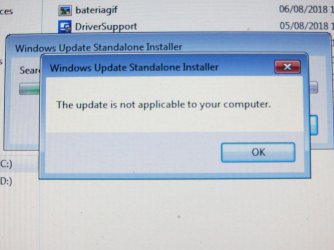
I downloaded link you sent via email (windows6.1-KB947821-V34-X64.msu)
But it said ( Please see attached)
I think I might have down loaded the wrong thing !!!!!
 

Attachments

  • IMG_8244.JPG
    IMG_8244.JPG
    600.9 KB · Views: 0

My Computer

Computer type
Laptop
Computer Manufacturer/Model Number
samsung N150
OS
WINDOWS 7 STARTER
Antivirus
AVAST
Browser
CHROME
Last edited:

My Computer

Computer type
Laptop
Computer Manufacturer/Model Number
Fujitsu LIFEBOOK
OS
Win 7 HP SP1 64-bit Vista HB SP2 32-bit Linux Mint 18.3
CPU
Intel(R) Pentium(R) CPU P6200 @ 2.13GHz
Motherboard
FUJITSU FJNBB06
Memory
4.00 GB
Graphics Card(s)
Intel(R) Graphics Media Accelerator HD
Sound Card
[1] Realtek High Definition Audio [2] Intel(R) Display Audio
Screen Resolution
1366 x 768 x 32 bits (4294967296 colors) @ 59 Hz
Hard Drives
TOSHIBA MK5076GSX
Antivirus
AVG FREE
OOPS!!!

Clare,


When you run the System Update Readiness Tool, be patient it may take a while to complete, it will create two log files. CheckSUR.log and CheckSUR.persist.log. The are in C:\Windows\Logs\CBS folder and are temporary in that location.

What SURT does is it checks for missing corrupt cat mum and manifests as well as registry entry errors. The logs it generates, along with CBS.log and WindowsUpdate.log provide a plethora of information related to Win Update.

By your error code, I'm inclined to believe that re-registering your .dll library will correct your Win Update problem

Nic
 

My Computer

Computer type
PC/Desktop
Computer Manufacturer/Model Number
HP Desktop & Compaq Laptop
OS
Win 10 x64, Linux Lite, Win 7 x64, BlackArch, & Kali
Hard Drives
Samsung 850 Pro 256Gb,
Hitachi HDD 1Tb,
Crucial MX SSD 250Gb
Segate 3Tb USB 3.0 Ext. Backup HDD
Internet Speed
150Mbps dn, 20Mbps up
Antivirus
Avast Free, Malwarebytes Anti-Exploit & Anti-Ransomware
Browser
Firefox, Chrome, Opera, & VPN
Hi Paul
I downloaded the link from the email (windows6.1-kB947821-V34-X64.msu) and got the attached pic.
 

My Computer

Computer type
Laptop
Computer Manufacturer/Model Number
samsung N150
OS
WINDOWS 7 STARTER
Antivirus
AVAST
Browser
CHROME
Hi I downloaded the 32 bit link and ran it and it updated windows 6.1-kb94781-v34-x86
But it still takes several clicks of mouse to respond to open ebay ect and takes ages to do that, also says it is going to down load an update Every time the computer is shut down.
Hope you can help me sort this and get this computer working correctly.
Thank you
Claire
 

My Computer

Computer type
Laptop
Computer Manufacturer/Model Number
samsung N150
OS
WINDOWS 7 STARTER
Antivirus
AVAST
Browser
CHROME
Hi CLAIRE39,

Hi Paul, I downloaded link you sent via email (windows6.1-KB947821-V34-X64.msu).
It wasn't me that sent you the link! It might have been Snick!

I hope this helps!
 

My Computer

Computer type
Laptop
Computer Manufacturer/Model Number
Fujitsu LIFEBOOK
OS
Win 7 HP SP1 64-bit Vista HB SP2 32-bit Linux Mint 18.3
CPU
Intel(R) Pentium(R) CPU P6200 @ 2.13GHz
Motherboard
FUJITSU FJNBB06
Memory
4.00 GB
Graphics Card(s)
Intel(R) Graphics Media Accelerator HD
Sound Card
[1] Realtek High Definition Audio [2] Intel(R) Display Audio
Screen Resolution
1366 x 768 x 32 bits (4294967296 colors) @ 59 Hz
Hard Drives
TOSHIBA MK5076GSX
Antivirus
AVG FREE
Nope it wasn't my error (this time) lol! Paul your post #5 link is for x64. Win7 Starter is x32, there is no x64 version. FYI

CLAIRE39,

There is no attached pic to your post #9.

A little explanation for you regarding Win Update Posting Instructions:

sfc /scannow is a system file-checker. It locates missing/corrupt system files and attempts to repair them or replace them if available on your computer or win7 disk if it in the drive. Quite often, sfc /scannow cannot repair or replace files).
System Update Readiness Tool (SURT) locates missing or corrupt mum, cat, manifest, and registry entries. If you do nothing but run it, it does not necessarily correct every problem (actually most of the time it doesn't). When run, it produces two log files, CheckSUR.log and CheckSUR.persist.log and they are temporary in default location:
C:\Windows\Logs

Your error code points to Dynamic Link Library (.dll) corruption. If that's the case, CheckSUR.log should indicate the problem(s) or not.

Would you please:
Click :orb:, in searchbox type cmd, when the entry appears, right-click cmd and choose run as administrator
At the > type or copy and paste with mouse
sfc /scannow
yes there is a space between c and /

After that, please run the SURT tool again and post logs:
Log location: C:\Windows\Logs
CBS.log

CheckSUR.log
Log Location: C:\Windows
WindowsUpdate.log

Nic
 
Last edited:

My Computer

Computer type
PC/Desktop
Computer Manufacturer/Model Number
HP Desktop & Compaq Laptop
OS
Win 10 x64, Linux Lite, Win 7 x64, BlackArch, & Kali
Hard Drives
Samsung 850 Pro 256Gb,
Hitachi HDD 1Tb,
Crucial MX SSD 250Gb
Segate 3Tb USB 3.0 Ext. Backup HDD
Internet Speed
150Mbps dn, 20Mbps up
Antivirus
Avast Free, Malwarebytes Anti-Exploit & Anti-Ransomware
Browser
Firefox, Chrome, Opera, & VPN
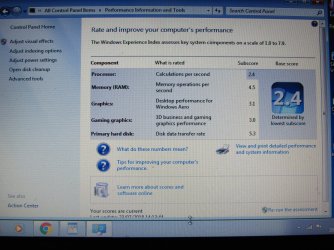
I have done all you said, but the only logs I can find is attached.
I tried typing c:windows \log ect in the search bottom left corner
but it just returned no files found??
But it still takes several clicks before connecting to icon.
And it is very slow at doing that.
As there are no files / programs on it would it help if I put it back to factory settings??
 

Attachments

  • IMG_8371.JPG
    IMG_8371.JPG
    1 MB · Views: 0

My Computer

Computer type
Laptop
Computer Manufacturer/Model Number
samsung N150
OS
WINDOWS 7 STARTER
Antivirus
AVAST
Browser
CHROME
Hi CLAIRE39,

As Snick has pointed out, the logs can be found here:

C:\Windows\Logs\CBS.log.
C:\Windows\Logs\CBS\CheckSUR.log.
C:\Windows\WindowsUpdate.log.

I hope this helps!
 

My Computer

Computer type
Laptop
Computer Manufacturer/Model Number
Fujitsu LIFEBOOK
OS
Win 7 HP SP1 64-bit Vista HB SP2 32-bit Linux Mint 18.3
CPU
Intel(R) Pentium(R) CPU P6200 @ 2.13GHz
Motherboard
FUJITSU FJNBB06
Memory
4.00 GB
Graphics Card(s)
Intel(R) Graphics Media Accelerator HD
Sound Card
[1] Realtek High Definition Audio [2] Intel(R) Display Audio
Screen Resolution
1366 x 768 x 32 bits (4294967296 colors) @ 59 Hz
Hard Drives
TOSHIBA MK5076GSX
Antivirus
AVG FREE
CLAIRE39, there are a few ways to get to the location of the logs. I usually provide the correct syntax (spelling, punctuation, etc.). You can copy and paste the location into the searchbox after clicking :orb:
 

My Computer

Computer type
PC/Desktop
Computer Manufacturer/Model Number
HP Desktop & Compaq Laptop
OS
Win 10 x64, Linux Lite, Win 7 x64, BlackArch, & Kali
Hard Drives
Samsung 850 Pro 256Gb,
Hitachi HDD 1Tb,
Crucial MX SSD 250Gb
Segate 3Tb USB 3.0 Ext. Backup HDD
Internet Speed
150Mbps dn, 20Mbps up
Antivirus
Avast Free, Malwarebytes Anti-Exploit & Anti-Ransomware
Browser
Firefox, Chrome, Opera, & VPN
As there are no files / programs on it would it help if I put it back to factory settings??

A Repair Install (click link for Brink/SevenForums page on subject-matter), also referred to as an In Place Upgrade, is what I'm inclined to suggest at this point. It preserves all your files, folder, music, video, etc. it replaces Windows and saves your old setting in a file called Windows.old
Here's an awesome video by Brian at Britec Computers UK
Repair Install to Fix Windows 7 Without Reformatting by Britec

If you wish to proceed with a Repair Install please advise and I'll be more than happy to walk you through it. Been there, done that many times.

Nic
 

My Computer

Computer type
PC/Desktop
Computer Manufacturer/Model Number
HP Desktop & Compaq Laptop
OS
Win 10 x64, Linux Lite, Win 7 x64, BlackArch, & Kali
Hard Drives
Samsung 850 Pro 256Gb,
Hitachi HDD 1Tb,
Crucial MX SSD 250Gb
Segate 3Tb USB 3.0 Ext. Backup HDD
Internet Speed
150Mbps dn, 20Mbps up
Antivirus
Avast Free, Malwarebytes Anti-Exploit & Anti-Ransomware
Browser
Firefox, Chrome, Opera, & VPN
Thank you Nic I have just watched the video Repair install by Britec and Hopefully it will solve the problems I'm having.
And I would be very grateful if you would help me do that.
The only thing is I do not have the windows 7 disk ?? mentioned and no CD on this computer.
Can this still be done.??
Regards
 

My Computer

Computer type
Laptop
Computer Manufacturer/Model Number
samsung N150
OS
WINDOWS 7 STARTER
Antivirus
AVAST
Browser
CHROME
Hi CLAIRE39,

Let's get your system specifications sorted out in your UserCP > Edit System Spec setup. This will enable us to give you better advice!

The tutorial below [Published by Brink and written by CyberZeus] let's you easily see all of your system information, along with the option of making filling out your system specifications here at Seven Forums easier. How to See Your System Specs with "System Info"

I hope this helps!
 
Last edited:

My Computer

Computer type
Laptop
Computer Manufacturer/Model Number
Fujitsu LIFEBOOK
OS
Win 7 HP SP1 64-bit Vista HB SP2 32-bit Linux Mint 18.3
CPU
Intel(R) Pentium(R) CPU P6200 @ 2.13GHz
Motherboard
FUJITSU FJNBB06
Memory
4.00 GB
Graphics Card(s)
Intel(R) Graphics Media Accelerator HD
Sound Card
[1] Realtek High Definition Audio [2] Intel(R) Display Audio
Screen Resolution
1366 x 768 x 32 bits (4294967296 colors) @ 59 Hz
Hard Drives
TOSHIBA MK5076GSX
Antivirus
AVG FREE
CLAIRE39, yes, you can download a copy of Win7 which is an ISO file. You don't need a CD drive or USB port because you perform the repair install/in place upgrade from within Windows.

How much free space do you have on your C: drive? When you perform a Repair Install/In Place Upgrade, a copy of your current C: drive is saved as Windows.old. There has to be enough space on your drive to save this file.

Assuming you have enough drive space, or close to it:

Download Win7x32 All-In-One ISO click here. After it finishes downloading, place it on your desktop.
Create two new folders on your desktop. Name one Win7 and the other DISM++

If you don't have 7-zip you can download it click here. Install it on your computer.

If you don't have your 25 character CD key you can use Magic Jellybean, to download it click here. Install it on your computer. When you run this tool, you want CD Key not Product ID. I copy and paste the CD key to notepad and print it to alleviate typos.

Download DISM++, click here, it is a zip/compressed folder, and place it on your desktop.

Run below batch file. Double-click zip/compressed folder, when it opens, double-click the file run disk cleanup extended. It will start disk cleanup extended (dce). The CMD window will open blank. Leave it open, after dce completes it will close. Check all the boxes in disk cleanup and run it. Be patient it may take a while to complete.
View attachment Run Disk Cleanup Extended.zip

Extract the contents of zip/compressed folder Windows 7 Ultimate ISO on your desktop to Win7 folder on your desktop. To do so, Right-click windows 7 ultimate file, on menu hover over 7-zip, new menu, choose extract files..., to the right of extract files, click the box with ... in it in, popup choose Win7, then OK.

Right-Click DISM++ zip/compressed folder on your desktop, on menu hover over 7-zip, new menu, choose extract files..., to the right of extract files, click the box with ... in it, popup choose DISM++, then OK. The folders you created on your, Win7 and DISM++ should now contain the contents of their zipped/compressed folders.

If you have an external hard drive, now would be the time to perform a full system image backup to it.

To start Repair Install, make sure you have your 25 character key, open the Win7 folder on your desktop, click setup. Follow prompts/instructions, you want Win 7 Starter, at the appropriate screen you want Upgrade.

You will use DISM++ to install the plethora of Windows Updates after you complete the Win 7 repair install. It's easy to use, after you've completed repair install, to install windows updates, open DISM++ folder, click on DISM++ x86, on menu select updates, then select scan, it will scan for updates and present what is available, choose everything, the program will then present you with options for any update that is potentially problematic with a description. You can choose to install or not, it's up to you. When all your choices are made, select install. Takes a while, not as long as Windows Update however and no need to reboot until after it completes!

After DISM++ runs, completes and you reboot, you should have a fully working Win7x32 Starter with updates you chose to install.

 
Last edited:

My Computer

Computer type
PC/Desktop
Computer Manufacturer/Model Number
HP Desktop & Compaq Laptop
OS
Win 10 x64, Linux Lite, Win 7 x64, BlackArch, & Kali
Hard Drives
Samsung 850 Pro 256Gb,
Hitachi HDD 1Tb,
Crucial MX SSD 250Gb
Segate 3Tb USB 3.0 Ext. Backup HDD
Internet Speed
150Mbps dn, 20Mbps up
Antivirus
Avast Free, Malwarebytes Anti-Exploit & Anti-Ransomware
Browser
Firefox, Chrome, Opera, & VPN
Thank you Paul and Snick.
For all you help you are giving me. Before I carry out a re-install I would like to let you know that I copied your links into search but it returned the same answer to all 3 links (no items match this search) is there any reason for this?? Or did I not do something correctly. Very sorry for any convenience.
 

My Computer

Computer type
Laptop
Computer Manufacturer/Model Number
samsung N150
OS
WINDOWS 7 STARTER
Antivirus
AVAST
Browser
CHROME
Back
Top