
Hey everyone,
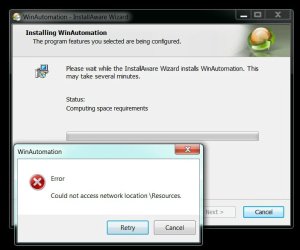
I'm trying to install the 30day trial for WinAutomation WinAutomation Macro Recorder and Windows Automation Software but I keep getting this error and yesterday I searched for about 5 hours for the solution but nothing worked and today I'm getting close to match that.
So far I've:
Searched "User Shell Folders" registry folders for incorrect values.
Ran a bunch of Microsoft FixIts.(everywhere I found someone having a "Could not access network location..." problem with a FixIt solution posted in the same thread, I dlded and executed that FixIt)
Uninstalled firefox then tried to install WA.
Updated .NET Framework to latest.
None of the above is working. Please help me solve this.
I've also sent an email to WA support team about it but since this seems to be a windows problem I feel like it's not their job to worry about it.
I'm trying to install the 30day trial for WinAutomation WinAutomation Macro Recorder and Windows Automation Software but I keep getting this error and yesterday I searched for about 5 hours for the solution but nothing worked and today I'm getting close to match that.
So far I've:
Searched "User Shell Folders" registry folders for incorrect values.
Ran a bunch of Microsoft FixIts.(everywhere I found someone having a "Could not access network location..." problem with a FixIt solution posted in the same thread, I dlded and executed that FixIt)
Uninstalled firefox then tried to install WA.
Updated .NET Framework to latest.
None of the above is working. Please help me solve this.
I've also sent an email to WA support team about it but since this seems to be a windows problem I feel like it's not their job to worry about it.
Attachments
My Computer
- OS
- Windows 7 Ultimate x64
