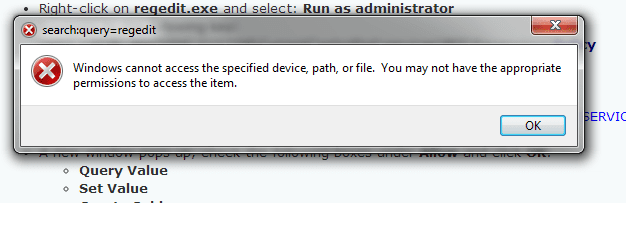
Error for bfe.reg import

carleye

New member
Local time
8:51 AM
Messages
14
Hi, I have been attempting to fix our PC after a virus/malware repair: cleaning it up took bfe.reg with it (which I only discovered after peerblock wouldn't work). I've followed the instructions here:Win7 PB 1.1 Windows Services Not Running (PB will not start) but when I attempt to import or merge bfe.reg, the error in the attached screen cap appears. To check if it was widespread I merged other reg files with no problem.

I've run malwarebytes, spybot, tweaking. I've read about a million forums and tried multiple fixes. I'm just about to nuke and pave.

I'd really appreciate some advice. I've been working on this a lot of today and I might be missing something simple.
 

Attachments
  • BFE IMPORT ERROR.png
    BFE IMPORT ERROR.png
    18.4 KB · Views: 54

My Computer

Computer type
PC/Desktop
Computer Manufacturer/Model Number
HP
OS
Windows 7 Home Premium
Antivirus
Avast
Browser
Chrome, Firefox, Ie
carleye,

...been attempting to fix our PC after a virus/malware repair

Do you remember its name, or have the repot of the tool used to detect it? If so, please post it.


:info: Now, please use the Farbar Recovery Scan Tool Download
Select the version that applies to your system.
Save it to your Desktop.
Double-click the downloaded file to run it.

When the tool opens click Yes to the disclaimer.
At the program's console, press the Scan button.

When done, the tool produces a log, FRST.txt, on the Desktop.
:ar: Please provide the FRST.txt in your reply.

The first time the tool is run, it also makes another log: Addition.txt
:ar: Also post the Addition.txt in your reply.


:info: Also, move on to Downloading Farbar Service Scanner

Let's get a view of all services and dependencies scoped by the tool...

Make sure the following options are checked:
Internet Services
Windows Firewall
System Restore
Security Center
Windows Update
Windows Defender

Press: Scan

When done, FSS creates a log, FSS.txt, on the Desktop.
:ar: Please provide the FSS.txt in your reply.

Thank you.
 

My Computer

Computer type
PC/Desktop
Computer Manufacturer/Model Number
An ol' eMachines
OS
Windows 7 Home Premium
Internet Speed
Fine for me...I'm retired!
Do you remember its name, or have the repot of the tool used to detect it? If so, please post it.

Sorry - no. I believe it was a ransomware that was the problem, but as everything *appeared* to be normal, I didn't realise the bfe was gone until I next tried to run peerblock. I can't be sure of the timeline or virus. We had a few positives around the same time and I don't remember specifics.

Please provide the FRST.txt in your reply.
Also post the Addition.txt in your reply.

Done, these are attached.

Please provide the FSS.txt in your reply.

Also done and attached.

Thank you.

No, thank you :)
 

Attachments

My Computer

Computer type
PC/Desktop
Computer Manufacturer/Model Number
HP
OS
Windows 7 Home Premium
Antivirus
Avast
Browser
Chrome, Firefox, Ie
carleye.

Aha! ZeroAccess came to visit your computer...

:info: Please open Notepad (Start > All Programs > Accessories > Notepad)
Copy the entire contents of the code box below (Do not copy the word 'code') to Notepad.
Save it to the Desktop, and name it: fixlist.txt
Code:
Start
Winlogon\Notify\SDWinLogon-x32: SDWinLogon.dll [X]
HKU\S-1-5-21-3313343369-3009874273-3512575399-1000\...\Run: [PMCRemote] => [X]
HKU\S-1-5-21-3313343369-3009874273-3512575399-1000\...409d6c4515e9\InprocServer32: [Default-shell32] C:\$Recycle.Bin\S-1-5-21-3313343369-3009874273-3512575399-1000\$70339cbe8081d6cd3c91fdbadba24b37\n. 
HR HKLM\SOFTWARE\Policies\Google: Policy restriction
C:\$Recycle.Bin\S-1-5-18\$70339cbe8081d6cd3c91fdbadba24b37
C:\$Recycle.Bin\S-1-5-21-3313343369-3009874273-3512575399-1000\$70339cbe8081d6cd3c91fdbadba24b37
C:\ProgramData\qd1qtbn.fee
C:\Users\hn68\AppData\Local\Temp\_isB634.exe
Defaulttab (HKLM-x32\...\DefaultTab) (Version: 2.4.8.2 - Search Results, LLC) 
File Type Assistant (HKLM-x32\...\Trusted Software Assistant_is1) (Version:  - Trusted Software) 
PDFssoftware Toolbar (HKLM-x32\...\PDFssoftware Toolbar) (Version: 6.10.2.5 - PDFssoftware)
Torch (HKCU\...\Torch) (Version: 2.0.0.2062 - Torch Media Inc.) 
Vittalia Installer (HKLM-x32\...\Vittalia) (Version: 1.0 - FILEWIN.net) 
Task: {E9A12218-9B80-4E7E-B806-D2DE3E1BE227} - System32\Tasks\DTReg => C:\Windows\system32\config\systemprofile\AppData\Roaming\DefaultTab\DefaultTab\DTReg.exe 
end
NOTICE: This script is written specifically for this computer!!!
Running this on another computer may cause damage to the Operating System.

Now, please run FRST, and press the Fix button, just once, and wait.

When done, the tool creates a report on the Desktop called: Fixlog.txt
:ar: Please post the Fixlog.txt in your reply.


:info: Since the following step involve editing the Registry, please create new restore point before proceeding:
http://www.sevenforums.com/tutorials/697-system-restore-point-create.html
Select: Option Two

:info: Now, please download the ESET ServicesRepair tool:
Download > http://kb.eset.com/library/ESET/KB Team Only/Malware/ServicesRepair.exe
Save to the Desktop.

Double-click to run the downloaded file.

When the program runs, a prompt appears asking if you want to proceed.
Click: Yes
When the Services routine is Completed, you are asked to Reboot.
Click Yes to allow the reboot.

The tool creates a folder on the Desktop named: CC Support
:ar: Please provide the CC Support\Logs\SvcRepair.txt in your reply.

:info: Next, please run the Farbar Service Scanner once again.

:at: Please provide the new FSS.txt in your reply.
 

My Computer

Computer type
PC/Desktop
Computer Manufacturer/Model Number
An ol' eMachines
OS
Windows 7 Home Premium
Internet Speed
Fine for me...I'm retired!
Please post the Fixlog.txt in your reply.

Please provide the CC Support\Logs\SvcRepair.txt in your reply.

Please provide the new FSS.txt in your reply.

These are attached. Thanks again.
 

Attachments

My Computer

Computer type
PC/Desktop
Computer Manufacturer/Model Number
HP
OS
Windows 7 Home Premium
Antivirus
Avast
Browser
Chrome, Firefox, Ie
carleye,

Please do the following...

:info: Please download the following files and save them to your Desktop:
(Direct links only available)

BFE:
http://download.bleepingcomputer.com/win-services/7/BFE.reg

MpsSvc:
http://download.bleepingcomputer.com/win-services/7/MpsSvc.reg

:info: Now double-click on the BFE.reg file.
A prompt appears asking if you want to merge the information contained in the file into the Registry.
Confirm the prompt to merge to your Registry.
Click: OK

Please, do the same for MpsSvc.reg


:info: Now, press the Windows key and the R key to open the Run prompt.
In the Open space, type: Regedit
Press: OK

When the Registry editor opens, navigate to the following key:

HKEY_LOCAL_MACHINE\SYSTEM\CurrentControlSet\services\BFE

Do this by clicking on the > to the left of each entry:
>HKEY_LOCAL_MACHINE
>SYSTEM
>CurrentControlSet
>services
BFE


When you reach the BFE key on the left pane (it looks like a folder), right-click on it, and click: Permissions
  • In the Permissions for BFE prompt, click: Add
  • In the Select Users or Groups prompt, in the area Enter the object name to select, type in: Everyone, and click: OK
  • Click once on Everyone in the list at the top, and, in the Full Control row, check the following box: Allow
  • Click OK to close the open windows, and restart the computer.
:info: Now, once again, press the Windows key and R at the same time.
In the Run box, type: notepad
Press: OK

Highlight the entire contents inside the following quote box, and copy/paste the text to Notepad.
@Echo off
sc config bfe start= auto
sc config MpsSvc start= auto
net stop BFE
net start BFE
net stop MpsSvc
net start MpsSvc
shutdown /r /t 1
del %0

In Notepad, select File > Save as...
Press Desktop on the left side.
In the File name box, type in: fixsvc.bat
Press: Save
Close: Notepad

Right-click fixsvc.bat on the Desktop, and select: Run As Administrator
Press Yes if prompted by the User Account Control.

When the batch commands are applied, Windows restarts.


:info: Last, run Farbar Service Scanner once again.
Select all the options.
Press: Scan

:ar: Please provide the new FSS.txt in your reply.
 

My Computer

Computer type
PC/Desktop
Computer Manufacturer/Model Number
An ol' eMachines
OS
Windows 7 Home Premium
Internet Speed
Fine for me...I'm retired!
When I tried to run BFE I got the same error message as in the original post. MpsSvc worked though.
 

My Computer

Computer type
PC/Desktop
Computer Manufacturer/Model Number
HP
OS
Windows 7 Home Premium
Antivirus
Avast
Browser
Chrome, Firefox, Ie
Please go to Start > Search programs and files (above Start)
In the search box, type: Command Prompt
Right click Command Prompt in the search results and select: Run as administrator

At the Command Prompt, please copy/paste (with mouse) the following:

SFC /scanfile=c:\windows\system32\bfe.dll

Press: Enter

If nothing is wrong, the following appears:

Microsoft Windows [Version 6.1.7601]
Copyright (c) 2009 Microsoft Corporation. All rights reserved.
C:\windows\system32>SFC /scanfile=c:\windows\system32\bfe.dll

Windows Resource Protection did not find any integrity violations.
C:\windows\system32>

However, if the file is corrupted, allow SFC to repair it, and post the results.

Type Exit and press Enter to quit the Command Prompt.

Restart your computer.

Next, try merging BFE.reg once again.

If you still get the error, continue with the rest of the instructions anyway, and post the FSS.txt
 
Last edited:

My Computer

Computer type
PC/Desktop
Computer Manufacturer/Model Number
An ol' eMachines
OS
Windows 7 Home Premium
Internet Speed
Fine for me...I'm retired!
I ran SFC and the file was not corrupted. Restarted, attempted the merge and hit the same error again (as in the original post).

*Oops, just saw the last sentence of your post. Will do and will repost.
 
Last edited:

My Computer

Computer type
PC/Desktop
Computer Manufacturer/Model Number
HP
OS
Windows 7 Home Premium
Antivirus
Avast
Browser
Chrome, Firefox, Ie
Here's the FSS
 

Attachments

My Computer

Computer type
PC/Desktop
Computer Manufacturer/Model Number
HP
OS
Windows 7 Home Premium
Antivirus
Avast
Browser
Chrome, Firefox, Ie
My apology for the delay. :o

:info: Please use Malwarebytes Anti-Rootkit (MBAR)
Download > http://downloads.malwarebytes.org/file/mbar

Save to the Desktop
Double-click the downloaded file to run the program.


Follow the instructions to update and press: Next

Press Scan to allow the program to check your computer for threats.


If no threats are found, please stop here. :warn:


If threats are found, click the Cleanup button to remove them, and reboot if prompted to do so.
Wait while the system shuts down and the cleanup process is performed.


Perform a second scan to verify that no threats remain.
If they do, click Cleanup once again, and repeat the process.


:ar: When done, please post the two logs produced: mbar-log.txt and system-log.txt
(The logs are found in the MBAR folder located on the Desktop)


:info: Also run fixdamage
Open the mbar folder and double-click on its file for the program will launch.

Press the Y key on your keyboard for the program to perform any necessary fixes.
When finished, press any key to exit, and the fixdamage screen to close.

Please restart your computer for changes to go into effect.

Now, check to see if the issue remains.
 

My Computer

Computer type
PC/Desktop
Computer Manufacturer/Model Number
An ol' eMachines
OS
Windows 7 Home Premium
Internet Speed
Fine for me...I'm retired!
Also,

Since the WMI is associated with the Firewall, please verify if WMI is consistent by running the following command at an elevated Command Prompt (right-click and select: Run as Administrator):

Code:
winmgmt /verifyrepository

If it says WMI repository is consistent, we are OK.
 

My Computer

Computer type
PC/Desktop
Computer Manufacturer/Model Number
An ol' eMachines
OS
Windows 7 Home Premium
Internet Speed
Fine for me...I'm retired!
My apology for the delay.
Absolutely no problem :)

I've attached the two files. WMI repository was consistent and MBAR found no threats.
 

Attachments

Last edited:

My Computer

Computer type
PC/Desktop
Computer Manufacturer/Model Number
HP
OS
Windows 7 Home Premium
Antivirus
Avast
Browser
Chrome, Firefox, Ie
:info: Please download RestoreBFE.exe
Download > http://download.bleepingcomputer.com/sUBs/MiniFixes/RestoreBFE.exe
Double click on the downloaded file.
It should only take a few seconds to run.
When complete, it shows: Done! Please check if BFE service is running now...

Any luck?


Also, let's see what this shows...

:info: Please download Security Check:
http://screen317.spywareinfoforum.org/
Save to your Desktop.
Double-click: SecurityCheck.exe
Follow the onscreen instructions inside the black box.

When done, a Notepad report opens automatically, called: checkup.txt

:ar: Please post the checkup.txt in your reply.
(Please do not take any corrective actions!)
 
Last edited:

My Computer

Computer type
PC/Desktop
Computer Manufacturer/Model Number
An ol' eMachines
OS
Windows 7 Home Premium
Internet Speed
Fine for me...I'm retired!
Please download RestoreBFE.exe ...Any luck?

No :(

Security check:

Results of screen317's Security Check version 0.99.83
Windows 7 Service Pack 1 x64 (UAC is enabled)
Internet Explorer 11
``````````````Antivirus/Firewall Check:``````````````
avast! Antivirus
Antivirus up to date!
`````````Anti-malware/Other Utilities Check:`````````
Spybot - Search & Destroy
Java(TM) 6 Update 29
Java 7 Update 17
Java version out of Date!
Adobe Flash Player 13.0.0.214
Adobe Reader 9
Adobe Reader XI
Mozilla Firefox 13.0.1 Firefox out of Date!
Google Chrome 34.0.1847.131
Google Chrome 34.0.1847.137
Google Chrome Baslog.log..
````````Process Check: objlist.exe by Laurent````````
Spybot Teatimer.exe is disabled!
Malwarebytes Anti-Malware mbamscheduler.exe
AVAST Software Avast AvastSvc.exe
AVAST Software Avast AvastUI.exe
`````````````````System Health check`````````````````
Total Fragmentation on Drive C: 0%
````````````````````End of Log``````````````````````

I don't use firefox very often - tend to stick to chrome.
 
Last edited:

My Computer

Computer type
PC/Desktop
Computer Manufacturer/Model Number
HP
OS
Windows 7 Home Premium
Antivirus
Avast
Browser
Chrome, Firefox, Ie

My Computer

Computer type
PC/Desktop
Computer Manufacturer/Model Number
An ol' eMachines
OS
Windows 7 Home Premium
Internet Speed
Fine for me...I'm retired!
Another approach:


:info: Please download the following file and save to the Desktop:

BFE:
http://download.bleepingcomputer.com...ices/7/BFE.reg

:info: Now double-click on the BFE.reg file.
A prompt appears asking if you want to merge the information contained in the file into the Registry.
Confirm the prompt to merge to your Registry.
Click: OK

Now, reboot.


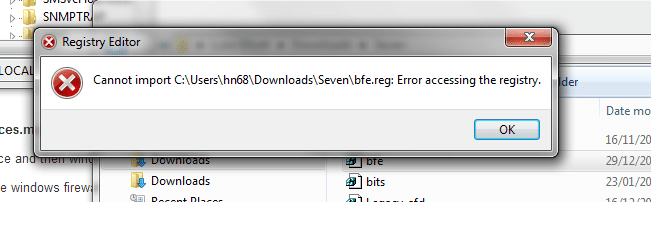
Next, please go to Start > Search programs and files, and type regedit
  • Right-click on regedit.exe and select: Run as administrator
  • Navigate to the following key:
    HKEY_LOCAL_MACHINE\SYSTEM\CurrentControlSet\services\BFE\Parameters\Policy
  • Right-click Policy and select: Permissions...
  • Click: Advanced
  • Under Permissions tab click: Add...
  • A window pops up, copy and paste the following in the Enter the object box: NT SERVICE\BFE
  • Click OK.
  • A new window pops up, check the following boxes under Allow and click OK:
    • Query Value
    • Set Value
    • Create Subkey
    • Enumerate Subkeys
    • Notify
    • Read control
Click OK to all the open windows, restart the computer, and see if it worked.
 

My Computer

Computer type
PC/Desktop
Computer Manufacturer/Model Number
An ol' eMachines
OS
Windows 7 Home Premium
Internet Speed
Fine for me...I'm retired!

Attachments

  • regedit search error.png
    regedit search error.png
    13.1 KB · Views: 7

My Computer

Computer type
PC/Desktop
Computer Manufacturer/Model Number
HP
OS
Windows 7 Home Premium
Antivirus
Avast
Browser
Chrome, Firefox, Ie
When I followed the filepath I was able to run as administrator. But there was still no BFE.
 

My Computer

Computer type
PC/Desktop
Computer Manufacturer/Model Number
HP
OS
Windows 7 Home Premium
Antivirus
Avast
Browser
Chrome, Firefox, Ie
Back
Top