ERROR: I_RpcBindingSetPrivateOtion & RPCRT4.dll

genius5000

New member
Local time
7:12 PM
Messages
6
ERROR: I_RpcBindingSetPrivateOption & RPCRT4.dll

Hello

I am getting this error after installing & clicking whatever software/patch (can't recall).
Uninstalling all the recent software did not help either.

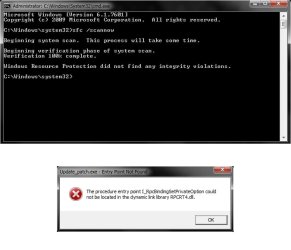
The procedure entry point I_RpcBindingSetPrivateOption could not be located in the dynamic link library RPCRT4.dll

Any help?

Thanks
 
Last edited:

My Computer My Computer

At a glance

Windows 7 Ultimate x64
Computer type
PC/Desktop
OS
Windows 7 Ultimate x64
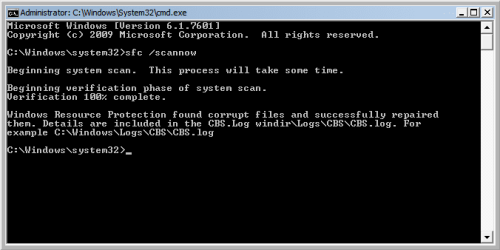
Try running System File Checker:

Click Start (Bottom-left button) > type "cmd" > Right click on it > Run as Administrator > type "sfc /scannow". Do not close the command prompt until the verification is finished. Restart your computer. Let us know if this resolved your problem.
 
Hi genius5000, welcome to Seven Forums,

Did you try going back to a previous restore point to see if that corrected your issue?

I hope this helps!
 

My Computer My Computer

At a glance

Win 7 HP SP1 64-bit Vista HB SP2 32-bit Linux...Intel(R) Pentium(R) CPU P6200 @ 2.13GHz4.00 GBIntel(R) Graphics Media Accelerator HD
Computer type
Laptop
Computer Manufacturer/Model Number
Fujitsu LIFEBOOK
OS
Win 7 HP SP1 64-bit Vista HB SP2 32-bit Linux Mint 18.3
CPU
Intel(R) Pentium(R) CPU P6200 @ 2.13GHz
Motherboard
FUJITSU FJNBB06
Memory
4.00 GB
Graphics Card(s)
Intel(R) Graphics Media Accelerator HD
Sound Card
[1] Realtek High Definition Audio [2] Intel(R) Display Audio
Screen Resolution
1366 x 768 x 32 bits (4294967296 colors) @ 59 Hz
Hard Drives
TOSHIBA MK5076GSX
Antivirus
AVG FREE
Thank you both for your replies.

@Paul Black
Yes, I tried. Windows previous restore points did not change anything.

@MSClin
Unfortunately, the scanning did find or fix anything. The error appears again !

Windows Resource Protection did not find any integrity violations

Please help ... May Day May Day :(
 

My Computer My Computer

At a glance

Windows 7 Ultimate x64
Computer type
PC/Desktop
OS
Windows 7 Ultimate x64
scan-report.jpg
 

My Computer My Computer

At a glance

Windows 7 Ultimate x64
Computer type
PC/Desktop
OS
Windows 7 Ultimate x64
Although SFC cannot identify that the file is corrupted, I believe that this is the problem, as rpcrt4.dll is essential part of Windows itself. It's malware most of the times that cause this. Let's try something a bit more overkill.

Boot into Safe Mode. Go to folder Windows > system32 > move rpcrt4.dll to temporary location (like your Desktop). Open CMD as administrator and run SFC again. I believe that it should at least notice that the .dll is missing and try to repair it. If not, move the original rpcrt4.dll to the system32 folder.

If this doesn't help, the only thing I can recommend you is clean reinstall of Windows, as you may have malware infection.
 
Hi genius5000,

You could try running Malwarebytes to see if it finds anything and cleans it!

I hope this helps!
 

My Computer My Computer

At a glance

Win 7 HP SP1 64-bit Vista HB SP2 32-bit Linux...Intel(R) Pentium(R) CPU P6200 @ 2.13GHz4.00 GBIntel(R) Graphics Media Accelerator HD
Computer type
Laptop
Computer Manufacturer/Model Number
Fujitsu LIFEBOOK
OS
Win 7 HP SP1 64-bit Vista HB SP2 32-bit Linux Mint 18.3
CPU
Intel(R) Pentium(R) CPU P6200 @ 2.13GHz
Motherboard
FUJITSU FJNBB06
Memory
4.00 GB
Graphics Card(s)
Intel(R) Graphics Media Accelerator HD
Sound Card
[1] Realtek High Definition Audio [2] Intel(R) Display Audio
Screen Resolution
1366 x 768 x 32 bits (4294967296 colors) @ 59 Hz
Hard Drives
TOSHIBA MK5076GSX
Antivirus
AVG FREE
@Paul Black
Done that, no malware found !

@MSClin
I'm gonna do the Safe Mode stuff and will let you know.
 

My Computer My Computer

At a glance

Windows 7 Ultimate x64
Computer type
PC/Desktop
OS
Windows 7 Ultimate x64
Well, I could repair the file in Safe Mode alright, but the error is still there :-(
 

My Computer My Computer

At a glance

Windows 7 Ultimate x64
Computer type
PC/Desktop
OS
Windows 7 Ultimate x64
Untitled-2.png
 

My Computer My Computer

At a glance

Windows 7 Ultimate x64
Computer type
PC/Desktop
OS
Windows 7 Ultimate x64
Well, something in your system went pretty bad and these things are the consequences. The only thing I can currenty think of is clean reinstall of Windows. It will save you ton of time, provided that you don't need days to set it up.

And to be honest, you probably can't fix this error without reinstalling Windows. In simple terms, what this error indicates is that an .exe search for a function which can't be found in the .dll file. Most of the times that's because the .dll is corrupted or replaced.

Also, this specific .dll you have problem with is bundled with Windows itself, so you can't find it bundled with software by Microsoft (I'm not really sure, though). And you also cannot use other (downloaded) version of the .dll, as this will either cause BSoD or nothing.

One last thing which you can try is installing Windows updates (if any) through Windows Update. They often replace system files.
 
Have you tried Googling "RPCRT4.dll" There are loads of references to this problem!
 

My Computer My Computer

At a glance

Microsoft Windows 7 Home Premium 64-bit 7601 ...Intel(R) Core(TM) i7-3770 CPU @ 3.40GHz8.00 GBIntel(R) HD Graphics 4000
Computer type
PC/Desktop
OS
Microsoft Windows 7 Home Premium 64-bit 7601 Multiprocessor Free Service Pack 1
CPU
Intel(R) Core(TM) i7-3770 CPU @ 3.40GHz
Motherboard
ASUSTeK COMPUTER INC. P8H77-M
Memory
8.00 GB
Graphics Card(s)
Intel(R) HD Graphics 4000
Sound Card
On Board
Monitor(s) Displays
Dell 24"
Screen Resolution
1920 x 1080
Hard Drives
(1) INTEL SSDSC2CT180A3 ATA Device (2) ST500DM002-1BD142 ATA Device (3) WDC WD3200AAKS-75L9A0 ATA Device (4) Generic- Compact Flash USB Device (5) Generic- MS/MS-Pro USB Device (6) Generic- SD/MMC USB Device (7) Generic- SM/xD-Picture USB
PSU
500w Corsair
Case
Cooler Master
Cooling
3 Fans
Keyboard
Logitech MK300
Mouse
Logitech WOM
Internet Speed
75Mb
Antivirus
Norton 360
Browser
Firefox, Opera, IE
Back
Top