Solved Error in installing a printer 0x000006f7

Dan Boy

New member
Local time
5:58 PM
Messages
10
I cannot install my Laserjet 5000 series printer because I get the above error. I have tried to download drivers from HP and reinstall that way but I then get the following message. It is very frustrating. Can anyone help?

Thanks, Dan.

10303300_10152970526707154_5171330467593633155_n.jpg


10888407_10152971959802154_4989495434444388993_n.jpg
 

My Computer

Computer type
PC/Desktop
OS
Windows 7 Home Premium 32 bit
Hello Dan Boy!

The cause of this usually is a heavy driver conflict. I would suggest reinstalling your printer and USB drivers (it is USB connected?). Before all, please remember to make a Restore point, just in case!

The error 0x000006f7 itself means misconfigured system files in your windows operating system. There is a repair tool for this error, which you can google, download and start.

I hope this helps!
Best of luck! :)

CK_WD
 

My Computer

Computer type
PC/Desktop
OS
Windows 7 Home Premium x64
What is the exact model of the printer?

Hope it's not one of these
Discontinued product models
HP LaserJet 5000 Printer (C4110A)
HP LaserJet 5000n Printer (C4111A)
HP LaserJet 5000gn Printer (C4112A)
HP LaserJet 5000dn Printer (C8068A)

but even if it is, HP has a generic driver - I'll just have to find it and confirm that it will/might work with your model. I've had mixed success with my own experiences using a generic driver. I've had less success helping on the forums, but they were always very old machines in a complicated network.

Could you p[ont me to the HP download page for your printer?
 

My Computer

Computer type
Laptop
Computer Manufacturer/Model Number
HP Pavilion dv6-6c10us
OS
x64 (6.3.9600) Win8.1 Pro & soon dual boot x64 (6.1.7601) Win7_SP1 HomePrem
CPU
AMD A6-3420M APU with Radeon(tm) HD Graphics
Motherboard
Hewlett-Packard 1805
Memory
6.00 GB
Graphics Card(s)
AMD Radeon(TM) HD 6520G
Sound Card
(1) AMD High Definition Audio Device (2) IDT High Definiti
Monitor(s) Displays
HP W2072a 20" LCD (1600 x 900) @ 60 Hz
Screen Resolution
1366 x 768 x 32 bits (4294967296 colors) @ 60 Hz
Hard Drives
ST640LM0 00 HM641JI SATA Disk Device
Keyboard
Logitech k520 wireless KB
Mouse
Logitech m320 wireless mouse (bundled with KB)
Internet Speed
15/5 | 54 MB Wireless 'n'
Antivirus
Realtime: Defender or Avast | On-demand: Malwarebytes, ESET
Browser
IE 11 on Win8, IE 10 on win 7
Other Info
Media: [Gimp, Audacity, VLC] || Comm: [WEmail 2012, Skype] || Productivity: [OpenOffice,| Textpad] || Utils: [Sysinternals, cCleaner, Speccy, Defraggler]
Hi Guys, thanks for the replies. Sadly my printer is a Laserjet 5000n. I have tried their universal drivers but No joy, am I missing something? How come the stock Microsoft driver won't work anymore?

What do I search for for the fix file?

Cheers Dan.
 

My Computer

Computer type
PC/Desktop
OS
Windows 7 Home Premium 32 bit
I saw somewhere that I should run sfc /scannow to fix corrupt files. I did this and it seems to focus on the printer files. I don't really understand the log but it says it couldn't repair all the files. If I could identify the files from the log that are corrupt how could I replace them? Can I get them from the Windows DVD?

I have attached the log file.

Cheers, Dan.
 

My Computer

Computer type
PC/Desktop
OS
Windows 7 Home Premium 32 bit
Good call on SFC - I was going to suggest that after I got a reply from you and I had a chnce to look at the generic driver. It's hit or miss with that and you already found out it's a miss in your case.

A quick glance at the CBS.log looks as though it repaired a lot of the files.

Restart your machine and follow this tutorial - it has two utilities (SFC, yes please run again; and SURT).
Follow the posting instructions (step 4)
http://www.sevenforums.com/windows-...4840-windows-update-posting-instructions.html

Don't worry about the windows update references or the start your own thread msg - you already have your own thread ;)

I know a bit about the CBS stuff, but I also know who to call if I can't take it any further.

I'd still like to know where you got the driver, please post a link to the HP download page. There might be something else you can do with it. If it's the same one I've help members with before, there are a ton of options.

Thanks,

Bill
.

OOps, I forgot to answer one of your questions.
The Windows DVD probably does not have the printer driver. Windows Update (WU) might, might deliver it to you, so that would be another option. Manually run WU and check the optional offers - that's where hardware funnels down.
 

My Computer

Computer type
Laptop
Computer Manufacturer/Model Number
HP Pavilion dv6-6c10us
OS
x64 (6.3.9600) Win8.1 Pro & soon dual boot x64 (6.1.7601) Win7_SP1 HomePrem
CPU
AMD A6-3420M APU with Radeon(tm) HD Graphics
Motherboard
Hewlett-Packard 1805
Memory
6.00 GB
Graphics Card(s)
AMD Radeon(TM) HD 6520G
Sound Card
(1) AMD High Definition Audio Device (2) IDT High Definiti
Monitor(s) Displays
HP W2072a 20" LCD (1600 x 900) @ 60 Hz
Screen Resolution
1366 x 768 x 32 bits (4294967296 colors) @ 60 Hz
Hard Drives
ST640LM0 00 HM641JI SATA Disk Device
Keyboard
Logitech k520 wireless KB
Mouse
Logitech m320 wireless mouse (bundled with KB)
Internet Speed
15/5 | 54 MB Wireless 'n'
Antivirus
Realtime: Defender or Avast | On-demand: Malwarebytes, ESET
Browser
IE 11 on Win8, IE 10 on win 7
Other Info
Media: [Gimp, Audacity, VLC] || Comm: [WEmail 2012, Skype] || Productivity: [OpenOffice,| Textpad] || Utils: [Sysinternals, cCleaner, Speccy, Defraggler]
Thanks Daniel, I'll take a look on the morrow.
 

My Computer

Computer type
Laptop
Computer Manufacturer/Model Number
HP Pavilion dv6-6c10us
OS
x64 (6.3.9600) Win8.1 Pro & soon dual boot x64 (6.1.7601) Win7_SP1 HomePrem
CPU
AMD A6-3420M APU with Radeon(tm) HD Graphics
Motherboard
Hewlett-Packard 1805
Memory
6.00 GB
Graphics Card(s)
AMD Radeon(TM) HD 6520G
Sound Card
(1) AMD High Definition Audio Device (2) IDT High Definiti
Monitor(s) Displays
HP W2072a 20" LCD (1600 x 900) @ 60 Hz
Screen Resolution
1366 x 768 x 32 bits (4294967296 colors) @ 60 Hz
Hard Drives
ST640LM0 00 HM641JI SATA Disk Device
Keyboard
Logitech k520 wireless KB
Mouse
Logitech m320 wireless mouse (bundled with KB)
Internet Speed
15/5 | 54 MB Wireless 'n'
Antivirus
Realtime: Defender or Avast | On-demand: Malwarebytes, ESET
Browser
IE 11 on Win8, IE 10 on win 7
Other Info
Media: [Gimp, Audacity, VLC] || Comm: [WEmail 2012, Skype] || Productivity: [OpenOffice,| Textpad] || Utils: [Sysinternals, cCleaner, Speccy, Defraggler]
Still no joy, still tells me that the driver files are corrupt or missing :(
 

My Computer

Computer type
PC/Desktop
OS
Windows 7 Home Premium 32 bit
is this the universal driver you have installed? Drivers & Software - HP Support Center. .. if not, try that. :D

Good find,

Dan Boy link: upd-pcl5-x32-5.9.0.18326.exe
ShoTTaS link: upd-pcl6-x32-6.0.0.18849.exe

Both are 32-bit, and machine is 32-bit.

It might make a difference and save further research on the older version.

Dan, try the new version, I really hope it installs AND works for your printer.

Bill
.
 

My Computer

Computer type
Laptop
Computer Manufacturer/Model Number
HP Pavilion dv6-6c10us
OS
x64 (6.3.9600) Win8.1 Pro & soon dual boot x64 (6.1.7601) Win7_SP1 HomePrem
CPU
AMD A6-3420M APU with Radeon(tm) HD Graphics
Motherboard
Hewlett-Packard 1805
Memory
6.00 GB
Graphics Card(s)
AMD Radeon(TM) HD 6520G
Sound Card
(1) AMD High Definition Audio Device (2) IDT High Definiti
Monitor(s) Displays
HP W2072a 20" LCD (1600 x 900) @ 60 Hz
Screen Resolution
1366 x 768 x 32 bits (4294967296 colors) @ 60 Hz
Hard Drives
ST640LM0 00 HM641JI SATA Disk Device
Keyboard
Logitech k520 wireless KB
Mouse
Logitech m320 wireless mouse (bundled with KB)
Internet Speed
15/5 | 54 MB Wireless 'n'
Antivirus
Realtime: Defender or Avast | On-demand: Malwarebytes, ESET
Browser
IE 11 on Win8, IE 10 on win 7
Other Info
Media: [Gimp, Audacity, VLC] || Comm: [WEmail 2012, Skype] || Productivity: [OpenOffice,| Textpad] || Utils: [Sysinternals, cCleaner, Speccy, Defraggler]
Installation Notes: XP SP3
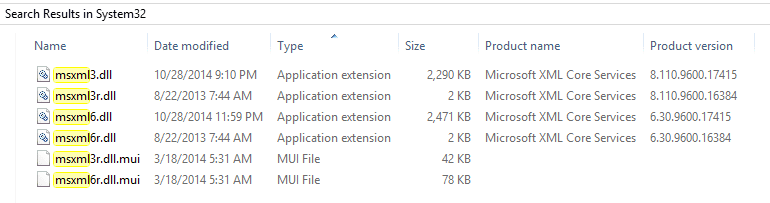
MSXML Version 6.0 SP1 (MSXML6.1) and later is required before installing UPD 5.6.5 or newer on this operating system.

I'm not sure this has any bearing on the issue - see what's on your machine and post the information as a reference.
I searched my Windows\System32 folder for MSXML and here is what I got (Win8 machine)
msxmlSrch.png
 

My Computer

Computer type
Laptop
Computer Manufacturer/Model Number
HP Pavilion dv6-6c10us
OS
x64 (6.3.9600) Win8.1 Pro & soon dual boot x64 (6.1.7601) Win7_SP1 HomePrem
CPU
AMD A6-3420M APU with Radeon(tm) HD Graphics
Motherboard
Hewlett-Packard 1805
Memory
6.00 GB
Graphics Card(s)
AMD Radeon(TM) HD 6520G
Sound Card
(1) AMD High Definition Audio Device (2) IDT High Definiti
Monitor(s) Displays
HP W2072a 20" LCD (1600 x 900) @ 60 Hz
Screen Resolution
1366 x 768 x 32 bits (4294967296 colors) @ 60 Hz
Hard Drives
ST640LM0 00 HM641JI SATA Disk Device
Keyboard
Logitech k520 wireless KB
Mouse
Logitech m320 wireless mouse (bundled with KB)
Internet Speed
15/5 | 54 MB Wireless 'n'
Antivirus
Realtime: Defender or Avast | On-demand: Malwarebytes, ESET
Browser
IE 11 on Win8, IE 10 on win 7
Other Info
Media: [Gimp, Audacity, VLC] || Comm: [WEmail 2012, Skype] || Productivity: [OpenOffice,| Textpad] || Utils: [Sysinternals, cCleaner, Speccy, Defraggler]
I'll post some other references so I don't lose them.

Trying the newer Universal Print Driver (UPD) is the only actionable post. Everything else is reference.
I'll ask direct questions or post instructions if I think something might help. These are always trial and error sessions, and there might not be a solution.

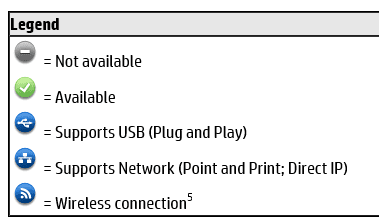
The first thing I noted when I read one of the documents is that the UPD only supports the LJ500 as an Ethernet connected printer
HP Universal Print Driver (UPD) supported printers

LJ5000connect.PNG

LJ5000Legend.PNG

I don't see how that would affect installing the driver. It might though - many devices want the driver installed before the device is connected, you are instructed to connect the device at some point in the install to complete the install and configure the device.

Question: Is the LJ5000 connected via Ethernet or USB?

The second thing I noted in a different document, was that two configuration files were missing. This sounded like it might be the fix, but after reading the document, I don't think it is applicable to the LJ5000 issue in your computing environment.

Setup and install - general
HP Universal Print Driver v5.6.5 - Missing Config Files

No action is recommended - there are a few more documents I want to read.
I'm also waitiign to see if the newer UPD helped any.

That's all I have at the moment.

Bill
.

 

My Computer

Computer type
Laptop
Computer Manufacturer/Model Number
HP Pavilion dv6-6c10us
OS
x64 (6.3.9600) Win8.1 Pro & soon dual boot x64 (6.1.7601) Win7_SP1 HomePrem
CPU
AMD A6-3420M APU with Radeon(tm) HD Graphics
Motherboard
Hewlett-Packard 1805
Memory
6.00 GB
Graphics Card(s)
AMD Radeon(TM) HD 6520G
Sound Card
(1) AMD High Definition Audio Device (2) IDT High Definiti
Monitor(s) Displays
HP W2072a 20" LCD (1600 x 900) @ 60 Hz
Screen Resolution
1366 x 768 x 32 bits (4294967296 colors) @ 60 Hz
Hard Drives
ST640LM0 00 HM641JI SATA Disk Device
Keyboard
Logitech k520 wireless KB
Mouse
Logitech m320 wireless mouse (bundled with KB)
Internet Speed
15/5 | 54 MB Wireless 'n'
Antivirus
Realtime: Defender or Avast | On-demand: Malwarebytes, ESET
Browser
IE 11 on Win8, IE 10 on win 7
Other Info
Media: [Gimp, Audacity, VLC] || Comm: [WEmail 2012, Skype] || Productivity: [OpenOffice,| Textpad] || Utils: [Sysinternals, cCleaner, Speccy, Defraggler]
Nothing seems to work. Even if I use new install files from one of the downloads listed here I get the same message. Could it be that it is the printer wizard that is at fault? Is there any way to install a printer without using it?

Thanks Daniel.
 

My Computer

Computer type
PC/Desktop
OS
Windows 7 Home Premium 32 bit
Nothing seems to work. Even if I use new install files from one of the downloads listed here I get the same message. Could it be that it is the printer wizard that is at fault? Is there any way to install a printer without using it?

Thanks Daniel.

Printer Wizard? I thought the UPD wasn't installing.

There's always a way - there might not be a successful way.

How are you connecting the printer?
 

My Computer

Computer type
Laptop
Computer Manufacturer/Model Number
HP Pavilion dv6-6c10us
OS
x64 (6.3.9600) Win8.1 Pro & soon dual boot x64 (6.1.7601) Win7_SP1 HomePrem
CPU
AMD A6-3420M APU with Radeon(tm) HD Graphics
Motherboard
Hewlett-Packard 1805
Memory
6.00 GB
Graphics Card(s)
AMD Radeon(TM) HD 6520G
Sound Card
(1) AMD High Definition Audio Device (2) IDT High Definiti
Monitor(s) Displays
HP W2072a 20" LCD (1600 x 900) @ 60 Hz
Screen Resolution
1366 x 768 x 32 bits (4294967296 colors) @ 60 Hz
Hard Drives
ST640LM0 00 HM641JI SATA Disk Device
Keyboard
Logitech k520 wireless KB
Mouse
Logitech m320 wireless mouse (bundled with KB)
Internet Speed
15/5 | 54 MB Wireless 'n'
Antivirus
Realtime: Defender or Avast | On-demand: Malwarebytes, ESET
Browser
IE 11 on Win8, IE 10 on win 7
Other Info
Media: [Gimp, Audacity, VLC] || Comm: [WEmail 2012, Skype] || Productivity: [OpenOffice,| Textpad] || Utils: [Sysinternals, cCleaner, Speccy, Defraggler]
OK, just proved it, I tried to install a brother driver and got the same message. It must be the install wizard at fault. Can I reinstall that?
 

My Computer

Computer type
PC/Desktop
OS
Windows 7 Home Premium 32 bit
Oh, I am connecting to the print via ethernet.
 

My Computer

Computer type
PC/Desktop
OS
Windows 7 Home Premium 32 bit
Please post a screen shot of Control Panel -> Devices and Printers. When I went through this same exercise with a Minolta printer using their UPD, there was an icon not categorized (sorry, I forget what it was called or how it was referenced).

Uninstall the HP UPD you installed during this exercise and the previous LJ5000 driver from Control Panel -> Programs and Features. If there isn't anything there, that's ok, but let me know.

If there are clearly identified LJ5000 icons in the Devices and Printers, remove them.

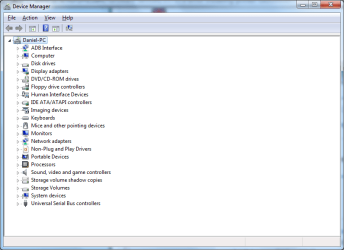
Then let me see what printers Device Manager thinks are installed. I'm also interested in any thing unknown (the category usually automatically expands to make it more noticeable)

I'd also like to see a Speccy repot to better understand your system.
Please follow this tutorial to provide the current operating environment of your machine.
http://www.sevenforums.com/tutorials/311593-speccy-publish-snapshot-your-system-specs.html

Thanks
 

My Computer

Computer type
Laptop
Computer Manufacturer/Model Number
HP Pavilion dv6-6c10us
OS
x64 (6.3.9600) Win8.1 Pro & soon dual boot x64 (6.1.7601) Win7_SP1 HomePrem
CPU
AMD A6-3420M APU with Radeon(tm) HD Graphics
Motherboard
Hewlett-Packard 1805
Memory
6.00 GB
Graphics Card(s)
AMD Radeon(TM) HD 6520G
Sound Card
(1) AMD High Definition Audio Device (2) IDT High Definiti
Monitor(s) Displays
HP W2072a 20" LCD (1600 x 900) @ 60 Hz
Screen Resolution
1366 x 768 x 32 bits (4294967296 colors) @ 60 Hz
Hard Drives
ST640LM0 00 HM641JI SATA Disk Device
Keyboard
Logitech k520 wireless KB
Mouse
Logitech m320 wireless mouse (bundled with KB)
Internet Speed
15/5 | 54 MB Wireless 'n'
Antivirus
Realtime: Defender or Avast | On-demand: Malwarebytes, ESET
Browser
IE 11 on Win8, IE 10 on win 7
Other Info
Media: [Gimp, Audacity, VLC] || Comm: [WEmail 2012, Skype] || Productivity: [OpenOffice,| Textpad] || Utils: [Sysinternals, cCleaner, Speccy, Defraggler]
Great Dan,

I'll look at the Speccy.

The unspecified Android icon is exactly like the one I saw for my Minolta printer. I guess that's what Windows posts for anything unspecified. Looks like an old oven to me or maybe a toaster ;)

You have the LJ5000 original install disc, yes?
I think we should drop attempts to use the HP UPD - you tried and it just didn't want to play nice.

Please run another SFC and let's hope those references are no longer reported. The previous reports looked as though the files were repaired, although there were obviously some that could not be repaired. If the new SFC still reports the same files, then there are two things you can do. Ignore them, they won't hurt anything and don't take up very much disk space. Or try to clean it up - it could be as easy as running cCleaner registry clean feature. It's always a good idea to create a restore point before making any registry changes even though cCleaner asks if you want to back up the pieces before changing anything. The best advice I can give about cCleaner, is to know what you're doing before committing the change - by this I really mean only use the tool to affect what you need to affect, don't make wholesale changes (i.e. don't fix everything it finds - only those specific to the LJ5000 printer, in your case).

Thanks, reading Speccy next.

Bill
.
 

My Computer

Computer type
Laptop
Computer Manufacturer/Model Number
HP Pavilion dv6-6c10us
OS
x64 (6.3.9600) Win8.1 Pro & soon dual boot x64 (6.1.7601) Win7_SP1 HomePrem
CPU
AMD A6-3420M APU with Radeon(tm) HD Graphics
Motherboard
Hewlett-Packard 1805
Memory
6.00 GB
Graphics Card(s)
AMD Radeon(TM) HD 6520G
Sound Card
(1) AMD High Definition Audio Device (2) IDT High Definiti
Monitor(s) Displays
HP W2072a 20" LCD (1600 x 900) @ 60 Hz
Screen Resolution
1366 x 768 x 32 bits (4294967296 colors) @ 60 Hz
Hard Drives
ST640LM0 00 HM641JI SATA Disk Device
Keyboard
Logitech k520 wireless KB
Mouse
Logitech m320 wireless mouse (bundled with KB)
Internet Speed
15/5 | 54 MB Wireless 'n'
Antivirus
Realtime: Defender or Avast | On-demand: Malwarebytes, ESET
Browser
IE 11 on Win8, IE 10 on win 7
Other Info
Media: [Gimp, Audacity, VLC] || Comm: [WEmail 2012, Skype] || Productivity: [OpenOffice,| Textpad] || Utils: [Sysinternals, cCleaner, Speccy, Defraggler]
Back
Top