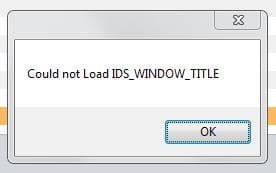
When does this error message occur? What do you do to generate it?
My Computer
Computer type
PC/Desktop
OS
Microsoft Windows 7 Home Premium 64-bit 7601 Multiprocessor Free Service Pack 1
CPU
Intel(R) Core(TM) i7-3770 CPU @ 3.40GHz
Motherboard
ASUSTeK COMPUTER INC. P8H77-M
Memory
8.00 GB
Graphics Card(s)
Intel(R) HD Graphics 4000
Sound Card
On Board
Monitor(s) Displays
Dell 24"
Screen Resolution
1920 x 1080
Hard Drives
(1) INTEL SSDSC2CT180A3 ATA Device (2) ST500DM002-1BD142 ATA Device (3) WDC WD3200AAKS-75L9A0 ATA Device (4) Generic- Compact Flash USB Device (5) Generic- MS/MS-Pro USB Device (6) Generic- SD/MMC USB Device (7) Generic- SM/xD-Picture USB
What program are you using when it appears? Where are you uploading to?
My Computer
Computer type
PC/Desktop
OS
Microsoft Windows 7 Home Premium 64-bit 7601 Multiprocessor Free Service Pack 1
CPU
Intel(R) Core(TM) i7-3770 CPU @ 3.40GHz
Motherboard
ASUSTeK COMPUTER INC. P8H77-M
Memory
8.00 GB
Graphics Card(s)
Intel(R) HD Graphics 4000
Sound Card
On Board
Monitor(s) Displays
Dell 24"
Screen Resolution
1920 x 1080
Hard Drives
(1) INTEL SSDSC2CT180A3 ATA Device (2) ST500DM002-1BD142 ATA Device (3) WDC WD3200AAKS-75L9A0 ATA Device (4) Generic- Compact Flash USB Device (5) Generic- MS/MS-Pro USB Device (6) Generic- SD/MMC USB Device (7) Generic- SM/xD-Picture USB
Go to Control panel, Programs and see if there is a repair option for Mozilla Thunderbird!
My Computer
Computer type
PC/Desktop
OS
Microsoft Windows 7 Home Premium 64-bit 7601 Multiprocessor Free Service Pack 1
CPU
Intel(R) Core(TM) i7-3770 CPU @ 3.40GHz
Motherboard
ASUSTeK COMPUTER INC. P8H77-M
Memory
8.00 GB
Graphics Card(s)
Intel(R) HD Graphics 4000
Sound Card
On Board
Monitor(s) Displays
Dell 24"
Screen Resolution
1920 x 1080
Hard Drives
(1) INTEL SSDSC2CT180A3 ATA Device (2) ST500DM002-1BD142 ATA Device (3) WDC WD3200AAKS-75L9A0 ATA Device (4) Generic- Compact Flash USB Device (5) Generic- MS/MS-Pro USB Device (6) Generic- SD/MMC USB Device (7) Generic- SM/xD-Picture USB
The all I can think of is to uninstall Thunderbird and re install it! Be sure to save your contacts, folders and messages first though!
My Computer
Computer type
PC/Desktop
OS
Microsoft Windows 7 Home Premium 64-bit 7601 Multiprocessor Free Service Pack 1
CPU
Intel(R) Core(TM) i7-3770 CPU @ 3.40GHz
Motherboard
ASUSTeK COMPUTER INC. P8H77-M
Memory
8.00 GB
Graphics Card(s)
Intel(R) HD Graphics 4000
Sound Card
On Board
Monitor(s) Displays
Dell 24"
Screen Resolution
1920 x 1080
Hard Drives
(1) INTEL SSDSC2CT180A3 ATA Device (2) ST500DM002-1BD142 ATA Device (3) WDC WD3200AAKS-75L9A0 ATA Device (4) Generic- Compact Flash USB Device (5) Generic- MS/MS-Pro USB Device (6) Generic- SD/MMC USB Device (7) Generic- SM/xD-Picture USB
HAve you tried the link posted by UsernameIssues in post#6 above?
My Computer
Computer type
PC/Desktop
OS
Microsoft Windows 7 Home Premium 64-bit 7601 Multiprocessor Free Service Pack 1
CPU
Intel(R) Core(TM) i7-3770 CPU @ 3.40GHz
Motherboard
ASUSTeK COMPUTER INC. P8H77-M
Memory
8.00 GB
Graphics Card(s)
Intel(R) HD Graphics 4000
Sound Card
On Board
Monitor(s) Displays
Dell 24"
Screen Resolution
1920 x 1080
Hard Drives
(1) INTEL SSDSC2CT180A3 ATA Device (2) ST500DM002-1BD142 ATA Device (3) WDC WD3200AAKS-75L9A0 ATA Device (4) Generic- Compact Flash USB Device (5) Generic- MS/MS-Pro USB Device (6) Generic- SD/MMC USB Device (7) Generic- SM/xD-Picture USB
The thread that I linked to was about a window popping up (just like your thread). The OP could not identify the program that was causing the windows to appear (just like your thread). Process Explorer identified the application that was making the window appear in that thread.
If you will download/run Process Explorer (using the info in the post that I linked to), then you can see which application on your computer is causing the window to appear.
Thank you so much everyone for your input, very much appreciated.
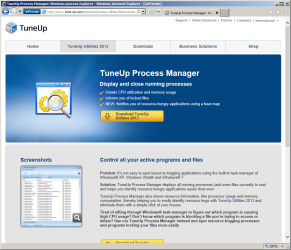
I used TuneUp Process Manager today and deactivated all I did not need and this worked. Still not sure which application was causing the issue but I will introduce the processes one by one and hopefully hunt the little bugger down
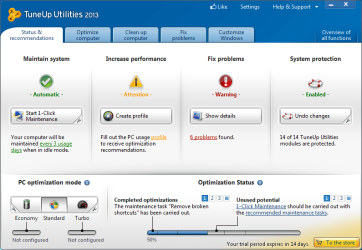
Try and get your money back if this was a recent purchase. The tool claims to do a lot, and I played with it a bit before posting what I did. Some of what it says it will do does not even sound like a good idea (disabling services to make the computer go faster). There is so much that I could write about this tool... but it would take too much time.
I will say that it does not clear the surfing history for IE10. It does not look in the right places. And the registry cleaner should be avoided. The 72 things that it wanted to "fix" in the fresh W7 install were all from Microsoft and would not harm or slowdown the computer in anyway.
Any performance gains that it claims to give you will be lost by just having the tuneup app running all of the time.
If you re-enable all of the items that you disabled via this tuneup tool, then use Process Explorer, you might find out right away what app is making the window popup that you show in the OP.
Thanks so much for that, I'll uninstall as soon as I've reversed the process thing. I only use Firefox but, as you state, if this is an 'iffy' program I will unistall.
Hello again Usernameissues, I have uninstalled the TuneUp programs which has brought the popup back again. I have downloaded Process Explorer and placed the icon over the popup. Is it the 'red' process that is causing the issue? If so, what do I do next to stop this happening please?



 Is it a no, no?