
Solved Error message when I replaces "notepad.exe" by "notepad++.exe"

seventrad

New member
Local time
12:30 AM
Messages
50
Error message when I replaces "notepad.exe" by "notepad++.exe"

Hi,

I folow this tutorial: How To Replace Notepad in Windows 7 - How-To Geek

After, when I started the "notepad.exe" (notepad++ executable) from C:\Windows the error below appears:
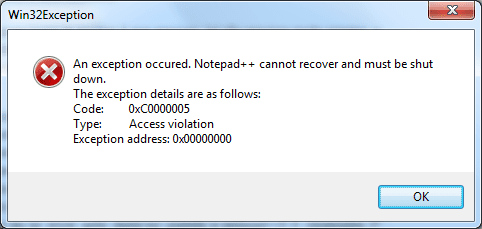
errorNPP.png
 

My Computer My Computer

At a glance

Windows 7 Ultimate x64 SP1
OS
Windows 7 Ultimate x64 SP1
Don't replace notepad...Just change file associations.
 

My Computer My Computer

At a glance

Windows 10 Pro (x64)Intel Core i7-3930K (3.2GHz - 4.5GHz)4x Samsung 4GB PC3-12800 DDR3 (16GB 1600MHz)Nvidia Geforce GTX 690
Computer type
PC/Desktop
Computer Manufacturer/Model Number
Alienware Aurora ALX R4
OS
Windows 10 Pro (x64)
CPU
Intel Core i7-3930K (3.2GHz - 4.5GHz)
Motherboard
Alienware Aurora-R4 x79
Memory
4x Samsung 4GB PC3-12800 DDR3 (16GB 1600MHz)
Graphics Card(s)
Nvidia Geforce GTX 690
Sound Card
SteelSeries Siberia Elite
Monitor(s) Displays
Dell UltraSharp U3011
Screen Resolution
2560x1600
Hard Drives
Samsung 850 Pro 256 GB, Seagate 1TB Desktop Hybrid HDD, 2x Western Digital 4TB Green HDD
PSU
875W Some Dell PSU <.<
Case
Alienware Aurora ALX
Cooling
Custom Liquid Cooling (EK CPU & GPU blocks) dual EK 480RAD
Keyboard
Logitech G710+ Mechanical
Mouse
Logitech G700s
Internet Speed
Verizon Fios (50 mbps average)
Other Info
Server: Intel NUC D54250WYK: i5-4250U, 16GB, 256 GB mSATA, Windows Server 2012 R2
Use the Context menu

I would only change the txt file association (otherwise you'll lose the special icons for bat, ini, etc.).

Another option is to make sure Notepad++ is added to the "Context menu" (when you install it) and just use that.
 

My Computer My Computer

At a glance

W7 Ultimate SP1, LM19.2 MATE, W10 Home 1703, ...AMD Phenom II x6 1100T, 3.3 GHz12GB DDR3 1333 G-Skill (4GB x 2), G-Skill (2G...NVIDIA GeForce GTX 660
Computer type
PC/Desktop
Computer Manufacturer/Model Number
n/a
OS
W7 Ultimate SP1, LM19.2 MATE, W10 Home 1703, W10 Pro 1703 VM, #All 64 bit
CPU
AMD Phenom II x6 1100T, 3.3 GHz
Motherboard
ASUS M4A88T-M/USB3 (AM3)
Memory
12GB DDR3 1333 G-Skill (4GB x 2), G-Skill (2GB x 2)
Graphics Card(s)
NVIDIA GeForce GTX 660
Sound Card
Realtek?
Monitor(s) Displays
Samsung S23B350
Screen Resolution
1920x1080
Hard Drives
WD Green 2TB (SATA), WD Green 3TB (SATA), WD Blue 4TB (SATA), WD Blue 6TB (SATA)
PSU
Cooler Master
Case
Antec GX300 Tower
Cooling
3x Antec TRICOOL 120mm Fans
Mouse
Wired Optical
Internet Speed
DSL
Antivirus
Avast
Browser
Pale Moon (64 bit)
Other Info
2018-12-27 Upgraded HDDs
2015-12-10 Upgraded case, graphics card, storage
2015-08-15 Upgraded motherboard & RAM
2015-07-15 Upgraded LM17.1 to LM17.2
That 'tutorial' will not work with Notepad++ since if it isn't being run out of its install directory it can't find it's supporting libraries and config files.

You need to to replace notepad.exe with the Notepad++ Launcher...

http://wiki.przemoc.net/projects/start#notepad_launcher
 

My Computer My Computer

At a glance

Windows 7 Pro x86T6600 @ 0.975V4GB DDRII-800Onboard Intel 4500mhd
Computer Manufacturer/Model Number
AOpen MP45
OS
Windows 7 Pro x86
CPU
T6600 @ 0.975V
Motherboard
i45GMx-I
Memory
4GB DDRII-800
Graphics Card(s)
Onboard Intel 4500mhd
Sound Card
Onboard Realtek + SteelSeries USB
Monitor(s) Displays
Asus ProArt 246
Screen Resolution
1920x1200
Hard Drives
Seagate Momentus XT 750
Keyboard
Cherry G230
Mouse
MS Wireless 3500
I will not replace the "notepad.exe" anymore. I will associate the file types with the Notepad++!

Thank You for all!
 

My Computer My Computer

At a glance

Windows 7 Ultimate x64 SP1
OS
Windows 7 Ultimate x64 SP1
Fair enough, associating is one way to do it.

The root of your problem though lies with a tutorial written by someone who obviously didn't bother to think about or test whether what they were telling people would actually work.

All the information on replacing Notepad with Notepad++ is (and always has been) available on the Notepad++ site.
 

My Computer My Computer

At a glance

Windows 7 Pro x86T6600 @ 0.975V4GB DDRII-800Onboard Intel 4500mhd
Computer Manufacturer/Model Number
AOpen MP45
OS
Windows 7 Pro x86
CPU
T6600 @ 0.975V
Motherboard
i45GMx-I
Memory
4GB DDRII-800
Graphics Card(s)
Onboard Intel 4500mhd
Sound Card
Onboard Realtek + SteelSeries USB
Monitor(s) Displays
Asus ProArt 246
Screen Resolution
1920x1200
Hard Drives
Seagate Momentus XT 750
Keyboard
Cherry G230
Mouse
MS Wireless 3500
Back
Top