error opening a word doc.. please help

eldinv

New member
Guru
Local time
8:47 AM
Messages
560
Location
New Hampshire
i have a file thats a docx file from microsoft. it has some important stuff, i dont remember locking it or anything, how can i get in there, is there a place to put in a password.

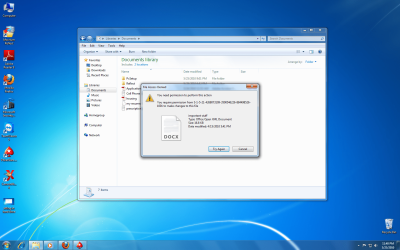
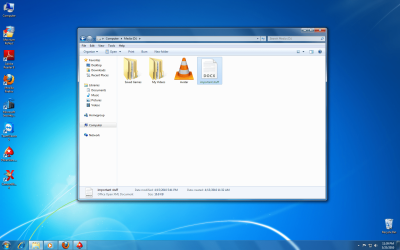
there are two images, first one shows where it sits on my secondary hard drive, and the other picture is what happens if i try and move to a different location.

i promise this file is mine, i just reinstalled windows today to a newer version.

please help and thanks
 

Attachments
  • sitting in hard drive.png
    sitting in hard drive.png
    310.8 KB · Views: 8
  • copying.png
    copying.png
    335.6 KB · Views: 40

My Computers

System One System Two

  • Computer type
    PC/Desktop
    Computer Manufacturer/Model Number
    PowerSpec G164
    OS
    WIN10
    CPU
    AMD Ryzen 5 3600 6-Core Processor 3.59 GHz
    Memory
    16.0 GB
    Internet Speed
    VERY FAST>>>!!!
  • Antivirus
    ESET Security Premium
i have a file thats a docx file from microsoft. it has some important stuff, i dont remember locking it or anything, how can i get in there, is there a place to put in a password.

there are two images, first one shows where it sits on my secondary hard drive, and the other picture is what happens if i try and move to a different location.

i promise this file is mine, i just reinstalled windows today to a newer version.

please help and thanks

Simple permission problem. right click file and "take ownership". May have to do that in safe mode (F8)
 

My Computer

Computer Manufacturer/Model Number
HP Pavillion dv-7 1005 Tx
OS
Win 8 Release candidate 8400
CPU
[email protected]
Memory
4 gigs
Graphics Card(s)
Nvidia 9600M
Sound Card
HD built-in
Monitor(s) Displays
17" Wxga
Screen Resolution
1440x900
Cooling
none
Internet Speed
45Mb down 5Mb up
i have a file thats a docx file from microsoft. it has some important stuff, i dont remember locking it or anything, how can i get in there, is there a place to put in a password.

there are two images, first one shows where it sits on my secondary hard drive, and the other picture is what happens if i try and move to a different location.

i promise this file is mine, i just reinstalled windows today to a newer version.

please help and thanks

Simple permission problem. right click file and "take ownership". May have to do that in safe mode (F8)


take ownership never seen this before maybe only under safe mode. dont have to use hidden built in admin right just normal admin?
 

My Computers

System One System Two

  • Computer type
    PC/Desktop
    Computer Manufacturer/Model Number
    PowerSpec G164
    OS
    WIN10
    CPU
    AMD Ryzen 5 3600 6-Core Processor 3.59 GHz
    Memory
    16.0 GB
    Internet Speed
    VERY FAST>>>!!!
  • Antivirus
    ESET Security Premium
look for tutorial on how to add take ownership to right click.. i did that in regular windows, a black box quickly appear and nothing. so then i went into safe mode and still nothing. access denied. please:cry:

it also happen to a subfolder... and all 200GB of media is unplayable.. im screwed.
 

My Computers

System One System Two

  • Computer type
    PC/Desktop
    Computer Manufacturer/Model Number
    PowerSpec G164
    OS
    WIN10
    CPU
    AMD Ryzen 5 3600 6-Core Processor 3.59 GHz
    Memory
    16.0 GB
    Internet Speed
    VERY FAST>>>!!!
  • Antivirus
    ESET Security Premium
any other solutions someone can think of, i dont really care about the media, but the important stuff docx, is just that has personal imformation, doctors names and appointments,


i would really appreciate it. :shock:
 

My Computers

System One System Two

  • Computer type
    PC/Desktop
    Computer Manufacturer/Model Number
    PowerSpec G164
    OS
    WIN10
    CPU
    AMD Ryzen 5 3600 6-Core Processor 3.59 GHz
    Memory
    16.0 GB
    Internet Speed
    VERY FAST>>>!!!
  • Antivirus
    ESET Security Premium
From the pics it looks like you haven't installed an Office application. if you do not have paid ms office i would advise to use open office. Once you have installed office application. it should work

You can download open office from the following link:
download: OpenOffice.org Downloads :p
 

My Computer

Computer Manufacturer/Model Number
x
OS
xp, vista, seven
CPU
x
Motherboard
x
Memory
x
Graphics Card(s)
x
Sound Card
x
Monitor(s) Displays
x
Hard Drives
x
PSU
x
Case
x
Cooling
x
Back
Top