Solved Error saving wireless profile

bujinkai

New member
Local time
1:15 PM
Messages
5
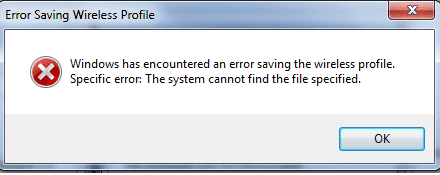
When i tried to access the properties of my wireless network i currently connected. It pops out
"Windows has encountered an error saving the wireless profile. Specific error: The system cannot find the file specified".

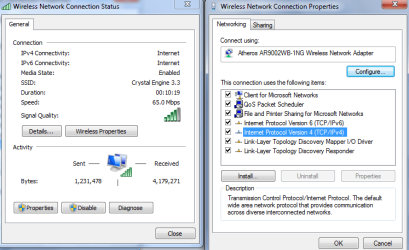
I'm able to connect to the internet, however, unable to access wireless properties and unable to check/uncheck the boxes in properties tab, unable to access ipv4, ipv6 all other properties.

When clicking the "properties (with the admin shield)" in Wireless Network Connection Status, it didnt prompted me to run as admin where it should have.

I've tried everything from sfc/scannow (everything is fine), uninstall the wireless device and reinstalled it, deleted all wireless profile, netsh ipv4 reset, winsock reset, ipv4 interface install, system restore (does not have a restore point).....and still unable to access the wireless properties as i am able before. I did not know what happened that able to cause this kinda problem. I fear it will cause future problems although there isnt any harm now except for unable to access the ipv4 and other properties. Please help.
 

Attachments
  • wireless profile error.png
    wireless profile error.png
    76.6 KB · Views: 8
  • error.png
    error.png
    31.1 KB · Views: 48

My Computer

Computer type
Laptop
Computer Manufacturer/Model Number
Asus
OS
windows 7 home premium 64bit
Antivirus
bitdefender
i have the same problem and I can't figure it out. I cannot connect to my wifi but I can't browse. I can ping and got a reply but still can't browse. Does anyone have this problem?
 

My Computer

Computer type
PC/Desktop
Computer Manufacturer/Model Number
Dell XPS 8300
OS
Windows 7 Home Premium 64bit
I am facing the same problem. Neither can i view the IPv4 properties nor can i connect to the internet. Need help.
 

My Computer

Computer type
PC/Desktop
OS
Windows 7 Basic 64bit

My Computer

Computer type
PC/Desktop
Computer Manufacturer/Model Number
Home built
OS
Windows 7 Ult, Windows 8.1 Pro,
CPU
Q9650-4.275GHz, E8600 4.5GHz, E6750-3.8GHz
Motherboard
Evga 780i FTW
Memory
G.Skill PC2 9600 1200Mhz 5 5 5 15 2T
Graphics Card(s)
GTX480
Sound Card
Asus Xonar D2
Monitor(s) Displays
HannsG
Screen Resolution
1680X1050
Hard Drives
GSkill Phoenix Pro 120GB SSD
PSU
ThermalTake Toughpower 1000Watt modular
Case
ThermalTake XaserV
Cooling
Xigmatek S1283
Keyboard
Logitech G15
Mouse
Logitech G9
Internet Speed
T1
I scan my computer but it doesn't detect any sort of viruses or malware. It shows I am connected to the internet but when I open my browser, it says, The page cannot be displayed. Also when I clicked on my network profile, it gave the above message. Has anyone found a solution to this problem?
 

My Computer

Computer type
PC/Desktop
Computer Manufacturer/Model Number
Dell XPS 8300
OS
Windows 7 Home Premium 64bit
I scan my computer but it doesn't detect any sort of viruses or malware. It shows I am connected to the internet but when I open my browser, it says, The page cannot be displayed. Also when I clicked on my network profile, it gave the above message. Has anyone found a solution to this problem?

Yes as I've just stated, the problem is caused by malware or virus. This has been proven true on multiple forums as noted from the links I posted. This problem has come up on multiple occasions and that was the cause in every single case.

One scan with one type of anti virus doesn't mean the problem isn't caused by a virus.

Suggest you go to the security section of the forum as I've already said. :geek:
 

My Computer

Computer type
PC/Desktop
Computer Manufacturer/Model Number
Home built
OS
Windows 7 Ult, Windows 8.1 Pro,
CPU
Q9650-4.275GHz, E8600 4.5GHz, E6750-3.8GHz
Motherboard
Evga 780i FTW
Memory
G.Skill PC2 9600 1200Mhz 5 5 5 15 2T
Graphics Card(s)
GTX480
Sound Card
Asus Xonar D2
Monitor(s) Displays
HannsG
Screen Resolution
1680X1050
Hard Drives
GSkill Phoenix Pro 120GB SSD
PSU
ThermalTake Toughpower 1000Watt modular
Case
ThermalTake XaserV
Cooling
Xigmatek S1283
Keyboard
Logitech G15
Mouse
Logitech G9
Internet Speed
T1
where to find the replacement of the tcpip.sys file for my OS windows..? i can connect smoothly to the internet, but just cant access those properties including ipv6 and others. Is it still tcpip.sys causing the problem?

PS: i've tried to replace the tcpip using the link u recommended by "Copy G:\tcpip.sys C:\Windows\System32\Drivers". But when i select "Y" for YES, it said access denied. If i did it manually by replacing a new tcpip.sys to the folder, it also doesnt let me. I've tried it in safe mode also. Cant work. It just wouldnt let me replace the tcpip.sys file. Help...
 
Last edited:

My Computer

Computer type
Laptop
Computer Manufacturer/Model Number
Asus
OS
windows 7 home premium 64bit
Antivirus
bitdefender
Fix?

I believe I have a fix for you.

It is caused by a registry problem. To fix it:

1. Make sure you are an Administrator.
2. Win + R. Type "regedt32" and hit enter.
3. Navigate to HKEY_LOCAL_MACHINE\SYSTEM\ControlSet001\Enum
4. Right click on the "Enum" folder and click "permissions..."
5. Click Advanced
6. Check the box next to "Include inheritable permissions from this object's parent".

NOTE: If you get an "access is denied" box, download the program RegOwnit and use it to gain ownership of the Enum key.

7. Grant full control to the Administrators group and/or your username.
8. Restart your computer.

It should function now!
 

My Computer

Computer type
Laptop
Computer Manufacturer/Model Number
Lenovo
OS
Windows 7 x64
CPU
Intel i5-2410M
Memory
8 GB DDR3
Graphics Card(s)
Intel Graphics 3000
Sound Card
Conexant HD Audio
Screen Resolution
1366x768
Hard Drives
500GB Toshiba SATA
Antivirus
AVG, Malwarebytes, MSE
Browser
Chrome
Other Info
Wireless Adapter: Intel Centrino Wireless N 1000
I believe I have a fix for you.

It is caused by a registry problem. To fix it:

1. Make sure you are an Administrator.
2. Win + R. Type "regedt32" and hit enter.
3. Navigate to HKEY_LOCAL_MACHINE\SYSTEM\ControlSet001\Enum
4. Right click on the "Enum" folder and click "permissions..."
5. Click Advanced
6. Check the box next to "Include inheritable permissions from this object's parent".

NOTE: If you get an "access is denied" box, download the program RegOwnit and use it to gain ownership of the Enum key.

7. Grant full control to the Administrators group and/or your username.
8. Restart your computer.

It should function now!

Wow, thanks alot, it worked like a charm. Though i'm logged in as admin, but due to unknown reason, i do not have access to the wireless properties as well as unable to delete some folders, which did not occur in the past. Apparently, perhaps there were changes made unbeknownst to me by some software or what. There are problems similar to mine but arent the same, those solutions didnt work. Anyway, thx for ur help, appreciate it!
 

My Computer

Computer type
Laptop
Computer Manufacturer/Model Number
Asus
OS
windows 7 home premium 64bit
Antivirus
bitdefender
Those registry settings don't change themselves, you may think this system is fixed but I can assure you it isn't. You only fixed one part of the problem created by malware or a virus.

If you want to completely fix the other issues and not have the problem occur again I would suggest going through malware removal guide in the following link.

How to easily clean an infected computer (Malware Removal Guide)
 

My Computer

Computer type
PC/Desktop
Computer Manufacturer/Model Number
Home built
OS
Windows 7 Ult, Windows 8.1 Pro,
CPU
Q9650-4.275GHz, E8600 4.5GHz, E6750-3.8GHz
Motherboard
Evga 780i FTW
Memory
G.Skill PC2 9600 1200Mhz 5 5 5 15 2T
Graphics Card(s)
GTX480
Sound Card
Asus Xonar D2
Monitor(s) Displays
HannsG
Screen Resolution
1680X1050
Hard Drives
GSkill Phoenix Pro 120GB SSD
PSU
ThermalTake Toughpower 1000Watt modular
Case
ThermalTake XaserV
Cooling
Xigmatek S1283
Keyboard
Logitech G15
Mouse
Logitech G9
Internet Speed
T1
Those registry settings don't change themselves, you may think this system is fixed but I can assure you it isn't. You only fixed one part of the problem created by malware or a virus.

If you want to completely fix the other issues and not have the problem occur again I would suggest going through malware removal guide in the following link.

How to easily clean an infected computer (Malware Removal Guide)


I've downloaded RegOwnit and I dont know how to gain ownership of it. Please help me .
 

My Computer

Computer type
PC/Desktop
OS
windows 7 Home basic
RegOwnit

Those registry settings don't change themselves, you may think this system is fixed but I can assure you it isn't. You only fixed one part of the problem created by malware or a virus.

If you want to completely fix the other issues and not have the problem occur again I would suggest going through malware removal guide in the following link.

How to easily clean an infected computer (Malware Removal Guide)


I've downloaded RegOwnit and I dont know how to gain ownership of it. Please help me .


Once you've navigated using your registry editor (regedt32) to the "Enum" key, right click on the key "folder" (it should look like a folder icon) and click "copy key name". Then, paste inside the bar at the bottom of RegOwnit and it will automatically configure itself. Then simply press the apply button at the bottom and it should tell you that it has set you the owner and given you permissions. However, you're not done yet. Remember that you have to go back to the registry editor, right click on "Enum" and click on "Permissions...". Next, on the "General" or "Users" tab (should be something like that) you'll see a list of users and then checkboxes with "full control" and "read" and stuff. Click on your user name and make sure "full control" and "read" are checked. If not, check it and click apply. Just to be sure, click on "OWNER RIGHTS" in the user list and make sure that full control and read are checked. Then, go to the owner tab and check the "inherit permissions from the object's parent" box. Then click apply.

PLEASE NOTE: This could potentially fix your problem temporarily. I would strongly suggest following chev65's advice on malware removal because it could easily be caused by a virus.
 

My Computer

Computer type
Laptop
Computer Manufacturer/Model Number
Lenovo
OS
Windows 7 x64
CPU
Intel i5-2410M
Memory
8 GB DDR3
Graphics Card(s)
Intel Graphics 3000
Sound Card
Conexant HD Audio
Screen Resolution
1366x768
Hard Drives
500GB Toshiba SATA
Antivirus
AVG, Malwarebytes, MSE
Browser
Chrome
Other Info
Wireless Adapter: Intel Centrino Wireless N 1000
I don't know what's wrong,.. I follow the steps carefully, I download the Regownit, and I try this Method Twice but, the Error Saving Wireless Profile is still in there and the Properties and Configure Option are not Working in Wireless Network Properties..:confused:

edit: but I can connect to the internet,the wireless and the adapter are working...the system detects and connect into my pocket wifi and when I connect my wifi through USB Cable it connects to the internet automatically..
I just want my wireless properties to work again because I want to change the DNS server I attach to it..
 
Last edited:

My Computer

Computer type
Laptop
Computer Manufacturer/Model Number
Lenovo/ Lenovo Win7 PC
OS
Windows 7 Home Basic 64bit.
CPU
Intel(R) Core(TM) i3 CPU
Screen Resolution
1366x768
Internet Speed
65.0 Mbps
Browser
Mozilla Firefox 27.0.1
is this topic is still alive.? can anyone answer my questions? please?
 

My Computer

Computer type
Laptop
Computer Manufacturer/Model Number
Lenovo/ Lenovo Win7 PC
OS
Windows 7 Home Basic 64bit.
CPU
Intel(R) Core(TM) i3 CPU
Screen Resolution
1366x768
Internet Speed
65.0 Mbps
Browser
Mozilla Firefox 27.0.1
solved by chev65

I had the same issue, i followed chev65's advice on malware removal and this solved the problem.
 

My Computer

Computer type
PC/Desktop
OS
Windows 7 Home Premium 32bit
Error :Windows has encountered an error saving the wireless profile

Hello
I have read the registry problem you've mentioned but when i open the system tab under HKEY_LOCAL_MACHINE I only see ControlSet005,006 and 007 but no 001
can anyone please help
:(
 

My Computer

Computer type
PC/Desktop
Computer Manufacturer/Model Number
Custom Build
OS
Windows 8.1 x64
CPU
Intel Core2Duo E4600 2.4 GHz
Motherboard
Gigabyte GA-G41M Combo
Memory
2 GB
Graphics Card(s)
nVidia Geforce 210 1GB DDR3
Monitor(s) Displays
AOC 2353
Screen Resolution
1920x1080 60 Hz
Hard Drives
Western Digital Caviar 160 GB
Keyboard
Microsoft Wireless Keyboard 1000
Mouse
Microsoft Wireless Mouse 800
Internet Speed
4 Mb/s down , 2 Mb/s up
Antivirus
Kaspersky Internet Security 2014
Browser
Internet Explorer 11
I had the same issue, i followed chev65's advice on malware removal and this solved the problem.

It's nice see someone wise enough to follow my advice for a change.

Little do these people know, the pathway to the repair is right there in front of them.

I can't force you all to follow advice people, I can only show you the way to fix problems but you must fix it on your own.

Over 10K views in such a short amount of time, yep, I wonder how many machines have been fixed by following that link already? Too bad they don't all report back in like you did.


Thanks for reporting back in. :geek:
 

My Computer

Computer type
PC/Desktop
Computer Manufacturer/Model Number
Home built
OS
Windows 7 Ult, Windows 8.1 Pro,
CPU
Q9650-4.275GHz, E8600 4.5GHz, E6750-3.8GHz
Motherboard
Evga 780i FTW
Memory
G.Skill PC2 9600 1200Mhz 5 5 5 15 2T
Graphics Card(s)
GTX480
Sound Card
Asus Xonar D2
Monitor(s) Displays
HannsG
Screen Resolution
1680X1050
Hard Drives
GSkill Phoenix Pro 120GB SSD
PSU
ThermalTake Toughpower 1000Watt modular
Case
ThermalTake XaserV
Cooling
Xigmatek S1283
Keyboard
Logitech G15
Mouse
Logitech G9
Internet Speed
T1
I had the same issue, i followed chev65's advice on malware removal and this solved the problem.

It's nice see someone wise enough to follow my advice for a change.

Little do these people know, the pathway to the repair is right there in front of them.

I can't force you all to follow advice people, I can only show you the way to fix problems but you must fix it on your own.

Over 10K views in such a short amount of time, yep, I wonder how many machines have been fixed by following that link already? Too bad they don't all report back in like you did.


Thanks for reporting back in. :geek:

HI chev i followed your advice and removed a few malware by usin Malware Bytes but still my problem isnt solved any further help would be much appreciated
 

My Computer

Computer type
PC/Desktop
Computer Manufacturer/Model Number
Custom Build
OS
Windows 8.1 x64
CPU
Intel Core2Duo E4600 2.4 GHz
Motherboard
Gigabyte GA-G41M Combo
Memory
2 GB
Graphics Card(s)
nVidia Geforce 210 1GB DDR3
Monitor(s) Displays
AOC 2353
Screen Resolution
1920x1080 60 Hz
Hard Drives
Western Digital Caviar 160 GB
Keyboard
Microsoft Wireless Keyboard 1000
Mouse
Microsoft Wireless Mouse 800
Internet Speed
4 Mb/s down , 2 Mb/s up
Antivirus
Kaspersky Internet Security 2014
Browser
Internet Explorer 11
Back
Top