Error when uninstalling some programs

kevindd992002

New member
Power User
Local time
11:16 PM
Messages
373
Why is it that when I uninstall some programs (with shortcut links in the desktop), they give me the error in the attachment?

I've noticed this when I uninstalled nvidia 3d vision player and itunes 64-bit. I've tried doing the same in another computer and they don't give me any error of this kind. I've looked at the security permissions of my C:\Users\[username]\Desktop folder and they seem to be intact and proper.

What could be wrong?
 

Attachments

  • error.JPG
    error.JPG
    30.2 KB · Views: 9

My Computer

Computer Manufacturer/Model Number
Sager NP8130
OS
Windows 7 Ultimate x6
CPU
i5 2670QM
Memory
2x4GB RAM Kingston HyperX Memory DDR3 1600 MHz Sticks
Graphics Card(s)
Nvidia GeForce GTX 560M
Sound Card
Realtek HD Audio (Built-in)
Screen Resolution
1920x1080
Hard Drives
128GB Crucial M4 SSD
500GB Seagate 7200RPM HDD
Internet Speed
12Mbps down/4Mbps up
I'm confused. :o

For confirmation/clarification, are you trying to remove just the shortcut link or the actual program the shortcut points to? The reason I'm confused is in your screenshot the error says, "Could not remove Shortcut NVIDIA 3D Vision Video Player link. Verify that the shortcut file exists and that you can access it."

Are you attempting to uninstall Vision Video Player through control panel > programs and features?

You could try using the forced uninstall option in Revo Uninstaller Pro. Revo has a full function free 30 day trial period.

Revo Uninstaller Pro - Uninstall Software, Remove Programs easily, Forced Uninstall, Leftovers Uninstaller

It's possible that the Vision Video Player has a broken uninstaller. You could try reinstalling the program to see if that fixes the uninstaller.
 

My Computer

Computer type
Laptop
Computer Manufacturer/Model Number
Sony Vaio VPCEB47GM Laptop
OS
Win 7 Pro 64-bit
CPU
Intel i5 2.4 Ghz
Memory
8GB DDR3
Graphics Card(s)
Intel HD 3000
Sound Card
IDT High Definition
Monitor(s) Displays
15.6 WGXA Anti-Glare LED
Screen Resolution
1280x800
Hard Drives
640Gb 7200rpm
Antivirus
MSE
Browser
Opera (primary) with IE9 backup
Some kind of corruption of Windows installer maybe, I'm not sure, but you may try this:

> Press Win+R.
> Type MSIEXEC /unregister and press Enter
> Type MSIEXEC /regserver and press Enter

...and see if this helps.
 

My Computer

Computer type
PC/Desktop
OS
Windows 7 Home Premium x64
I'm trying to uninstall NVIDIA 3D Vision Player and every single time I do so, it prompts me with that error. Installing that program back and then uninstalling it again gives the same error. This is also true when uninstalling Itunes. I'm positive that this is not because of a corrupt Windows installer or something because when I try the same process (same installer and everything) in another computer, there are no error prompts like this.

Revo uninstaller might work but that's actually not my target. My question is why does this error prompt even occur on my laptop? There's some kind of security permission broken here that's not allowing these uninstallers access the shortcut link in the desktop when running them.

Oh and yes, the pictures above is when uninstalling through Control Panel -> Programs and Features.
 

My Computer

Computer Manufacturer/Model Number
Sager NP8130
OS
Windows 7 Ultimate x6
CPU
i5 2670QM
Memory
2x4GB RAM Kingston HyperX Memory DDR3 1600 MHz Sticks
Graphics Card(s)
Nvidia GeForce GTX 560M
Sound Card
Realtek HD Audio (Built-in)
Screen Resolution
1920x1080
Hard Drives
128GB Crucial M4 SSD
500GB Seagate 7200RPM HDD
Internet Speed
12Mbps down/4Mbps up
Well, windows installer might be corrupted only on the first machine on which you are getting the error...
 

My Computer

Computer type
PC/Desktop
OS
Windows 7 Home Premium x64
Well, windows installer might be corrupted only on the first machine on which you are getting the error...

Ah, possibly. But I tried your suggestion above but the problem still persists. What can I do next?
 

My Computer

Computer Manufacturer/Model Number
Sager NP8130
OS
Windows 7 Ultimate x6
CPU
i5 2670QM
Memory
2x4GB RAM Kingston HyperX Memory DDR3 1600 MHz Sticks
Graphics Card(s)
Nvidia GeForce GTX 560M
Sound Card
Realtek HD Audio (Built-in)
Screen Resolution
1920x1080
Hard Drives
128GB Crucial M4 SSD
500GB Seagate 7200RPM HDD
Internet Speed
12Mbps down/4Mbps up
Hmm, this is interesting. I've tried installing the program for "Just Me" instead of "Everyone" and tried uninstalling again and there were no problems. When I tick for Everyone, the shortcut.lnk is copied over to C:\Users\Kevin\Public\Public Desktop\ and it seems I have problems when that is installed in that location.
 

My Computer

Computer Manufacturer/Model Number
Sager NP8130
OS
Windows 7 Ultimate x6
CPU
i5 2670QM
Memory
2x4GB RAM Kingston HyperX Memory DDR3 1600 MHz Sticks
Graphics Card(s)
Nvidia GeForce GTX 560M
Sound Card
Realtek HD Audio (Built-in)
Screen Resolution
1920x1080
Hard Drives
128GB Crucial M4 SSD
500GB Seagate 7200RPM HDD
Internet Speed
12Mbps down/4Mbps up
Are you Administrator on the PC or are installing as Admin?

Run SFC /SCANNOW Command to check System File integrity

Since you're interested in learning more about troubleshooting work through these Troubleshooting Steps for Windows 7

Yes I'm an Administrator on this PC and the installer is an MSI installer so that means it is automatically run as Admin.

Already did SFC /SSCANNOW and found no integrity violation on my system.

Which of the steps in that troubleshooting guide do I need to do? I feel that most of them aren't applicable on my situation here.
 

My Computer

Computer Manufacturer/Model Number
Sager NP8130
OS
Windows 7 Ultimate x6
CPU
i5 2670QM
Memory
2x4GB RAM Kingston HyperX Memory DDR3 1600 MHz Sticks
Graphics Card(s)
Nvidia GeForce GTX 560M
Sound Card
Realtek HD Audio (Built-in)
Screen Resolution
1920x1080
Hard Drives
128GB Crucial M4 SSD
500GB Seagate 7200RPM HDD
Internet Speed
12Mbps down/4Mbps up
Check the logs to resolve repeat errors, utilize the System Resources to find solutions to problems, generate a System Health Report. All of the steps will go over a PC to find most any problem.

It's the kind of error we see on factory preinstalled Win7 corrupted by the sponsored bloatware and useless duplicate utilities that always have better versions built into Win7. So I'd immediately establish a Clean Boot, and if you're still running the factory preinstall Clean Up Factory Bloatware.

But there is no comparison to getting a perfect Clean Reinstall - Factory OEM Windows 7 which is the best possible install one can have.
 
...when I try the same process (same installer and everything) in another computer, there are no error prompts like this....
As I was reading thru your thread, I wondered when someone (or you) would figure out that the shortcut was on the public desktop. Since you have another computer, compare the permissions on the exact same shortcut on the public desktop. Something has to be preventing the uninstall app from being able to delete the shortcut from the public desktop.
 

My Computer

Computer type
Laptop
Computer Manufacturer/Model Number
Employer provided Dell Latitude
OS
W7 Pro SP1 64bit
CPU
i7
Memory
8GB
Graphics Card(s)
Intel HD Graphics
Hard Drives
crappy SSD
Antivirus
Employer mandated Symantec Endpoint Protection
Browser
Pale Moon 64bit, IE11 64bit & Chrome 64bit
I glossed over that - assuming that it was a copy/paste/edit error - or a typo.

The path to the public desktop is normally:
C:\Users\Public\Desktop
Which might display under the alias of
C:\Users\Public\Public Desktop
For some people.

If the OP really has moved the public desktop folder to be under his username folder, then that might be a part of the problem.
 

My Computer

Computer type
Laptop
Computer Manufacturer/Model Number
Employer provided Dell Latitude
OS
W7 Pro SP1 64bit
CPU
i7
Memory
8GB
Graphics Card(s)
Intel HD Graphics
Hard Drives
crappy SSD
Antivirus
Employer mandated Symantec Endpoint Protection
Browser
Pale Moon 64bit, IE11 64bit & Chrome 64bit
...when I try the same process (same installer and everything) in another computer, there are no error prompts like this....
As I was reading thru your thread, I wondered when someone (or you) would figure out that the shortcut was on the public desktop. Since you have another computer, compare the permissions on the exact same shortcut on the public desktop. Something has to be preventing the uninstall app from being able to delete the shortcut from the public desktop.

I already actually did that but the other computer has a Win8 OS. The only difference between the security permissions of the Public Desktop folder of both computers is that the Win8 one has an additional "[computer name]\Users" group with the "special permissions" field checked but GREYED OUT. I tried adding the same group to the Public Desktop folder of the Win7 computer but I cannot check the special permissions field because it is greyed out. Why is this?

C:\Users\<username>\Public\Public Desktop\

Sorry but I haven't got any further workarounds. I don't have those marked folders in my user folder. :confused: Anyone else have that?

I glossed over that - assuming that it was a copy/paste/edit error - or a typo.

The path to the public desktop is normally:
C:\Users\Public\Desktop
Which might display under the alias of
C:\Users\Public\Public Desktop
For some people.

If the OP really has moved the public desktop folder to be under his username folder, then that might be a part of the problem.

Usernameissues is correct. The actual path is C:\Users\Public\Desktop but it shows as Public Desktop when you check show hidden folders. Using C:\Users\Public\Public Desktop also points to the same path anyway so no worries on that.

EDIT: I remembered that I removed the default sharing properties of the Public folder because I did not want anyone accessing that folder in my network. Could this have broken the security permissions of the whole Public folder?
 

My Computer

Computer Manufacturer/Model Number
Sager NP8130
OS
Windows 7 Ultimate x6
CPU
i5 2670QM
Memory
2x4GB RAM Kingston HyperX Memory DDR3 1600 MHz Sticks
Graphics Card(s)
Nvidia GeForce GTX 560M
Sound Card
Realtek HD Audio (Built-in)
Screen Resolution
1920x1080
Hard Drives
128GB Crucial M4 SSD
500GB Seagate 7200RPM HDD
Internet Speed
12Mbps down/4Mbps up
EDIT: I remembered that I removed the default sharing properties of the Public folder because I did not want anyone accessing that folder in my network. Could this have broken the security permissions of the whole Public folder?

There lies the problem.
 

My Computer

Computer type
PC/Desktop
OS
Windows 7 Home Premium x64
...when I try the same process (same installer and everything) in another computer, there are no error prompts like this....
As I was reading thru your thread, I wondered when someone (or you) would figure out that the shortcut was on the public desktop. Since you have another computer, compare the permissions on the exact same shortcut on the public desktop. Something has to be preventing the uninstall app from being able to delete the shortcut from the public desktop.

C:\Users\<username>\Public\Public Desktop\

Sorry but I haven't got any further workarounds. I don't have those marked folders in my user folder. :confused: Anyone else have that?

EDIT: I remembered that I removed the default sharing properties of the Public folder because I did not want anyone accessing that folder in my network. Could this have broken the security permissions of the whole Public folder?

There lies the problem.

Hmmm, ok. Why would that change the security permissions of the public folder? Is there any way that I can set the Public folder not to be shared across the Network but remain its properties? How do I restore it to its default sharing properties?
 

My Computer

Computer Manufacturer/Model Number
Sager NP8130
OS
Windows 7 Ultimate x6
CPU
i5 2670QM
Memory
2x4GB RAM Kingston HyperX Memory DDR3 1600 MHz Sticks
Graphics Card(s)
Nvidia GeForce GTX 560M
Sound Card
Realtek HD Audio (Built-in)
Screen Resolution
1920x1080
Hard Drives
128GB Crucial M4 SSD
500GB Seagate 7200RPM HDD
Internet Speed
12Mbps down/4Mbps up
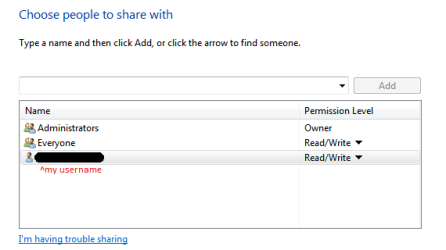
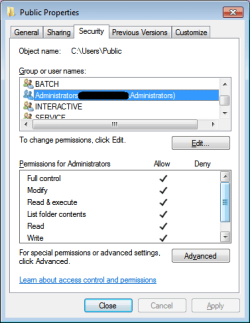
Oh sorry, I thought you changed the "Permissions". Anyway try restoring default sharing settings, here are my defaults:

1.PNG
 

My Computer

Computer type
PC/Desktop
OS
Windows 7 Home Premium x64
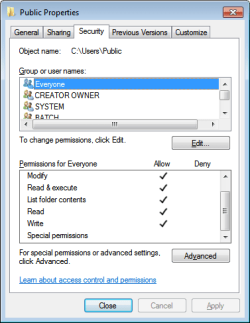
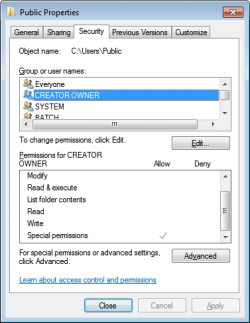
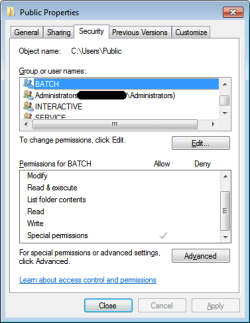
Did some hardwork for you. :hot: Here are the default permissions:
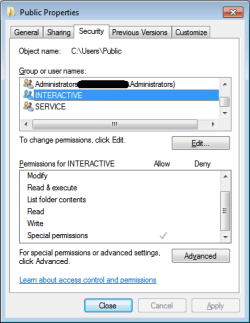
1.PNG 2.png 3.png 4.png 5.png 6.png

For SERVICE, same as INTERACTIVE.
 

My Computer

Computer type
PC/Desktop
OS
Windows 7 Home Premium x64

My Computer

Computer Manufacturer/Model Number
Sager NP8130
OS
Windows 7 Ultimate x6
CPU
i5 2670QM
Memory
2x4GB RAM Kingston HyperX Memory DDR3 1600 MHz Sticks
Graphics Card(s)
Nvidia GeForce GTX 560M
Sound Card
Realtek HD Audio (Built-in)
Screen Resolution
1920x1080
Hard Drives
128GB Crucial M4 SSD
500GB Seagate 7200RPM HDD
Internet Speed
12Mbps down/4Mbps up

My Computer

Computer type
PC/Desktop
OS
Windows 7 Home Premium x64
Back
Top