Error: Windows failed to start. A recent hardware or software change

faith

New member
Local time
3:01 PM
Messages
9
I have a Lenovo Desktop which have Windows 7 Professional on it running for 2 years.

Suddenly, it fails to boot into Windows and show below error messages:

Windows failed to start. A recent hardware or software change might be the cause.

If I click "Start Windows normally", it just hang and reboot itself and continue this infinite loop.

I searched and tried below methods but none of them help. Please see if there are any other ideas. Thanks.

- Run automatic repair tool
- Run chkdsk tool
- Run sfc /scannow
- Follow instructions in http://www.sevenforums.com/tutorials/139576-startup-repair-infinite-loop-recovery.html
- Reinstall Windows 7 Professional
 

My Computer

Computer type
PC/Desktop
OS
Windows 7 Professional 64-bit SP1
Hello Faith now as you have done those tests and reinstalled it really points the finger at some new hardware or perhaps something going wrong with the original hardware and I am thinking of the hard drive for example it is going south then it might well cause the problems you describe.

So have you renewed the drive or added any external drives or mice or suchlike recently or say within a month? I am leaning more to the drive failing to be honest and if you can get it to run then use this
SeaTools for Windows | Seagate
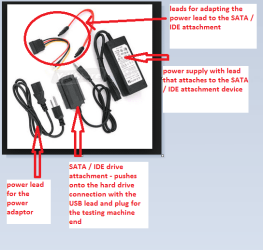
Now if you cannot get the machine to power up to do that have you got access to another machine? because you can use a USB to SATA adaptor to hook it up to another computer and run that test making sure you have the target drive (your Lenovo one) marked down for testing. See my pic of the adaptor.

Now another thing I have to ask is really obvious I suppose but has the machine been dropped, spilt on, had something dropped on it or exposed to extreme temperatures recently? ie left in hot car?

I am just trying to cover all bases here so bear with me.
 

Attachments

  • ADAPTOR SATA _ IDE.PNG
    ADAPTOR SATA _ IDE.PNG
    33.2 KB · Views: 8

My Computer

Computer type
PC/Desktop
Computer Manufacturer/Model Number
Own build (new) Desk1 / Asus ROG Win 7 / Desk2 1st build
OS
Desk1 7 Home Prem / Desk2 10 Pro / Main lap Asus ROG 10 Pro 2 laptop Toshiba 7 Pro Asus P2520 7 & 10
CPU
Desk1 i5 3750K / Laptop i7 GTX 860M / Desk2 i5 2500
Motherboard
Desk1 Asus P877-V / Desk2 Gigabyte H67 UD3H / Laptop ?
Memory
Desk1 8GB (1866) / Desk2 16GB (1333) / Laptop 8Gb DDR3
Graphics Card(s)
Desk 1& 2NVidia GTX 650 & Laptops on board Intel
Sound Card
Desk 1 & 2 -XONAR DG Realtek High Def audio Laptop
Monitor(s) Displays
Desk 1 Benq HD 2450 / Desk2 Philips 24" / Laptop 17.5"
Screen Resolution
1920x1080 D1 & D2 & Laptop 1
Hard Drives
Desk1 Samsung 120GB 830 SSD
Asus ROG 256GB 850 Pro SSD
Desk2 Samsung 840 256 SSD
Toshiba 120GB EVO
PSU
Desk 1 Corsair HX 1050/ Laptop ? / Desk 2 Corsair HX 650
Case
Desk 1 Cooler HAF XM ? Toshiba laptop / Desk2 Coolermaster
Cooling
Fans on all Desk1 -2 Desk2 - all Coolermasters 5 Laptop ?
Keyboard
Desk 1 MS Sidewinder X6 Desk 2 MS Sidewinder X 4
Mouse
Desk 1&2 - Gigabyte MS 900 gamer - laptop - Logitec wireless
Internet Speed
ADSL2+
Other Info
One other Desktop (tester) and spare Toshba laptop both with SSD's
Running Kaspersky 2016 ISS on all machines config'd identically
Logitec audio stereo systems on each machine (x3)
Canon MG5250MFC
Router/modem TP-Link running WPA2SK
Hello Faith now as you have done those tests and reinstalled it really points the finger at some new hardware or perhaps something going wrong with the original hardware and I am thinking of the hard drive for example it is going south then it might well cause the problems you describe.

So have you renewed the drive or added any external drives or mice or suchlike recently or say within a month? I am leaning more to the drive failing to be honest and if you can get it to run then use this
SeaTools for Windows | Seagate
Now if you cannot get the machine to power up to do that have you got access to another machine? because you can use a USB to SATA adaptor to hook it up to another computer and run that test making sure you have the target drive (your Lenovo one) marked down for testing. See my pic of the adaptor.

Now another thing I have to ask is really obvious I suppose but has the machine been dropped, spilt on, had something dropped on it or exposed to extreme temperatures recently? ie left in hot car?

I am just trying to cover all bases here so bear with me.

Thanks for your good suggestion. No recent hardware change I notice on this computer.

This Desktop is running RAID 1, I will try your suggestion to take both harddisk to another computer and check using the provided tool.

As this computer is for normal office use, it does not exposed to extreme condition and user did not report any accidents happen on it (or hide me from knowing it).
 

My Computer

Computer type
PC/Desktop
OS
Windows 7 Professional 64-bit SP1
OK Faith well in that case you may be able to install the drive directly into the second computer and if it works ok then it could be something as simple as a SATA cable that is no good or just not making a good contact which prompts me to say try reseating it in the original machine.

Whatever you actually do keep us informed:)

PS I f it is a bad drive then there are ways of retrieving data and not use Windows to do that - I have on many occasions using some Linux programs namely Ubuntu and Linux Mint MATE. If this is the case post back and we can help with that.
 

My Computer

Computer type
PC/Desktop
Computer Manufacturer/Model Number
Own build (new) Desk1 / Asus ROG Win 7 / Desk2 1st build
OS
Desk1 7 Home Prem / Desk2 10 Pro / Main lap Asus ROG 10 Pro 2 laptop Toshiba 7 Pro Asus P2520 7 & 10
CPU
Desk1 i5 3750K / Laptop i7 GTX 860M / Desk2 i5 2500
Motherboard
Desk1 Asus P877-V / Desk2 Gigabyte H67 UD3H / Laptop ?
Memory
Desk1 8GB (1866) / Desk2 16GB (1333) / Laptop 8Gb DDR3
Graphics Card(s)
Desk 1& 2NVidia GTX 650 & Laptops on board Intel
Sound Card
Desk 1 & 2 -XONAR DG Realtek High Def audio Laptop
Monitor(s) Displays
Desk 1 Benq HD 2450 / Desk2 Philips 24" / Laptop 17.5"
Screen Resolution
1920x1080 D1 & D2 & Laptop 1
Hard Drives
Desk1 Samsung 120GB 830 SSD
Asus ROG 256GB 850 Pro SSD
Desk2 Samsung 840 256 SSD
Toshiba 120GB EVO
PSU
Desk 1 Corsair HX 1050/ Laptop ? / Desk 2 Corsair HX 650
Case
Desk 1 Cooler HAF XM ? Toshiba laptop / Desk2 Coolermaster
Cooling
Fans on all Desk1 -2 Desk2 - all Coolermasters 5 Laptop ?
Keyboard
Desk 1 MS Sidewinder X6 Desk 2 MS Sidewinder X 4
Mouse
Desk 1&2 - Gigabyte MS 900 gamer - laptop - Logitec wireless
Internet Speed
ADSL2+
Other Info
One other Desktop (tester) and spare Toshba laptop both with SSD's
Running Kaspersky 2016 ISS on all machines config'd identically
Logitec audio stereo systems on each machine (x3)
Canon MG5250MFC
Router/modem TP-Link running WPA2SK
Back
Top