error

saurav Gautam

Banned
Local time
9:59 AM
Messages
44
I am facing problem with my hard drive.
One of the drive of my hard disk (:f) doesnt work.
After i open "MY COMPUTER" it doesnt show drive f:

I tried to find it by booting from windows-7 dvd. There i could see drive f: in the list of other drives but i was not able to either format it or delete it or create a new partition from it. My 100 Gb space is lost. it just shows UNALLOCATED SPACE.


The code error is Error:0x8004240f
please help me find the solution of this
 

My Computer

OS
Windows 7 Ultimate x86
Is this a spare drive you have just put into the machine? If so, how has it been formatted?
 

My Computer

OS
win7
hi:)
sounds as if you need to format the drive if it is empty Have you tried going to Control Panel/Admin Tools/Computer Management/Disk Management & see whether your ext HDD is present there? If it is and it is showing with a question mark above it, it may need initialized-NOT FORMATTED - initialized.

to format
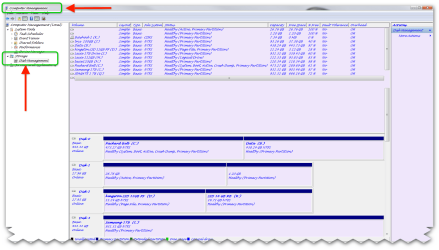
click start, Right click the "computer" option and choose "manage" which opens the "computer management" window. On the left explorer pane, click the storage option and then choose disk management which brings you a list of all available hard drives that you are using in your system. Before doing a format, make sure you have a backup of all your files since formatting will erase the entire contents of the specified drive. Right click the drive you wish to format and choose "format" and in the window that appears, choose the type of formatting option which is either NTFS or FAT32. Choose any one of them and make sure that "perform a quick format" is checked (a tick mark should be enabled). Then finally click the OK button to start formatting and wait for a few minutes for the formatting to complete.

See more: How to format your hard drive in Windows 7 | Video « Wonder How To How to format your hard drive in Windows 7 | Video « Wonder How To


here is a definition of What is unallocated space?

Unallocated space, sometimes called “free space”, is logical space on a hard drive that the operating system, e.g Windows, can write to. To put it another way it is the opposite of “allocated” space, which is where the operating system has already written files to.

Examples.

If the operating system writes a file to a certain space on the hard drive that part of the drive is now “allocated”, as the file is using it the space, and no other files can be written to that section. If that file is deleted then that part of the hard drive is no longer required to be “allocated” it becomes unallocated. This means that new files can now be re-written to that location.

On a standard, working computer, files can only be written to the unallocated space.

If a newly formatted drive is connected to a computer, virtually all of the drive space is unallocated space (a small amount of space will be taken up by files within the file system, e.g $MFT, etc). On a new drive the unallocated space is normally zeros, as files are written to the hard drive the zeros are over written with the file data

Working Example

Blank Drive

A freshly formatted (NTFS) 500 GB hard drive starts with 99.9% unallocated space; we will assume its 100% to make the maths slightly easier. All of the unallocated space will be zeros, literally 00 00 00 written on the hard drives.

If a 5 GB file, e.g a large movie, is placed on the drive, then there will be 1% (5 GB) allocated space and 99% unallocated (495 GB)

If a 10 GB database file is now added to this hard drive there will be a total of 3 % (15 GB) of allocated space and 485 GB unallocated space. New files will only be written into the remaining unallocated space.

What happens when a file is deleted?

If the movie file, from the above example, is deleted the allocated space it was using will now become unallocated. I.e There will now be 2% allocated space (the 10 GB database) and 98% unallocated space.

However the data from the movie file is still on the hard drive, it does not just disappear, it just changes its status. This means that the following situation now exists:

There is 10 GB of allocated space and 490 GB of unallocated space.

Of the 490 GB, 485 GB would be all zeros, however 5 GB of the unallocated space would be the old movie data.

Until new files are written to the hard drive this movie file will remain deleted but still recoverable from the hard drive. Even if new files are written it must overwrite the same unallocated space as the movie file, before the movie file is destroyed.

REMEMBER NTFS IS THE BEST CHOICE FOR FILE TYPE FOR THE HARD DRIVE

 

My Computer

Computer Manufacturer/Model Number
packard bell IXTREME M5722
OS
Operating System : Windows 7 Home Premium Edition 6.01.7600 SP1 (x64)
CPU
Processor : Intel Core 2 Quad Q8300 @ 2500 MHz
Motherboard
Mainboard : Packard Bell (Acer EG43M )
Memory
Physical Memory :8GB Corsair4x 2GB 800MHz C5 DDR2
Graphics Card(s)
Video Card : XFX 6700 AMD
Monitor(s) Displays
Maestro 234DL - BenQ V2220 - BenQ VW2420H
Screen Resolution
Current Display :1920x1080p pixels at 60 Hz in HD LED
Hard Drives
Hard Disks : WDC (1000 GB)
Drive C: (Hard Disk) : 428 GB available on 491 GB
Drive D: (Hard Disk) : 426 GB available on 492 GB
SAMSUNG spinpoint HD103SJ 1000.2 GB
(X 2) KINGSTON SSD NOW V 30GB
PSU
XFX ProSeries 550W PSU
Case
PACKARD BELL IXTREME
Cooling
System Blower Current: 150mA Air Flow16CFM ;Akasa 90mm rear
Keyboard
Gigabyte Aivia K8100
Mouse
TRUST-Wireless Laser Mouse - Carbon edition MI-7770C
Internet Speed
TP-LINK > TL-WN951N / AV500 Gigabit Powerline Adapters
Browser
chrome dev
Other Info
EXTRA COOLING>(FAN CONTROLLER) PC Bay Cooler 3 x 40mm fans; Akasa AK-HD-BL Blue hard drive cooler 2 x 40 mm fan 4500 rpm 29.7 dBA
Bios> American Megatrends Inc.
Version : P01-A1
Date : 08/31/2009
is this f a separate drive or a partition on a drive? can you post a screenshot like mine please
 

Attachments

  • brys snap ?17 ?March ?2011 10h03m07s.png
    brys snap ?17 ?March ?2011 10h03m07s.png
    84.4 KB · Views: 217

My Computer

Computer Manufacturer/Model Number
packard bell IXTREME M5722
OS
Operating System : Windows 7 Home Premium Edition 6.01.7600 SP1 (x64)
CPU
Processor : Intel Core 2 Quad Q8300 @ 2500 MHz
Motherboard
Mainboard : Packard Bell (Acer EG43M )
Memory
Physical Memory :8GB Corsair4x 2GB 800MHz C5 DDR2
Graphics Card(s)
Video Card : XFX 6700 AMD
Monitor(s) Displays
Maestro 234DL - BenQ V2220 - BenQ VW2420H
Screen Resolution
Current Display :1920x1080p pixels at 60 Hz in HD LED
Hard Drives
Hard Disks : WDC (1000 GB)
Drive C: (Hard Disk) : 428 GB available on 491 GB
Drive D: (Hard Disk) : 426 GB available on 492 GB
SAMSUNG spinpoint HD103SJ 1000.2 GB
(X 2) KINGSTON SSD NOW V 30GB
PSU
XFX ProSeries 550W PSU
Case
PACKARD BELL IXTREME
Cooling
System Blower Current: 150mA Air Flow16CFM ;Akasa 90mm rear
Keyboard
Gigabyte Aivia K8100
Mouse
TRUST-Wireless Laser Mouse - Carbon edition MI-7770C
Internet Speed
TP-LINK > TL-WN951N / AV500 Gigabit Powerline Adapters
Browser
chrome dev
Other Info
EXTRA COOLING>(FAN CONTROLLER) PC Bay Cooler 3 x 40mm fans; Akasa AK-HD-BL Blue hard drive cooler 2 x 40 mm fan 4500 rpm 29.7 dBA
Bios> American Megatrends Inc.
Version : P01-A1
Date : 08/31/2009
It is one of the drive of my hard disk. It was working properly before. I faced the problem after my last os formatting process
 

My Computer

OS
Windows 7 Ultimate x86
When i boot from windows-7 dvd. It shows drive f: with 100 gb space but as unallocated space.
I then formatted drive c: thinking that both drive C and F would merge together as unallocated spaces and i could make new drives from it. But they appeared separately.

I made drive c: as new drive and i succeded but could not make drive f: so. The code error was 0x8004240f during that process
 

My Computer

OS
Windows 7 Ultimate x86
if they are separate hard drives they will not merge when you have partitions on one drive you can merge partitions you delete the partition then increase another partition with the free allocated space from the partition you deleted do you have two drives? is it one hard drive with 2 partitions you want to merge?
 

My Computer

Computer Manufacturer/Model Number
packard bell IXTREME M5722
OS
Operating System : Windows 7 Home Premium Edition 6.01.7600 SP1 (x64)
CPU
Processor : Intel Core 2 Quad Q8300 @ 2500 MHz
Motherboard
Mainboard : Packard Bell (Acer EG43M )
Memory
Physical Memory :8GB Corsair4x 2GB 800MHz C5 DDR2
Graphics Card(s)
Video Card : XFX 6700 AMD
Monitor(s) Displays
Maestro 234DL - BenQ V2220 - BenQ VW2420H
Screen Resolution
Current Display :1920x1080p pixels at 60 Hz in HD LED
Hard Drives
Hard Disks : WDC (1000 GB)
Drive C: (Hard Disk) : 428 GB available on 491 GB
Drive D: (Hard Disk) : 426 GB available on 492 GB
SAMSUNG spinpoint HD103SJ 1000.2 GB
(X 2) KINGSTON SSD NOW V 30GB
PSU
XFX ProSeries 550W PSU
Case
PACKARD BELL IXTREME
Cooling
System Blower Current: 150mA Air Flow16CFM ;Akasa 90mm rear
Keyboard
Gigabyte Aivia K8100
Mouse
TRUST-Wireless Laser Mouse - Carbon edition MI-7770C
Internet Speed
TP-LINK > TL-WN951N / AV500 Gigabit Powerline Adapters
Browser
chrome dev
Other Info
EXTRA COOLING>(FAN CONTROLLER) PC Bay Cooler 3 x 40mm fans; Akasa AK-HD-BL Blue hard drive cooler 2 x 40 mm fan 4500 rpm 29.7 dBA
Bios> American Megatrends Inc.
Version : P01-A1
Date : 08/31/2009
I have only one hard disk. I deleted both drives(c: and f:). But they did not merge. Drive f: remains unallocated but separately. I tested deleting drive c: and d: and they got merged. I successfully made new partitations from those drives(c: and d:).... but drive f: doesnot allow to make new partitation. nor gets merged to other drives.
 

My Computer

OS
Windows 7 Ultimate x86
I have already tested on control panel too. Drive f: is visible there but as unallocated space. I clicked on the right button and pressed new and then ok. It showed error.
 

My Computer

OS
Windows 7 Ultimate x86
ok fine you need to increase the size (volume) of the partition with the unallocated space. increase c volume in the disc management.
 

My Computer

Computer Manufacturer/Model Number
packard bell IXTREME M5722
OS
Operating System : Windows 7 Home Premium Edition 6.01.7600 SP1 (x64)
CPU
Processor : Intel Core 2 Quad Q8300 @ 2500 MHz
Motherboard
Mainboard : Packard Bell (Acer EG43M )
Memory
Physical Memory :8GB Corsair4x 2GB 800MHz C5 DDR2
Graphics Card(s)
Video Card : XFX 6700 AMD
Monitor(s) Displays
Maestro 234DL - BenQ V2220 - BenQ VW2420H
Screen Resolution
Current Display :1920x1080p pixels at 60 Hz in HD LED
Hard Drives
Hard Disks : WDC (1000 GB)
Drive C: (Hard Disk) : 428 GB available on 491 GB
Drive D: (Hard Disk) : 426 GB available on 492 GB
SAMSUNG spinpoint HD103SJ 1000.2 GB
(X 2) KINGSTON SSD NOW V 30GB
PSU
XFX ProSeries 550W PSU
Case
PACKARD BELL IXTREME
Cooling
System Blower Current: 150mA Air Flow16CFM ;Akasa 90mm rear
Keyboard
Gigabyte Aivia K8100
Mouse
TRUST-Wireless Laser Mouse - Carbon edition MI-7770C
Internet Speed
TP-LINK > TL-WN951N / AV500 Gigabit Powerline Adapters
Browser
chrome dev
Other Info
EXTRA COOLING>(FAN CONTROLLER) PC Bay Cooler 3 x 40mm fans; Akasa AK-HD-BL Blue hard drive cooler 2 x 40 mm fan 4500 rpm 29.7 dBA
Bios> American Megatrends Inc.
Version : P01-A1
Date : 08/31/2009

My Computer

Computer Manufacturer/Model Number
packard bell IXTREME M5722
OS
Operating System : Windows 7 Home Premium Edition 6.01.7600 SP1 (x64)
CPU
Processor : Intel Core 2 Quad Q8300 @ 2500 MHz
Motherboard
Mainboard : Packard Bell (Acer EG43M )
Memory
Physical Memory :8GB Corsair4x 2GB 800MHz C5 DDR2
Graphics Card(s)
Video Card : XFX 6700 AMD
Monitor(s) Displays
Maestro 234DL - BenQ V2220 - BenQ VW2420H
Screen Resolution
Current Display :1920x1080p pixels at 60 Hz in HD LED
Hard Drives
Hard Disks : WDC (1000 GB)
Drive C: (Hard Disk) : 428 GB available on 491 GB
Drive D: (Hard Disk) : 426 GB available on 492 GB
SAMSUNG spinpoint HD103SJ 1000.2 GB
(X 2) KINGSTON SSD NOW V 30GB
PSU
XFX ProSeries 550W PSU
Case
PACKARD BELL IXTREME
Cooling
System Blower Current: 150mA Air Flow16CFM ;Akasa 90mm rear
Keyboard
Gigabyte Aivia K8100
Mouse
TRUST-Wireless Laser Mouse - Carbon edition MI-7770C
Internet Speed
TP-LINK > TL-WN951N / AV500 Gigabit Powerline Adapters
Browser
chrome dev
Other Info
EXTRA COOLING>(FAN CONTROLLER) PC Bay Cooler 3 x 40mm fans; Akasa AK-HD-BL Blue hard drive cooler 2 x 40 mm fan 4500 rpm 29.7 dBA
Bios> American Megatrends Inc.
Version : P01-A1
Date : 08/31/2009
I know how to increase partition but it didnt work this time.
and i have already mentioned the type of problem on previous comments/
Has my hard drive been damaged?
 

My Computer

OS
Windows 7 Ultimate x86
its a possibility. run a disc check also run a SFC Scan this may help

Perform a SFC Scan

1. Click Start, click All Programs, click Accessories, right-click Command Prompt, and then click Run as administrator. If you are prompted for an administrator password or for a confirmation, type the password, or click Allow

2. Type the following command, sfc /scannow and then press ENTER:

(A message will appear stating that 'The system scan will begin'. Be patient because the scan may take some time)

3. If any files require a replace SFC will replace them. You may be asked to insert your Windows 7 DVD for this process to continue

4. If everything is okay you should, after the scan, see the following message "Windows resource protection did not find any integrity violations"

5. After the scan has completed, close the command prompt window, restart the computer. (TIP repeat scan minimum 3 times)
 

My Computer

Computer Manufacturer/Model Number
packard bell IXTREME M5722
OS
Operating System : Windows 7 Home Premium Edition 6.01.7600 SP1 (x64)
CPU
Processor : Intel Core 2 Quad Q8300 @ 2500 MHz
Motherboard
Mainboard : Packard Bell (Acer EG43M )
Memory
Physical Memory :8GB Corsair4x 2GB 800MHz C5 DDR2
Graphics Card(s)
Video Card : XFX 6700 AMD
Monitor(s) Displays
Maestro 234DL - BenQ V2220 - BenQ VW2420H
Screen Resolution
Current Display :1920x1080p pixels at 60 Hz in HD LED
Hard Drives
Hard Disks : WDC (1000 GB)
Drive C: (Hard Disk) : 428 GB available on 491 GB
Drive D: (Hard Disk) : 426 GB available on 492 GB
SAMSUNG spinpoint HD103SJ 1000.2 GB
(X 2) KINGSTON SSD NOW V 30GB
PSU
XFX ProSeries 550W PSU
Case
PACKARD BELL IXTREME
Cooling
System Blower Current: 150mA Air Flow16CFM ;Akasa 90mm rear
Keyboard
Gigabyte Aivia K8100
Mouse
TRUST-Wireless Laser Mouse - Carbon edition MI-7770C
Internet Speed
TP-LINK > TL-WN951N / AV500 Gigabit Powerline Adapters
Browser
chrome dev
Other Info
EXTRA COOLING>(FAN CONTROLLER) PC Bay Cooler 3 x 40mm fans; Akasa AK-HD-BL Blue hard drive cooler 2 x 40 mm fan 4500 rpm 29.7 dBA
Bios> American Megatrends Inc.
Version : P01-A1
Date : 08/31/2009

My Computer

Computer Manufacturer/Model Number
packard bell IXTREME M5722
OS
Operating System : Windows 7 Home Premium Edition 6.01.7600 SP1 (x64)
CPU
Processor : Intel Core 2 Quad Q8300 @ 2500 MHz
Motherboard
Mainboard : Packard Bell (Acer EG43M )
Memory
Physical Memory :8GB Corsair4x 2GB 800MHz C5 DDR2
Graphics Card(s)
Video Card : XFX 6700 AMD
Monitor(s) Displays
Maestro 234DL - BenQ V2220 - BenQ VW2420H
Screen Resolution
Current Display :1920x1080p pixels at 60 Hz in HD LED
Hard Drives
Hard Disks : WDC (1000 GB)
Drive C: (Hard Disk) : 428 GB available on 491 GB
Drive D: (Hard Disk) : 426 GB available on 492 GB
SAMSUNG spinpoint HD103SJ 1000.2 GB
(X 2) KINGSTON SSD NOW V 30GB
PSU
XFX ProSeries 550W PSU
Case
PACKARD BELL IXTREME
Cooling
System Blower Current: 150mA Air Flow16CFM ;Akasa 90mm rear
Keyboard
Gigabyte Aivia K8100
Mouse
TRUST-Wireless Laser Mouse - Carbon edition MI-7770C
Internet Speed
TP-LINK > TL-WN951N / AV500 Gigabit Powerline Adapters
Browser
chrome dev
Other Info
EXTRA COOLING>(FAN CONTROLLER) PC Bay Cooler 3 x 40mm fans; Akasa AK-HD-BL Blue hard drive cooler 2 x 40 mm fan 4500 rpm 29.7 dBA
Bios> American Megatrends Inc.
Version : P01-A1
Date : 08/31/2009
I am facing problem with my hard drive.
One of the drive of my hard disk (:f) doesnt work.
After i open "MY COMPUTER" it doesnt show drive f:

I tried to find it by booting from windows-7 dvd. There i could see drive f: in the list of other drives but i was not able to either format it or delete it or create a new partition from it. My 100 Gb space is lost. it just shows UNALLOCATED SPACE.


The code error is Error:0x8004240f
please help me find the solution of this

you could try this fix How to fix 0X8004240F Error? >>> http://www.wiki-errors.com/wiki-errors.php?wiki=0X8004240F

1) Download http://www.wiki-errors.com/download.php
2) Install program and click Scan button.
3) Click the Fix Errors button when scan is completed.
4) Restart your computer.
 

My Computer

Computer Manufacturer/Model Number
packard bell IXTREME M5722
OS
Operating System : Windows 7 Home Premium Edition 6.01.7600 SP1 (x64)
CPU
Processor : Intel Core 2 Quad Q8300 @ 2500 MHz
Motherboard
Mainboard : Packard Bell (Acer EG43M )
Memory
Physical Memory :8GB Corsair4x 2GB 800MHz C5 DDR2
Graphics Card(s)
Video Card : XFX 6700 AMD
Monitor(s) Displays
Maestro 234DL - BenQ V2220 - BenQ VW2420H
Screen Resolution
Current Display :1920x1080p pixels at 60 Hz in HD LED
Hard Drives
Hard Disks : WDC (1000 GB)
Drive C: (Hard Disk) : 428 GB available on 491 GB
Drive D: (Hard Disk) : 426 GB available on 492 GB
SAMSUNG spinpoint HD103SJ 1000.2 GB
(X 2) KINGSTON SSD NOW V 30GB
PSU
XFX ProSeries 550W PSU
Case
PACKARD BELL IXTREME
Cooling
System Blower Current: 150mA Air Flow16CFM ;Akasa 90mm rear
Keyboard
Gigabyte Aivia K8100
Mouse
TRUST-Wireless Laser Mouse - Carbon edition MI-7770C
Internet Speed
TP-LINK > TL-WN951N / AV500 Gigabit Powerline Adapters
Browser
chrome dev
Other Info
EXTRA COOLING>(FAN CONTROLLER) PC Bay Cooler 3 x 40mm fans; Akasa AK-HD-BL Blue hard drive cooler 2 x 40 mm fan 4500 rpm 29.7 dBA
Bios> American Megatrends Inc.
Version : P01-A1
Date : 08/31/2009
My hard disk size is 320 gb...... Ok friends. I shall try all the instructions given by you tonight. If the problem didnt get fixed yet then i will come upto you again. Thank you for your replies. The problem was strange for me in the whole life.
 

My Computer

OS
Windows 7 Ultimate x86
My hard disk size is 320 gb...... Ok friends. I shall try all the instructions given by you tonight. If the problem didnt get fixed yet then i will come upto you again. Thank you for your replies. The problem was strange for me in the whole life.

ok do run the fix i posted :)
 

My Computer

Computer Manufacturer/Model Number
packard bell IXTREME M5722
OS
Operating System : Windows 7 Home Premium Edition 6.01.7600 SP1 (x64)
CPU
Processor : Intel Core 2 Quad Q8300 @ 2500 MHz
Motherboard
Mainboard : Packard Bell (Acer EG43M )
Memory
Physical Memory :8GB Corsair4x 2GB 800MHz C5 DDR2
Graphics Card(s)
Video Card : XFX 6700 AMD
Monitor(s) Displays
Maestro 234DL - BenQ V2220 - BenQ VW2420H
Screen Resolution
Current Display :1920x1080p pixels at 60 Hz in HD LED
Hard Drives
Hard Disks : WDC (1000 GB)
Drive C: (Hard Disk) : 428 GB available on 491 GB
Drive D: (Hard Disk) : 426 GB available on 492 GB
SAMSUNG spinpoint HD103SJ 1000.2 GB
(X 2) KINGSTON SSD NOW V 30GB
PSU
XFX ProSeries 550W PSU
Case
PACKARD BELL IXTREME
Cooling
System Blower Current: 150mA Air Flow16CFM ;Akasa 90mm rear
Keyboard
Gigabyte Aivia K8100
Mouse
TRUST-Wireless Laser Mouse - Carbon edition MI-7770C
Internet Speed
TP-LINK > TL-WN951N / AV500 Gigabit Powerline Adapters
Browser
chrome dev
Other Info
EXTRA COOLING>(FAN CONTROLLER) PC Bay Cooler 3 x 40mm fans; Akasa AK-HD-BL Blue hard drive cooler 2 x 40 mm fan 4500 rpm 29.7 dBA
Bios> American Megatrends Inc.
Version : P01-A1
Date : 08/31/2009
CHKDSK

Open the Computer option from the start menu, which will display all of the drives available to scan on your PC:
Then, right click on the drive you wish to scan for errors and select Properties:
Now click the Tools menu, then Check Now under the error-checking section:

You have several options within the check disk tool. It is always recommended you leave the "automatically fix file system errors" box checked, as this repairs and problems found. If you want to perform a deeper scan, tick "scan for and attempt recovery of bad sectors". This second option takes longer, but is worth doing if you suspect a drive problem. Once you are configured, click Start:
If you try to check a disk that is currently in use, you will receive a message asking if you wish to schedule a scan. Accepting this will perform the scan next time you restart your PC:
 

My Computer

Computer Manufacturer/Model Number
packard bell IXTREME M5722
OS
Operating System : Windows 7 Home Premium Edition 6.01.7600 SP1 (x64)
CPU
Processor : Intel Core 2 Quad Q8300 @ 2500 MHz
Motherboard
Mainboard : Packard Bell (Acer EG43M )
Memory
Physical Memory :8GB Corsair4x 2GB 800MHz C5 DDR2
Graphics Card(s)
Video Card : XFX 6700 AMD
Monitor(s) Displays
Maestro 234DL - BenQ V2220 - BenQ VW2420H
Screen Resolution
Current Display :1920x1080p pixels at 60 Hz in HD LED
Hard Drives
Hard Disks : WDC (1000 GB)
Drive C: (Hard Disk) : 428 GB available on 491 GB
Drive D: (Hard Disk) : 426 GB available on 492 GB
SAMSUNG spinpoint HD103SJ 1000.2 GB
(X 2) KINGSTON SSD NOW V 30GB
PSU
XFX ProSeries 550W PSU
Case
PACKARD BELL IXTREME
Cooling
System Blower Current: 150mA Air Flow16CFM ;Akasa 90mm rear
Keyboard
Gigabyte Aivia K8100
Mouse
TRUST-Wireless Laser Mouse - Carbon edition MI-7770C
Internet Speed
TP-LINK > TL-WN951N / AV500 Gigabit Powerline Adapters
Browser
chrome dev
Other Info
EXTRA COOLING>(FAN CONTROLLER) PC Bay Cooler 3 x 40mm fans; Akasa AK-HD-BL Blue hard drive cooler 2 x 40 mm fan 4500 rpm 29.7 dBA
Bios> American Megatrends Inc.
Version : P01-A1
Date : 08/31/2009
Back
Top