hi

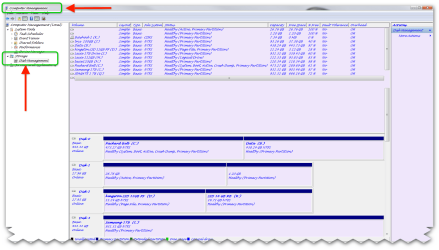
sounds as if you need to format the drive if it is empty Have you tried going to Control Panel/Admin Tools/Computer Management/Disk Management & see whether your ext HDD is present there? If it is and it is showing with a question mark above it, it may need initialized-NOT FORMATTED - initialized.
to format
click start, Right click the "computer" option and choose "manage" which opens the "computer management" window. On the left explorer pane, click the storage option and then choose disk management which brings you a list of all available hard drives that you are using in your system. Before doing a format, make sure you have a backup of all your files since formatting will erase the entire contents of the specified drive. Right click the drive you wish to format and choose "format" and in the window that appears, choose the type of formatting option which is either NTFS or FAT32. Choose any one of them and make sure that "perform a quick format" is checked (a tick mark should be enabled). Then finally click the OK button to start formatting and wait for a few minutes for the formatting to complete.
See more: How to format your hard drive in Windows 7 | Video « Wonder How To
How to format your hard drive in Windows 7 | Video « Wonder How To
here is a definition of
What is unallocated space?
Unallocated space, sometimes called “free space”, is logical space on a hard drive that the operating system, e.g Windows, can write to. To put it another way it is the opposite of “allocated” space, which is where the operating system has already written files to.
Examples.
If the operating system writes a file to a certain space on the hard drive that part of the drive is now “allocated”, as the file is using it the space, and no other files can be written to that section. If that file is deleted then that part of the hard drive is no longer required to be “allocated” it becomes unallocated. This means that new files can now be re-written to that location.
On a standard, working computer, files can only be written to the unallocated space.
If a newly formatted drive is connected to a computer, virtually all of the drive space is unallocated space (a small amount of space will be taken up by files within the file system, e.g $MFT, etc). On a new drive the unallocated space is normally zeros, as files are written to the hard drive the zeros are over written with the file data
Working Example
Blank Drive
A freshly formatted (NTFS) 500 GB hard drive starts with 99.9% unallocated space; we will assume its 100% to make the maths slightly easier. All of the unallocated space will be zeros, literally 00 00 00 written on the hard drives.
If a 5 GB file, e.g a large movie, is placed on the drive, then there will be 1% (5 GB) allocated space and 99% unallocated (495 GB)
If a 10 GB database file is now added to this hard drive there will be a total of 3 % (15 GB) of allocated space and 485 GB unallocated space. New files will only be written into the remaining unallocated space.
What happens when a file is deleted?
If the movie file, from the above example, is deleted the allocated space it was using will now become unallocated. I.e There will now be 2% allocated space (the 10 GB database) and 98% unallocated space.
However the data from the movie file is still on the hard drive, it does not just disappear, it just changes its status. This means that the following situation now exists:
There is 10 GB of allocated space and 490 GB of unallocated space.
Of the 490 GB, 485 GB would be all zeros, however 5 GB of the unallocated space would be the old movie data.
Until new files are written to the hard drive this movie file will remain deleted but still recoverable from the hard drive. Even if new files are written it must overwrite the same unallocated space as the movie file, before the movie file is destroyed.
REMEMBER NTFS IS THE BEST CHOICE FOR FILE TYPE FOR THE HARD DRIVE