Solved Errors 0x800F0900 and 0x800B0100

Mentos

New member
Local time
12:44 PM
Messages
10
Some updates are failing with error code 800B0100. One of the failing updates is SP1 (KB976932).

I ran the SURT then sfc /scannow, but the error persisted.

Looking at the CheckSUR log, I can see the errors "CBS MUM Corrupt 0x800F0900" and "CBS Catalog Corrupt 0x800B0100".

I've attached the CBS log directory.

Thanks!
 

My Computer

Computer type
Laptop
Computer Manufacturer/Model Number
Toshiba Satellite A215-S4807
OS
Windows 7 Pro x64
The CheckSUR has exposed the following errors...
Code:
Unavailable repair files:
 winsxs\manifests\msil_mscorlib.resources_b77a5c561934e089_6.1.7600.20935_en-us_4fdd65da8f1fc992.manifest
 winsxs\manifests\msil_mscorlib.resources_b77a5c561934e089_6.1.7600.16789_en-us_66afb31075744e72.manifest
 servicing\packages\Package_1_for_KB2518867~31bf3856ad364e35~amd64~~6.1.1.0.mum
 servicing\packages\Package_1_for_KB2518867~31bf3856ad364e35~amd64~~6.1.1.0.mum
 servicing\packages\Package_2_for_KB2518867~31bf3856ad364e35~amd64~~6.1.1.0.mum
 servicing\packages\Package_2_for_KB2518867~31bf3856ad364e35~amd64~~6.1.1.0.mum
 servicing\packages\Package_3_for_KB2518867~31bf3856ad364e35~amd64~~6.1.1.0.mum
 servicing\packages\Package_3_for_KB2518867~31bf3856ad364e35~amd64~~6.1.1.0.mum
 servicing\packages\Package_5_for_KB2518867~31bf3856ad364e35~amd64~~6.1.1.0.mum
 servicing\packages\Package_5_for_KB2518867~31bf3856ad364e35~amd64~~6.1.1.0.mum
 servicing\packages\Package_1_for_KB2518867~31bf3856ad364e35~amd64~~6.1.1.0.cat
 servicing\packages\Package_1_for_KB2518867~31bf3856ad364e35~amd64~~6.1.1.0.cat
 servicing\packages\Package_2_for_KB2518867~31bf3856ad364e35~amd64~~6.1.1.0.cat
 servicing\packages\Package_2_for_KB2518867~31bf3856ad364e35~amd64~~6.1.1.0.cat
 servicing\packages\Package_3_for_KB2518867~31bf3856ad364e35~amd64~~6.1.1.0.cat
 servicing\packages\Package_3_for_KB2518867~31bf3856ad364e35~amd64~~6.1.1.0.cat
 servicing\packages\Package_5_for_KB2518867~31bf3856ad364e35~amd64~~6.1.1.0.cat
 servicing\packages\Package_5_for_KB2518867~31bf3856ad364e35~amd64~~6.1.1.0.cat

I'll post a fix for them a little later.

The SFC scan found the following problem....
Code:
 Line 4325: 2013-08-18 08:16:27, Info                  CSI    0000031d [SR] Repairing 1 components
 Line 4326: 2013-08-18 08:16:27, Info                  CSI    0000031e [SR] Beginning Verify and Repair transaction
 Line 4329: 2013-08-18 08:16:28, Info                  CSI    00000320 [SR] Cannot repair member file [l:22{11}]"autochk.exe" of Microsoft-Windows-Autochk, Version = 6.1.7600.16385, pA = PROCESSOR_ARCHITECTURE_AMD64 (9), Culture neutral, VersionScope = 1 nonSxS, PublicKeyToken = {l:8 b:31bf3856ad364e35}, Type neutral, TypeName neutral, PublicKey neutral in the store, hash mismatch

I'll post a fix for that later as well
 

My Computer

Computer type
Laptop
Computer Manufacturer/Model Number
Asus K52F or Lenovo B51-80
OS
Win 7 x64 Home Premium (and x86 VirtualBox VM)/Win10
CPU
i3 370M/i7 6500U
Motherboard
Asus/Lenovo
Memory
8GB - finally :)/8GB
Graphics Card(s)
it's an i3, dude!/dual Intel&nVidia
Sound Card
onboard
Monitor(s) Displays
15.6" built-in
Screen Resolution
1366x768/1920x1080
Hard Drives
750GB Seagate internal
Sundry external drives attached to other computers on the local network
1TB SSD on the Lenovo
PSU
n/a
Internet Speed
as much as I can get - usually on a dongle/phone, so <1MB/s
Antivirus
MSE/Defender
Browser
IE11/12/Edge/Chrome/FF(if I must)
I've uploaded a file - mtsaa.zip - to my SkyDrive at Noel's SkyDrive
Please download and save it.
Right-click on the downloaded file, and select Extract all…
Extract to the default location - which will create a new folder mtsaa in the same place.
Open this folder - there should be two folders inside it (Manifests, and Packages)

Copy the content of the Packages folder to the folder
C:\Windows\Temp\CheckSur\Servicing\Packages

And the content of the manifests folder (.manifest files) into this folder:

C:\Windows\Temp\CheckSur\Winsxs\Manifests

Now run the CheckSUR tool again (it may take a while)

Post the new CheckSUR.log file, and the CheckSUR.persist.log file.
 

My Computer

Computer type
Laptop
Computer Manufacturer/Model Number
Asus K52F or Lenovo B51-80
OS
Win 7 x64 Home Premium (and x86 VirtualBox VM)/Win10
CPU
i3 370M/i7 6500U
Motherboard
Asus/Lenovo
Memory
8GB - finally :)/8GB
Graphics Card(s)
it's an i3, dude!/dual Intel&nVidia
Sound Card
onboard
Monitor(s) Displays
15.6" built-in
Screen Resolution
1366x768/1920x1080
Hard Drives
750GB Seagate internal
Sundry external drives attached to other computers on the local network
1TB SSD on the Lenovo
PSU
n/a
Internet Speed
as much as I can get - usually on a dongle/phone, so <1MB/s
Antivirus
MSE/Defender
Browser
IE11/12/Edge/Chrome/FF(if I must)
I've uploaded a file - mtsab.zip - to my SkyDrive at Noel's SkyDrive
Please download and save it.

Right-click on the saved file and select Extract all...
Change the target to C:\ and click on Extract
Close all windows (it would be a good idea to print these instructions!)
Now reboot to the Repair Environment - as soon as the machine restarts, start tapping F8 - this should bring up the Advanced Boot Menu, at the top of which should be the option 'Repair my Computer'
Pick that
You'll have to log in with your username and password.

Pick the option to use a Command Prompt
At the prompt type
DIR C:\mtsab
hit the enter key - if you get a 'Not Found' error try
DIR D:\mtsab
or
DIR E:\mtsab


The drive letter in use when you find the folder will need to be substituted (for<drive>) into the following command...

XCOPY <drive>:\mtsab <drive>:\windows\winsxs /y /i /s /v /h

(e.g. XCOPY P:\wfire P:\windows\winsxs /y /i /s /v /h )

run the command (it should take almost no time)and when the prompt returns, type
EXIT
and hit the Enter key to exit Command Prompt - reboot to Normal Mode Windows.

Now run SFC /SCANNOW in an Elevated Command Prompt
then reboot and upload the new CBS.log file to your SkyDrive Public folder, and post a new link

Also run a new MGADiag report, and post the result.
 

My Computer

Computer type
Laptop
Computer Manufacturer/Model Number
Asus K52F or Lenovo B51-80
OS
Win 7 x64 Home Premium (and x86 VirtualBox VM)/Win10
CPU
i3 370M/i7 6500U
Motherboard
Asus/Lenovo
Memory
8GB - finally :)/8GB
Graphics Card(s)
it's an i3, dude!/dual Intel&nVidia
Sound Card
onboard
Monitor(s) Displays
15.6" built-in
Screen Resolution
1366x768/1920x1080
Hard Drives
750GB Seagate internal
Sundry external drives attached to other computers on the local network
1TB SSD on the Lenovo
PSU
n/a
Internet Speed
as much as I can get - usually on a dongle/phone, so <1MB/s
Antivirus
MSE/Defender
Browser
IE11/12/Edge/Chrome/FF(if I must)
Ok, thanks. I'll post back when I've completed the steps.
 

My Computer

Computer type
Laptop
Computer Manufacturer/Model Number
Toshiba Satellite A215-S4807
OS
Windows 7 Pro x64
Attached are the logfiles after performing the requested steps, as well as the results from running MGADiag.

Edit: the files I copied into \servicing\Packages are labeled x86, and CheckSUR appears to be looking for amd64. Hopefully it's just that easy from this point :)
 

My Computer

Computer type
Laptop
Computer Manufacturer/Model Number
Toshiba Satellite A215-S4807
OS
Windows 7 Pro x64
You're right - my apologies!
I'll get it right in a minute.

The SFC replacement doesn't seem to have worked, either :(
Please run the following commands, and we'll see what went wrong....

DIR C:\mtsaa /S
DIR C:\Windows\winsxs\mtsaa

post the results.


Here are some instructions to make life easier :)
1) To open an Elevated Command Prompt Window (the ECP window), click on Start, All Programs, Accessories – then right-click on Command Prompt, and select Run as Administrator. Accept the UAC prompt.
2) To run the commands easier, highlight the block of commands, and right-click on the highlight – select Copy. In the CP Window, click on the black/white icon at top left – select Paste. The commands will run but may not complete the last command, so hit the Enter Key once.
3) To copy the results... click on the Black/White icon in the top left, and select Edit... 'Select All', and hit the Enter key - then use Ctrl+V or r-click+Paste to paste it into your response.


(must eat before I hunt for the new file set! :))
 

My Computer

Computer type
Laptop
Computer Manufacturer/Model Number
Asus K52F or Lenovo B51-80
OS
Win 7 x64 Home Premium (and x86 VirtualBox VM)/Win10
CPU
i3 370M/i7 6500U
Motherboard
Asus/Lenovo
Memory
8GB - finally :)/8GB
Graphics Card(s)
it's an i3, dude!/dual Intel&nVidia
Sound Card
onboard
Monitor(s) Displays
15.6" built-in
Screen Resolution
1366x768/1920x1080
Hard Drives
750GB Seagate internal
Sundry external drives attached to other computers on the local network
1TB SSD on the Lenovo
PSU
n/a
Internet Speed
as much as I can get - usually on a dongle/phone, so <1MB/s
Antivirus
MSE/Defender
Browser
IE11/12/Edge/Chrome/FF(if I must)
I've uploaded a file - mtsac.zip - to my SkyDrive at Noel's SkyDrive
Please download and save it.
Right-click on the downloaded file, and select Extract all…
Extract to the default location - which will create a new folder mtsac in the same place.
Open this folder - there should be one folders inside it (Packages)

Copy the content of the Packages folder to the folder
C:\Windows\Temp\CheckSur\Servicing\Packages

Now run the CheckSUR tool again (it may take a while)

Post the new CheckSUR.log file, and the CheckSUR.persist.log file.
 

My Computer

Computer type
Laptop
Computer Manufacturer/Model Number
Asus K52F or Lenovo B51-80
OS
Win 7 x64 Home Premium (and x86 VirtualBox VM)/Win10
CPU
i3 370M/i7 6500U
Motherboard
Asus/Lenovo
Memory
8GB - finally :)/8GB
Graphics Card(s)
it's an i3, dude!/dual Intel&nVidia
Sound Card
onboard
Monitor(s) Displays
15.6" built-in
Screen Resolution
1366x768/1920x1080
Hard Drives
750GB Seagate internal
Sundry external drives attached to other computers on the local network
1TB SSD on the Lenovo
PSU
n/a
Internet Speed
as much as I can get - usually on a dongle/phone, so <1MB/s
Antivirus
MSE/Defender
Browser
IE11/12/Edge/Chrome/FF(if I must)
The SFC replacement doesn't seem to have worked, either :(
Please run the following commands, and we'll see what went wrong....

DIR C:\mtsaa /S
DIR C:\Windows\winsxs\mtsaa
Just to double-check, should I have copied the contents of the mtsab directory such that the amd64_microsoft-windows-autochk_... directory is alongside the other similarly-named directories in \winsxs\? That's what I did initially, but your post makes it sound like I should have copied the inner mtsab folder itself - not the contents - into \winsxs\

In other words, I currently have C:\Windows\winsxs\amd64_microsoft-windows-autochk_[...etc...]22996\autochk.exe, but should it really be C:\Windows\winsxs\mtsab\amd64_microsoft-windows-autochk_[...etc...]22996\autochk.exe?

I'm re-running CheckSUR with the amd64 versions of the package files - I'll post some logs when it completes.

Edit: CheckSUR logs attached - looking good :)

Edit2: CBS.log uploaded to dropbox (over size limit). Seems to show errors for autochk.exe still. I ran sfc /scannow with the replacement autochk.exe in both the locations I mentioned earlier in the post, just to cover the bases.
 
Last edited:

My Computer

Computer type
Laptop
Computer Manufacturer/Model Number
Toshiba Satellite A215-S4807
OS
Windows 7 Pro x64
The CheckSUR fix worked that time :)

The base folder structure should be

C:\mtsaa\<long foldername>\<longfilename>
 

My Computer

Computer type
Laptop
Computer Manufacturer/Model Number
Asus K52F or Lenovo B51-80
OS
Win 7 x64 Home Premium (and x86 VirtualBox VM)/Win10
CPU
i3 370M/i7 6500U
Motherboard
Asus/Lenovo
Memory
8GB - finally :)/8GB
Graphics Card(s)
it's an i3, dude!/dual Intel&nVidia
Sound Card
onboard
Monitor(s) Displays
15.6" built-in
Screen Resolution
1366x768/1920x1080
Hard Drives
750GB Seagate internal
Sundry external drives attached to other computers on the local network
1TB SSD on the Lenovo
PSU
n/a
Internet Speed
as much as I can get - usually on a dongle/phone, so <1MB/s
Antivirus
MSE/Defender
Browser
IE11/12/Edge/Chrome/FF(if I must)
The base folder structure should be

C:\mtsaa\<long foldername>\<longfilename>
For completeness, here's the structure I currently have:
Code:
C:\Windows\system32>dir C:\mtsab /S
 Volume in drive C has no label.
 Volume Serial Number is B4DF-125D

 Directory of C:\mtsab

08/19/2013  09:10 AM    <DIR>          .
08/19/2013  09:10 AM    <DIR>          ..
08/18/2013  05:13 PM    <DIR>          amd64_microsoft-windows-autochk_31bf3856ad364e35_6.1.7600.16385_none_3de8def0db722996
               0 File(s)              0 bytes

 Directory of C:\mtsab\amd64_microsoft-windows-autochk_31bf3856ad364e35_6.1.7600.16385_none_3de8def0db722996

08/18/2013  05:13 PM    <DIR>          .
08/18/2013  05:13 PM    <DIR>          ..
07/14/2009  02:38 AM           777,728 autochk.exe
               1 File(s)        777,728 bytes

     Total Files Listed:
               1 File(s)        777,728 bytes
               5 Dir(s)   3,077,718,016 bytes free

C:\Windows\system32>dir C:\Windows\winsxs\mtsab
 Volume in drive C has no label.
 Volume Serial Number is B4DF-125D

 Directory of C:\Windows\winsxs\mtsab

08/18/2013  09:18 PM    <DIR>          .
08/18/2013  09:18 PM    <DIR>          ..
08/18/2013  09:18 PM    <DIR>          amd64_microsoft-windows-autochk_31bf3856ad364e35_6.1.7600.16385_none_3de8def0db722996
               0 File(s)              0 bytes
               3 Dir(s)   3,077,718,016 bytes free
I've also tried running SFC with the amd64_[...]autochk[...]\ directory moved up a level (to \winsxs\amd64_[...]autochk[...]\).

I could be missing some simple yet crucial step.

Edit: just to make sure, it should be mtsab, not mtsaa, correct?
 

My Computer

Computer type
Laptop
Computer Manufacturer/Model Number
Toshiba Satellite A215-S4807
OS
Windows 7 Pro x64
That explains the problem with Autochek then :)

You appear to have been xcopying the mtsab folder, rather than its content (C:\Windows\Winsxs\mtsab should not exist)
Please review my instructions again and follow them exactly
 

My Computer

Computer type
Laptop
Computer Manufacturer/Model Number
Asus K52F or Lenovo B51-80
OS
Win 7 x64 Home Premium (and x86 VirtualBox VM)/Win10
CPU
i3 370M/i7 6500U
Motherboard
Asus/Lenovo
Memory
8GB - finally :)/8GB
Graphics Card(s)
it's an i3, dude!/dual Intel&nVidia
Sound Card
onboard
Monitor(s) Displays
15.6" built-in
Screen Resolution
1366x768/1920x1080
Hard Drives
750GB Seagate internal
Sundry external drives attached to other computers on the local network
1TB SSD on the Lenovo
PSU
n/a
Internet Speed
as much as I can get - usually on a dongle/phone, so <1MB/s
Antivirus
MSE/Defender
Browser
IE11/12/Edge/Chrome/FF(if I must)

My Computer

Computer type
Laptop
Computer Manufacturer/Model Number
Toshiba Satellite A215-S4807
OS
Windows 7 Pro x64
Still the same error :(

Maybe it's a registry problem? - maybe it's still a file problem.....

Please run the following commands...

COPY C:\Windows\Winsxs\amd64_microsoft-windows-autochk_31bf3856ad364e35_6.1.7600.16385_none_3de8def0db722996 %userprofile%\desktop\mtsnp1
REG QUERY "HKEY_LOCAL_MACHINE\COMPONENTS\DerivedData\VersionedIndex\6.1.7601.17592 (win7sp1_gdr.110408-1631)\ComponentFamilies\amd64_microsoft-windows-autochk_31bf3856ad364e35_none_e006b9b4b9af9929" /S

Post the results.

You'll fined that the first command put a file on your desktop - 'mtsnp1'
Please zip it and attach it to your results as well - then I can check it against the normal file.
 

My Computer

Computer type
Laptop
Computer Manufacturer/Model Number
Asus K52F or Lenovo B51-80
OS
Win 7 x64 Home Premium (and x86 VirtualBox VM)/Win10
CPU
i3 370M/i7 6500U
Motherboard
Asus/Lenovo
Memory
8GB - finally :)/8GB
Graphics Card(s)
it's an i3, dude!/dual Intel&nVidia
Sound Card
onboard
Monitor(s) Displays
15.6" built-in
Screen Resolution
1366x768/1920x1080
Hard Drives
750GB Seagate internal
Sundry external drives attached to other computers on the local network
1TB SSD on the Lenovo
PSU
n/a
Internet Speed
as much as I can get - usually on a dongle/phone, so <1MB/s
Antivirus
MSE/Defender
Browser
IE11/12/Edge/Chrome/FF(if I must)
Results of commands:
Code:
C:\Windows\system32>COPY C:\Windows\Winsxs\amd64_microsoft-windows-autochk_31bf3856ad364e35_6.1.7600.16385_none_3de8def0db722996 %userprofil
e%\desktop\mtsnp1
C:\Windows\Winsxs\amd64_microsoft-windows-autochk_31bf3856ad364e35_6.1.7600.16385_none_3de8def0db722996\autochk.exe
        1 file(s) copied.

C:\Windows\system32>REG QUERY "HKEY_LOCAL_MACHINE\COMPONENTS\DerivedData\VersionedIndex\6.1.7601.17592 (win7sp1_gdr.110408-1631)\ComponentFa
milies\amd64_microsoft-windows-autochk_31bf3856ad364e35_none_e006b9b4b9af9929" /S
ERROR: The system was unable to find the specified registry key or value.

C:\Windows\system32>REG QUERY "HKEY_LOCAL_MACHINE\COMPONENTS\DerivedData\VersionedIndex\6.1.7601.17592(win7sp1_gdr.110408-1631)\ComponentFam
ilies\amd64_microsoft-windows-autochk_31bf3856ad364e35_none_e006b9b4b9af9929" /S
ERROR: The system was unable to find the specified registry key or value.

HKEY_LOCAL_MACHINE\COMPONENTS\ doesn't appear to exist when looking through regedit.

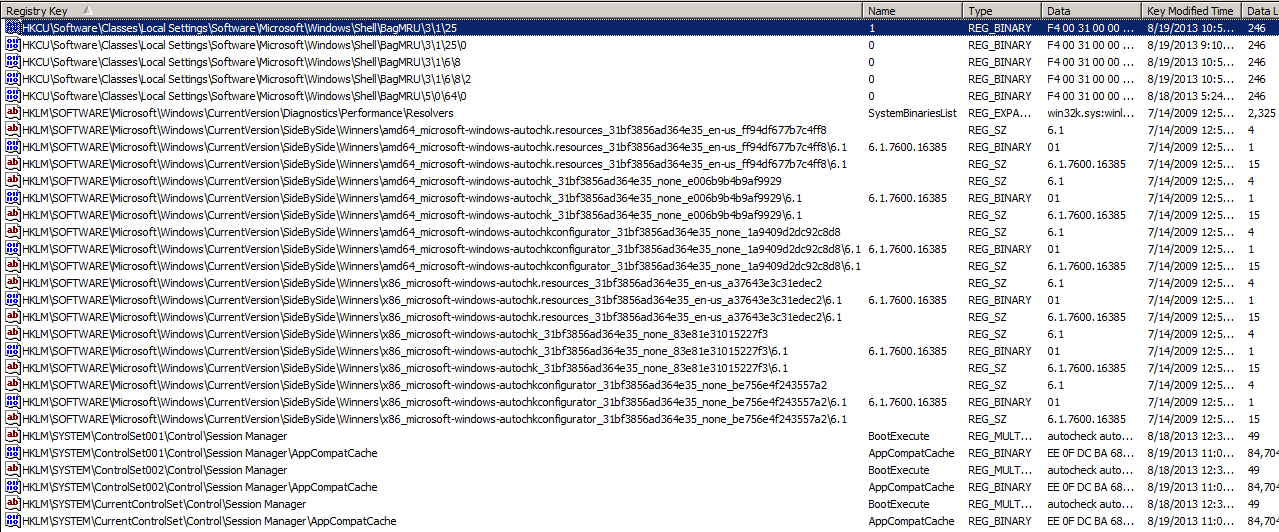
I also searched for 'autochk' using RegScanner - these are the results:
Qc1xOWM.png
 

My Computer

Computer type
Laptop
Computer Manufacturer/Model Number
Toshiba Satellite A215-S4807
OS
Windows 7 Pro x64
The file is very definitely not being properly replaced - all hashes run on it are different to the standard.
Somehow, you appear not to be following the proper procedure for replacement of the file.

Please try again, and this time note the EXACT XCOPY command you are using, and post it in your reply.
 

My Computer

Computer type
Laptop
Computer Manufacturer/Model Number
Asus K52F or Lenovo B51-80
OS
Win 7 x64 Home Premium (and x86 VirtualBox VM)/Win10
CPU
i3 370M/i7 6500U
Motherboard
Asus/Lenovo
Memory
8GB - finally :)/8GB
Graphics Card(s)
it's an i3, dude!/dual Intel&nVidia
Sound Card
onboard
Monitor(s) Displays
15.6" built-in
Screen Resolution
1366x768/1920x1080
Hard Drives
750GB Seagate internal
Sundry external drives attached to other computers on the local network
1TB SSD on the Lenovo
PSU
n/a
Internet Speed
as much as I can get - usually on a dongle/phone, so <1MB/s
Antivirus
MSE/Defender
Browser
IE11/12/Edge/Chrome/FF(if I must)
The exact command I entered was:
Code:
XCOPY C:\mtsab C:\Windows\winsxs /y /i /s /v /h
with the result "1 File(s) copied".

For comparison, I've zipped the autochk.exe files from both the source mtsab folder and the destination folder in winsxs (files are renamed to source_autochk and destination_autochk). Perhaps the autochk.exe in the mtsab folder is the incorrect version?
 

My Computer

Computer type
Laptop
Computer Manufacturer/Model Number
Toshiba Satellite A215-S4807
OS
Windows 7 Pro x64

My Computer

Computer type
Laptop
Computer Manufacturer/Model Number
Asus K52F or Lenovo B51-80
OS
Win 7 x64 Home Premium (and x86 VirtualBox VM)/Win10
CPU
i3 370M/i7 6500U
Motherboard
Asus/Lenovo
Memory
8GB - finally :)/8GB
Graphics Card(s)
it's an i3, dude!/dual Intel&nVidia
Sound Card
onboard
Monitor(s) Displays
15.6" built-in
Screen Resolution
1366x768/1920x1080
Hard Drives
750GB Seagate internal
Sundry external drives attached to other computers on the local network
1TB SSD on the Lenovo
PSU
n/a
Internet Speed
as much as I can get - usually on a dongle/phone, so <1MB/s
Antivirus
MSE/Defender
Browser
IE11/12/Edge/Chrome/FF(if I must)
Ah I see, thanks. Running a scan now, I'll check back when it's done.
 

My Computer

Computer type
Laptop
Computer Manufacturer/Model Number
Toshiba Satellite A215-S4807
OS
Windows 7 Pro x64
I checked, and MBAM doesn't actually detect it (yet) - but it may find other things, including the control program that keeps reverting it.
 

My Computer

Computer type
Laptop
Computer Manufacturer/Model Number
Asus K52F or Lenovo B51-80
OS
Win 7 x64 Home Premium (and x86 VirtualBox VM)/Win10
CPU
i3 370M/i7 6500U
Motherboard
Asus/Lenovo
Memory
8GB - finally :)/8GB
Graphics Card(s)
it's an i3, dude!/dual Intel&nVidia
Sound Card
onboard
Monitor(s) Displays
15.6" built-in
Screen Resolution
1366x768/1920x1080
Hard Drives
750GB Seagate internal
Sundry external drives attached to other computers on the local network
1TB SSD on the Lenovo
PSU
n/a
Internet Speed
as much as I can get - usually on a dongle/phone, so <1MB/s
Antivirus
MSE/Defender
Browser
IE11/12/Edge/Chrome/FF(if I must)
Back
Top