I posted this on tenforums.com 4 hours ago. There have been no replies.
The reason for the 'dormancy' of the Win10 install is I preferred to continue to use Win7. As the end-of-life approaches I noticed articles suggesting that it might be wise to update my Win10 install so that my install is of a supported version.
I've subsequently established that both Win10 and Win7 lock up when I attempt to work with my data drive.
Is this a problem for file recovery software (suggestions) or perhaps simply CHKDSK. I hate to make a bigger mess randomly trying to see if anything might work.
.....
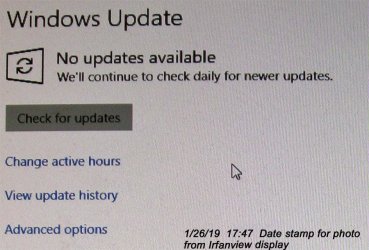
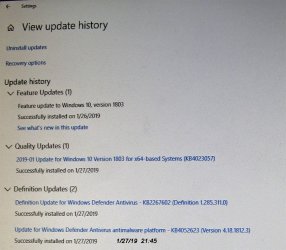
I installed Win10 in July 2016 and left it 'dormant' until yesterday, 1/25/19. I was concerned I might lose the ability to update it. It needed many updates.
I forgot to turn off my eSATA data drive before I ran the updates the first time I tried.
The update process created a new folder called "Windows10Upgrade" on the eSATA drive. It contains a new folder containing a 1.239 GB ESD file and a small XML Document. If I was asked permission, I certainly missed seeing it.
When I shut down Win10 and disconnected that System Disk and then rebooted from another System Disk into Win7Pro/x64 with the eSATA drive running my system locks up. If I start the drive after booting to Win7 I can see the file structure on the drive in Windows Explorer, but any attempt to use it locks up the system.
I returned on 1/26/19 and successfully ran the updates again with the eSATA drive turned off. I now have Ver. 1803 installed, so it appears that the update was successful. I never installed any program files on the system disk with Win10. I can see the folder in file explorer in Win10.
Win10 appears to recognize a problem with the eSATA disk and runs some kind of checking process on it, but I can't get my digital camera up quickly enough to document it before the two windows that describe it have vanished.
What might the process have done to my eSATA drive?
Would it help to delete the new folder and its contents? Perhaps do that and also run the Win10 version of CHKDSK afterwards?
I don't want to dig a deeper hole for myself.
The reason for the 'dormancy' of the Win10 install is I preferred to continue to use Win7. As the end-of-life approaches I noticed articles suggesting that it might be wise to update my Win10 install so that my install is of a supported version.
I've subsequently established that both Win10 and Win7 lock up when I attempt to work with my data drive.
Is this a problem for file recovery software (suggestions) or perhaps simply CHKDSK. I hate to make a bigger mess randomly trying to see if anything might work.
.....
I installed Win10 in July 2016 and left it 'dormant' until yesterday, 1/25/19. I was concerned I might lose the ability to update it. It needed many updates.
I forgot to turn off my eSATA data drive before I ran the updates the first time I tried.
The update process created a new folder called "Windows10Upgrade" on the eSATA drive. It contains a new folder containing a 1.239 GB ESD file and a small XML Document. If I was asked permission, I certainly missed seeing it.
When I shut down Win10 and disconnected that System Disk and then rebooted from another System Disk into Win7Pro/x64 with the eSATA drive running my system locks up. If I start the drive after booting to Win7 I can see the file structure on the drive in Windows Explorer, but any attempt to use it locks up the system.
I returned on 1/26/19 and successfully ran the updates again with the eSATA drive turned off. I now have Ver. 1803 installed, so it appears that the update was successful. I never installed any program files on the system disk with Win10. I can see the folder in file explorer in Win10.
Win10 appears to recognize a problem with the eSATA disk and runs some kind of checking process on it, but I can't get my digital camera up quickly enough to document it before the two windows that describe it have vanished.
What might the process have done to my eSATA drive?
Would it help to delete the new folder and its contents? Perhaps do that and also run the Win10 version of CHKDSK afterwards?
I don't want to dig a deeper hole for myself.
thanks
baumgrenze
baumgrenze
My Computer
At a glance
Win 7 Pro 64Intel Core 2 Quad Q6600 (2.4 GHz) Quad Core2 x Crucial 4GB Kit (2GBx2) DDR2 CT2KIT25664A...Sapphire Radeon HD 3870 PCIe 512 Mb
- Computer type
- PC/Desktop
- Computer Manufacturer/Model Number
- Custom built by GamePC/Solid Electric - Palo Alto - on 03/10/08
- OS
- Win 7 Pro 64
- CPU
- Intel Core 2 Quad Q6600 (2.4 GHz) Quad Core
- Motherboard
- Gigabyte GA-P35-DS3P Intel P35 ATX (rev. 2.1)
- Memory
- 2 x Crucial 4GB Kit (2GBx2) DDR2 CT2KIT25664AA800
- Graphics Card(s)
- Sapphire Radeon HD 3870 PCIe 512 Mb
- Sound Card
- RealTek audio on MOBO + EDIROL UA-1EX
- Monitor(s) Displays
- Samsung S24A450BW 24" LED monitor
- Screen Resolution
- 1600 x 1200 at 75 Hz
- Hard Drives
- 2 Crucial 128 Gb SSD (CT128M550SSD1)
one mounted and running Win7/Pro x64
one disconnected containing only Win10/Pro upgrade - in process
1 1TB WD Caviar Black (WD1003FZEX-00MK2A0) (Data drive)
1 2TB Seagate 2TB (PN/ 9JB1N3-576 - ST2000DM001-1ER
- PSU
- Seasonic S12-HT 650W 80% Efficiency Power Supply
- Case
- Lian Li PC-B25B
- Cooling
- Gigabyte Silent-Pipe
- Keyboard
- Dell MS Comfort
- Mouse
- HP x4000 wireless
- Internet Speed
- Sonic FTTN @ 23 Mbps
- Antivirus
- Avast
- Browser
- SeaMonkey
- Other Info
- BIOS: Award Software International, Inc. F6 06/18/2009
System Specs - Updated on 09//16/19