
"Ethernet" Connection Drop

I did a clean install of x64 build 7600 & tried the earlier suggestion by "levesquemarc" which reduced the problem in build 7100 but does no help in sorting out in build 7600.

Its very irritating problem & i cant use this build if no solution is found, its happening every 15-20 mins, the uploading stops, sound /video freeze the entire computer becomes unresponsive for 4-5 mins. I am using the latest lan drivers Marvell Yukon (Miniport) Gigabit Ethernet Driver v10.70.5.3 Dated 07/21/2009 - released July 28, 2009 WHQL

I tried to find LAN port configuration:
but I don't see such settings under device manager> lan card properties
am I looking at the wrong place? here is the screen shot
 

Attachments
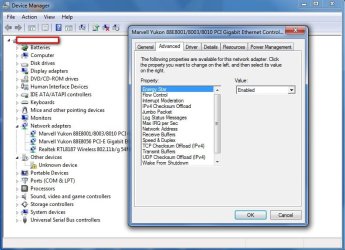
  • devise manager.jpg
    devise manager.jpg
    124.5 KB · Views: 106

My Computer

Computer Manufacturer/Model Number
Custom Built
OS
Windows 7 Ultimate x64 build 7600
CPU
Intel C2D 6300 1.86MHz
Motherboard
Asus P5B-dlx wifi
Memory
4x1Gb Transcend JetRAM DDR2 PC2-6400 800MHz
Graphics Card(s)
XFX 7600GT
Sound Card
Creative Audigy Value
Monitor(s) Displays
Lenovo 20"
Screen Resolution
1680x1050
Hard Drives
4 x 1.5TB Seagate barracuda
PSU
Zebronics Platinum 450Watts
Case
Zebronics Peace
Cooling
stock cooling
Keyboard
silicon keyboard
Mouse
Logitech 3 button mouse
Internet Speed
1mbps
Ok, tested the solution posted on nVidia forums, and works flawlessly with build 7100 and nForce. Two days of downloading and streaming at full speed, no single drop.

ranjan2001, the LAN config solution is for nForce-based lan ports (named NVIDIA nForce 10/100/1000 Mbps Ethernet), try to search a similiar post on Marvell forums/support.
 

My Computer

OS
Windows 7 Ultimate Edition x64
CPU
AMD Phenom X4 9950 Black Edition
Motherboard
Asus M2N-SLI Deluxe
Memory
4GB DDR2 800Mhz OCZ Gold Edition
Graphics Card(s)
Asus Radeon HD5850
Monitor(s) Displays
Hannsg 22''
Screen Resolution
1680*1050
Hard Drives
Western Digital Caviar Green1TB
Mouse
Logitech MX400
Internet Speed
Tiscali 20Mbit
Oh I didnt notice that its applicable only to nForce-based lan ports, seems I will have to struggle with this build till the final version comes out.
 

My Computer

Computer Manufacturer/Model Number
Custom Built
OS
Windows 7 Ultimate x64 build 7600
CPU
Intel C2D 6300 1.86MHz
Motherboard
Asus P5B-dlx wifi
Memory
4x1Gb Transcend JetRAM DDR2 PC2-6400 800MHz
Graphics Card(s)
XFX 7600GT
Sound Card
Creative Audigy Value
Monitor(s) Displays
Lenovo 20"
Screen Resolution
1680x1050
Hard Drives
4 x 1.5TB Seagate barracuda
PSU
Zebronics Platinum 450Watts
Case
Zebronics Peace
Cooling
stock cooling
Keyboard
silicon keyboard
Mouse
Logitech 3 button mouse
Internet Speed
1mbps
Maybe you can change similiar parameters like Flow Control, Interrupt Moderation, Jumbo Packet, IP/TCP/UDP Checksums, Network Address, Speed/Duplex... (obviously with a backup of the default config).
 

My Computer

OS
Windows 7 Ultimate Edition x64
CPU
AMD Phenom X4 9950 Black Edition
Motherboard
Asus M2N-SLI Deluxe
Memory
4GB DDR2 800Mhz OCZ Gold Edition
Graphics Card(s)
Asus Radeon HD5850
Monitor(s) Displays
Hannsg 22''
Screen Resolution
1680*1050
Hard Drives
Western Digital Caviar Green1TB
Mouse
Logitech MX400
Internet Speed
Tiscali 20Mbit
For some strange reason instead of new I was using the old driver which was causing this problem. Last 20 hrs running with the updated driver, not a single hangup so I conclude that the build 7600 with new driver has solved this bug.

EDITED
No hangups, no connection dropping last 3 days, all seems to be working fine with new drivers 7 build 7600 x64.
 
Last edited:

My Computer

Computer Manufacturer/Model Number
Custom Built
OS
Windows 7 Ultimate x64 build 7600
CPU
Intel C2D 6300 1.86MHz
Motherboard
Asus P5B-dlx wifi
Memory
4x1Gb Transcend JetRAM DDR2 PC2-6400 800MHz
Graphics Card(s)
XFX 7600GT
Sound Card
Creative Audigy Value
Monitor(s) Displays
Lenovo 20"
Screen Resolution
1680x1050
Hard Drives
4 x 1.5TB Seagate barracuda
PSU
Zebronics Platinum 450Watts
Case
Zebronics Peace
Cooling
stock cooling
Keyboard
silicon keyboard
Mouse
Logitech 3 button mouse
Internet Speed
1mbps
Hello,

Since the first build of Win7 I was having occasional drops of Ethernet connection. The solution is always to disable and re-enable the network card. It doesn't show "Ethernet cable disconnected" or anything, it just stops working.

I thought this problem would disappear over the builds but it is still there. I'm on 7264 now.

I have a Realtek 8139 integrated card. The driver is 6.110.1029.2008 .

I didn't read the last 29 pages, I don't have the time right now. If someone got a solution, I would appreciate to hear it.

Thank you!
 

My Computer

OS
Win7 64 bits FR
CPU
2500K @ 4.5 GHz
Motherboard
Asrock Z68 Gen3 Extreme3
Memory
4x4GB 1600MHz GSkill CL9.
Graphics Card(s)
HD6850 Powercolor stock
Sound Card
Integrated
Monitor(s) Displays
Samsung 2343 + Dell 20in 4/3
Screen Resolution
2048x1152, 1600x1200
Hard Drives
OCZ Vertex LE SSD, 50GB
OCZ Solid 3 120GB
OCZ Vertex 2 240GB
Western Digital Scorpio 320GB 5400 rpm
PSU
KingWin Lazer Platinum (90+) 550Watts
Case
HAF912
Cooling
CPU: OCZ Vendetta 2
Keyboard
MX5500 revolution bluetooth
Mouse
MX5500 revolution bluetooth
Internet Speed
Cable 7 Mbps
A kind of solution has been posted in this thread and reported here on sevenforums, it's for nForce cards and I don't know if it's valid for other types.
 

My Computer

OS
Windows 7 Ultimate Edition x64
CPU
AMD Phenom X4 9950 Black Edition
Motherboard
Asus M2N-SLI Deluxe
Memory
4GB DDR2 800Mhz OCZ Gold Edition
Graphics Card(s)
Asus Radeon HD5850
Monitor(s) Displays
Hannsg 22''
Screen Resolution
1680*1050
Hard Drives
Western Digital Caviar Green1TB
Mouse
Logitech MX400
Internet Speed
Tiscali 20Mbit
Thanks, I looked a the forum and the seem to have found a solution, but the solution is not applicable to my driver (the receive side scaling setting).
 

My Computer

OS
Win7 64 bits FR
CPU
2500K @ 4.5 GHz
Motherboard
Asrock Z68 Gen3 Extreme3
Memory
4x4GB 1600MHz GSkill CL9.
Graphics Card(s)
HD6850 Powercolor stock
Sound Card
Integrated
Monitor(s) Displays
Samsung 2343 + Dell 20in 4/3
Screen Resolution
2048x1152, 1600x1200
Hard Drives
OCZ Vertex LE SSD, 50GB
OCZ Solid 3 120GB
OCZ Vertex 2 240GB
Western Digital Scorpio 320GB 5400 rpm
PSU
KingWin Lazer Platinum (90+) 550Watts
Case
HAF912
Cooling
CPU: OCZ Vendetta 2
Keyboard
MX5500 revolution bluetooth
Mouse
MX5500 revolution bluetooth
Internet Speed
Cable 7 Mbps
Hello,

I have done some testing on my wireless network (with my laptop and my PC). I have found that for both of them, the XP drivers (one linksys and the other Intel) works better than the Vista ones.

Maybe there is something different in the way Windows 7 use the network that interfere with Vista drivers.

If I continue to have problems with my Ethernet card, I will try an old XP driver.
 

My Computer

OS
Win7 64 bits FR
CPU
2500K @ 4.5 GHz
Motherboard
Asrock Z68 Gen3 Extreme3
Memory
4x4GB 1600MHz GSkill CL9.
Graphics Card(s)
HD6850 Powercolor stock
Sound Card
Integrated
Monitor(s) Displays
Samsung 2343 + Dell 20in 4/3
Screen Resolution
2048x1152, 1600x1200
Hard Drives
OCZ Vertex LE SSD, 50GB
OCZ Solid 3 120GB
OCZ Vertex 2 240GB
Western Digital Scorpio 320GB 5400 rpm
PSU
KingWin Lazer Platinum (90+) 550Watts
Case
HAF912
Cooling
CPU: OCZ Vendetta 2
Keyboard
MX5500 revolution bluetooth
Mouse
MX5500 revolution bluetooth
Internet Speed
Cable 7 Mbps
Hi, I am new to this forum but had registered just to post this.
I also had issues with network connection dropping and unavailable gateway since Ive installed Win7 (x64, 7100).
Ive checked many options and finally I think I ve found what couse this problem: topology mapping.
After I've disable it in Local area connection preferences (the settings near IP4/IP6 ) I dont have Lan drop outs.
Try this and tell if it make difference in Your case.
Kind regards,
Piotr
 

My Computer

OS
windows 7
CPU
i7 920
Motherboard
Asus Rampage II GENE
Memory
3 x 2 Gb
Graphics Card(s)
ATI 4870
Sound Card
X-FI on MB
Hard Drives
Intel SSD M X-25 80Gb (OS)
Samsung SpinPoint 1Tb (DATA)
PSU
500W
Cooling
Air
New drivers from Marvell have fixed this for me (x64).
 

My Computer

OS
Windows 7 build 7232 x64
CPU
Core2Duo E6600
Motherboard
Gigabyte GA-965P-DS4
Memory
3GB
UPDATE: After installing newest REaltek driver I dont have any dropout since!

I need to correct my statement (sadly ;-( ) - I had one dropout. Now Ive installed newest REaltek driver - will post an update
 
Last edited:

My Computer

OS
windows 7
CPU
i7 920
Motherboard
Asus Rampage II GENE
Memory
3 x 2 Gb
Graphics Card(s)
ATI 4870
Sound Card
X-FI on MB
Hard Drives
Intel SSD M X-25 80Gb (OS)
Samsung SpinPoint 1Tb (DATA)
PSU
500W
Cooling
Air
I have a Realtek RTL8169/8110 Family PCI Gigabit Ethernet NIC built into an ABIT board, getting these stupid cannot connect to gateway messages trying to connect to websites. After i click it a couple more times it eventually goes. I've had this issue since 7100, but not before. I assumed it would be fixed RTM, but evidently not. Any ideas?

Tried Windows 7 NIDS 6.20, 6.0, and Vista 64 drivers.

Considering that we're at 30 pages, this is obviously an issue....
 

My Computer

OS
Windows 7
i Have installed build 7600.16385 x64 and my realtek 8139 is dropping again. A reboot is the only fix, I have installed the new driver from WinUpdate but it has not fixed it. I hope now win7 is rtm realtek get off their **** and fix their drivers SOON
 

My Computer

Computer Manufacturer/Model Number
Foxconn Winfast K8M890-8237
OS
Windows 7 Build 7201
CPU
AMD Athlon 64 X2 6000+
Motherboard
Winfast K8M890M2MA-RS2H
Memory
KINGMAX 2x1024 DDR2 800
Graphics Card(s)
Geforce 8600GT
Sound Card
Onboard Realtek AC'97
Monitor(s) Displays
SONY 46Inch LCD 1080P
Screen Resolution
1080P
Hard Drives
80GB Western Digital SATA
PSU
ThermalTake 430W
Case
Theater Case Bach
Cooling
AMD CPU Stock 2x80mm and 2x40mm case
Keyboard
Logitech Dinovo Bluetooth
Mouse
Part of keyboard
themouse - infact realtek release its updated signed driver - look at earlier page links to get it. Ive installed it yesterday and Ill post an update if its working or not.
 

My Computer

OS
windows 7
CPU
i7 920
Motherboard
Asus Rampage II GENE
Memory
3 x 2 Gb
Graphics Card(s)
ATI 4870
Sound Card
X-FI on MB
Hard Drives
Intel SSD M X-25 80Gb (OS)
Samsung SpinPoint 1Tb (DATA)
PSU
500W
Cooling
Air
I have a 590SLI AM2 board and am having this happen to me when trying to upload work papers and so on. Any fix yet?

EDIT- Found the fix on another forum..


LAN port configuration:
Sleep on disconnect: enabled
flow control: disabled
interrupt moderation: disabled
ip checksum offload: disabled
jumbo packet: 9014 bytes (this might have no effect for you)
ALL large send offloads: disabled
BOTH low power: enabled
network address: not present
priority & vlan: priority enabled
receive side scaling: disabled
speed/duplex settings: auto
ALL TCP & UDP offloads: disabled
vlan id: 1
ALL wake ons: enabled
 

My Computer

OS
Windows 7
I've joined this forum specifically for this thread, as I've also had problems with my wired network staggering and then finally dropping for no apparent reason.

First, some info:
I'm running the TechNet Windows 7 RTM ( 7600.16385.x86fre.win7_rtm.090713-1255 ), Windows Firewall only and no antivirus ( yet. ;) ). My network card is an intigrated Realtek RTL8139/810x Family Fast Ethernet NIC using the drivers that Windows 7 installed ( Driver Version 6.111.530.2008 ).

I had the issue of dropped network with both Win 7 RTM, and Vista ( which I downgraded to because of the networking problems in Win 7 ), for the past several months with no solution. My network ( 1.5 Mbps DSL ) would jump from full throttle to nothing all day, large downloads would stall and resume multiple times and then after roughly 24 hours my network would just drop without any indication whatsoever.

I installed Win 7 again two days ago, and my network has been stable and running since the install with no drops. I'll list the things I did differently this time, in hopes that something will help someone else.


  • I didn't install the Windows Update drivers for my network card. In previous installs, I'd install the WinUpdate drivers but then use the previous drivers option in my network card properties. This time, I just went with the Win 7 drivers and nothing more.
  • I disabled Windows Indexing. I know this seems irrelevant, but when my network would die, Windows Search would be eating up my processor sometimes forcing me to hard reboot my computer.
  • I disabled Link-Layer Topology. Again, seemed harmless enough as it's used to display a graphical representation of your network in a map, but whatever helps.
  • No Antivirus. I've always used NOD32 as my AV of choice, and reading that some AV/Firewalls can cause problems I decided to leave it out for now. I know not everyone uses NOD32, but I wanted to post everything I did differently this time.
I know this post is at the end of a 30 page topic, but if I can help anyone with this info then it was worth it.
 

My Computer

OS
Windows 7
This issue is really starting to **** me off. This bug for me appeared after build 7057 and it has never been addressed. All i can think of is cause the 8139 is old now they not really supporting it. I also found (could be coincidence) that x64 is worse. I am currently on RTM x64 and i get daily drops, previously i was using 7201 x86 and it started with frequent drops but then settled down. The only think i haven't done out of the suggestions so far is

Turn off indexing
Turn off network topology
 

My Computer

Computer Manufacturer/Model Number
Foxconn Winfast K8M890-8237
OS
Windows 7 Build 7201
CPU
AMD Athlon 64 X2 6000+
Motherboard
Winfast K8M890M2MA-RS2H
Memory
KINGMAX 2x1024 DDR2 800
Graphics Card(s)
Geforce 8600GT
Sound Card
Onboard Realtek AC'97
Monitor(s) Displays
SONY 46Inch LCD 1080P
Screen Resolution
1080P
Hard Drives
80GB Western Digital SATA
PSU
ThermalTake 430W
Case
Theater Case Bach
Cooling
AMD CPU Stock 2x80mm and 2x40mm case
Keyboard
Logitech Dinovo Bluetooth
Mouse
Part of keyboard
Having had this problem for months--random (?) internet disconnects, requiring a "disable adaptor"/"enable adaptor" dance, on what had become a daily basis--I've now gone longer than recently without any problems, having installed the new (as of 8/13) drivers from Realtek for the RTL81XX series of LANs (in my case, a part of my Gigabyte GA-MA78GM motherboard). [After installation, the driver version appears as 7.5.730.2009.] It is the first time I've had any hope of a "fix" for a longstanding problem that started in the early Windows 7 betas, and has continued (until this--cross fingers) in my current use of build 7229.

Obviously, this only applies to those with problems from Realtek LANs, which have been frequently, but not uniquely, identified with this problem. But, if you have a Realtek LAN, particularly if in the RTL8111 family, give the new Realtek drivers a try--none of the revisions from MS had worked to this point, but I am at leat hopeful that the new Realtek drivers may fix an egregiously bad, and longstanding (just look at the length of this thread!) problem....

I'll post again if everything falls apart!
 

My Computer

OS
Windows 7 Build 7229
CPU
Athlon 64 x2 5200+
Motherboard
Gigabyte GA-MA78GM-S2H
Memory
4 GB DDR2
Graphics Card(s)
On board
Sound Card
On board
I feel like I should join in on this and see what the heck the problem is. Just bought a new HP XW4600 for my work desktop. quad core, 6gig RAM, on board nic, nvid quadro dual monitor card.

My first step was to format the HD. I the installed Win 7 pro from our MSDN site, connection drops every 2 minutes and is a NIGHTMARE to get running againg.

suggestion?
 

My Computer

Computer Manufacturer/Model Number
HP XW4600
OS
Windows 7 64bit (hopefully)
CPU
Intel® Core™2 Quad Q9300 processor
Motherboard
Intel® X38 Express chipset
Memory
6 GB 800 MHz DDR2 SDRAM
Graphics Card(s)
Nvidia Quadro NVS 285
Sound Card
on board
Hard Drives
250gig sata
Case
HP
Cooling
HP
Keyboard
HP
Mouse
HP
Internet Speed
1000/100/10, WIRED
Other Info
on board NIC Broadcom NetXtreme Gigabit
Back
Top