Ethernet Connections not being recognized.

Sevi20

New member
Local time
10:51 PM
Messages
10
First of all thanks in advice for taking the time to read my issue and if you can help me, Thanks even more!

So my issue is regarding ethernet connections not being recognized when i plug in the ethernet cable to the port.

I have been searching for days for a solutions, but no one quite seems to have the same problem as me.


Issues addressed:

SO, First of all i have determined that its not the ethernet cable by checking it in my girlfriends computer and my best mates.

Its not the routers, as the are working fine with the aforementioned peoples machine's. with all of the same ethernet cables and everything.

So i figure with those two ruled out, its my machine.

I actually have had this issue on and off for a while, with various different internet connections. Ie. my own, my girlfriends and my best mates.

Most recently, I have lost the ability to use my mates internet today. We were away from the computers for ten hours or so, i turned my machine off with the Ethernet plugged in, and when i came back and started it, it seems to have "forgotten what and Ethernet connection or cable is.


Last week the same thing happened at my girlfriends house with her connection.

My guess is that it is most likely related to my drivers OR the power settings...

I've been fighting with this issue for a while now... its getting a bit time consuming and old.

Oh one more thing, Any wireless connection, presents no problems what so ever...
 

My Computer My Computer

Computer Manufacturer/Model Number
Dell / Inspiron N7010
OS
Windows 7 64bit
CPU
Intel(R) Core (TM) i3 CPU M330 @ 2.13GHz
Memory
4.00GB
Graphics Card(s)
1024 (MB) ATI HD5470 Mobility RadeonTM Integrated Intel® HD
Sound Card
4-Watt (2 x 2W) High Definition Audio 2.0 Stereo Speakers wi
Monitor(s) Displays
17.3 inch display (1600X900)
EThernet

Welcome to windows 7 support, in order to trouble shoot the issue please provide us with more information such as spec info on your available system hardware. Please fill out your system specs at the bottom of your screen. I venture to say that the possibility of your nic card giving you rthe connection issue,

Adrian
 

My Computer My Computer

Computer Manufacturer/Model Number
Custom Build
OS
Windows 7 7600 1 X64
CPU
AMD PHENOM II X 550 PROCESSOR 3.1 ghz
Motherboard
ASUS M4A78-TE
Memory
Corsair 4 gig ddr 3
Graphics Card(s)
ati radeon 3300
Sound Card
ati hd
Monitor(s) Displays
syncmaster 2033sw
Screen Resolution
1600X900 60 hz refresh
Hard Drives
twin_seagates SATA's 1 TB & 500 Gig, hitachi_slimline 160 gig
PSU
antec_550 watt
Case
cooler master GLite
Cooling
stock_heat sink
Internet Speed
20mbs up/ 1.5mbs down
Other Info
favorite child "stewie"
favorite dog "brian"
Thanks for the response! I really appreciate it.

So ive updated the fundamentals that ive managed to find easily, and that should be relevant. if you need any other specs, ill search them out!
 

My Computer My Computer

Computer Manufacturer/Model Number
Dell / Inspiron N7010
OS
Windows 7 64bit
CPU
Intel(R) Core (TM) i3 CPU M330 @ 2.13GHz
Memory
4.00GB
Graphics Card(s)
1024 (MB) ATI HD5470 Mobility RadeonTM Integrated Intel® HD
Sound Card
4-Watt (2 x 2W) High Definition Audio 2.0 Stereo Speakers wi
Monitor(s) Displays
17.3 inch display (1600X900)
Thanks for updating your system specs.
As I understand your issue: After connecting your system via ethernet cabling to your system you do not have access to the internet.
 

My Computer My Computer

Computer Manufacturer/Model Number
Custom Build
OS
Windows 7 7600 1 X64
CPU
AMD PHENOM II X 550 PROCESSOR 3.1 ghz
Motherboard
ASUS M4A78-TE
Memory
Corsair 4 gig ddr 3
Graphics Card(s)
ati radeon 3300
Sound Card
ati hd
Monitor(s) Displays
syncmaster 2033sw
Screen Resolution
1600X900 60 hz refresh
Hard Drives
twin_seagates SATA's 1 TB & 500 Gig, hitachi_slimline 160 gig
PSU
antec_550 watt
Case
cooler master GLite
Cooling
stock_heat sink
Internet Speed
20mbs up/ 1.5mbs down
Other Info
favorite child "stewie"
favorite dog "brian"
Simply yes thats the issue.

However, I was connected fine this morning, after the first connection since i arrived here. 2 seconds plugged in and the ethernet was doing its thing.

so we went out, i turned off my machine. when i got back, my machine couldn't identify the plugged in cables.
This happens with friends connections, girlfriend and even my own.


like i say ive tested the cables and routers with other computers, and they're all dandy and fine.
 

My Computer My Computer

Computer Manufacturer/Model Number
Dell / Inspiron N7010
OS
Windows 7 64bit
CPU
Intel(R) Core (TM) i3 CPU M330 @ 2.13GHz
Memory
4.00GB
Graphics Card(s)
1024 (MB) ATI HD5470 Mobility RadeonTM Integrated Intel® HD
Sound Card
4-Watt (2 x 2W) High Definition Audio 2.0 Stereo Speakers wi
Monitor(s) Displays
17.3 inch display (1600X900)
Simply yes thats the issue.

However, I was connected fine this morning, after the first connection since i arrived here. 2 seconds plugged in and the ethernet was doing its thing.

so we went out, i turned off my machine. when i got back, my machine couldn't identify the plugged in cables.
This happens with friends connections, girlfriend and even my own.


like i say ive tested the cables and routers with other computers, and they're all dandy and fine.
We need to identify how you are connecting, are you connecting to a router and broadband modem?
 

My Computer My Computer

Computer Manufacturer/Model Number
Custom Build
OS
Windows 7 7600 1 X64
CPU
AMD PHENOM II X 550 PROCESSOR 3.1 ghz
Motherboard
ASUS M4A78-TE
Memory
Corsair 4 gig ddr 3
Graphics Card(s)
ati radeon 3300
Sound Card
ati hd
Monitor(s) Displays
syncmaster 2033sw
Screen Resolution
1600X900 60 hz refresh
Hard Drives
twin_seagates SATA's 1 TB & 500 Gig, hitachi_slimline 160 gig
PSU
antec_550 watt
Case
cooler master GLite
Cooling
stock_heat sink
Internet Speed
20mbs up/ 1.5mbs down
Other Info
favorite child "stewie"
favorite dog "brian"
In some situations both.

In my house i connect directly to a BB modem.

at the gf's and mates places, its both a BB modem with a 4port ethernet router.

None of the above are wireless routers.

Now that you mention this, It seems i have fewer problems when i connect directly to a modem
 

My Computer My Computer

Computer Manufacturer/Model Number
Dell / Inspiron N7010
OS
Windows 7 64bit
CPU
Intel(R) Core (TM) i3 CPU M330 @ 2.13GHz
Memory
4.00GB
Graphics Card(s)
1024 (MB) ATI HD5470 Mobility RadeonTM Integrated Intel® HD
Sound Card
4-Watt (2 x 2W) High Definition Audio 2.0 Stereo Speakers wi
Monitor(s) Displays
17.3 inch display (1600X900)
Lets assume for now that you are connecting to the modem.
There are 3 possibilities that explain your issue:
  1. Your IP provider is experiencing outtages.
  2. Your modem is at fault.
  3. Your NIC card is not configured correctly.
 

My Computer My Computer

Computer Manufacturer/Model Number
Custom Build
OS
Windows 7 7600 1 X64
CPU
AMD PHENOM II X 550 PROCESSOR 3.1 ghz
Motherboard
ASUS M4A78-TE
Memory
Corsair 4 gig ddr 3
Graphics Card(s)
ati radeon 3300
Sound Card
ati hd
Monitor(s) Displays
syncmaster 2033sw
Screen Resolution
1600X900 60 hz refresh
Hard Drives
twin_seagates SATA's 1 TB & 500 Gig, hitachi_slimline 160 gig
PSU
antec_550 watt
Case
cooler master GLite
Cooling
stock_heat sink
Internet Speed
20mbs up/ 1.5mbs down
Other Info
favorite child "stewie"
favorite dog "brian"
NIC

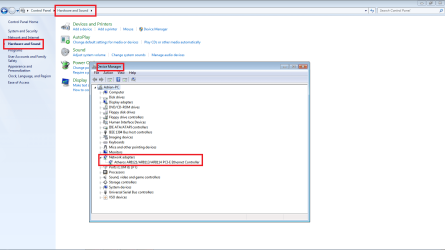
The NIC card is easily eliminated by performing the following steps:
  1. At your system proceed to the control panel
  2. Proceed to devices and hardware
  3. Click on device manager
  4. Halfway down you will see Network Adaptor
  5. Click on network adaptor and if you see a yellow exclamation icon we can then proceed to update the driver.
For your review see the attached image to help.
 

Attachments

  • nic.png
    nic.png
    51.2 KB · Views: 56

My Computer My Computer

Computer Manufacturer/Model Number
Custom Build
OS
Windows 7 7600 1 X64
CPU
AMD PHENOM II X 550 PROCESSOR 3.1 ghz
Motherboard
ASUS M4A78-TE
Memory
Corsair 4 gig ddr 3
Graphics Card(s)
ati radeon 3300
Sound Card
ati hd
Monitor(s) Displays
syncmaster 2033sw
Screen Resolution
1600X900 60 hz refresh
Hard Drives
twin_seagates SATA's 1 TB & 500 Gig, hitachi_slimline 160 gig
PSU
antec_550 watt
Case
cooler master GLite
Cooling
stock_heat sink
Internet Speed
20mbs up/ 1.5mbs down
Other Info
favorite child "stewie"
favorite dog "brian"
so i have regularly checked the connection on other computers at the time, switching cables to other computers and the like. I am rather confident that its not to do with the modem, the cables or the internet provider due to other machines working.

If thats the case, i would love to attempt to configure the NIC correctly, it seems to me it is the most likely cause
 

My Computer My Computer

Computer Manufacturer/Model Number
Dell / Inspiron N7010
OS
Windows 7 64bit
CPU
Intel(R) Core (TM) i3 CPU M330 @ 2.13GHz
Memory
4.00GB
Graphics Card(s)
1024 (MB) ATI HD5470 Mobility RadeonTM Integrated Intel® HD
Sound Card
4-Watt (2 x 2W) High Definition Audio 2.0 Stereo Speakers wi
Monitor(s) Displays
17.3 inch display (1600X900)
oh sorry about that, i missed that last post, ill give that a try and update you
 

My Computer My Computer

Computer Manufacturer/Model Number
Dell / Inspiron N7010
OS
Windows 7 64bit
CPU
Intel(R) Core (TM) i3 CPU M330 @ 2.13GHz
Memory
4.00GB
Graphics Card(s)
1024 (MB) ATI HD5470 Mobility RadeonTM Integrated Intel® HD
Sound Card
4-Watt (2 x 2W) High Definition Audio 2.0 Stereo Speakers wi
Monitor(s) Displays
17.3 inch display (1600X900)
so i have regularly checked the connection on other computers at the time, switching cables to other computers and the like. I am rather confident that its not to do with the modem, the cables or the internet provider due to other machines working.

If thats the case, i would love to attempt to configure the NIC correctly, it seems to me it is the most likely cause
As I posted above, we must identify if the NIC is the issue.
Proceed with the following steps that I just posted.
 

My Computer My Computer

Computer Manufacturer/Model Number
Custom Build
OS
Windows 7 7600 1 X64
CPU
AMD PHENOM II X 550 PROCESSOR 3.1 ghz
Motherboard
ASUS M4A78-TE
Memory
Corsair 4 gig ddr 3
Graphics Card(s)
ati radeon 3300
Sound Card
ati hd
Monitor(s) Displays
syncmaster 2033sw
Screen Resolution
1600X900 60 hz refresh
Hard Drives
twin_seagates SATA's 1 TB & 500 Gig, hitachi_slimline 160 gig
PSU
antec_550 watt
Case
cooler master GLite
Cooling
stock_heat sink
Internet Speed
20mbs up/ 1.5mbs down
Other Info
favorite child "stewie"
favorite dog "brian"

My Computer My Computer

Computer Manufacturer/Model Number
Custom Build
OS
Windows 7 7600 1 X64
CPU
AMD PHENOM II X 550 PROCESSOR 3.1 ghz
Motherboard
ASUS M4A78-TE
Memory
Corsair 4 gig ddr 3
Graphics Card(s)
ati radeon 3300
Sound Card
ati hd
Monitor(s) Displays
syncmaster 2033sw
Screen Resolution
1600X900 60 hz refresh
Hard Drives
twin_seagates SATA's 1 TB & 500 Gig, hitachi_slimline 160 gig
PSU
antec_550 watt
Case
cooler master GLite
Cooling
stock_heat sink
Internet Speed
20mbs up/ 1.5mbs down
Other Info
favorite child "stewie"
favorite dog "brian"
so i looked at the network adapters and there are no yellow warnings or question marks. the network drivers all seem fine..

I plugged an Ethernet directly from my computer to the modem, instead of the router here, and it started to identify the ethernet cable as being plugged in.

So it seems when i move somewhere and use a "fresh" connection to the previous one, the ethernet connects right away and there is no problem, but when i try to connect to a network that i was using last time i turned on or used the computer, my machine doesnt recognize that any ethernet is plugged in at all.
 

My Computer My Computer

Computer Manufacturer/Model Number
Dell / Inspiron N7010
OS
Windows 7 64bit
CPU
Intel(R) Core (TM) i3 CPU M330 @ 2.13GHz
Memory
4.00GB
Graphics Card(s)
1024 (MB) ATI HD5470 Mobility RadeonTM Integrated Intel® HD
Sound Card
4-Watt (2 x 2W) High Definition Audio 2.0 Stereo Speakers wi
Monitor(s) Displays
17.3 inch display (1600X900)
so i looked at the network adapters and there are no yellow warnings or question marks. the network drivers all seem fine..

I plugged an Ethernet directly from my computer to the modem, instead of the router here, and it started to identify the ethernet cable as being plugged in.

So it seems when i move somewhere and use a "fresh" connection to the previous one, the ethernet connects right away and there is no problem, but when i try to connect to a network that i was using last time i turned on or used the computer, my machine doesnt recognize that any ethernet is plugged in at all.
This tells us that the NIC card is working with the cable modem.
So we have eliminated that issue.
Then the issue is the router.
Please identify your router.
 

My Computer My Computer

Computer Manufacturer/Model Number
Custom Build
OS
Windows 7 7600 1 X64
CPU
AMD PHENOM II X 550 PROCESSOR 3.1 ghz
Motherboard
ASUS M4A78-TE
Memory
Corsair 4 gig ddr 3
Graphics Card(s)
ati radeon 3300
Sound Card
ati hd
Monitor(s) Displays
syncmaster 2033sw
Screen Resolution
1600X900 60 hz refresh
Hard Drives
twin_seagates SATA's 1 TB & 500 Gig, hitachi_slimline 160 gig
PSU
antec_550 watt
Case
cooler master GLite
Cooling
stock_heat sink
Internet Speed
20mbs up/ 1.5mbs down
Other Info
favorite child "stewie"
favorite dog "brian"
is the issue likely to be the router if other computers can connect with no issues while i am trying to connect?
 

My Computer My Computer

Computer Manufacturer/Model Number
Dell / Inspiron N7010
OS
Windows 7 64bit
CPU
Intel(R) Core (TM) i3 CPU M330 @ 2.13GHz
Memory
4.00GB
Graphics Card(s)
1024 (MB) ATI HD5470 Mobility RadeonTM Integrated Intel® HD
Sound Card
4-Watt (2 x 2W) High Definition Audio 2.0 Stereo Speakers wi
Monitor(s) Displays
17.3 inch display (1600X900)
is the issue likely to be the router if other computers can connect with no issues while i am trying to connect?
It depends on the scenario.
I don;t know if you are connecting directly to your router, if so whats your router?
Are you connecting to someone elses router?
If you are connecting to your own router at home then I suggest shutting all systems down, power up your modem, wait a few seconds, then power up your router and then last, power up your system.
Your router may not be able to establish the DHCP lease from the modem. And again depending on the router you may want to reset it to factory defaults.
 

My Computer My Computer

Computer Manufacturer/Model Number
Custom Build
OS
Windows 7 7600 1 X64
CPU
AMD PHENOM II X 550 PROCESSOR 3.1 ghz
Motherboard
ASUS M4A78-TE
Memory
Corsair 4 gig ddr 3
Graphics Card(s)
ati radeon 3300
Sound Card
ati hd
Monitor(s) Displays
syncmaster 2033sw
Screen Resolution
1600X900 60 hz refresh
Hard Drives
twin_seagates SATA's 1 TB & 500 Gig, hitachi_slimline 160 gig
PSU
antec_550 watt
Case
cooler master GLite
Cooling
stock_heat sink
Internet Speed
20mbs up/ 1.5mbs down
Other Info
favorite child "stewie"
favorite dog "brian"
so im at a mates house,

Sorry to be unclear.

He has a ethernet router and we both are connected to the router. ill try shut it all down and see how it goes.

It seems rather strange that my machine starts finding ethernet connections after plugging into a new router/modem, but not being able to reconnect after a shut down or hibernation
 

My Computer My Computer

Computer Manufacturer/Model Number
Dell / Inspiron N7010
OS
Windows 7 64bit
CPU
Intel(R) Core (TM) i3 CPU M330 @ 2.13GHz
Memory
4.00GB
Graphics Card(s)
1024 (MB) ATI HD5470 Mobility RadeonTM Integrated Intel® HD
Sound Card
4-Watt (2 x 2W) High Definition Audio 2.0 Stereo Speakers wi
Monitor(s) Displays
17.3 inch display (1600X900)
so im at a mates house,

Sorry to be unclear.

He has a ethernet router and we both are connected to the router. ill try shut it all down and see how it goes.

It seems rather strange that my machine starts finding ethernet connections after plugging into a new router/modem, but not being able to reconnect after a shut down or hibernation
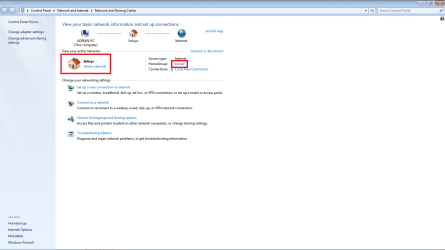
This must happen on the system side depending how you configure windows.
If you are using the home group setting instead of connecting to a public group this would be the issue.
Review your connection settings and make adjustments.

Regards,
Adrian
 

Attachments

  • group.png
    group.png
    37.6 KB · Views: 45

My Computer My Computer

Computer Manufacturer/Model Number
Custom Build
OS
Windows 7 7600 1 X64
CPU
AMD PHENOM II X 550 PROCESSOR 3.1 ghz
Motherboard
ASUS M4A78-TE
Memory
Corsair 4 gig ddr 3
Graphics Card(s)
ati radeon 3300
Sound Card
ati hd
Monitor(s) Displays
syncmaster 2033sw
Screen Resolution
1600X900 60 hz refresh
Hard Drives
twin_seagates SATA's 1 TB & 500 Gig, hitachi_slimline 160 gig
PSU
antec_550 watt
Case
cooler master GLite
Cooling
stock_heat sink
Internet Speed
20mbs up/ 1.5mbs down
Other Info
favorite child "stewie"
favorite dog "brian"
so simple... always feel like a fool when its something so basic. i knew it would be.

I think that is quite possibly the issue, hard to be certain right now as the ISP seems to be having issues as well. But i ll definately let you/ every one know.

Just to be clear, when connecting to a router, we should use the public network setting? and a modem should be home?

thanks so much adrian, youve been brilliant. Really appreciative man!
 

My Computer My Computer

Computer Manufacturer/Model Number
Dell / Inspiron N7010
OS
Windows 7 64bit
CPU
Intel(R) Core (TM) i3 CPU M330 @ 2.13GHz
Memory
4.00GB
Graphics Card(s)
1024 (MB) ATI HD5470 Mobility RadeonTM Integrated Intel® HD
Sound Card
4-Watt (2 x 2W) High Definition Audio 2.0 Stereo Speakers wi
Monitor(s) Displays
17.3 inch display (1600X900)
Back
Top