Ethernet Driver for Homemade PC

Are you positive that's your motherboard?
Oh hell... I'm just going by Everest Ultimate Edition, although when I actually look at the motherboard, I can only see Gigabyte GA-G41M-ES2L - I see no revision number.
At this point, I would try the next BIOS down and see if you can run the .exe from that file and have it call the .f9 or the .f8 bios revision
Don't know what you mean...
Are you saying to go to that page and download (and extract and run) the F8 version? And if so, what do you mean by have it call the .f9 or the .f8 bios revision?
 

My Computer My Computer

Computer type
Laptop
OS
Windows 7 home premium 64 bit
CPU
AMD K10
Motherboard
Hewlett-Packard 1444 (Socket S1G4)
Memory
3.00GB Dual-Channel DDR3 @ 532MHz
Graphics Card(s)
ATI AMD M880G with ATI Mobility Radeon HD 4250 (HP)
Sound Card
Realtek
Screen Resolution
1366 x 768
Hard Drives
465GB Western Digital
Antivirus
MSE
Yes, and if you move the .f8 bios out of the folder, it might call the only bios available and update to the F9 instead of F8. If it doesn't, try moving .f8 back and just updating to that.
 

My Computer My Computer

Computer Manufacturer/Model Number
Pugh Technologies
OS
W7 Professional x64
CPU
AMD Athlon II X3 445 Rana 3.10 GHz
Motherboard
MSI 870A-G54
Memory
PNY XLR DDR3 1600 4x2GB
Graphics Card(s)
NVIDIA GeForce GTS 450 (fermi) 1GB GDDR5
Sound Card
Realtek ALC892 onboard
Monitor(s) Displays
ASUS VE205t, Viewsonic VX2035WM
Screen Resolution
1600x900, 1600x1050
Hard Drives
977GB Hitachi Hitachi HDS721010CLA332
244GB Western Digital WDC WD2500AAJS-65B4A0
488GB Western Digital WDC WD5000AAJS-00A8B0
488GB Western Digital WDC WD5000AAKS-00UU3A0
PSU
Antec EarthWatts EA650 650W
Case
ThermalTake Armor A90 Mid Tower
Cooling
3x 120mm in, 1x 120mm & 200mm out, self built hydro-cooler
Keyboard
Logitec 55
Mouse
Razer Deathadder
Internet Speed
20 Mbps D/L, 9 Mbps U/L
Yes, and if you move the .f8 bios out of the folder, it might call the only bios available and update to the F9 instead of F8. If it doesn't, try moving .f8 back and just updating to that.
With the F8 version, I still get the 'not compatible with the version of Windows' msg, no matter if F8 is in or out of the folder.

I'm about ready to call it a night. Is there anything on this utility page of value?
GIGABYTE - Motherboard - Socket 775 - GA-G41M-ES2L (rev. 1.3)

At this point I'm considering wiping the HD and installing Windows XP. Don't know if that would help the drivers problem, or not, but that compatibilty msg is maddening.
 

My Computer My Computer

Computer type
Laptop
OS
Windows 7 home premium 64 bit
CPU
AMD K10
Motherboard
Hewlett-Packard 1444 (Socket S1G4)
Memory
3.00GB Dual-Channel DDR3 @ 532MHz
Graphics Card(s)
ATI AMD M880G with ATI Mobility Radeon HD 4250 (HP)
Sound Card
Realtek
Screen Resolution
1366 x 768
Hard Drives
465GB Western Digital
Antivirus
MSE
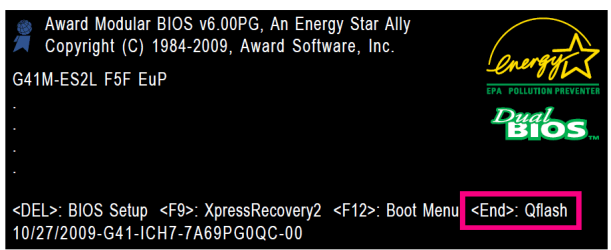
For BIOS update, take look at page 64 of the manual.

GA BIOS.PNG
 

My Computer My Computer

OS
ME/XP/Vista/Win7
Hi there

Lets go right back to ist principles.

1) I assume you can get into the BIOS.

If so check if the system has ONBOARD VIDEO, LAN and AUDIO. If it has REMOVE any extra installed audio / lan / video cards and check either jumper leads on the MB or settings on the BIOS to disable the external audio / video / lan.

2) Now re-install Windows and don't worry about what drivers are missing at this stage -- do a BRAND NEW install.

3) the chances are that the LAN won't work and the Video will probably look horrible in VGA mode at ist W7 boot -- don't worry about this yet.

4) You'll need access to ANOTHER computer to get the LAN driver for the MB. Download from the site and install. This should get your Internet connection working.

5) now let Windows update try and find as many drivers as possible - go into Device management and right mouse click against devices with question marks etc against them and select update driver.

6) for the ones that don't work you'll have to get to the manufacturers site and download manually -- ASUS MB's are usually quite good for the drivers. The most important drivers you'll need are usually the Chipset, Audio and Video drivers.

7) If you want to use expansion cards (video etc) then ensure the onboard feature is turned off in the BIOS and you can download the driver from the manufactuerers site.

It's VERY RARE that you really need a BIOS update -- I think in all the years I've used computers I've never done this ONCE.

You can run W7 on some incredibly old machines -- any machine with a dual core 775 socket processor will EASILY be capable of running W7 (maybe not X-64 but who cares).

Cheers
jimbo
 

My Computer My Computer

Computer type
PC/Desktop
Computer Manufacturer/Model Number
Custom built, several laptops HP/ASUS
OS
Linux CENTOS 7 / various Windows OS'es and servers
CPU
Intel i7 Intel i5
Memory
8GB, 16GB
Graphics Card(s)
On Motherboard
Sound Card
Realtek HD audio
Monitor(s) Displays
Apple Cinema display, Samsung LCD
Screen Resolution
1920 X 1080
Hard Drives
4 X 1TB SATA
Mouse
Toshiba wireless laser
Internet Speed
> 20MB up
Lol, all this just for an Ethernet driver... I doubt the OP is gonna format just for an Ethernet driver... But this is the best solution, albeit the most time-consuming.
 

My Computer My Computer

Computer Manufacturer/Model Number
HP Pavilion dv6-2020ev
OS
Ubuntu 12.10
CPU
Intel Core i7 720QM
Motherboard
Its a HP secret...
Memory
4GB RAM
Graphics Card(s)
NVIDIA GeForce 230M
Sound Card
IDT
Screen Resolution
1366x768
Hard Drives
500 GB
Mouse
HP
Internet Speed
4 Mbps
When I extract this file I did it to the desktop of the damaged PC, and I get 3 files - an autoexec.bat, a file called G41MES2L.F9, and an application Flashspi.exe.


Excuse me for butting in, but this sounds like this download is designed to be run off a floppy, since it has an autoexec.bat included in the download. If so, running it from Windows probably won't work. It's odd that it isn't an image, or have a copy of FreeDOS with it. Given the way it's packaged, I don't think you're going to have much luck with it, aside from contacting Gigabyte. You might also want to check Gigabyte's site for *Windows* flash utility that you could use to take G41MES2L.F9 and update your BIOS.

If I might suggest an alternate tack, you might want to just go out and get a $10-$15 PCI network adapter. Make sure it's compatible with Windows 7 (check the box) and that it's fast enough for your home network (100Mbps/Fast Ethernet is usually fast enough.) It's possible that might not work either, but it might be a cheap and easy solution to your dilemma.

EDIT: Just read theog's post - if I'm understanding what he's saying, it might be possible to put those three files you downloaded on a USB flash drive (and *ONLY* those files - backup and delete anything else on the drive) and use that Qflash function to update your BIOS from the USB flash drive.
 

My Computer My Computer

Computer Manufacturer/Model Number
Homebuilt
OS
Windows 7 Home Premium x64
CPU
Intel Core 2 Quad Q6600 @ 2.4 GHz
Motherboard
Gigabyte P35-DS3L
Memory
6GB DDR2 667MHz
Graphics Card(s)
EVGA "Superclocked" GeForce GTX 560 1GB
Sound Card
M-Audio Delta 410
Monitor(s) Displays
22" Apple Cinema Display
Screen Resolution
1600x1024
Hard Drives
Western Digital 7200RPM 640GB SATA II, Toshiba 4200RPM 250GB SATA II
PSU
Rosewill 600w
Case
LOGISYS CS888CL Clear Acrylic Case
Cooling
Stock
Keyboard
Logitech K120 USB
Mouse
Saitek Cyborg RAT7
Internet Speed
60Mbps Cable (when it works)
Other Info
Laptop - Dell Precision M6300, T7250, 4GB DDR2-667, 250GB Toshiba HD, Vista Business x64
Hi there

Lets go right back to ist principles.

1) I assume you can get into the BIOS.
Yep. Sure can.
If so check if the system has ONBOARD VIDEO, LAN and AUDIO. If it has REMOVE any extra installed audio / lan / video cards and check either jumper leads on the MB or settings on the BIOS to disable the external audio / video / lan.
On the Advanced Chipset there is a listing for Onboard VGA, which is set to Enable If No Ext PEG, and Init Display First which is set to PCI. When I go into the Integrated Peripherals, I see an entry called Onboard LAB Boot ROM which is disabled. Also one called Green LAN - also disabled. Onboard H/W Lan = Enabled, Smart LAN, which requires me to press Enter, and then reads Virtual Cable Test Port. Link Detected-> 100Mbps,....
All of the Onboard Serial Ports are Enabled
On the motherboard are 2 white PCI slots - both empty. There is a light blue PCI Express slot that holds the video card. No other slots. The NIC card is integrated into the mobo. I have no idea how to check for jumper leads.
2) Now re-install Windows and don't worry about what drivers are missing at this stage -- do a BRAND NEW install.
Have not yet done this. The PC came 'as is' - no disks, no sticker with a product code on the chassis. AIAS, it was built from parts, and I assume all new parts. I'm concerned that putting in a Windows 7 CD and doing an install will prompt for a product code which I don't possess.
3) the chances are that the LAN won't work and the Video will probably look horrible in VGA mode at ist W7 boot -- don't worry about this yet.

4) You'll need access to ANOTHER computer to get the LAN driver for the MB. Download from the site and install. This should get your Internet connection working.

5) now let Windows update try and find as many drivers as possible - go into Device management and right mouse click against devices with question marks etc against them and select update driver.

6) for the ones that don't work you'll have to get to the manufacturers site and download manually -- ASUS MB's are usually quite good for the drivers. The most important drivers you'll need are usually the Chipset, Audio and Video drivers.

7) If you want to use expansion cards (video etc) then ensure the onboard feature is turned off in the BIOS and you can download the driver from the manufactuerers site.

It's VERY RARE that you really need a BIOS update -- I think in all the years I've used computers I've never done this ONCE.

You can run W7 on some incredibly old machines -- any machine with a dual core 775 socket processor will EASILY be capable of running W7 (maybe not X-64 but who cares).

Cheers
jimbo
 

My Computer My Computer

Computer type
Laptop
OS
Windows 7 home premium 64 bit
CPU
AMD K10
Motherboard
Hewlett-Packard 1444 (Socket S1G4)
Memory
3.00GB Dual-Channel DDR3 @ 532MHz
Graphics Card(s)
ATI AMD M880G with ATI Mobility Radeon HD 4250 (HP)
Sound Card
Realtek
Screen Resolution
1366 x 768
Hard Drives
465GB Western Digital
Antivirus
MSE
Have used QFlash to update the BIOS, and it now posts with an F9 instead of the old F3. I used device mgr and deleted the NIC card. I went to the Gigabyte site and downloaded the Chipset and LAN drivers onto a flash drive and then installed them on the Franken-PC (or just effin-PC), and.....

No difference - 'This device cannot find enough free resources that it can use (Code 12)'.

I'm just sorry I missed the trash man the other day. Now I have to wait until Thursday to toss this...
 

My Computer My Computer

Computer type
Laptop
OS
Windows 7 home premium 64 bit
CPU
AMD K10
Motherboard
Hewlett-Packard 1444 (Socket S1G4)
Memory
3.00GB Dual-Channel DDR3 @ 532MHz
Graphics Card(s)
ATI AMD M880G with ATI Mobility Radeon HD 4250 (HP)
Sound Card
Realtek
Screen Resolution
1366 x 768
Hard Drives
465GB Western Digital
Antivirus
MSE

My Computer My Computer

Computer Manufacturer/Model Number
HP Pavilion dv6-2020ev
OS
Ubuntu 12.10
CPU
Intel Core i7 720QM
Motherboard
Its a HP secret...
Memory
4GB RAM
Graphics Card(s)
NVIDIA GeForce 230M
Sound Card
IDT
Screen Resolution
1366x768
Hard Drives
500 GB
Mouse
HP
Internet Speed
4 Mbps
Before I reinstall, I'm going to get a PCI network adapter card, and see if that makes a diff. Maybe the integrated LAN has gone bad.??
 

My Computer My Computer

Computer type
Laptop
OS
Windows 7 home premium 64 bit
CPU
AMD K10
Motherboard
Hewlett-Packard 1444 (Socket S1G4)
Memory
3.00GB Dual-Channel DDR3 @ 532MHz
Graphics Card(s)
ATI AMD M880G with ATI Mobility Radeon HD 4250 (HP)
Sound Card
Realtek
Screen Resolution
1366 x 768
Hard Drives
465GB Western Digital
Antivirus
MSE
Okay....
So I had an old Windows 98 PC in the basement that had a NIC card which I removed. I opened up the problem PC and inserted the card into the PCI slot. I figured 'What's it gonna hurt?'. A NIC card is a NIC card. So what if it comes from a W98 machine?

Anyway when I rebooted I got the msg installing hardware. Then it gave me the msg that the hardware might not have installed correctly.

When I went to device mgr, there was another entry - Other devices. When I opened it up it said Ethernet Controller. No name - just Ethernet Controller. I still had the Realtek device (the one that always said it could not find enough resources) under Network adapters. So now I had 2 ethernet devices that didn't work.

I uninstalled the Ethernet controller, and the Network adapter in Dev Mgr. Then I uninstalled the Realtek device from the setup file in the folder I'd extracted to the desktop. Then I reinstalled the Realtek driver, was prompted to reboot, and am now back with Ethernet Controller under Other devices and the Realtek driver under Network Adapter. The Realtek still has the property of not finding enough resources to run. And the Ethernet adapter under Other devices has no driver, and cannor find one on my PC.

Am I getting closer or further away?
 

My Computer My Computer

Computer type
Laptop
OS
Windows 7 home premium 64 bit
CPU
AMD K10
Motherboard
Hewlett-Packard 1444 (Socket S1G4)
Memory
3.00GB Dual-Channel DDR3 @ 532MHz
Graphics Card(s)
ATI AMD M880G with ATI Mobility Radeon HD 4250 (HP)
Sound Card
Realtek
Screen Resolution
1366 x 768
Hard Drives
465GB Western Digital
Antivirus
MSE

My Computer My Computer

Computer type
PC/Desktop
Computer Manufacturer/Model Number
Custom Build
OS
Windows 7 Home Premium 64 bit
CPU
Intel Core i7-4790
Motherboard
GA-Z87X-D3H
Memory
G.SKILL 8GB (2 x 4GB) DDR3 F3-10666CL9D-8GBNT
Graphics Card(s)
AMD Radeon R7 250
Sound Card
Realtek ALC892
Monitor(s) Displays
Samsung UN32EH5000, Dell 1703FPT
Screen Resolution
1920 x 1080, 1280 x 1024
Hard Drives
WD5003AZEX
WD10EZEX
Samsung HD103SJ
Samsung 128 GB 840 PRO
PSU
SeaSonic M12II SS-500GM
Case
Fractal Design Define R4
Cooling
Zalman CNPS9900ALED
Keyboard
Logitech K800
Mouse
Logitech M705
Internet Speed
16 Mbps
Antivirus
Avast
Browser
Firefox
Other Info
Bose Companion 2 Multimedia Speakers

My Computer My Computer

Computer type
Laptop
OS
Windows 7 home premium 64 bit
CPU
AMD K10
Motherboard
Hewlett-Packard 1444 (Socket S1G4)
Memory
3.00GB Dual-Channel DDR3 @ 532MHz
Graphics Card(s)
ATI AMD M880G with ATI Mobility Radeon HD 4250 (HP)
Sound Card
Realtek
Screen Resolution
1366 x 768
Hard Drives
465GB Western Digital
Antivirus
MSE
Even though you could plug the NIC card from your Windows 98 computer into the computer with the Ethernet issue, it wouldn't work, because you wouldn't be able to find a driver for it.
 

My Computer My Computer

Computer Manufacturer/Model Number
HP Pavilion dv6-2020ev
OS
Ubuntu 12.10
CPU
Intel Core i7 720QM
Motherboard
Its a HP secret...
Memory
4GB RAM
Graphics Card(s)
NVIDIA GeForce 230M
Sound Card
IDT
Screen Resolution
1366x768
Hard Drives
500 GB
Mouse
HP
Internet Speed
4 Mbps
You might be on the right track... But I would just bite the bullet and spend the ~5-10 bucks for a cheap NIC
 

My Computer My Computer

Computer Manufacturer/Model Number
Pugh Technologies
OS
W7 Professional x64
CPU
AMD Athlon II X3 445 Rana 3.10 GHz
Motherboard
MSI 870A-G54
Memory
PNY XLR DDR3 1600 4x2GB
Graphics Card(s)
NVIDIA GeForce GTS 450 (fermi) 1GB GDDR5
Sound Card
Realtek ALC892 onboard
Monitor(s) Displays
ASUS VE205t, Viewsonic VX2035WM
Screen Resolution
1600x900, 1600x1050
Hard Drives
977GB Hitachi Hitachi HDS721010CLA332
244GB Western Digital WDC WD2500AAJS-65B4A0
488GB Western Digital WDC WD5000AAJS-00A8B0
488GB Western Digital WDC WD5000AAKS-00UU3A0
PSU
Antec EarthWatts EA650 650W
Case
ThermalTake Armor A90 Mid Tower
Cooling
3x 120mm in, 1x 120mm & 200mm out, self built hydro-cooler
Keyboard
Logitec 55
Mouse
Razer Deathadder
Internet Speed
20 Mbps D/L, 9 Mbps U/L
Yup.
 

My Computer My Computer

Computer Manufacturer/Model Number
HP Pavilion dv6-2020ev
OS
Ubuntu 12.10
CPU
Intel Core i7 720QM
Motherboard
Its a HP secret...
Memory
4GB RAM
Graphics Card(s)
NVIDIA GeForce 230M
Sound Card
IDT
Screen Resolution
1366x768
Hard Drives
500 GB
Mouse
HP
Internet Speed
4 Mbps
Son of a bitch.... I got the old adapter to work. Joy to the world.
 

My Computer My Computer

Computer type
Laptop
OS
Windows 7 home premium 64 bit
CPU
AMD K10
Motherboard
Hewlett-Packard 1444 (Socket S1G4)
Memory
3.00GB Dual-Channel DDR3 @ 532MHz
Graphics Card(s)
ATI AMD M880G with ATI Mobility Radeon HD 4250 (HP)
Sound Card
Realtek
Screen Resolution
1366 x 768
Hard Drives
465GB Western Digital
Antivirus
MSE
The Windows 98 one?
 

My Computer My Computer

Computer Manufacturer/Model Number
HP Pavilion dv6-2020ev
OS
Ubuntu 12.10
CPU
Intel Core i7 720QM
Motherboard
Its a HP secret...
Memory
4GB RAM
Graphics Card(s)
NVIDIA GeForce 230M
Sound Card
IDT
Screen Resolution
1366x768
Hard Drives
500 GB
Mouse
HP
Internet Speed
4 Mbps
To quote you...

'Yup'.
 

My Computer My Computer

Computer type
Laptop
OS
Windows 7 home premium 64 bit
CPU
AMD K10
Motherboard
Hewlett-Packard 1444 (Socket S1G4)
Memory
3.00GB Dual-Channel DDR3 @ 532MHz
Graphics Card(s)
ATI AMD M880G with ATI Mobility Radeon HD 4250 (HP)
Sound Card
Realtek
Screen Resolution
1366 x 768
Hard Drives
465GB Western Digital
Antivirus
MSE
Back
Top