
Solved Ethernet port in wall not working

Normally, a house or apartment that is wired for ethernet will have jacks in each room and then in a closet or utility room there will be an area to plug in a router, modem, or switch.
in that room will either be loose wires with jacks on them or a plate with however many jacks that are wired into the house.
Basically, each of the rooms has an open circuit at the ethernet port if the device in the closet/utility room is missing.
 

My Computer My Computer

At a glance

Windows 7 Ultimate 64bitIntel i7 3770K16GB DDR3 1333 Corsair XMS3XFX HD6950 2GB EyeFinity
Computer Manufacturer/Model Number
HAL-9000
OS
Windows 7 Ultimate 64bit
CPU
Intel i7 3770K
Motherboard
Asus Sabertooth Z77
Memory
16GB DDR3 1333 Corsair XMS3
Graphics Card(s)
XFX HD6950 2GB EyeFinity
Sound Card
Logitech G35 & Sennheiser PC135 & VIA HD
Monitor(s) Displays
23" HP 2310e, 23" Samsung B2230, 21.5" Viewsonic
Screen Resolution
5760x1080
Hard Drives
16TB of Storage
128GB & 256GB Crucial M4 SSD's, 2X 1TB WD Black, 3x 2TB WD, 3x 2TB Samsung F4, 1.5TB Seagate, WD 500GB,
PSU
Antec True Power New 650watt
Case
Cooler Master HAF-932
Cooling
Corsair H60 Hydro Cooler, 3x 230mm Fans, 2x120mm Fan
Keyboard
Logitech G15 and G13
Mouse
Logitech G700 Gaming Mouse
Internet Speed
50/10 Mbit
Other Info
Speakers : Alesis M1 Active Mk2 Studio Monitors , APC RS 1200 UPS, HP 4500DN Color Laser, HP P1006 mono Laser, Kodak 8500 Dye-Sub, Epson 1280 inkjet, Epson Worforce 610 MFC
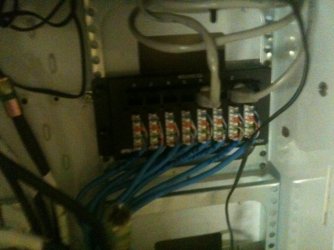
ok i found the box with the ethernet cables, and other stuff, connected through it in the garage. with 8 blue (ethernet?) cords attached to one board which is the number of ethernet ports in the house as i am aware of. now what?

there is a row of ports below it with a cord connecting two of them, the blue cord in the corresponding slot above it is labeled dining (the location of the router) and the other to another port.
 

My Computer My Computer

At a glance

Windows 7 Professional x64Intel Core i7 Q720 1.60GHz4GB DDR3 (2GB + 2GB) (1066MHz)NVIDIA GeForce GTS 250M
Computer Manufacturer/Model Number
Toshiba Qosmio x500 02g - PQX33A 02g00J
OS
Windows 7 Professional x64
CPU
Intel Core i7 Q720 1.60GHz
Motherboard
TOSHIBA Qosmio X500
Memory
4GB DDR3 (2GB + 2GB) (1066MHz)
Graphics Card(s)
NVIDIA GeForce GTS 250M
Sound Card
(1) NVIDIA High Definition Audio (2) Conexant Pebble High
Monitor(s) Displays
18.4” Widescreen Full HD TruBrite® Display (1920 x 1080)
Screen Resolution
1920x1080
Hard Drives
(1) TOSHIBA MK5055GSX (2) TOSHIBA MK5055GSX
ill upload a photo of what it looks like, much easier than describing it.

so thats upside down
 

Attachments

  • photo.jpg
    photo.jpg
    326.5 KB · Views: 58

My Computer My Computer

At a glance

Windows 7 Professional x64Intel Core i7 Q720 1.60GHz4GB DDR3 (2GB + 2GB) (1066MHz)NVIDIA GeForce GTS 250M
Computer Manufacturer/Model Number
Toshiba Qosmio x500 02g - PQX33A 02g00J
OS
Windows 7 Professional x64
CPU
Intel Core i7 Q720 1.60GHz
Motherboard
TOSHIBA Qosmio X500
Memory
4GB DDR3 (2GB + 2GB) (1066MHz)
Graphics Card(s)
NVIDIA GeForce GTS 250M
Sound Card
(1) NVIDIA High Definition Audio (2) Conexant Pebble High
Monitor(s) Displays
18.4” Widescreen Full HD TruBrite® Display (1920 x 1080)
Screen Resolution
1920x1080
Hard Drives
(1) TOSHIBA MK5055GSX (2) TOSHIBA MK5055GSX
Depending on where you put the router will determine if you need to purchase a 4 port or 8 port switch (that is if you need to use the other 7 ports).
A switch will need to be installed in the area where that junction box is and will be pretty much plug and play.

Here is a quick wiring diagram using Jack #1 as the router in the dining room.

At the junction box in the garage:
#1 will hook to Port #1 on the switch
#2 will hook to Port #2 on the switch
Do this for all the ports you using.


In the above photo you posted, it is wired from the dining room to whatever room the other cable is attached to.
Looks like is jumping ports 2 and 4.

EDIT:
I just thought about it for a second, and you should just purchase an 8 port switch and 8 short cables, just plug 1 to 1, 2 to 2 etc for all 8 ports.
this will be the easiest way and all the rooms will have Ethernet.
 

My Computer My Computer

At a glance

Windows 7 Ultimate 64bitIntel i7 3770K16GB DDR3 1333 Corsair XMS3XFX HD6950 2GB EyeFinity
Computer Manufacturer/Model Number
HAL-9000
OS
Windows 7 Ultimate 64bit
CPU
Intel i7 3770K
Motherboard
Asus Sabertooth Z77
Memory
16GB DDR3 1333 Corsair XMS3
Graphics Card(s)
XFX HD6950 2GB EyeFinity
Sound Card
Logitech G35 & Sennheiser PC135 & VIA HD
Monitor(s) Displays
23" HP 2310e, 23" Samsung B2230, 21.5" Viewsonic
Screen Resolution
5760x1080
Hard Drives
16TB of Storage
128GB & 256GB Crucial M4 SSD's, 2X 1TB WD Black, 3x 2TB WD, 3x 2TB Samsung F4, 1.5TB Seagate, WD 500GB,
PSU
Antec True Power New 650watt
Case
Cooler Master HAF-932
Cooling
Corsair H60 Hydro Cooler, 3x 230mm Fans, 2x120mm Fan
Keyboard
Logitech G15 and G13
Mouse
Logitech G700 Gaming Mouse
Internet Speed
50/10 Mbit
Other Info
Speakers : Alesis M1 Active Mk2 Studio Monitors , APC RS 1200 UPS, HP 4500DN Color Laser, HP P1006 mono Laser, Kodak 8500 Dye-Sub, Epson 1280 inkjet, Epson Worforce 610 MFC
ok thanks for that, ill keep it in mind, but as i am but a tenant im not sure if ill be allowed to install one, so ill contact the manager about it.
but using that idea the cord that connects two different ports (the grey one in picture) is essentially doing the same thing just only from the modem to one other port, correct? so if i were to connect it to the port that links to my room it should work for the time being?
 
Last edited:

My Computer My Computer

At a glance

Windows 7 Professional x64Intel Core i7 Q720 1.60GHz4GB DDR3 (2GB + 2GB) (1066MHz)NVIDIA GeForce GTS 250M
Computer Manufacturer/Model Number
Toshiba Qosmio x500 02g - PQX33A 02g00J
OS
Windows 7 Professional x64
CPU
Intel Core i7 Q720 1.60GHz
Motherboard
TOSHIBA Qosmio X500
Memory
4GB DDR3 (2GB + 2GB) (1066MHz)
Graphics Card(s)
NVIDIA GeForce GTS 250M
Sound Card
(1) NVIDIA High Definition Audio (2) Conexant Pebble High
Monitor(s) Displays
18.4” Widescreen Full HD TruBrite® Display (1920 x 1080)
Screen Resolution
1920x1080
Hard Drives
(1) TOSHIBA MK5055GSX (2) TOSHIBA MK5055GSX
EDIT:
so it works now completely through LAN, thanks to everyone.
i will get that switch ASAP and get the house connected, thank you Zepher
 
Last edited:

My Computer My Computer

At a glance

Windows 7 Professional x64Intel Core i7 Q720 1.60GHz4GB DDR3 (2GB + 2GB) (1066MHz)NVIDIA GeForce GTS 250M
Computer Manufacturer/Model Number
Toshiba Qosmio x500 02g - PQX33A 02g00J
OS
Windows 7 Professional x64
CPU
Intel Core i7 Q720 1.60GHz
Motherboard
TOSHIBA Qosmio X500
Memory
4GB DDR3 (2GB + 2GB) (1066MHz)
Graphics Card(s)
NVIDIA GeForce GTS 250M
Sound Card
(1) NVIDIA High Definition Audio (2) Conexant Pebble High
Monitor(s) Displays
18.4” Widescreen Full HD TruBrite® Display (1920 x 1080)
Screen Resolution
1920x1080
Hard Drives
(1) TOSHIBA MK5055GSX (2) TOSHIBA MK5055GSX
No problem, glad I could help.
 

My Computer My Computer

At a glance

Windows 7 Ultimate 64bitIntel i7 3770K16GB DDR3 1333 Corsair XMS3XFX HD6950 2GB EyeFinity
Computer Manufacturer/Model Number
HAL-9000
OS
Windows 7 Ultimate 64bit
CPU
Intel i7 3770K
Motherboard
Asus Sabertooth Z77
Memory
16GB DDR3 1333 Corsair XMS3
Graphics Card(s)
XFX HD6950 2GB EyeFinity
Sound Card
Logitech G35 & Sennheiser PC135 & VIA HD
Monitor(s) Displays
23" HP 2310e, 23" Samsung B2230, 21.5" Viewsonic
Screen Resolution
5760x1080
Hard Drives
16TB of Storage
128GB & 256GB Crucial M4 SSD's, 2X 1TB WD Black, 3x 2TB WD, 3x 2TB Samsung F4, 1.5TB Seagate, WD 500GB,
PSU
Antec True Power New 650watt
Case
Cooler Master HAF-932
Cooling
Corsair H60 Hydro Cooler, 3x 230mm Fans, 2x120mm Fan
Keyboard
Logitech G15 and G13
Mouse
Logitech G700 Gaming Mouse
Internet Speed
50/10 Mbit
Other Info
Speakers : Alesis M1 Active Mk2 Studio Monitors , APC RS 1200 UPS, HP 4500DN Color Laser, HP P1006 mono Laser, Kodak 8500 Dye-Sub, Epson 1280 inkjet, Epson Worforce 610 MFC
Back
Top