
Event ID: 100 upon start up

Gadgety

New member
Local time
7:51 PM
Messages
37
My Windows7 PC took forever to start up. Prior to that it took forever to shut down (more than 30 minutes, it just got stuck on AMI POST code 32..34, so finally I forced a shut down.)

I tried starting, but it got stuck on 41...42..., alternating. It didn't proceed. I forced a shut down in this process, took out the powercable. Restarted. It worked, and the PC booted.

I went into the event log (I apologize if the terms are incorrect, as all names have to be translated to English. This is the last time I choose a local language version).

Windows 7 (6.1.7600.16385)
41849ms start up delay
IsDegradation: false
Event ID: 100

Error report source: Microsoft-Windows-Diagnostics-Performance

I continued to Microsoft's online help and got the following:

Diagnose

Events 100, 102, 1107, and 1108 indicate that there is a problem with the event provider registration.
Event 100 and 1108 can be resolved by resinstalling the event provider. Contact the vendor that developed the event provider to reinstalling the provider does not fix the problem.
Events 102 and 1107 can only be fixed by contacting the vendor that developed the event provider and informing them of the problem.


Event ID 100 ? Provider configuration


I guess that the "event provider" is Microsoft (or) Windows7, and the above diagnosis (with poor spelling and grammar straight from Msft) is directing me to reinstall?


Would anyone know if my interpretation is correct?

+ System - Provider [ Name] Microsoft-Windows-Diagnostics-Performance [ Guid] {CFC18EC0-96B1-4EBA-961B-622CAEE05B0A}
EventID 100 Version 2 Level 3 Task 4002 Opcode 34 Keywords 0x8000000000010000 - TimeCreated [ SystemTime] 2014-04-01T11:06:14.349609300Z
EventRecordID 346 - Correlation [ ActivityID] {0330CC90-F800-000A-C64C-64189A4DCF01}
- Execution [ ProcessID] 1440 [ ThreadID] 2348
Channel Microsoft-Windows-Diagnostics-Performance/Operational Computer SR-2 - Security [ UserID] S-1-5-19

- EventData

BootTsVersion 2

BootStartTime 2014-04-01T11:04:04.656250000Z

BootEndTime 2014-04-01T11:06:12.009765600Z

SystemBootInstance 99

UserBootInstance 94

BootTime 41849

MainPathBootTime 26349

BootKernelInitTime 22

BootDriverInitTime 436

BootDevicesInitTime 4867

BootPrefetchInitTime 0

BootPrefetchBytes 0

BootAutoChkTime 0

BootSmssInitTime 18368

BootCriticalServicesInitTime 647

BootUserProfileProcessingTime 215

BootMachineProfileProcessingTime 0

BootExplorerInitTime 877

BootNumStartupApps 12

BootPostBootTime 15500

BootIsRebootAfterInstall false

BootRootCauseStepImprovementBits 0

BootRootCauseGradualImprovementBits 0

BootRootCauseStepDegradationBits 0

BootRootCauseGradualDegradationBits 0

BootIsDegradation false

BootIsStepDegradation false

BootIsGradualDegradation false

BootImprovementDelta 0

BootDegradationDelta 0

BootIsRootCauseIdentified false

OSLoaderDuration 1014

BootPNPInitStartTimeMS 22

BootPNPInitDuration 4963

OtherKernelInitDuration 356

SystemPNPInitStartTimeMS 5302

SystemPNPInitDuration 340

SessionInitStartTimeMS 5660

Session0InitDuration 16911

Session1InitDuration 163

SessionInitOtherDuration 1293

WinLogonStartTimeMS 24028

OtherLogonInitActivityDuration 1227

UserLogonWaitDuration 10589
 

My Computer My Computer

Computer type
PC/Desktop
Computer Manufacturer/Model Number
Own build
OS
Windows 7 Professional 64 bit
CPU
Xeon X5650
Motherboard
EVGA SR-2
Memory
Crucial CT3KIT102472BB160B
Graphics Card(s)
Nvidia Quadro 2000
Monitor(s) Displays
Acer
Screen Resolution
1024
Hard Drives
Samsung 840 EVO 250GB
WD Red 3TB
PSU
Silverstone Strider ST-1500
Case
Lian-Li PC-90
Keyboard
Logitech KU-1255 ThinkPad Compact USB with Trackpoint
Mouse
Trackpoint on keyboard; Logitech G600
Internet Speed
LTE 50-80 MB/s
Antivirus
MSE+Antimalwarebytes
Browser
Firefox primary; IE11 secondary
Other Info
Secondary system:
W7 Pro x64
AMD A8-7600 Kaveri
AsRock FM2A88X-ITX+
ADATA 2x4GB DDR 2133 PC3-17000
Kingston Tech SSDNOW 300 120GB
External WD 1021 2TB USB
Samsung Slimline SN-506BB Bluray Writer
Lian-Li PC-Q02
DVB-T2 Hauppage PCTV 292e USB stick

My Computer My Computer

Computer type
PC/Desktop
Computer Manufacturer/Model Number
Own build (new) Desk1 / Asus ROG Win 7 / Desk2 1st build
OS
Desk1 7 Home Prem / Desk2 10 Pro / Main lap Asus ROG 10 Pro 2 laptop Toshiba 7 Pro Asus P2520 7 & 10
CPU
Desk1 i5 3750K / Laptop i7 GTX 860M / Desk2 i5 2500
Motherboard
Desk1 Asus P877-V / Desk2 Gigabyte H67 UD3H / Laptop ?
Memory
Desk1 8GB (1866) / Desk2 16GB (1333) / Laptop 8Gb DDR3
Graphics Card(s)
Desk 1& 2NVidia GTX 650 & Laptops on board Intel
Sound Card
Desk 1 & 2 -XONAR DG Realtek High Def audio Laptop
Monitor(s) Displays
Desk 1 Benq HD 2450 / Desk2 Philips 24" / Laptop 17.5"
Screen Resolution
1920x1080 D1 & D2 & Laptop 1
Hard Drives
Desk1 Samsung 120GB 830 SSD
Asus ROG 256GB 850 Pro SSD
Desk2 Samsung 840 256 SSD
Toshiba 120GB EVO
PSU
Desk 1 Corsair HX 1050/ Laptop ? / Desk 2 Corsair HX 650
Case
Desk 1 Cooler HAF XM ? Toshiba laptop / Desk2 Coolermaster
Cooling
Fans on all Desk1 -2 Desk2 - all Coolermasters 5 Laptop ?
Keyboard
Desk 1 MS Sidewinder X6 Desk 2 MS Sidewinder X 4
Mouse
Desk 1&2 - Gigabyte MS 900 gamer - laptop - Logitec wireless
Internet Speed
ADSL2+
Other Info
One other Desktop (tester) and spare Toshba laptop both with SSD's
Running Kaspersky 2016 ISS on all machines config'd identically
Logitec audio stereo systems on each machine (x3)
Canon MG5250MFC
Router/modem TP-Link running WPA2SK
Thank you for your reply, and for your welcome, ICit2lol

It booted up. So the event data and ID is from inside Windows, normal mode. Thank you for scannow, and the disk check. I'm familiar with both, and I'll run them. However, is my reading of the report correct, that the "event provider" is Windows/Microsoft, or is that conjecture? I.e. to understand the report readout I have to check further before concluding who/what is the event provider.
 

My Computer My Computer

Computer type
PC/Desktop
Computer Manufacturer/Model Number
Own build
OS
Windows 7 Professional 64 bit
CPU
Xeon X5650
Motherboard
EVGA SR-2
Memory
Crucial CT3KIT102472BB160B
Graphics Card(s)
Nvidia Quadro 2000
Monitor(s) Displays
Acer
Screen Resolution
1024
Hard Drives
Samsung 840 EVO 250GB
WD Red 3TB
PSU
Silverstone Strider ST-1500
Case
Lian-Li PC-90
Keyboard
Logitech KU-1255 ThinkPad Compact USB with Trackpoint
Mouse
Trackpoint on keyboard; Logitech G600
Internet Speed
LTE 50-80 MB/s
Antivirus
MSE+Antimalwarebytes
Browser
Firefox primary; IE11 secondary
Other Info
Secondary system:
W7 Pro x64
AMD A8-7600 Kaveri
AsRock FM2A88X-ITX+
ADATA 2x4GB DDR 2133 PC3-17000
Kingston Tech SSDNOW 300 120GB
External WD 1021 2TB USB
Samsung Slimline SN-506BB Bluray Writer
Lian-Li PC-Q02
DVB-T2 Hauppage PCTV 292e USB stick
Well gadgety mate I am not that well up on the codes and stuff contained in the Event Viewer all I know is there are "events" ie actions taken at certain times during a login which will show up just about what you are doing at any given time on that date and if the "event: is of abnormal behavior it will come up as a warning , error, or critical. Now like I said what those actually refer to is a bit beyond me.

Those checks especially Option 2 in chkdsk can put a few things right if not all if you like I can ask for someone to take a look at the logs because even though I cannot ID the problem it does look ominous to me but that is not to say it actually is.

But please back up any data as previously requested just in case.

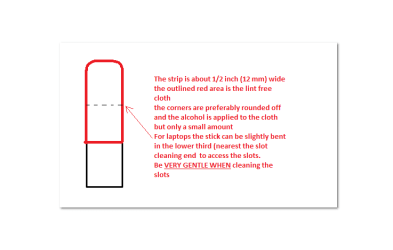
Having said the above this could also be a hardware problem too and that is more in my line to answer on. Just out of interest how old is the machine mate? For starters you could try reseating all cards sticks etc see my little ditty and pic

SLOTCLEANING

Now as for the slotsto clean them use a strip of old credit card about 1/2 inch wide nip thecorners off one end - preferably round them offhold a piece of thin lint free clothover the end dab on some form of alcohol - iso propyl alcohol (what we swab theskin with before an injection) is good and GENTLYswipe along the slots.

This can also be donefor the GPU slot/s.
 

Attachments

  • STICK.PNG
    STICK.PNG
    6 KB · Views: 2

My Computer My Computer

Computer type
PC/Desktop
Computer Manufacturer/Model Number
Own build (new) Desk1 / Asus ROG Win 7 / Desk2 1st build
OS
Desk1 7 Home Prem / Desk2 10 Pro / Main lap Asus ROG 10 Pro 2 laptop Toshiba 7 Pro Asus P2520 7 & 10
CPU
Desk1 i5 3750K / Laptop i7 GTX 860M / Desk2 i5 2500
Motherboard
Desk1 Asus P877-V / Desk2 Gigabyte H67 UD3H / Laptop ?
Memory
Desk1 8GB (1866) / Desk2 16GB (1333) / Laptop 8Gb DDR3
Graphics Card(s)
Desk 1& 2NVidia GTX 650 & Laptops on board Intel
Sound Card
Desk 1 & 2 -XONAR DG Realtek High Def audio Laptop
Monitor(s) Displays
Desk 1 Benq HD 2450 / Desk2 Philips 24" / Laptop 17.5"
Screen Resolution
1920x1080 D1 & D2 & Laptop 1
Hard Drives
Desk1 Samsung 120GB 830 SSD
Asus ROG 256GB 850 Pro SSD
Desk2 Samsung 840 256 SSD
Toshiba 120GB EVO
PSU
Desk 1 Corsair HX 1050/ Laptop ? / Desk 2 Corsair HX 650
Case
Desk 1 Cooler HAF XM ? Toshiba laptop / Desk2 Coolermaster
Cooling
Fans on all Desk1 -2 Desk2 - all Coolermasters 5 Laptop ?
Keyboard
Desk 1 MS Sidewinder X6 Desk 2 MS Sidewinder X 4
Mouse
Desk 1&2 - Gigabyte MS 900 gamer - laptop - Logitec wireless
Internet Speed
ADSL2+
Other Info
One other Desktop (tester) and spare Toshba laptop both with SSD's
Running Kaspersky 2016 ISS on all machines config'd identically
Logitec audio stereo systems on each machine (x3)
Canon MG5250MFC
Router/modem TP-Link running WPA2SK
Scannow = 100% verified and nothing found. I won't run chkdsk as it's for HDDs and I've only got an SSD. The motherboard is all new, and the build is about 6-7 weeks. Prior to posting, I had run a virus check and malware check as well. It could still be hardware related of course, although probably not grime/dirt related. Your credit card/isopropyl trick will come in handy some day. Things are odd, though. I can't get the Windows desktop gadgets to run/or open from the control panel, and they were displayed previously.
 

My Computer My Computer

Computer type
PC/Desktop
Computer Manufacturer/Model Number
Own build
OS
Windows 7 Professional 64 bit
CPU
Xeon X5650
Motherboard
EVGA SR-2
Memory
Crucial CT3KIT102472BB160B
Graphics Card(s)
Nvidia Quadro 2000
Monitor(s) Displays
Acer
Screen Resolution
1024
Hard Drives
Samsung 840 EVO 250GB
WD Red 3TB
PSU
Silverstone Strider ST-1500
Case
Lian-Li PC-90
Keyboard
Logitech KU-1255 ThinkPad Compact USB with Trackpoint
Mouse
Trackpoint on keyboard; Logitech G600
Internet Speed
LTE 50-80 MB/s
Antivirus
MSE+Antimalwarebytes
Browser
Firefox primary; IE11 secondary
Other Info
Secondary system:
W7 Pro x64
AMD A8-7600 Kaveri
AsRock FM2A88X-ITX+
ADATA 2x4GB DDR 2133 PC3-17000
Kingston Tech SSDNOW 300 120GB
External WD 1021 2TB USB
Samsung Slimline SN-506BB Bluray Writer
Lian-Li PC-Q02
DVB-T2 Hauppage PCTV 292e USB stick
Event Viewer

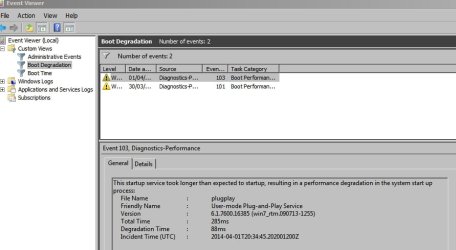
If you want to get information from Event Viewer you'll need to add custom views to investigate problems as shown here:

Use Windows 7 Event Viewer to track down issues that cause slower boot times - TechRepublic

If you look at the Boot Degradation tab it should hopefully provide details on what caused the problem. Fixing it is another matter!

Example from my machine (this one is not a problem unless it happens on a regular basis).

Perhaps if you can manage to use this method to find out what caused the problem - other members might provide a fix!
 

Attachments

  • Event Viewer.jpg
    Event Viewer.jpg
    41.4 KB · Views: 1

My Computer My Computer

Computer type
Laptop
Computer Manufacturer/Model Number
ASUS
OS
Microsoft Windows 7 Home Premium 64-bit 7601 Multiprocessor Free Service Pack 1
CPU
AMD C-60 APU with Radeon(tm) HD Graphics
Motherboard
ASUSTeK COMPUTER INC. X501U
Memory
4.00 GB
Graphics Card(s)
AMD Radeon HD 6290 Graphics
Sound Card
(1) AMD High Definition Audio Device (2) Realtek High Defi
Screen Resolution
1366 x 768 x 32 bits (4294967296 colors) @ 60 Hz
Hard Drives
Hitachi HTS545050A7E380 SATA Disk Device
Antivirus
Comodo CIS & FW, SecureAplus App Whitelisting, Threatfire
Browser
Cyberfox 64bit, Opera 64bit, Airfox
Other Info
Spy-The-Spy, HitmanPro.Alert, Norton Connect Safe, MJRegWatcher, BitDefender TrafficLight, Voodoo Shield, Zemana AntiMalware
Scannow = 100% verified and nothing found. I won't run chkdsk as it's for HDDs and I've only got an SSD. The motherboard is all new, and the build is about 6-7 weeks. Prior to posting, I had run a virus check and malware check as well. It could still be hardware related of course, although probably not grime/dirt related. Your credit card/isopropyl trick will come in handy some day. Things are odd, though. I can't get the Windows desktop gadgets to run/or open from the control panel, and they were displayed previously.
Just a by the by Gagdety the chkdsk can be run on SSD's mate there is no problem and unlike the old spinners it is much quicker to run.
The one you do not run on SSD's is defrag http://www.sevenforums.com/tutorials/3292-disk-defragmenter-schedule-turn-off.html

I suppose you have the TRIM set too? http://www.sevenforums.com/performance-maintenance/267861-how-trim-ssd-windows-7-a.html
 

My Computer My Computer

Computer type
PC/Desktop
Computer Manufacturer/Model Number
Own build (new) Desk1 / Asus ROG Win 7 / Desk2 1st build
OS
Desk1 7 Home Prem / Desk2 10 Pro / Main lap Asus ROG 10 Pro 2 laptop Toshiba 7 Pro Asus P2520 7 & 10
CPU
Desk1 i5 3750K / Laptop i7 GTX 860M / Desk2 i5 2500
Motherboard
Desk1 Asus P877-V / Desk2 Gigabyte H67 UD3H / Laptop ?
Memory
Desk1 8GB (1866) / Desk2 16GB (1333) / Laptop 8Gb DDR3
Graphics Card(s)
Desk 1& 2NVidia GTX 650 & Laptops on board Intel
Sound Card
Desk 1 & 2 -XONAR DG Realtek High Def audio Laptop
Monitor(s) Displays
Desk 1 Benq HD 2450 / Desk2 Philips 24" / Laptop 17.5"
Screen Resolution
1920x1080 D1 & D2 & Laptop 1
Hard Drives
Desk1 Samsung 120GB 830 SSD
Asus ROG 256GB 850 Pro SSD
Desk2 Samsung 840 256 SSD
Toshiba 120GB EVO
PSU
Desk 1 Corsair HX 1050/ Laptop ? / Desk 2 Corsair HX 650
Case
Desk 1 Cooler HAF XM ? Toshiba laptop / Desk2 Coolermaster
Cooling
Fans on all Desk1 -2 Desk2 - all Coolermasters 5 Laptop ?
Keyboard
Desk 1 MS Sidewinder X6 Desk 2 MS Sidewinder X 4
Mouse
Desk 1&2 - Gigabyte MS 900 gamer - laptop - Logitec wireless
Internet Speed
ADSL2+
Other Info
One other Desktop (tester) and spare Toshba laptop both with SSD's
Running Kaspersky 2016 ISS on all machines config'd identically
Logitec audio stereo systems on each machine (x3)
Canon MG5250MFC
Router/modem TP-Link running WPA2SK
Thank you, both.

@ICit2lol On the chkdsk the info I had was don't run because it wouldn't bring any benefits to the SSD, as they have built in error handling, but I hadn't looked into the specifics, and there's been some differing opinions about it online. Having had a quick read I understand that chkdsk can still check the file system, regardless of the SSD's sector status. The disk defrag I've stayed clear of, thanks for the heads up on that one anyway! Trim on/off tip, thanks for that, too.

@Callender Thank you for the custom viewer suggestion. I think I got the listing I enclosed through the event viewer, and then continued on to Microsoft's suggested link. Your TechRepublic link also did explain a little bit more about what the various headings mean. My current understanding is that there must have been something else going on, since it took way longer than 47 sec's to boot up, so it requires further digging and checking the reports on my side. I still haven't figured out who the "event provider" is, though.

And now for the clincher, the problem is automagically gone, and the boot up, as well as shut down, are both working well again.
 

My Computer My Computer

Computer type
PC/Desktop
Computer Manufacturer/Model Number
Own build
OS
Windows 7 Professional 64 bit
CPU
Xeon X5650
Motherboard
EVGA SR-2
Memory
Crucial CT3KIT102472BB160B
Graphics Card(s)
Nvidia Quadro 2000
Monitor(s) Displays
Acer
Screen Resolution
1024
Hard Drives
Samsung 840 EVO 250GB
WD Red 3TB
PSU
Silverstone Strider ST-1500
Case
Lian-Li PC-90
Keyboard
Logitech KU-1255 ThinkPad Compact USB with Trackpoint
Mouse
Trackpoint on keyboard; Logitech G600
Internet Speed
LTE 50-80 MB/s
Antivirus
MSE+Antimalwarebytes
Browser
Firefox primary; IE11 secondary
Other Info
Secondary system:
W7 Pro x64
AMD A8-7600 Kaveri
AsRock FM2A88X-ITX+
ADATA 2x4GB DDR 2133 PC3-17000
Kingston Tech SSDNOW 300 120GB
External WD 1021 2TB USB
Samsung Slimline SN-506BB Bluray Writer
Lian-Li PC-Q02
DVB-T2 Hauppage PCTV 292e USB stick
Well maybe the scans did something to clear the jam mate the chkdsk well I run it then I know for sure the filing system is checked - especially in Option 2 there are options to repair sectors, errors etc but of course the choice is yours.
It doesn't take long to run and costs nothing but again the choice as I said is yours.

Anyway at least you are up and running that is the main thing:)
 

My Computer My Computer

Computer type
PC/Desktop
Computer Manufacturer/Model Number
Own build (new) Desk1 / Asus ROG Win 7 / Desk2 1st build
OS
Desk1 7 Home Prem / Desk2 10 Pro / Main lap Asus ROG 10 Pro 2 laptop Toshiba 7 Pro Asus P2520 7 & 10
CPU
Desk1 i5 3750K / Laptop i7 GTX 860M / Desk2 i5 2500
Motherboard
Desk1 Asus P877-V / Desk2 Gigabyte H67 UD3H / Laptop ?
Memory
Desk1 8GB (1866) / Desk2 16GB (1333) / Laptop 8Gb DDR3
Graphics Card(s)
Desk 1& 2NVidia GTX 650 & Laptops on board Intel
Sound Card
Desk 1 & 2 -XONAR DG Realtek High Def audio Laptop
Monitor(s) Displays
Desk 1 Benq HD 2450 / Desk2 Philips 24" / Laptop 17.5"
Screen Resolution
1920x1080 D1 & D2 & Laptop 1
Hard Drives
Desk1 Samsung 120GB 830 SSD
Asus ROG 256GB 850 Pro SSD
Desk2 Samsung 840 256 SSD
Toshiba 120GB EVO
PSU
Desk 1 Corsair HX 1050/ Laptop ? / Desk 2 Corsair HX 650
Case
Desk 1 Cooler HAF XM ? Toshiba laptop / Desk2 Coolermaster
Cooling
Fans on all Desk1 -2 Desk2 - all Coolermasters 5 Laptop ?
Keyboard
Desk 1 MS Sidewinder X6 Desk 2 MS Sidewinder X 4
Mouse
Desk 1&2 - Gigabyte MS 900 gamer - laptop - Logitec wireless
Internet Speed
ADSL2+
Other Info
One other Desktop (tester) and spare Toshba laptop both with SSD's
Running Kaspersky 2016 ISS on all machines config'd identically
Logitec audio stereo systems on each machine (x3)
Canon MG5250MFC
Router/modem TP-Link running WPA2SK
Back
Top