
Event ID 10016 -- DCOM permissions error

rbmorse

mostly confounded
Power User
Local time
8:36 PM
Messages
90
Location
Albuquerque, New Mexico USA
I'm having trouble trying to figure out how to correct a persistent Event ID 10016 error that keeps showing up in Event Viewer.

I've actually found a couple of guides on how to fix this...change the launch permissions for the app that's causing the problem (IPbusEnum) but when I try to change the launch permissions using dcomcnfg none of the options on the properties/securities tab are available (grayed out).

My user has administrator permissions, I've tried launching dcomcnfg.exe by right click/click on "run as administrator" but no go.

Here's the text of the error message:


The application-specific permission settings do not grant Local Launch permission for the COM Server application with CLSID
{C97FCC79-E628-407D-AE68-A06AD6D8B4D1}
and APPID
{344ED43D-D086-4961-86A6-1106F4ACAD9B}
to the user NT AUTHORITY\SYSTEM SID (S-1-5-18) from address LocalHost (Using LRPC). This security permission can be modified using the Component Services administrative tool.


The CLSID and APPID resolve to a service run under svchost (IPBusEnum). Would appreciate any pointers/hints on how to resolve this error.
 

My Computer

Computer Manufacturer/Model Number
Self-built
OS
Ubuntu Lunix and Windows 7
CPU
Intel Core2Quad QX9700
Motherboard
Gigabyte GA-EP45-UD3P
Memory
8 GB Corsair Twin-X
Graphics Card(s)
Sapphire/ATI Radeon HD5850
Sound Card
Embedded or Bose Companion System V
Monitor(s) Displays
Apple 23 Inch Cinema Display
Screen Resolution
1920 X 1200
Hard Drives
1 X 120GB Intel Series 320 SSD
2 X 1TB Western Digital WD1002 FAEX internal hard drives
1 X 1Tb Seagate 7200.11 SATA (external, for backup)
PSU
Corsair 750TX
Case
Lian-Li V2120B
Cooling
Zalman CNPS ZX10C
Keyboard
CVT Avant Prime
Mouse
Logitech wireless trackman
Internet Speed
Comcast 8M/sec
Other Info
Also use MacBookPro (1st gen Intel w/ OS X 10.6) and a second desktop built upon an Intel D975XBX with Intel E6600 multi-booting Ubuntu, SuSE and Fedora Linux and 32-bit Windows 7 Home Premium..
DCOM objects are also available directly in registry in HKLM\Software\Classes\AppID.Find subkeys which error message say and give System account and Administrators group full control to these
 

My Computer

Computer Manufacturer/Model Number
Custom made
OS
Windows 7 Professional x64 PL
CPU
AMD Athlon 4450e
Motherboard
Giga-Byte GA-MA69G-S3H
Memory
GoodRam DDR2 2x2048MB (FSB 800MHz)
Graphics Card(s)
nVidia GeForce 9600GT (G94-300) 1024 MB
Monitor(s) Displays
SAMSUNG SyncMaster HS2P301688
Hard Drives
Seagate ST3750330AS 750GB
PSU
Corsair 550W
Cooling
AeroCool ExtremeEngine 3T
Thanks for the response.

Regedit gives me an "access denied" message. Tried again starting regedit.exe with "run as administratior" option with same result.

I can change permissions for some items, including the APPIDs on either side of this one in regedit's list, but not this particular APPID.
 

My Computer

Computer Manufacturer/Model Number
Self-built
OS
Ubuntu Lunix and Windows 7
CPU
Intel Core2Quad QX9700
Motherboard
Gigabyte GA-EP45-UD3P
Memory
8 GB Corsair Twin-X
Graphics Card(s)
Sapphire/ATI Radeon HD5850
Sound Card
Embedded or Bose Companion System V
Monitor(s) Displays
Apple 23 Inch Cinema Display
Screen Resolution
1920 X 1200
Hard Drives
1 X 120GB Intel Series 320 SSD
2 X 1TB Western Digital WD1002 FAEX internal hard drives
1 X 1Tb Seagate 7200.11 SATA (external, for backup)
PSU
Corsair 750TX
Case
Lian-Li V2120B
Cooling
Zalman CNPS ZX10C
Keyboard
CVT Avant Prime
Mouse
Logitech wireless trackman
Internet Speed
Comcast 8M/sec
Other Info
Also use MacBookPro (1st gen Intel w/ OS X 10.6) and a second desktop built upon an Intel D975XBX with Intel E6600 multi-booting Ubuntu, SuSE and Fedora Linux and 32-bit Windows 7 Home Premium..
Thanks for the response.

Regedit gives me an "access denied" message. Tried again starting regedit.exe with "run as administratior" option with same result.

I can change permissions for some items, including the APPIDs on either side of this one in regedit's list, but not this particular APPID.

Two explanations why you can't change permissions:

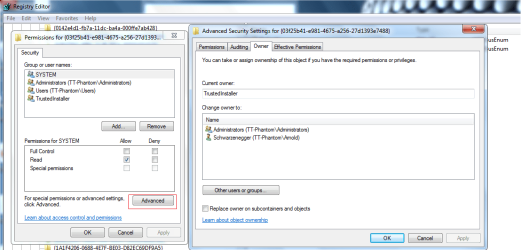
1.You are not the owner of this key and first you have to takeownership of key

see example:

CCom.png

in above example the owner of key is TrustedInstaller not you.Probably in your case the owner of this key is TrustedInstaller or System,not you or Administrators group and thus this problem.You can only change permission if you or Administrators group are owner.So you have to takeownership of this key lecture:Take Ownership of file - Vista Forums

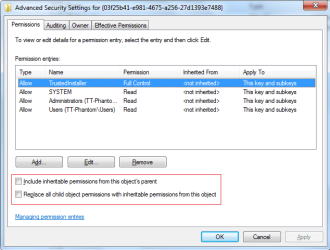
2.Another reason wouldbe restriction relate with inheriting permissions from object's parrents.Make sure the below options are unchecked (image)
CCom2.png
 

My Computer

Computer Manufacturer/Model Number
Custom made
OS
Windows 7 Professional x64 PL
CPU
AMD Athlon 4450e
Motherboard
Giga-Byte GA-MA69G-S3H
Memory
GoodRam DDR2 2x2048MB (FSB 800MHz)
Graphics Card(s)
nVidia GeForce 9600GT (G94-300) 1024 MB
Monitor(s) Displays
SAMSUNG SyncMaster HS2P301688
Hard Drives
Seagate ST3750330AS 750GB
PSU
Corsair 550W
Cooling
AeroCool ExtremeEngine 3T
That did it. Thanks.
 

My Computer

Computer Manufacturer/Model Number
Self-built
OS
Ubuntu Lunix and Windows 7
CPU
Intel Core2Quad QX9700
Motherboard
Gigabyte GA-EP45-UD3P
Memory
8 GB Corsair Twin-X
Graphics Card(s)
Sapphire/ATI Radeon HD5850
Sound Card
Embedded or Bose Companion System V
Monitor(s) Displays
Apple 23 Inch Cinema Display
Screen Resolution
1920 X 1200
Hard Drives
1 X 120GB Intel Series 320 SSD
2 X 1TB Western Digital WD1002 FAEX internal hard drives
1 X 1Tb Seagate 7200.11 SATA (external, for backup)
PSU
Corsair 750TX
Case
Lian-Li V2120B
Cooling
Zalman CNPS ZX10C
Keyboard
CVT Avant Prime
Mouse
Logitech wireless trackman
Internet Speed
Comcast 8M/sec
Other Info
Also use MacBookPro (1st gen Intel w/ OS X 10.6) and a second desktop built upon an Intel D975XBX with Intel E6600 multi-booting Ubuntu, SuSE and Fedora Linux and 32-bit Windows 7 Home Premium..
Same Problem

I found this forum because I was looking for a solution to the same exact Event Viewer error that rbmorse described in the opening post.

I followed the instructions in this thread, but I still get the same error. I'm not an expert with this stuff, but I thought the changes I made would work.

I gave ownership to the Administrators Group and that allowed me to change permissions. I made sure that System and Administrators both had Full Control for the CLSID {C97FCC79-E628-407D-AE68-A06AD6D8B4D1} and for the APPID {344ED43D-D086-4961-86A6-1106F4ACAD9B}.

However, after I rebooted, the Event ID 10016 error persists.
 

My Computer

OS
Windows 7 Home Premium
I doubt it is really issue and I think the best way to ignore it

Well...Maybe there is way to solve it although I don't know it is worth to do that.

Run cmd.exe with administrative previlliges (right click on cmd.exe as admin) and type:

net localgroup Administrators "NT Authority\LocalService" /add


WARNING:

If your first language is not English you have to type "Administrators" in your own language
 

My Computer

Computer Manufacturer/Model Number
Custom made
OS
Windows 7 Professional x64 PL
CPU
AMD Athlon 4450e
Motherboard
Giga-Byte GA-MA69G-S3H
Memory
GoodRam DDR2 2x2048MB (FSB 800MHz)
Graphics Card(s)
nVidia GeForce 9600GT (G94-300) 1024 MB
Monitor(s) Displays
SAMSUNG SyncMaster HS2P301688
Hard Drives
Seagate ST3750330AS 750GB
PSU
Corsair 550W
Cooling
AeroCool ExtremeEngine 3T
Hi Flavius.

I ran the cmd as you suggested and although it did "successfully add", it did not resolve the Event Viewer error.

Should I change it back to the way it was? If so, how?

Thanks for your help.
 

My Computer

OS
Windows 7 Home Premium
The only thing I can add is to go back to Flavius' post #4 and study it carefully. Note there are two steps...first is changing ownership then setting the correct permissions. I rebooted after those steps, although it probably wasn't necessary.

Then I still had to go back to dcomcnfg and set the proper launch permissions for the offending app...actually I think I went directly to the registry as suggested in Flavius' #2.

Anyway...fixing the ownership issue didn't fix the underlying problem, it only made it possible to fix the underlying problem.
 

My Computer

Computer Manufacturer/Model Number
Self-built
OS
Ubuntu Lunix and Windows 7
CPU
Intel Core2Quad QX9700
Motherboard
Gigabyte GA-EP45-UD3P
Memory
8 GB Corsair Twin-X
Graphics Card(s)
Sapphire/ATI Radeon HD5850
Sound Card
Embedded or Bose Companion System V
Monitor(s) Displays
Apple 23 Inch Cinema Display
Screen Resolution
1920 X 1200
Hard Drives
1 X 120GB Intel Series 320 SSD
2 X 1TB Western Digital WD1002 FAEX internal hard drives
1 X 1Tb Seagate 7200.11 SATA (external, for backup)
PSU
Corsair 750TX
Case
Lian-Li V2120B
Cooling
Zalman CNPS ZX10C
Keyboard
CVT Avant Prime
Mouse
Logitech wireless trackman
Internet Speed
Comcast 8M/sec
Other Info
Also use MacBookPro (1st gen Intel w/ OS X 10.6) and a second desktop built upon an Intel D975XBX with Intel E6600 multi-booting Ubuntu, SuSE and Fedora Linux and 32-bit Windows 7 Home Premium..
Hi Flavius.

I ran the cmd as you suggested and although it did "successfully add", it did not resolve the Event Viewer error.

Should I change it back to the way it was? If so, how?

Thanks for your help.

You can try another things find these keys:

HKLM\Software\Classes\AppID\{344ED43D-D086-4961-86A6-1106F4ACAD9B}

and HKLM\Software\Classes\AppID\{C97FCC79-E628-407D-AE68-A06AD6D8B4D1}

and add LOCAL SERVICE account to have full control for these keys

Should I change it back to the way it was? If so, how?
To remove Local Service from Administrators group type:

net localgroup Administrators "NT Authority\LocalService" /delete
 

My Computer

Computer Manufacturer/Model Number
Custom made
OS
Windows 7 Professional x64 PL
CPU
AMD Athlon 4450e
Motherboard
Giga-Byte GA-MA69G-S3H
Memory
GoodRam DDR2 2x2048MB (FSB 800MHz)
Graphics Card(s)
nVidia GeForce 9600GT (G94-300) 1024 MB
Monitor(s) Displays
SAMSUNG SyncMaster HS2P301688
Hard Drives
Seagate ST3750330AS 750GB
PSU
Corsair 550W
Cooling
AeroCool ExtremeEngine 3T
I'm not sure if I did this correctly, but I added LOCAL SERVICE to the Groups list, and gave it Full Control. I did this for both keys.

However, the result was the same...the error 10016 persists.

Do you know what program is causing this?

I'm inclined to ignore it unless something goes wrong and it seems to be related to the error.
 

My Computer

OS
Windows 7 Home Premium
Do you know what program is causing this?

Open this key HKLM\Software\Classes\AppID\{C97FCC79-E628-407D-AE68-A06AD6D8B4D1}

(this key comes from any 3p applications) ,read strings there,if you have trouble with identefication just post this key here
 

My Computer

Computer Manufacturer/Model Number
Custom made
OS
Windows 7 Professional x64 PL
CPU
AMD Athlon 4450e
Motherboard
Giga-Byte GA-MA69G-S3H
Memory
GoodRam DDR2 2x2048MB (FSB 800MHz)
Graphics Card(s)
nVidia GeForce 9600GT (G94-300) 1024 MB
Monitor(s) Displays
SAMSUNG SyncMaster HS2P301688
Hard Drives
Seagate ST3750330AS 750GB
PSU
Corsair 550W
Cooling
AeroCool ExtremeEngine 3T
It looks like the value is IPBusEnum, which looks like something to do with PnP.

I think I'm getting in over my head here and don't want to mess things up.

Can I go back to those keys and delete the LOCAL SERVICE group that was added without causing problems?
 

My Computer

OS
Windows 7 Home Premium
I don't have this key

HKLM\Software\Classes\AppID\{C97FCC79-E628-407D-AE68-A06AD6D8B4D1}

because you have it,I suspect it belongs to any non-system components and should be there any information about owner.

run cmd.exe and type:

REG EXPORT HKLM\Software\Classes\AppID\{C97FCC79-E628-407D-AE68-A06AD6D8B4D1} %userprofile%\Desktop\log.txt

on your desktop appear log.txt file,attache it to post

Can I go back to those keys and delete the LOCAL SERVICE group that was added without causing problems?
1.LOCAL SERVICE is account not group
2.If LOCALE SERVICE didn't have any rights to those keys then yes otherwise you can only restore original rights...or just leave it as you have already.In my system LOCAL SERVICE don't have any rights for HKLM\Software\Classes\AppID\{344ED43D-D086-4961-86A6-1106F4ACAD9B} key,what about the second? -I don't know.
 

My Computer

Computer Manufacturer/Model Number
Custom made
OS
Windows 7 Professional x64 PL
CPU
AMD Athlon 4450e
Motherboard
Giga-Byte GA-MA69G-S3H
Memory
GoodRam DDR2 2x2048MB (FSB 800MHz)
Graphics Card(s)
nVidia GeForce 9600GT (G94-300) 1024 MB
Monitor(s) Displays
SAMSUNG SyncMaster HS2P301688
Hard Drives
Seagate ST3750330AS 750GB
PSU
Corsair 550W
Cooling
AeroCool ExtremeEngine 3T
[
I don't have that either. It is under:
HKLM\Software\Classes\CLSID\{C97FCC79-E628-407D-AE68-A06AD6D8B4D1}
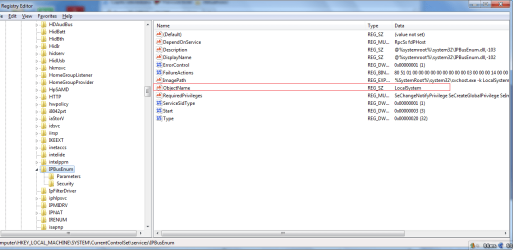
You've right.It was my mistake this time.Yes I have this key too.Check only in HKLM\System\CurrentControlSet\Services\IPBusEnum ObjectName string is set LocalSystem (image below)

And no more idea
 

Attachments

  • IPBUs.png
    IPBUs.png
    33.2 KB · Views: 2,419

My Computer

Computer Manufacturer/Model Number
Custom made
OS
Windows 7 Professional x64 PL
CPU
AMD Athlon 4450e
Motherboard
Giga-Byte GA-MA69G-S3H
Memory
GoodRam DDR2 2x2048MB (FSB 800MHz)
Graphics Card(s)
nVidia GeForce 9600GT (G94-300) 1024 MB
Monitor(s) Displays
SAMSUNG SyncMaster HS2P301688
Hard Drives
Seagate ST3750330AS 750GB
PSU
Corsair 550W
Cooling
AeroCool ExtremeEngine 3T
Yes, it is set to LocalSystem. I'm OK with ignoring it for now. I do appreciate your patience and willingness to help. Thank you.
 

My Computer

OS
Windows 7 Home Premium
I have the same error come up in Win 7 Ultimate. I have amended the registry key permissions as suggested, rebooted but still can't amend the DCOM settings. Admininstrators, Trusted Installer and System all have full permissions. Any suggestions? I've been trying to install Win 7 SP1 beta with no luck.
 

My Computer

Computer Manufacturer/Model Number
HP Presario A935EM
OS
Windows 7 ultimate
Can you post exactly error message?I think it's very important too also what SID is mentioned in error message.Possibly you have to add another account to permission...
 

My Computer

Computer Manufacturer/Model Number
Custom made
OS
Windows 7 Professional x64 PL
CPU
AMD Athlon 4450e
Motherboard
Giga-Byte GA-MA69G-S3H
Memory
GoodRam DDR2 2x2048MB (FSB 800MHz)
Graphics Card(s)
nVidia GeForce 9600GT (G94-300) 1024 MB
Monitor(s) Displays
SAMSUNG SyncMaster HS2P301688
Hard Drives
Seagate ST3750330AS 750GB
PSU
Corsair 550W
Cooling
AeroCool ExtremeEngine 3T
The error is:
The application-specific permission settings do not grant Local Launch permission for the COM Server application with CLSID
{C97FCC79-E628-407D-AE68-A06AD6D8B4D1}
and APPID
{344ED43D-D086-4961-86A6-1106F4ACAD9B}
to the user NT AUTHORITY\SYSTEM SID (S-1-5-18) from address LocalHost (Using LRPC). This security permission can be modified using the Component Services administrative tool.

The event is:
Log Name: System
Source: Microsoft-Windows-DistributedCOM
Date: 02/08/2010 19:26:23
Event ID: 10016
Task Category: None
Level: Error
Keywords: Classic
User: SYSTEM
Computer: Simons-PC
Description:
The application-specific permission settings do not grant Local Launch permission for the COM Server application with CLSID
{C97FCC79-E628-407D-AE68-A06AD6D8B4D1}
and APPID
{344ED43D-D086-4961-86A6-1106F4ACAD9B}
to the user NT AUTHORITY\SYSTEM SID (S-1-5-18) from address LocalHost (Using LRPC). This security permission can be modified using the Component Services administrative tool.
Event Xml:
<Event xmlns="http://schemas.microsoft.com/win/2004/08/events/event">
<System>
<Provider Name="Microsoft-Windows-DistributedCOM" Guid="{1B562E86-B7AA-4131-BADC-B6F3A001407E}" EventSourceName="DCOM" />
<EventID Qualifiers="49152">10016</EventID>
<Version>0</Version>
<Level>2</Level>
<Task>0</Task>
<Opcode>0</Opcode>
<Keywords>0x80000000000000</Keywords>
<TimeCreated SystemTime="2010-08-02T18:26:23.000000000Z" />
<EventRecordID>26399</EventRecordID>
<Correlation />
<Execution ProcessID="0" ThreadID="0" />
<Channel>System</Channel>
<Computer>Simons-PC</Computer>
<Security UserID="S-1-5-18" />
</System>
<EventData>
<Data Name="param1">application-specific</Data>
<Data Name="param2">Local</Data>
<Data Name="param3">Launch</Data>
<Data Name="param4">{C97FCC79-E628-407D-AE68-A06AD6D8B4D1}</Data>
<Data Name="param5">{344ED43D-D086-4961-86A6-1106F4ACAD9B}</Data>
<Data Name="param6">NT AUTHORITY</Data>
<Data Name="param7">SYSTEM</Data>
<Data Name="param8">S-1-5-18</Data>
<Data Name="param9">LocalHost (Using LRPC)</Data>
</EventData>
</Event>
 

My Computer

Computer Manufacturer/Model Number
HP Presario A935EM
OS
Windows 7 ultimate
Back
Top