Solved Event ID 7001 Service Control Manager causing slow logon

Malwarebytes Pro has always been installed, up to date and scanned.
SAS! Not yet
Windows is up to date, updates are installed on automatic, the only updates I turned off (months ago) are the IE11 upgrade as it would not complete (lots of people apparently had issues with it) and Windows defender for the same reason.
 

My Computer My Computer

At a glance

Windows 7 ultimate x64 SP1Intel(R) Core(TM) i7-2720QM CPU @ 2.20Ghz8192MB RamNVIDIA GeForce GT555M
Computer type
Laptop
Computer Manufacturer/Model Number
Dell XPS L702X (17)
OS
Windows 7 ultimate x64 SP1
CPU
Intel(R) Core(TM) i7-2720QM CPU @ 2.20Ghz
Memory
8192MB Ram
Graphics Card(s)
NVIDIA GeForce GT555M
Hard Drives
600mb TOSHIBA MK6461GSY ATA
Antivirus
McAfee Security Centre
Browser
IE11
Okay, sounds like you can slow down a bit as long as those errors stay away. I find that SAS will find more junk than mbam, but that's what it does best, goes after those trackin' cookies, though I have had it nail a few bigger nasties.

Yea, just watch when you're installing anything, it seems lately, those programmers will try an slip ya a mickey if you're not careful. :p

Have you ever seen this? Unchecky - Keeps your checkboxes clear
 

My Computer My Computer

At a glance

Originally Win 7 Hm Prem x64 Ver 6.1.7600 Bui...Intel i3 530 2.93GHz, 2933MHz 2 Cores 4 Logic...6GB of 1,333MHz DDR3 SDRAM32MB Intel Graphics Media Accelerator HD IGChip
Computer type
PC/Desktop
Computer Manufacturer/Model Number
Gateway DX4831-01e (Mid-Tower Desktop)
OS
Originally Win 7 Hm Prem x64 Ver 6.1.7600 Build 7601-SP1 | Upgraded to Windows 10 December 14, 2019
CPU
Intel i3 530 2.93GHz, 2933MHz 2 Cores 4 Logical Processors
Motherboard
Gateway H57M01 133 megahertz
Memory
6GB of 1,333MHz DDR3 SDRAM
Graphics Card(s)
32MB Intel Graphics Media Accelerator HD IGChip
Sound Card
Realtek High Definition Audio
Monitor(s) Displays
Gateway HX2000 20inch TFT active matrix TN
Screen Resolution
1600 x 900 x 59 hertz
Hard Drives
WDC WD10EADS-00M2B0 [HDD] (1000.20 GB) -- drive 0,
HL-DT-ST DVDRAM GH41N [CD-ROM dr]
Four card readers, and Four USB 2.0
PSU
300watts.
Case
Mid-Tower Desktop
Cooling
Stock from Gateway
Keyboard
Natural Ergonomic Keyboard 4000, see Other Info
Mouse
Orig. Gateway wore out now using Insignia USB wired optical
Internet Speed
Vz FIOS 10ms png 57.64Mbps down 65.53Mbps up Speedtest.org
Antivirus
Zamana Anti-logger with Anti-malware, MSE, Windows Firewall,
Browser
IE11.0.9600.19399-Upd ver11.0.135, Firefox 68.0.1 x64
Other Info
System Specs by Belarc.

BIOS: American Megatrends Inc. P01-A0 11/17/2009

Replaced the MS 'Natural' Standard PS/2 Enhanced 101-102 Keyboard with a new Natural Ergonomic Keyboard 4000 on August 1st 2014.

Canon Pixma MG3222 Printer.

Updated to IE11 on 12102015 | Fios Quantum Router g1100

Additional AV: SpywareBlaster, manual Mbam, SAS
Absolutely could not agree more and the Unchecky is the best program I have added for a long time it saves a lot of grief.

Like Anak has said many a mickey finn slipped in by the unscrupulous and especially those programs that some insist on using that promise to make the machine faster and find drivers etc etc
Prsonally I do everything manually apart form the on call scans and CCleaner.
 

My Computer My Computer

At a glance

Desk1 7 Home Prem / Desk2 10 Pro / Main lap A...Desk1 i5 3750K / Laptop i7 GTX 860M / Desk2 i...Desk1 8GB (1866) / Desk2 16GB (1333) / Laptop...Desk 1& 2NVidia GTX 650 & Laptops on board Intel
Computer type
PC/Desktop
Computer Manufacturer/Model Number
Own build (new) Desk1 / Asus ROG Win 7 / Desk2 1st build
OS
Desk1 7 Home Prem / Desk2 10 Pro / Main lap Asus ROG 10 Pro 2 laptop Toshiba 7 Pro Asus P2520 7 & 10
CPU
Desk1 i5 3750K / Laptop i7 GTX 860M / Desk2 i5 2500
Motherboard
Desk1 Asus P877-V / Desk2 Gigabyte H67 UD3H / Laptop ?
Memory
Desk1 8GB (1866) / Desk2 16GB (1333) / Laptop 8Gb DDR3
Graphics Card(s)
Desk 1& 2NVidia GTX 650 & Laptops on board Intel
Sound Card
Desk 1 & 2 -XONAR DG Realtek High Def audio Laptop
Monitor(s) Displays
Desk 1 Benq HD 2450 / Desk2 Philips 24" / Laptop 17.5"
Screen Resolution
1920x1080 D1 & D2 & Laptop 1
Hard Drives
Desk1 Samsung 120GB 830 SSD
Asus ROG 256GB 850 Pro SSD
Desk2 Samsung 840 256 SSD
Toshiba 120GB EVO
PSU
Desk 1 Corsair HX 1050/ Laptop ? / Desk 2 Corsair HX 650
Case
Desk 1 Cooler HAF XM ? Toshiba laptop / Desk2 Coolermaster
Cooling
Fans on all Desk1 -2 Desk2 - all Coolermasters 5 Laptop ?
Keyboard
Desk 1 MS Sidewinder X6 Desk 2 MS Sidewinder X 4
Mouse
Desk 1&2 - Gigabyte MS 900 gamer - laptop - Logitec wireless
Internet Speed
ADSL2+
Other Info
One other Desktop (tester) and spare Toshba laptop both with SSD's
Running Kaspersky 2016 ISS on all machines config'd identically
Logitec audio stereo systems on each machine (x3)
Canon MG5250MFC
Router/modem TP-Link running WPA2SK
Anak
When you get the time let us know if you tested your log-in with MAC
disabled, Okay?

Startup with Mcafee disabled I think coincided with better logon timescale having also already done ADWCleanup. Since MAC has been enabled and still getting better logon have ruled it out for now. Also, since you mentioned it, 'Siteadvisor' is not enabled.

I am going to wait till I have visited each client site and experienced the logon the timescales before doing much else here. If they prove ok I will be giving a big thanks to you both for your help.
 

My Computer My Computer

At a glance

Windows 7 ultimate x64 SP1Intel(R) Core(TM) i7-2720QM CPU @ 2.20Ghz8192MB RamNVIDIA GeForce GT555M
Computer type
Laptop
Computer Manufacturer/Model Number
Dell XPS L702X (17)
OS
Windows 7 ultimate x64 SP1
CPU
Intel(R) Core(TM) i7-2720QM CPU @ 2.20Ghz
Memory
8192MB Ram
Graphics Card(s)
NVIDIA GeForce GT555M
Hard Drives
600mb TOSHIBA MK6461GSY ATA
Antivirus
McAfee Security Centre
Browser
IE11
With what you've been through it's understandable that you'd be a little gun-shy about your login timescales, try to compare them with how it was before all this happened.

Different clients would have faster or slower login's simply because of the fact that each connection is going through different servers / connections. You wouldn't have to be precise but now would be a good time to keep a log to get a baseline of the time it takes to connect to each client.

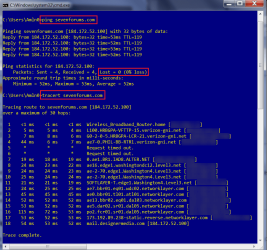
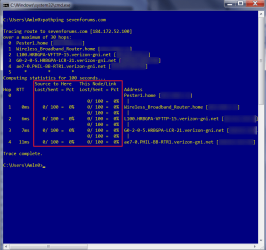
On the other hand.....If you would like to be precise you can run a ping, tracert, and a more comprehensive pathping test to see how each clients connection behaves.

Open a CMD prompt; Windows key+R, type in cmd click OK or tap the enter/return key.

At the blinking cursor type; ping (your clients name (dot) com), that is a space after ping and whatever domain your clients have be it com, gov, net, edu. etc.
i.e. the login address you use for your clients.

When that finishes running substitute tracert for ping and include your clients address, click OK or tap the enter/return key.

When that finishes running substitute pathping for tracert and include your clients address, click OK or tap the enter/return key.

Here are my results for sevenforums.com, first ping and tracert the one item to look for in all examples is packet loss, 0% is good:
Ping Tracert 7F.png

Using the ping command

The Ping.exe Command Line Tool

Tracert

Then pathping:
Pathping 7F.png

PathPing

To save when you're finished running these cmd's go up to the cmd icon in the upper left corner of the window and click on it.

Go to Edit >Select All. Then you'll have to re-enter the context menu and Edit >Copy. Once you have all three cmd's copied you can save to your text editor (Word, Libre/Open office) for reference later if your login gets slow again, comparing times you'll be able to pinpoint where the problem lies.

I don't know how many clients you have (its probably a lot) but these tests should be done for each one. :(
 

My Computer My Computer

At a glance

Originally Win 7 Hm Prem x64 Ver 6.1.7600 Bui...Intel i3 530 2.93GHz, 2933MHz 2 Cores 4 Logic...6GB of 1,333MHz DDR3 SDRAM32MB Intel Graphics Media Accelerator HD IGChip
Computer type
PC/Desktop
Computer Manufacturer/Model Number
Gateway DX4831-01e (Mid-Tower Desktop)
OS
Originally Win 7 Hm Prem x64 Ver 6.1.7600 Build 7601-SP1 | Upgraded to Windows 10 December 14, 2019
CPU
Intel i3 530 2.93GHz, 2933MHz 2 Cores 4 Logical Processors
Motherboard
Gateway H57M01 133 megahertz
Memory
6GB of 1,333MHz DDR3 SDRAM
Graphics Card(s)
32MB Intel Graphics Media Accelerator HD IGChip
Sound Card
Realtek High Definition Audio
Monitor(s) Displays
Gateway HX2000 20inch TFT active matrix TN
Screen Resolution
1600 x 900 x 59 hertz
Hard Drives
WDC WD10EADS-00M2B0 [HDD] (1000.20 GB) -- drive 0,
HL-DT-ST DVDRAM GH41N [CD-ROM dr]
Four card readers, and Four USB 2.0
PSU
300watts.
Case
Mid-Tower Desktop
Cooling
Stock from Gateway
Keyboard
Natural Ergonomic Keyboard 4000, see Other Info
Mouse
Orig. Gateway wore out now using Insignia USB wired optical
Internet Speed
Vz FIOS 10ms png 57.64Mbps down 65.53Mbps up Speedtest.org
Antivirus
Zamana Anti-logger with Anti-malware, MSE, Windows Firewall,
Browser
IE11.0.9600.19399-Upd ver11.0.135, Firefox 68.0.1 x64
Other Info
System Specs by Belarc.

BIOS: American Megatrends Inc. P01-A0 11/17/2009

Replaced the MS 'Natural' Standard PS/2 Enhanced 101-102 Keyboard with a new Natural Ergonomic Keyboard 4000 on August 1st 2014.

Canon Pixma MG3222 Printer.

Updated to IE11 on 12102015 | Fios Quantum Router g1100

Additional AV: SpywareBlaster, manual Mbam, SAS
Ok, have been seeing if the event occurred again during visits to clients sites and no problems UNTIL today! arrrgghhh after logon the screen went black for over ten minutes until I forced a shutdown and restarted in safe mode.

In the event viewer in safe mode I saw thousands of the event id's 7001 BUT... I noticed something else. They occurred during the safe mode restart NOT during the black screen I had forced the shut down from.

In fact the event 7001's seem to contribute only 1.5 minutes to the start up time. Whilst they do occur in other than Sage Mode (albeit not for a week or so) I am sure I should not be getting them......

The event that took the time (ten minutes), and which I can only assume led to the black screen and delay was Source: DHCP-Client Event ID:1001 Level: Error User: LOCAL SERVICE OpCode: IpAddressNotAssigned General
"
Your computer was not assigned an address from the network (by the DHCP Server) for the Network Card with network address 0x88532E083A19. The following error occurred: 0x79. Your computer will continue to try and obtain an address on its own from the network address (DHCP) server."

I have checked back over previous events where my eye had been directed to the 7001 errors and sure enough it is the above error that had taken the time not the 7001's.

Is this significant?

After the safe mode I rebooted using a different clean logon profile and the error did not occur the rebooted again with my own profile again and the error did not occur.
 

My Computer My Computer

At a glance

Windows 7 ultimate x64 SP1Intel(R) Core(TM) i7-2720QM CPU @ 2.20Ghz8192MB RamNVIDIA GeForce GT555M
Computer type
Laptop
Computer Manufacturer/Model Number
Dell XPS L702X (17)
OS
Windows 7 ultimate x64 SP1
CPU
Intel(R) Core(TM) i7-2720QM CPU @ 2.20Ghz
Memory
8192MB Ram
Graphics Card(s)
NVIDIA GeForce GT555M
Hard Drives
600mb TOSHIBA MK6461GSY ATA
Antivirus
McAfee Security Centre
Browser
IE11
I'm wondering if that MAC Siteadvisor got started up again, but you restarted and everything was back to normal.

Open Services.msc; That's Window Key+R to open the Run box, type in Services.msc and click on OK.

Scroll down to Server make sure that Status is started and Start up type is set to Automatic. Then,
scroll down a bit more to Workstation, and make sure that Status is started and Start up type is set to Automatic.

Then I'd like you to go and check your network connections. Do you know how to get to the ipv4 and ipv6 adapter properties settings and check to see if they are set to obtain automatically?
 

My Computer My Computer

At a glance

Originally Win 7 Hm Prem x64 Ver 6.1.7600 Bui...Intel i3 530 2.93GHz, 2933MHz 2 Cores 4 Logic...6GB of 1,333MHz DDR3 SDRAM32MB Intel Graphics Media Accelerator HD IGChip
Computer type
PC/Desktop
Computer Manufacturer/Model Number
Gateway DX4831-01e (Mid-Tower Desktop)
OS
Originally Win 7 Hm Prem x64 Ver 6.1.7600 Build 7601-SP1 | Upgraded to Windows 10 December 14, 2019
CPU
Intel i3 530 2.93GHz, 2933MHz 2 Cores 4 Logical Processors
Motherboard
Gateway H57M01 133 megahertz
Memory
6GB of 1,333MHz DDR3 SDRAM
Graphics Card(s)
32MB Intel Graphics Media Accelerator HD IGChip
Sound Card
Realtek High Definition Audio
Monitor(s) Displays
Gateway HX2000 20inch TFT active matrix TN
Screen Resolution
1600 x 900 x 59 hertz
Hard Drives
WDC WD10EADS-00M2B0 [HDD] (1000.20 GB) -- drive 0,
HL-DT-ST DVDRAM GH41N [CD-ROM dr]
Four card readers, and Four USB 2.0
PSU
300watts.
Case
Mid-Tower Desktop
Cooling
Stock from Gateway
Keyboard
Natural Ergonomic Keyboard 4000, see Other Info
Mouse
Orig. Gateway wore out now using Insignia USB wired optical
Internet Speed
Vz FIOS 10ms png 57.64Mbps down 65.53Mbps up Speedtest.org
Antivirus
Zamana Anti-logger with Anti-malware, MSE, Windows Firewall,
Browser
IE11.0.9600.19399-Upd ver11.0.135, Firefox 68.0.1 x64
Other Info
System Specs by Belarc.

BIOS: American Megatrends Inc. P01-A0 11/17/2009

Replaced the MS 'Natural' Standard PS/2 Enhanced 101-102 Keyboard with a new Natural Ergonomic Keyboard 4000 on August 1st 2014.

Canon Pixma MG3222 Printer.

Updated to IE11 on 12102015 | Fios Quantum Router g1100

Additional AV: SpywareBlaster, manual Mbam, SAS
Server and Workstation are already set to Automatic and Started.

ipv4 and 6, no I don't know how to get to properties.

NB. I don't have siteadvisor installed.

Thanks
 

My Computer My Computer

At a glance

Windows 7 ultimate x64 SP1Intel(R) Core(TM) i7-2720QM CPU @ 2.20Ghz8192MB RamNVIDIA GeForce GT555M
Computer type
Laptop
Computer Manufacturer/Model Number
Dell XPS L702X (17)
OS
Windows 7 ultimate x64 SP1
CPU
Intel(R) Core(TM) i7-2720QM CPU @ 2.20Ghz
Memory
8192MB Ram
Graphics Card(s)
NVIDIA GeForce GT555M
Hard Drives
600mb TOSHIBA MK6461GSY ATA
Antivirus
McAfee Security Centre
Browser
IE11
I'll have to set up a short tutorial, might take 'bout a half hour.
 

My Computer My Computer

At a glance

Originally Win 7 Hm Prem x64 Ver 6.1.7600 Bui...Intel i3 530 2.93GHz, 2933MHz 2 Cores 4 Logic...6GB of 1,333MHz DDR3 SDRAM32MB Intel Graphics Media Accelerator HD IGChip
Computer type
PC/Desktop
Computer Manufacturer/Model Number
Gateway DX4831-01e (Mid-Tower Desktop)
OS
Originally Win 7 Hm Prem x64 Ver 6.1.7600 Build 7601-SP1 | Upgraded to Windows 10 December 14, 2019
CPU
Intel i3 530 2.93GHz, 2933MHz 2 Cores 4 Logical Processors
Motherboard
Gateway H57M01 133 megahertz
Memory
6GB of 1,333MHz DDR3 SDRAM
Graphics Card(s)
32MB Intel Graphics Media Accelerator HD IGChip
Sound Card
Realtek High Definition Audio
Monitor(s) Displays
Gateway HX2000 20inch TFT active matrix TN
Screen Resolution
1600 x 900 x 59 hertz
Hard Drives
WDC WD10EADS-00M2B0 [HDD] (1000.20 GB) -- drive 0,
HL-DT-ST DVDRAM GH41N [CD-ROM dr]
Four card readers, and Four USB 2.0
PSU
300watts.
Case
Mid-Tower Desktop
Cooling
Stock from Gateway
Keyboard
Natural Ergonomic Keyboard 4000, see Other Info
Mouse
Orig. Gateway wore out now using Insignia USB wired optical
Internet Speed
Vz FIOS 10ms png 57.64Mbps down 65.53Mbps up Speedtest.org
Antivirus
Zamana Anti-logger with Anti-malware, MSE, Windows Firewall,
Browser
IE11.0.9600.19399-Upd ver11.0.135, Firefox 68.0.1 x64
Other Info
System Specs by Belarc.

BIOS: American Megatrends Inc. P01-A0 11/17/2009

Replaced the MS 'Natural' Standard PS/2 Enhanced 101-102 Keyboard with a new Natural Ergonomic Keyboard 4000 on August 1st 2014.

Canon Pixma MG3222 Printer.

Updated to IE11 on 12102015 | Fios Quantum Router g1100

Additional AV: SpywareBlaster, manual Mbam, SAS
Use this tutorial to start: http://www.sevenforums.com/tutorials/12421-local-area-connection-status-create-shortcut.html

But, when you get to step #4 click on Properties instead of create shortcut
. You'll see this open:

lanmug.JPG

Make sure everything that's there is checked.

  • Double click on TCP/Ipv6, on the general tab make sure both radio buttons are checked for automatically.

  • Click on the Advanced button, lower right corner. The IP tab should say Automatic configuration only. Nothing in the default gateway box and automatic metric checked.

  • The DNS tab should have the append primary and connection specific DNS suffixes on.

  • Append parent suffixes of the primary DNS suffix checked.

  • The last append button is unchecked.

  • At the bottom register this connections addresses in DNS is checked off.

  • Below that is unchecked.


  • Double click TCP/Ipv4 the general tab should have both obtain IP address and Obtain DNS server set to automatic.

  • Alternate config tab have automatic private IP address on.

  • Go back to General tab, click on the advanced button.

  • IP settings tab should say DHCP enabled, automatic metric checked.

  • The DNS tab should have the append primary and connection specific DNS suffixes on.

  • Append parent suffixes of the primary DNS suffix checked.

  • The last append button is unchecked.

  • At the bottom register this connections addresses in DNS is checked off.

  • Below that is unchecked.


  • The WINS tab should have the LMHOSTS lookup checked.

  • NETBIOS set to default.

OK your way back out Anything much different if at all?

I also uploaded a zip file for your services settings from: Black Viper?s Windows 7 Service Pack 1 Service Configurations » Black Viper | www.blackviper.com

I used Libre office calc, If you can't open it go to that link and check or I can try to save it in excel format.
The columns are hide-able, click on the show/hide columns button and you can narrow them down to where you only see the service its file name, win7 Ultimate and whether it has a safe , tweaked or bare bones setting.


It's done with windows zip:
View attachment BVULTSP1.zip
 

My Computer My Computer

At a glance

Originally Win 7 Hm Prem x64 Ver 6.1.7600 Bui...Intel i3 530 2.93GHz, 2933MHz 2 Cores 4 Logic...6GB of 1,333MHz DDR3 SDRAM32MB Intel Graphics Media Accelerator HD IGChip
Computer type
PC/Desktop
Computer Manufacturer/Model Number
Gateway DX4831-01e (Mid-Tower Desktop)
OS
Originally Win 7 Hm Prem x64 Ver 6.1.7600 Build 7601-SP1 | Upgraded to Windows 10 December 14, 2019
CPU
Intel i3 530 2.93GHz, 2933MHz 2 Cores 4 Logical Processors
Motherboard
Gateway H57M01 133 megahertz
Memory
6GB of 1,333MHz DDR3 SDRAM
Graphics Card(s)
32MB Intel Graphics Media Accelerator HD IGChip
Sound Card
Realtek High Definition Audio
Monitor(s) Displays
Gateway HX2000 20inch TFT active matrix TN
Screen Resolution
1600 x 900 x 59 hertz
Hard Drives
WDC WD10EADS-00M2B0 [HDD] (1000.20 GB) -- drive 0,
HL-DT-ST DVDRAM GH41N [CD-ROM dr]
Four card readers, and Four USB 2.0
PSU
300watts.
Case
Mid-Tower Desktop
Cooling
Stock from Gateway
Keyboard
Natural Ergonomic Keyboard 4000, see Other Info
Mouse
Orig. Gateway wore out now using Insignia USB wired optical
Internet Speed
Vz FIOS 10ms png 57.64Mbps down 65.53Mbps up Speedtest.org
Antivirus
Zamana Anti-logger with Anti-malware, MSE, Windows Firewall,
Browser
IE11.0.9600.19399-Upd ver11.0.135, Firefox 68.0.1 x64
Other Info
System Specs by Belarc.

BIOS: American Megatrends Inc. P01-A0 11/17/2009

Replaced the MS 'Natural' Standard PS/2 Enhanced 101-102 Keyboard with a new Natural Ergonomic Keyboard 4000 on August 1st 2014.

Canon Pixma MG3222 Printer.

Updated to IE11 on 12102015 | Fios Quantum Router g1100

Additional AV: SpywareBlaster, manual Mbam, SAS
Anak

Firstly, How do I insert a snipping tool image into these posts, ( Pictures, Words and Telly Savalas!)

In response to your guide - For this I have selected the Local Area Connection 'Realtek PCIe GBE Family Controller' but whilst the network cable is unplugged because I am currently on wireless (hope that makes no difference) (I did check the same things on the Wireless network connection and they are the same on each as below).

for TCP/Ipv6 The ONLY thing potentially different is

At the bottom register this connections addresses in DNS is checked off
Mine is checked.

for TCP/Ipv4 The ONLY thing potentially different is

At the bottom register this connections addresses in DNS is checked off
Mine is checked.

I am looking into the Service configurations next
 

My Computer My Computer

At a glance

Windows 7 ultimate x64 SP1Intel(R) Core(TM) i7-2720QM CPU @ 2.20Ghz8192MB RamNVIDIA GeForce GT555M
Computer type
Laptop
Computer Manufacturer/Model Number
Dell XPS L702X (17)
OS
Windows 7 ultimate x64 SP1
CPU
Intel(R) Core(TM) i7-2720QM CPU @ 2.20Ghz
Memory
8192MB Ram
Graphics Card(s)
NVIDIA GeForce GT555M
Hard Drives
600mb TOSHIBA MK6461GSY ATA
Antivirus
McAfee Security Centre
Browser
IE11
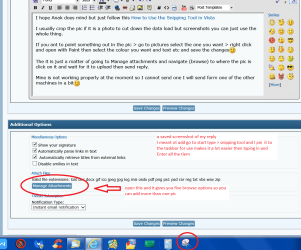
I hope Anak doesn't mind but just follow this How to Use the Snipping Tool in Vista

I usually crop the pic if it is a photo to cut down the data load but screenshots you can just use the whole thing.

If you ant to point something out in the pic > go to pictures select the one you want > right click and open with Paint then select the colour you want and text etc and save the changes:)

The it is just a matter of going to Manage attachments and navigate (browse) to where the pic is click on it and wait for it to upload then send reply.

Mine is not working properly at the moment so I cannot send one I will send form one of the other machines in a bit:)
 

Attachments

  • SNIP 3.PNG
    SNIP 3.PNG
    60.1 KB · Views: 0

My Computer My Computer

At a glance

Desk1 7 Home Prem / Desk2 10 Pro / Main lap A...Desk1 i5 3750K / Laptop i7 GTX 860M / Desk2 i...Desk1 8GB (1866) / Desk2 16GB (1333) / Laptop...Desk 1& 2NVidia GTX 650 & Laptops on board Intel
Computer type
PC/Desktop
Computer Manufacturer/Model Number
Own build (new) Desk1 / Asus ROG Win 7 / Desk2 1st build
OS
Desk1 7 Home Prem / Desk2 10 Pro / Main lap Asus ROG 10 Pro 2 laptop Toshiba 7 Pro Asus P2520 7 & 10
CPU
Desk1 i5 3750K / Laptop i7 GTX 860M / Desk2 i5 2500
Motherboard
Desk1 Asus P877-V / Desk2 Gigabyte H67 UD3H / Laptop ?
Memory
Desk1 8GB (1866) / Desk2 16GB (1333) / Laptop 8Gb DDR3
Graphics Card(s)
Desk 1& 2NVidia GTX 650 & Laptops on board Intel
Sound Card
Desk 1 & 2 -XONAR DG Realtek High Def audio Laptop
Monitor(s) Displays
Desk 1 Benq HD 2450 / Desk2 Philips 24" / Laptop 17.5"
Screen Resolution
1920x1080 D1 & D2 & Laptop 1
Hard Drives
Desk1 Samsung 120GB 830 SSD
Asus ROG 256GB 850 Pro SSD
Desk2 Samsung 840 256 SSD
Toshiba 120GB EVO
PSU
Desk 1 Corsair HX 1050/ Laptop ? / Desk 2 Corsair HX 650
Case
Desk 1 Cooler HAF XM ? Toshiba laptop / Desk2 Coolermaster
Cooling
Fans on all Desk1 -2 Desk2 - all Coolermasters 5 Laptop ?
Keyboard
Desk 1 MS Sidewinder X6 Desk 2 MS Sidewinder X 4
Mouse
Desk 1&2 - Gigabyte MS 900 gamer - laptop - Logitec wireless
Internet Speed
ADSL2+
Other Info
One other Desktop (tester) and spare Toshba laptop both with SSD's
Running Kaspersky 2016 ISS on all machines config'd identically
Logitec audio stereo systems on each machine (x3)
Canon MG5250MFC
Router/modem TP-Link running WPA2SK
Services

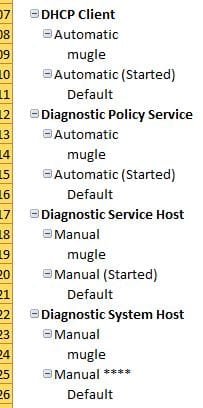
144 Services we both have listed of which 62 have different 'Settings' albeit that includes the likes of 'Automatic' as opposed to 'Automatic (Started)' as I am not sure the significance of what I am looking for!

In addition
20 Services that Viper has listed but I do not
76 Services that I have listed but Viper does not
 

My Computer My Computer

At a glance

Windows 7 ultimate x64 SP1Intel(R) Core(TM) i7-2720QM CPU @ 2.20Ghz8192MB RamNVIDIA GeForce GT555M
Computer type
Laptop
Computer Manufacturer/Model Number
Dell XPS L702X (17)
OS
Windows 7 ultimate x64 SP1
CPU
Intel(R) Core(TM) i7-2720QM CPU @ 2.20Ghz
Memory
8192MB Ram
Graphics Card(s)
NVIDIA GeForce GT555M
Hard Drives
600mb TOSHIBA MK6461GSY ATA
Antivirus
McAfee Security Centre
Browser
IE11
ICit2lol

I have to snip and save to a location on my drive then upload as attachment? I hoped to be able to just snip and insert into the message! like you have with the screen shots in your answer.

I have tried it here but I think it ends up as an attachment not an inserted image.
 

Attachments

  • Services.JPG
    Services.JPG
    22.4 KB · Views: 14

My Computer My Computer

At a glance

Windows 7 ultimate x64 SP1Intel(R) Core(TM) i7-2720QM CPU @ 2.20Ghz8192MB RamNVIDIA GeForce GT555M
Computer type
Laptop
Computer Manufacturer/Model Number
Dell XPS L702X (17)
OS
Windows 7 ultimate x64 SP1
CPU
Intel(R) Core(TM) i7-2720QM CPU @ 2.20Ghz
Memory
8192MB Ram
Graphics Card(s)
NVIDIA GeForce GT555M
Hard Drives
600mb TOSHIBA MK6461GSY ATA
Antivirus
McAfee Security Centre
Browser
IE11
No, I was wrong! it does insert as an image.

Thanks for that
 

My Computer My Computer

At a glance

Windows 7 ultimate x64 SP1Intel(R) Core(TM) i7-2720QM CPU @ 2.20Ghz8192MB RamNVIDIA GeForce GT555M
Computer type
Laptop
Computer Manufacturer/Model Number
Dell XPS L702X (17)
OS
Windows 7 ultimate x64 SP1
CPU
Intel(R) Core(TM) i7-2720QM CPU @ 2.20Ghz
Memory
8192MB Ram
Graphics Card(s)
NVIDIA GeForce GT555M
Hard Drives
600mb TOSHIBA MK6461GSY ATA
Antivirus
McAfee Security Centre
Browser
IE11
Yes mate I save mine to the Pictures library as I keep a lot of pics there that show application function etc

Oh when you browse you just go to that library and search though it > click on the pic and open.

If you forget to to add the pic you just edit your post go to GO Advanced and do it from there:)
 

My Computer My Computer

At a glance

Desk1 7 Home Prem / Desk2 10 Pro / Main lap A...Desk1 i5 3750K / Laptop i7 GTX 860M / Desk2 i...Desk1 8GB (1866) / Desk2 16GB (1333) / Laptop...Desk 1& 2NVidia GTX 650 & Laptops on board Intel
Computer type
PC/Desktop
Computer Manufacturer/Model Number
Own build (new) Desk1 / Asus ROG Win 7 / Desk2 1st build
OS
Desk1 7 Home Prem / Desk2 10 Pro / Main lap Asus ROG 10 Pro 2 laptop Toshiba 7 Pro Asus P2520 7 & 10
CPU
Desk1 i5 3750K / Laptop i7 GTX 860M / Desk2 i5 2500
Motherboard
Desk1 Asus P877-V / Desk2 Gigabyte H67 UD3H / Laptop ?
Memory
Desk1 8GB (1866) / Desk2 16GB (1333) / Laptop 8Gb DDR3
Graphics Card(s)
Desk 1& 2NVidia GTX 650 & Laptops on board Intel
Sound Card
Desk 1 & 2 -XONAR DG Realtek High Def audio Laptop
Monitor(s) Displays
Desk 1 Benq HD 2450 / Desk2 Philips 24" / Laptop 17.5"
Screen Resolution
1920x1080 D1 & D2 & Laptop 1
Hard Drives
Desk1 Samsung 120GB 830 SSD
Asus ROG 256GB 850 Pro SSD
Desk2 Samsung 840 256 SSD
Toshiba 120GB EVO
PSU
Desk 1 Corsair HX 1050/ Laptop ? / Desk 2 Corsair HX 650
Case
Desk 1 Cooler HAF XM ? Toshiba laptop / Desk2 Coolermaster
Cooling
Fans on all Desk1 -2 Desk2 - all Coolermasters 5 Laptop ?
Keyboard
Desk 1 MS Sidewinder X6 Desk 2 MS Sidewinder X 4
Mouse
Desk 1&2 - Gigabyte MS 900 gamer - laptop - Logitec wireless
Internet Speed
ADSL2+
Other Info
One other Desktop (tester) and spare Toshba laptop both with SSD's
Running Kaspersky 2016 ISS on all machines config'd identically
Logitec audio stereo systems on each machine (x3)
Canon MG5250MFC
Router/modem TP-Link running WPA2SK
John, I won't ever mind if someone jumps in to help in my absence. Well done!

mugel,
Those settings are okay for ipv4 and 6, I didn't word it right but you do want the register this connections addresses in DNS checked.

Don't worry if viper has more or less services than you, his list is generic, and it would be understandable that yours would be different. Go to the beginning of the viper link I gave you and read it, it will explain what the different types (auto, auto delayed, manual, etc. mean) look under Configuration Information.

For the 76 Services that you have listed but Viper does not you'll have to track them down if their specific to Dell or a program or hardware you've installed.

You can use this as a guide: http://www.sevenforums.com/tutorials/2495-services-start-disable.html
 

My Computer My Computer

At a glance

Originally Win 7 Hm Prem x64 Ver 6.1.7600 Bui...Intel i3 530 2.93GHz, 2933MHz 2 Cores 4 Logic...6GB of 1,333MHz DDR3 SDRAM32MB Intel Graphics Media Accelerator HD IGChip
Computer type
PC/Desktop
Computer Manufacturer/Model Number
Gateway DX4831-01e (Mid-Tower Desktop)
OS
Originally Win 7 Hm Prem x64 Ver 6.1.7600 Build 7601-SP1 | Upgraded to Windows 10 December 14, 2019
CPU
Intel i3 530 2.93GHz, 2933MHz 2 Cores 4 Logical Processors
Motherboard
Gateway H57M01 133 megahertz
Memory
6GB of 1,333MHz DDR3 SDRAM
Graphics Card(s)
32MB Intel Graphics Media Accelerator HD IGChip
Sound Card
Realtek High Definition Audio
Monitor(s) Displays
Gateway HX2000 20inch TFT active matrix TN
Screen Resolution
1600 x 900 x 59 hertz
Hard Drives
WDC WD10EADS-00M2B0 [HDD] (1000.20 GB) -- drive 0,
HL-DT-ST DVDRAM GH41N [CD-ROM dr]
Four card readers, and Four USB 2.0
PSU
300watts.
Case
Mid-Tower Desktop
Cooling
Stock from Gateway
Keyboard
Natural Ergonomic Keyboard 4000, see Other Info
Mouse
Orig. Gateway wore out now using Insignia USB wired optical
Internet Speed
Vz FIOS 10ms png 57.64Mbps down 65.53Mbps up Speedtest.org
Antivirus
Zamana Anti-logger with Anti-malware, MSE, Windows Firewall,
Browser
IE11.0.9600.19399-Upd ver11.0.135, Firefox 68.0.1 x64
Other Info
System Specs by Belarc.

BIOS: American Megatrends Inc. P01-A0 11/17/2009

Replaced the MS 'Natural' Standard PS/2 Enhanced 101-102 Keyboard with a new Natural Ergonomic Keyboard 4000 on August 1st 2014.

Canon Pixma MG3222 Printer.

Updated to IE11 on 12102015 | Fios Quantum Router g1100

Additional AV: SpywareBlaster, manual Mbam, SAS
Anak and ICIT2LOL

Apologies for not having responded/updated more recently. I just have been unable to get anywhere near it.

Wanted to thank you for all your time and assistance, all of which very helpful, easy to follow and informative.

Since, following your help, I have only had one incident of the Service Control login delay I have sort of given it a back seat unless it arises again although still looking into your last suggestions to see if there are any deeper issues.

Again, really appreciate all you help.

Regards
 

My Computer My Computer

At a glance

Windows 7 ultimate x64 SP1Intel(R) Core(TM) i7-2720QM CPU @ 2.20Ghz8192MB RamNVIDIA GeForce GT555M
Computer type
Laptop
Computer Manufacturer/Model Number
Dell XPS L702X (17)
OS
Windows 7 ultimate x64 SP1
CPU
Intel(R) Core(TM) i7-2720QM CPU @ 2.20Ghz
Memory
8192MB Ram
Graphics Card(s)
NVIDIA GeForce GT555M
Hard Drives
600mb TOSHIBA MK6461GSY ATA
Antivirus
McAfee Security Centre
Browser
IE11
You're welcome mb,

No problem with the time delay, I'd of posted sooner myself, but my Mum's in rehab and I'm now catching up. Let us know if you run into any snags or something you don't understand.
 

My Computer My Computer

At a glance

Originally Win 7 Hm Prem x64 Ver 6.1.7600 Bui...Intel i3 530 2.93GHz, 2933MHz 2 Cores 4 Logic...6GB of 1,333MHz DDR3 SDRAM32MB Intel Graphics Media Accelerator HD IGChip
Computer type
PC/Desktop
Computer Manufacturer/Model Number
Gateway DX4831-01e (Mid-Tower Desktop)
OS
Originally Win 7 Hm Prem x64 Ver 6.1.7600 Build 7601-SP1 | Upgraded to Windows 10 December 14, 2019
CPU
Intel i3 530 2.93GHz, 2933MHz 2 Cores 4 Logical Processors
Motherboard
Gateway H57M01 133 megahertz
Memory
6GB of 1,333MHz DDR3 SDRAM
Graphics Card(s)
32MB Intel Graphics Media Accelerator HD IGChip
Sound Card
Realtek High Definition Audio
Monitor(s) Displays
Gateway HX2000 20inch TFT active matrix TN
Screen Resolution
1600 x 900 x 59 hertz
Hard Drives
WDC WD10EADS-00M2B0 [HDD] (1000.20 GB) -- drive 0,
HL-DT-ST DVDRAM GH41N [CD-ROM dr]
Four card readers, and Four USB 2.0
PSU
300watts.
Case
Mid-Tower Desktop
Cooling
Stock from Gateway
Keyboard
Natural Ergonomic Keyboard 4000, see Other Info
Mouse
Orig. Gateway wore out now using Insignia USB wired optical
Internet Speed
Vz FIOS 10ms png 57.64Mbps down 65.53Mbps up Speedtest.org
Antivirus
Zamana Anti-logger with Anti-malware, MSE, Windows Firewall,
Browser
IE11.0.9600.19399-Upd ver11.0.135, Firefox 68.0.1 x64
Other Info
System Specs by Belarc.

BIOS: American Megatrends Inc. P01-A0 11/17/2009

Replaced the MS 'Natural' Standard PS/2 Enhanced 101-102 Keyboard with a new Natural Ergonomic Keyboard 4000 on August 1st 2014.

Canon Pixma MG3222 Printer.

Updated to IE11 on 12102015 | Fios Quantum Router g1100

Additional AV: SpywareBlaster, manual Mbam, SAS
Back
Top