
Event Viewer: Clear All Events

How to Clear all Event Logs in Event Viewer using Windows PowerShell

   Information
This tutorial will show you how to quickly clear all event logs in Event Viewer with a one line PowerShell script.

This one line command clears each log in the Event log list one at a time.
wevtutil el gets the Event log list and passes the list to
Foreach-Object which calls
wevtutil cl for each log in the Event log list.

   Note
This process does not clear Analytic or Debug logs. If you have them enabled, wevutl returns an error, but the other logs are cleared.

   Warning
If you are trouble shooting an issue on your computer it is NOT advisable to clear the Event logs. The Event logs provide technical information about your system that could help resolve an issue.
Only clear the Event logs if your system is running well. The logs don't use a lot of resources so it doesn't hurt to leave them in place.


Here's How:

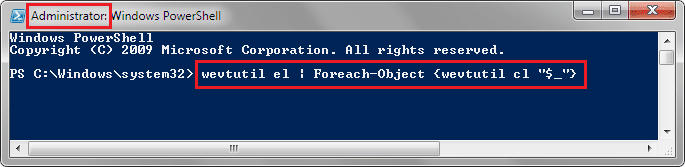
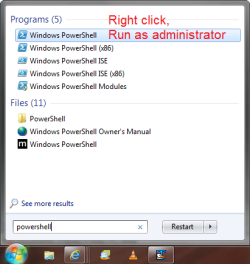
1. Open an elevated PowerShell prompt.

2. Copy and paste the command below into the PowerShell window, and press Enter.
wevtutil el | Foreach-Object {wevtutil cl "$_"}
EventViewer_PScmd.png
4. Wait for the script to finish, then you can close PowerShell if you like.

5. All events have been cleared.


This tutorial showed you how to clear all logs in Event Viewer, but you can use the wevtutil command to clear individual event logs.
Instead of using the el parameter and piping the list to Foreach-Object, you would use the cl parameter and the log name.

Copy the line following the specific event log and paste the wevtutil line (the bold line) into the PowerShell window.


To clear the
  • Application event log
    wevtutil cl Application

  • Security event log
    wevtutil cl Security

  • Setup event log
    wevtutil cl Setup

  • System event log
    wevtutil cl System
You can clear any of the Event logs the same way, all you have to know is the log name.
To get a full list of the log names, simply enter wevtutil el in the elevated PowerShell window.

Then you can use the cl parameter and the event log name to clear that specific event log (see the examples above).

   Note
There are two command parameters of wevtutil used in this section:
cl is the clear event log parameter
el is the event log list parameter

The results will be quite different if you use the wrong one. For any clear the log operation in this section, you will use the cl parameter.

   Tip
While unrelated to clearing Event Viewer logs, this tip does clean up one particular event. WMI error 10 is erroneoulsy logged in the application log after every reboot.
This is easy to fix with MS Fixit 50688 - scroll down on the MS Fixit page and click the Microsoft Fix it button.


Credits:
Joe Waldin: script source
Brink: tutorial housekeeping


Attachments
  • StartMenu_PowerShell.png
    StartMenu_PowerShell.png
    51.2 KB · Views: 13
Last edited:
Nice tutorial!
Does clearing event logs make a noticeable performance improvement or a significant decrease in space used on the C drive?
My OSs were installed 4+ years ago and I've never cleared logs.

Thanks,
David
 

My Computer

Computer type
PC/Desktop
Computer Manufacturer/Model Number
home built
OS
Multi-Boot W7_Pro_x64 W8.1_Pro_x64 W10_Pro_x64 +Linux_VMs +Chromium_VM
CPU
AMD Athlon II x4 620
Motherboard
Gigabyte GA-MA785G-UD3H
Memory
6GB GSkill DDR2 800
Graphics Card(s)
AMD 4670 GPU + AMD 4200 IGP
Sound Card
on board Realtek ALC889A
Monitor(s) Displays
RCA 40" LCD TV, Insignia 32" LCD TV, HP 15" LCD monitor
Screen Resolution
1680 x 1050
Hard Drives
OCZ Vertex 3 120GB,
Samsung F3 1TB (3),
Several others - WD, Seagate, Hitachi, ...
PSU
Corsair 500 W
Case
Rosewill mid tower
Cooling
CM 90mm rifle
Keyboard
Gyration wireless, Logitech wireless, Dell USB wired
Mouse
Gyration wireless, Logitech wireless, V7 USB wired
Internet Speed
Spectrum - 100Mbps D / 10Mbps U
Antivirus
Avast, MBAM3, EMET, WinPatrol
Browser
Pale Moon, Firefox, IE
Other Info
2 multi-boot PC's
Mainly HTPC/Office/Gen purpose (no gaming).
Trendnet USB KVM.
LG DVD burner/Blue Ray Player.
Tray system for removable SATA backup drives.

Not currently OCd, under-volted.
I use Hybrid sleep, rarely re-boot or shutdown.

Hauppauge HD-PVR, Avermedia PCIe TV Tuner, Hauppauge PCI TV Tuner.
Hey David,

It makes no difference in performance, and not much hard drive space would be regained. It's mostly just if you wanted to clear the logs. :)
 

My Computer

Computer type
PC/Desktop
Computer Manufacturer/Model Number
Self built custom
OS
64-bit Windows 11 Pro for Workstations
CPU
Intel i7-8700K OC'd to 5 GHz
Motherboard
ASUS ROG Maximus XI Formula Z390
Memory
64 GB (4x16GB) G.SKILL TridentZ RGB DDR4 3600 MHz
Graphics Card(s)
ASUS ROG-STRIX-GTX1080TI-O11G-GAMING
Sound Card
Integrated
Monitor(s) Displays
2 x Samsung Odyssey G7 27"
Screen Resolution
2560x1440
Hard Drives
1TB Samsung 990 PRO M.2,
4TB Samsung 990 PRO PRO M.2,
TerraMaster F8 SSD Plus NAS
PSU
Seasonic Prime Titanium 850W
Case
Thermaltake Core P3
Cooling
Corsair Hydro H115i
Keyboard
Logitech wireless K800
Mouse
Logitech MX Master 4
Internet Speed
2 Gb/s Download and 100 Mb/s Upload
Antivirus
Malwarebyte Anti-Malware Premium
Browser
Google Chrome
Other Info
Logitech Z625 speaker system,
Logitech BRIO 4K Pro webcam,
HP Color LaserJet Pro MFP M477fdn,
APC SMART-UPS RT 1000 XL - SURT1000XLI,
Galaxy S23 Plus phone
Thanks Shawn :)
 

My Computer

Computer type
PC/Desktop
Computer Manufacturer/Model Number
home built
OS
Multi-Boot W7_Pro_x64 W8.1_Pro_x64 W10_Pro_x64 +Linux_VMs +Chromium_VM
CPU
AMD Athlon II x4 620
Motherboard
Gigabyte GA-MA785G-UD3H
Memory
6GB GSkill DDR2 800
Graphics Card(s)
AMD 4670 GPU + AMD 4200 IGP
Sound Card
on board Realtek ALC889A
Monitor(s) Displays
RCA 40" LCD TV, Insignia 32" LCD TV, HP 15" LCD monitor
Screen Resolution
1680 x 1050
Hard Drives
OCZ Vertex 3 120GB,
Samsung F3 1TB (3),
Several others - WD, Seagate, Hitachi, ...
PSU
Corsair 500 W
Case
Rosewill mid tower
Cooling
CM 90mm rifle
Keyboard
Gyration wireless, Logitech wireless, Dell USB wired
Mouse
Gyration wireless, Logitech wireless, V7 USB wired
Internet Speed
Spectrum - 100Mbps D / 10Mbps U
Antivirus
Avast, MBAM3, EMET, WinPatrol
Browser
Pale Moon, Firefox, IE
Other Info
2 multi-boot PC's
Mainly HTPC/Office/Gen purpose (no gaming).
Trendnet USB KVM.
LG DVD burner/Blue Ray Player.
Tray system for removable SATA backup drives.

Not currently OCd, under-volted.
I use Hybrid sleep, rarely re-boot or shutdown.

Hauppauge HD-PVR, Avermedia PCIe TV Tuner, Hauppauge PCI TV Tuner.
Your welcome.
 

My Computer

Computer type
PC/Desktop
Computer Manufacturer/Model Number
Self built custom
OS
64-bit Windows 11 Pro for Workstations
CPU
Intel i7-8700K OC'd to 5 GHz
Motherboard
ASUS ROG Maximus XI Formula Z390
Memory
64 GB (4x16GB) G.SKILL TridentZ RGB DDR4 3600 MHz
Graphics Card(s)
ASUS ROG-STRIX-GTX1080TI-O11G-GAMING
Sound Card
Integrated
Monitor(s) Displays
2 x Samsung Odyssey G7 27"
Screen Resolution
2560x1440
Hard Drives
1TB Samsung 990 PRO M.2,
4TB Samsung 990 PRO PRO M.2,
TerraMaster F8 SSD Plus NAS
PSU
Seasonic Prime Titanium 850W
Case
Thermaltake Core P3
Cooling
Corsair Hydro H115i
Keyboard
Logitech wireless K800
Mouse
Logitech MX Master 4
Internet Speed
2 Gb/s Download and 100 Mb/s Upload
Antivirus
Malwarebyte Anti-Malware Premium
Browser
Google Chrome
Other Info
Logitech Z625 speaker system,
Logitech BRIO 4K Pro webcam,
HP Color LaserJet Pro MFP M477fdn,
APC SMART-UPS RT 1000 XL - SURT1000XLI,
Galaxy S23 Plus phone
Thanks David,

Shawn is right... no performance boost or even significant space reclamation.

Reading logs is an art - clearing the logs simply removes ancient history. The MS Fixit tip at the bottom is probably more important to me because it stops a bogus error log so I don't have to think "Hey there's an error.... is it important? Nah, it's just that WMI 10 log entry..." The entries for WMI 10 are still there until you clear the event logs.

The real trick is NOT clearing the logs too often - you might lose that key piece of information.

Rule of thumb: if your system is stable and has been for a while - clear the logs. In a year or two, same conditions, clear the logs again. This really isn't something you have to do on a regular basis.

Bill
.
 

My Computer

Computer type
Laptop
Computer Manufacturer/Model Number
HP Pavilion dv6-6c10us
OS
x64 (6.3.9600) Win8.1 Pro & soon dual boot x64 (6.1.7601) Win7_SP1 HomePrem
CPU
AMD A6-3420M APU with Radeon(tm) HD Graphics
Motherboard
Hewlett-Packard 1805
Memory
6.00 GB
Graphics Card(s)
AMD Radeon(TM) HD 6520G
Sound Card
(1) AMD High Definition Audio Device (2) IDT High Definiti
Monitor(s) Displays
HP W2072a 20" LCD (1600 x 900) @ 60 Hz
Screen Resolution
1366 x 768 x 32 bits (4294967296 colors) @ 60 Hz
Hard Drives
ST640LM0 00 HM641JI SATA Disk Device
Keyboard
Logitech k520 wireless KB
Mouse
Logitech m320 wireless mouse (bundled with KB)
Internet Speed
15/5 | 54 MB Wireless 'n'
Antivirus
Realtime: Defender or Avast | On-demand: Malwarebytes, ESET
Browser
IE 11 on Win8, IE 10 on win 7
Other Info
Media: [Gimp, Audacity, VLC] || Comm: [WEmail 2012, Skype] || Productivity: [OpenOffice,| Textpad] || Utils: [Sysinternals, cCleaner, Speccy, Defraggler]
Thanks for the info.
My systems are stable. No problems with updates, no crashes, etc.
I just know as soon as I clear the logs something will happen, and I'll wish I had the history. :p
 

My Computer

Computer type
PC/Desktop
Computer Manufacturer/Model Number
home built
OS
Multi-Boot W7_Pro_x64 W8.1_Pro_x64 W10_Pro_x64 +Linux_VMs +Chromium_VM
CPU
AMD Athlon II x4 620
Motherboard
Gigabyte GA-MA785G-UD3H
Memory
6GB GSkill DDR2 800
Graphics Card(s)
AMD 4670 GPU + AMD 4200 IGP
Sound Card
on board Realtek ALC889A
Monitor(s) Displays
RCA 40" LCD TV, Insignia 32" LCD TV, HP 15" LCD monitor
Screen Resolution
1680 x 1050
Hard Drives
OCZ Vertex 3 120GB,
Samsung F3 1TB (3),
Several others - WD, Seagate, Hitachi, ...
PSU
Corsair 500 W
Case
Rosewill mid tower
Cooling
CM 90mm rifle
Keyboard
Gyration wireless, Logitech wireless, Dell USB wired
Mouse
Gyration wireless, Logitech wireless, V7 USB wired
Internet Speed
Spectrum - 100Mbps D / 10Mbps U
Antivirus
Avast, MBAM3, EMET, WinPatrol
Browser
Pale Moon, Firefox, IE
Other Info
2 multi-boot PC's
Mainly HTPC/Office/Gen purpose (no gaming).
Trendnet USB KVM.
LG DVD burner/Blue Ray Player.
Tray system for removable SATA backup drives.

Not currently OCd, under-volted.
I use Hybrid sleep, rarely re-boot or shutdown.

Hauppauge HD-PVR, Avermedia PCIe TV Tuner, Hauppauge PCI TV Tuner.
BAT file for lazy people...

@echo off
FOR /F "tokens=1,2*" %%V IN ('bcdedit') DO SET adminTest=%%V
IF (%adminTest%)==(Access) goto noAdmin
for /F "tokens=*" %%G in ('wevtutil.exe el') DO (call :do_clear "%%G")
echo.
echo goto theEnd
:do_clear
echo clearing %1
wevtutil.exe cl %1
goto :eof
:noAdmin
exit


Copy to Notepad and save as *.BAT

Double click to run BAT files.

All logs cleared.
 

My Computer

Computer Manufacturer/Model Number
Titan Onyx i7 920 Overclockers UK
OS
Windows 7 Ultimate 64bit
CPU
Intel Core i7 920 overclocked to 4.00ghz
Motherboard
Asus P6T Deluxe
Memory
6gb Corsair DDR3
Graphics Card(s)
Radeon HD 5850
Sound Card
Onboard
Monitor(s) Displays
ProLite E2407HDS
Screen Resolution
1920 x 1080
Hard Drives
System Drive: Crucial CT128M4SSD
Data Drive: Hitachi HDE721010SLA330 1 TB SATA II Hard Drive
PSU
OCZ600
Cooling
Air
Keyboard
G11
Mouse
MX518
Internet Speed
20mb

My Computer

Computer type
Laptop
Computer Manufacturer/Model Number
HP Pavilion dv6-6c10us
OS
x64 (6.3.9600) Win8.1 Pro & soon dual boot x64 (6.1.7601) Win7_SP1 HomePrem
CPU
AMD A6-3420M APU with Radeon(tm) HD Graphics
Motherboard
Hewlett-Packard 1805
Memory
6.00 GB
Graphics Card(s)
AMD Radeon(TM) HD 6520G
Sound Card
(1) AMD High Definition Audio Device (2) IDT High Definiti
Monitor(s) Displays
HP W2072a 20" LCD (1600 x 900) @ 60 Hz
Screen Resolution
1366 x 768 x 32 bits (4294967296 colors) @ 60 Hz
Hard Drives
ST640LM0 00 HM641JI SATA Disk Device
Keyboard
Logitech k520 wireless KB
Mouse
Logitech m320 wireless mouse (bundled with KB)
Internet Speed
15/5 | 54 MB Wireless 'n'
Antivirus
Realtime: Defender or Avast | On-demand: Malwarebytes, ESET
Browser
IE 11 on Win8, IE 10 on win 7
Other Info
Media: [Gimp, Audacity, VLC] || Comm: [WEmail 2012, Skype] || Productivity: [OpenOffice,| Textpad] || Utils: [Sysinternals, cCleaner, Speccy, Defraggler]
When I try this it says "Fails to clear log...The requested operation cannot be performed over an enabled direct channel".
 

My Computer

Computer type
Laptop
Computer Manufacturer/Model Number
Acer Aspire 6930G
OS
W7 Home Premium x86 SP1 Build 7601
CPU
Intel Mobile Core 2 Duo P7450 @ 2.13GHz
Motherboard
Acer Makalu U2E1
Memory
4.00GB Dual-Channel DDR2 @ 332MH
Graphics Card(s)
1024MB NVIDIA GeForce 9600M GT
Monitor(s) Displays
Generic PnP
Screen Resolution
1024x768@60Hz
Hard Drives
298GB Western Digital WDC WD3200BEVT-22ZCT0 (SATA)
Antivirus
Kaspersky Security Cloud Free / VoodooShield
Browser
Brave / Firefox
Other Info
uBlockOrigin / Bidefender Trafficlight / HitmanPro
Back
Top