Event Viewer One Click Clear

How to Clear Event Viewer with One Click in Windows


   Information
This will show you how to create a command line shortcut that will clear all of the Event Viewer logs in one click.


Here is a batch file that can help you clear the event viewer in one click.

Download


Download this file above..

Unzip on your desktop.

You can use the task scheduler to give it a high priority so you won't get a UAC prompt

See Brink's Tip HERE

Or, just copy this script and paste in notepad and save as Clean Viewer.BAT

Right click, and click on Run as administrator to run the file
Code:
@echo off
FOR /F "tokens=1,2*" %%V IN ('bcdedit') DO SET adminTest=%%V
IF (%adminTest%)==(Access) goto noAdmin
for /F "tokens=*" %%G in ('wevtutil.exe el') DO (call :do_clear "%%G")
echo.
echo goto theEnd
:do_clear
echo clearing %1
wevtutil.exe cl %1
goto :eof
:noAdmin
exit

:geek:


Last edited by a moderator:
Have used the useful script many times.

There are 5 types of Events - Critical/ Error/ Warning/ Information/ Audit Success

Any method that we can retain, say, Critical and, maybe, Error, that are crucial for diagnosing problems in future, and can delete rest of the types that are informative?

How can we just stop Audit success type of events from getting recorded in event logs?

Thanks.
--
 

My Computer My Computer

Computer Manufacturer/Model Number
assembled locally.
OS
Windows 7 Ultimate x86/x64 dual boot
CPU
Intel(R) Pentium(R) Dual CPU E2180 @ 2.00GHz
Motherboard
ASUSTeK Computer INC. Model P5G-MX
Memory
2GB DDR2
Graphics Card(s)
Intel 82945G Express Chipset Family v 8.15.10.1930
Sound Card
Realtek High Definition Audio 2.65 v6..0.1.6449
Monitor(s) Displays
LG Flatron W1943S
Screen Resolution
1360*760
Hard Drives
Seagate SATA 250 GB, Seagate IDE 40 GB
PSU
beetel ATX
Case
Intex
Cooling
?
Keyboard
zebronics K06 non-multimedia
Mouse
zebronics M05
Internet Speed
3.1 Mbps reliance broadband+ (it crowls mostly)
VBS Version

First of all, thanks for the great batch files. Just wanted to add a VBS version that I created to do the same in case anyone was interested in it.

Please note, this does not have any checking for Admin rights, but that is since I usually have these running via a Software Delivery System (MDT, SCCM, etc) or are part of my MDT Applications.


Code:
On Error Resume Next

'Define and configure objects
Set WshShell = CreateObject("WScript.Shell")
Set WshShellExec = WshShell.Exec("%ComSpec% /C WEvtUtil.exe EL")
WshShellExecOutPut = WshShellExec.StdOut.ReadAll

'Read each line and clear the event logs 
For Each EventLog in Split (WshShellExecOutPut, VBNewLine)
    WScript.Echo "Clearing: " & EventLog
    WshShell.Run "WEvtUtil.exe CL " & EventLog, 0, TRUE
Next
 

My Computer My Computer

OS
Windows 7 Professional x64
Hello Mirfster, and welcome to Seven Forums.

No problem. Here's your .vbs with a UAC prompt for elevation added to it. :)

Code:
'UAC prompt for elevation
If WScript.Arguments.Count = 0 Then
     Set objShell = CreateObject("Shell.Application")
     objShell.ShellExecute "wscript.exe", Chr(34) & WScript.ScriptFullName & Chr(34) & " Run", , "runas", 1
Else
 
On Error Resume Next
 
'Define and configure objects
Set WshShell = CreateObject("WScript.Shell")
Set WshShellExec = WshShell.Exec("%ComSpec% /C WEvtUtil.exe EL")
WshShellExecOutPut = WshShellExec.StdOut.ReadAll
 
'Read each line and clear the event logs 
For Each EventLog in Split (WshShellExecOutPut, VBNewLine)
    [B][COLOR=red]WScript.Echo "Clearing: " & EventLog[/COLOR][/B]
    WshShell.Run "WEvtUtil.exe CL " & EventLog, 0, TRUE
Next
 
End If
 
Last edited:

My Computer My Computer

Computer type
PC/Desktop
Computer Manufacturer/Model Number
Self built custom
OS
64-bit Windows 11 Pro for Workstations
CPU
Intel i7-8700K OC'd to 5 GHz
Motherboard
ASUS ROG Maximus XI Formula Z390
Memory
64 GB (4x16GB) G.SKILL TridentZ RGB DDR4 3600 MHz
Graphics Card(s)
ASUS ROG-STRIX-GTX1080TI-O11G-GAMING
Sound Card
Integrated
Monitor(s) Displays
2 x Samsung Odyssey G7 27"
Screen Resolution
2560x1440
Hard Drives
1TB Samsung 990 PRO M.2,
4TB Samsung 990 PRO PRO M.2,
TerraMaster F8 SSD Plus NAS
PSU
Seasonic Prime Titanium 850W
Case
Thermaltake Core P3
Cooling
Corsair Hydro H115i
Keyboard
Logitech wireless K800
Mouse
Logitech MX Master 4
Internet Speed
2 Gb/s Download and 100 Mb/s Upload
Antivirus
Malwarebyte Anti-Malware Premium
Browser
Google Chrome
Other Info
Logitech Z625 speaker system,
Logitech BRIO 4K Pro webcam,
HP Color LaserJet Pro MFP M477fdn,
APC SMART-UPS RT 1000 XL - SURT1000XLI,
Galaxy S23 Plus phone
Thanks Brink, that is a nice addition. :)
 

My Computer My Computer

OS
Windows 7 Professional x64
You're welcome.

I'd recommend to remove the line below to not have to click on OK for each log cleared. Only a few million of them.

Code:
WScript.Echo "Clearing: " & EventLog


Maybe this instead:

Code:
'UAC prompt for elevation
If WScript.Arguments.Count = 0 Then
     Set objShell = CreateObject("Shell.Application")
     objShell.ShellExecute "wscript.exe", Chr(34) & WScript.ScriptFullName & Chr(34) & " Run", , "runas", 1
Else
 
On Error Resume Next

'Define and configure objects
Set WshShell = CreateObject("WScript.Shell")
Set WshShellExec = WshShell.Exec("%ComSpec% /C WEvtUtil.exe EL")
WshShellExecOutPut = WshShellExec.StdOut.ReadAll

'Read each line and clear the event logs 
For Each EventLog in Split (WshShellExecOutPut, VBNewLine)
        WshShell.Run "WEvtUtil.exe CL " & EventLog, 0, TRUE
Next
 
End If
 
[B][COLOR=red]MsgBox "Event Viewer logs have been successfully cleared."[/COLOR][/B]
 

My Computer My Computer

Computer type
PC/Desktop
Computer Manufacturer/Model Number
Self built custom
OS
64-bit Windows 11 Pro for Workstations
CPU
Intel i7-8700K OC'd to 5 GHz
Motherboard
ASUS ROG Maximus XI Formula Z390
Memory
64 GB (4x16GB) G.SKILL TridentZ RGB DDR4 3600 MHz
Graphics Card(s)
ASUS ROG-STRIX-GTX1080TI-O11G-GAMING
Sound Card
Integrated
Monitor(s) Displays
2 x Samsung Odyssey G7 27"
Screen Resolution
2560x1440
Hard Drives
1TB Samsung 990 PRO M.2,
4TB Samsung 990 PRO PRO M.2,
TerraMaster F8 SSD Plus NAS
PSU
Seasonic Prime Titanium 850W
Case
Thermaltake Core P3
Cooling
Corsair Hydro H115i
Keyboard
Logitech wireless K800
Mouse
Logitech MX Master 4
Internet Speed
2 Gb/s Download and 100 Mb/s Upload
Antivirus
Malwarebyte Anti-Malware Premium
Browser
Google Chrome
Other Info
Logitech Z625 speaker system,
Logitech BRIO 4K Pro webcam,
HP Color LaserJet Pro MFP M477fdn,
APC SMART-UPS RT 1000 XL - SURT1000XLI,
Galaxy S23 Plus phone
Actually, I just left that in there so that when it is being ran via "CScript.exe" it shows progress. The code I provided is actually a snippet from my VBS that I use to prepare my base image.

I see what you mean though if it were to be launched via "WScript.exe".
 

My Computer My Computer

OS
Windows 7 Professional x64
Hi Everyone,

Has a final and best version been decided?

Thank You
 

My Computer My Computer

Computer type
PC/Desktop
Computer Manufacturer/Model Number
Master Control (25 plus year old custom build)
OS
Windows 7 Premium 64 Bit
CPU
Opteron 185
Motherboard
DFI Lanparty N4 Ultra-d
Memory
4 gig OCZ High Performance Dual Channel @ 500 Mhz
Graphics Card(s)
ATI Radeon HD 5450 (Direct X11)
Sound Card
Creative SB Audigy Audio 2 ZS
Monitor(s) Displays
Dell 2208WFP (Digital)
Screen Resolution
1680 x 1050
Hard Drives
Plextor M3 Pro 128 Gb Sata 6 SSD (Main)

Western Digital Blue 320 Gb IDE 7200 RPM Internal Daily (Backup Drive)

Western Digital 2 TB RE4 SATA 3 Gb/s 7200 RPM 64 MB Cache Enterprise Hard Drive (External Data & Backup Drive).
PSU
OCZ GameXStream 850 Watt PSU.
Case
Antec Performance Series
Cooling
Working on it.
Keyboard
Saitek Eclipse II
Mouse
Kensington SlimBlade
Internet Speed
50 Gb
Antivirus
Microsoft Security Essentials
Browser
From Netscape to Internet Explorer.
Other Info
Got a mix of old and new hardware. Sound card hooked up to a 250 watt per channel Harman Kardon Amp to a pair of Dak 5 way old school acoustically suspended speakers.
Hello Rockit,

Either option in the tutorial does the same thing. It's just a matter of which one you would like to use. :)
 

My Computer My Computer

Computer type
PC/Desktop
Computer Manufacturer/Model Number
Self built custom
OS
64-bit Windows 11 Pro for Workstations
CPU
Intel i7-8700K OC'd to 5 GHz
Motherboard
ASUS ROG Maximus XI Formula Z390
Memory
64 GB (4x16GB) G.SKILL TridentZ RGB DDR4 3600 MHz
Graphics Card(s)
ASUS ROG-STRIX-GTX1080TI-O11G-GAMING
Sound Card
Integrated
Monitor(s) Displays
2 x Samsung Odyssey G7 27"
Screen Resolution
2560x1440
Hard Drives
1TB Samsung 990 PRO M.2,
4TB Samsung 990 PRO PRO M.2,
TerraMaster F8 SSD Plus NAS
PSU
Seasonic Prime Titanium 850W
Case
Thermaltake Core P3
Cooling
Corsair Hydro H115i
Keyboard
Logitech wireless K800
Mouse
Logitech MX Master 4
Internet Speed
2 Gb/s Download and 100 Mb/s Upload
Antivirus
Malwarebyte Anti-Malware Premium
Browser
Google Chrome
Other Info
Logitech Z625 speaker system,
Logitech BRIO 4K Pro webcam,
HP Color LaserJet Pro MFP M477fdn,
APC SMART-UPS RT 1000 XL - SURT1000XLI,
Galaxy S23 Plus phone
Just the thing I was looking for, thanks!
 

My Computer My Computer

Computer type
PC/Desktop
Computer Manufacturer/Model Number
Custom Build/Mod
OS
Windows 7 Home Premium x64
CPU
Intel QX9650 Extreme 4.0 GHz
Motherboard
ASUS Rampage Extreme Rev2
Memory
8GB (4x2) Corsair Dominator DDR3
Graphics Card(s)
2x Radeon R390X [8GB]
Sound Card
SupremeFX X-Fi
Monitor(s) Displays
Dell 2408WFP 26" Panel
Screen Resolution
1920x1200
Hard Drives
4x WD 2TB (8TB+ Total)
2x Crucial SSD 128GB (RAID-0)
1x LG Blu-ray read/write
1x Phillips LightScribe DVD read/write
PSU
Corsair HX1000
Case
CoolerMaster - Cosmos S
Cooling
Custom Liquid - 320mm rad w/ 3x 80mm fans, CPU/NB/SB Blocks
Keyboard
Logitech Illuminater Pro
Mouse
Logitech
Internet Speed
Fractional T1 - 125Mbps
Antivirus
ESET Security Suite / Microsoft Security Essentials
Browser
Cyberfox Intel x64
Other Info
OC'd to 5.0GHz @ 44c under full load
Great tool, thanks very much. I've become a bit OCD about no errors on boot up, so this really comes in handy :)
 

My Computer My Computer

Computer type
PC/Desktop
Computer Manufacturer/Model Number
Custom Build
OS
Windows 7 Ultimate x64
CPU
i7-3770k
Motherboard
Asrock Z77 Extreme4
Memory
Crucial Ballistix (2 x 8gb)
Graphics Card(s)
Zotac GTX 660
Sound Card
On board Realtek HD
Monitor(s) Displays
LG L246WP
Screen Resolution
1920 x 1200
Hard Drives
Samsung 840 Pro (256gb)
WD 1tb Blue
PSU
SeaSonic 500w
Cooling
Cooler Master Hyper 212 Evo
Keyboard
Logitech MK550
Mouse
Evoluent Vertical Mouse
Antivirus
AVG
Browser
Coolnovo
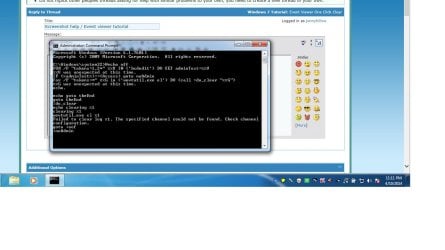
Used the Event viewer tutorial to clear logs/ have question.

Ho folks , I have another thread but it's not the same question, I followed the Event viewer tutorial but got the below result.

Any ideas

Thank you
 

Attachments

  • Untitled.jpg
    Untitled.jpg
    84.4 KB · Views: 324

My Computer My Computer

Computer type
Laptop
Computer Manufacturer/Model Number
Asus laptop U56E
OS
Microsoft Windows 7 Home Premium 64-bit 7601 Multiprocessor Free Service Pack 1
CPU
Intel(R) Core(TM) i5-2430M CPU @ 2.40GHz
Motherboard
ASUSTeK Computer Inc. U56E
Memory
6.00 GB
Graphics Card(s)
Intel(R) HD Graphics 3000
Sound Card
(1) High Definition Audio Device (2) High Definition Audio
Screen Resolution
1366 x 768 x 32 bits (4294967296 colors) @ 60 Hz
Hard Drives
WDC WD6400BPVT-80HXZT3
Have tried this bat file (as admin) with no success, anyone got a script that will work, thanks
 

My Computer My Computer

Computer type
PC/Desktop
Computer Manufacturer/Model Number
Custom Build
OS
Win 7 Pro 64 Bit
CPU
amd 955 be
Motherboard
Gigabyte 990
Memory
8gb
Graphics Card(s)
HD7790
Hard Drives
SSD 120. Seagate 2TB, Toshiba 1 TB
PSU
750Watt
Internet Speed
Slow
Antivirus
Eset
Browser
IE 11, Firefox
Hello sgmdew, and welcome to Seven Forums.

What issue did you have?

Did you run the .bat using Run as administrator?
 

My Computer My Computer

Computer type
PC/Desktop
Computer Manufacturer/Model Number
Self built custom
OS
64-bit Windows 11 Pro for Workstations
CPU
Intel i7-8700K OC'd to 5 GHz
Motherboard
ASUS ROG Maximus XI Formula Z390
Memory
64 GB (4x16GB) G.SKILL TridentZ RGB DDR4 3600 MHz
Graphics Card(s)
ASUS ROG-STRIX-GTX1080TI-O11G-GAMING
Sound Card
Integrated
Monitor(s) Displays
2 x Samsung Odyssey G7 27"
Screen Resolution
2560x1440
Hard Drives
1TB Samsung 990 PRO M.2,
4TB Samsung 990 PRO PRO M.2,
TerraMaster F8 SSD Plus NAS
PSU
Seasonic Prime Titanium 850W
Case
Thermaltake Core P3
Cooling
Corsair Hydro H115i
Keyboard
Logitech wireless K800
Mouse
Logitech MX Master 4
Internet Speed
2 Gb/s Download and 100 Mb/s Upload
Antivirus
Malwarebyte Anti-Malware Premium
Browser
Google Chrome
Other Info
Logitech Z625 speaker system,
Logitech BRIO 4K Pro webcam,
HP Color LaserJet Pro MFP M477fdn,
APC SMART-UPS RT 1000 XL - SURT1000XLI,
Galaxy S23 Plus phone

My Computer My Computer

Computer type
Laptop
Computer Manufacturer/Model Number
HP Pavilion dv6-6c10us
OS
x64 (6.3.9600) Win8.1 Pro & soon dual boot x64 (6.1.7601) Win7_SP1 HomePrem
CPU
AMD A6-3420M APU with Radeon(tm) HD Graphics
Motherboard
Hewlett-Packard 1805
Memory
6.00 GB
Graphics Card(s)
AMD Radeon(TM) HD 6520G
Sound Card
(1) AMD High Definition Audio Device (2) IDT High Definiti
Monitor(s) Displays
HP W2072a 20" LCD (1600 x 900) @ 60 Hz
Screen Resolution
1366 x 768 x 32 bits (4294967296 colors) @ 60 Hz
Hard Drives
ST640LM0 00 HM641JI SATA Disk Device
Keyboard
Logitech k520 wireless KB
Mouse
Logitech m320 wireless mouse (bundled with KB)
Internet Speed
15/5 | 54 MB Wireless 'n'
Antivirus
Realtime: Defender or Avast | On-demand: Malwarebytes, ESET
Browser
IE 11 on Win8, IE 10 on win 7
Other Info
Media: [Gimp, Audacity, VLC] || Comm: [WEmail 2012, Skype] || Productivity: [OpenOffice,| Textpad] || Utils: [Sysinternals, cCleaner, Speccy, Defraggler]
Hello sgmdew, and welcome to Seven Forums.

What issue did you have?

Did you run the .bat using Run as administrator?


Ran as admin, tried the wevtutil.exe, powershell, and all other bat files I could find but none clear my event viewer or other logs. It must be something wrong that I can't delete any of the logs information, thanks.
 

My Computer My Computer

Computer type
PC/Desktop
Computer Manufacturer/Model Number
Custom Build
OS
Win 7 Pro 64 Bit
CPU
amd 955 be
Motherboard
Gigabyte 990
Memory
8gb
Graphics Card(s)
HD7790
Hard Drives
SSD 120. Seagate 2TB, Toshiba 1 TB
PSU
750Watt
Internet Speed
Slow
Antivirus
Eset
Browser
IE 11, Firefox
Are you getting an error message?
 

My Computer My Computer

Computer type
PC/Desktop
Computer Manufacturer/Model Number
Self built custom
OS
64-bit Windows 11 Pro for Workstations
CPU
Intel i7-8700K OC'd to 5 GHz
Motherboard
ASUS ROG Maximus XI Formula Z390
Memory
64 GB (4x16GB) G.SKILL TridentZ RGB DDR4 3600 MHz
Graphics Card(s)
ASUS ROG-STRIX-GTX1080TI-O11G-GAMING
Sound Card
Integrated
Monitor(s) Displays
2 x Samsung Odyssey G7 27"
Screen Resolution
2560x1440
Hard Drives
1TB Samsung 990 PRO M.2,
4TB Samsung 990 PRO PRO M.2,
TerraMaster F8 SSD Plus NAS
PSU
Seasonic Prime Titanium 850W
Case
Thermaltake Core P3
Cooling
Corsair Hydro H115i
Keyboard
Logitech wireless K800
Mouse
Logitech MX Master 4
Internet Speed
2 Gb/s Download and 100 Mb/s Upload
Antivirus
Malwarebyte Anti-Malware Premium
Browser
Google Chrome
Other Info
Logitech Z625 speaker system,
Logitech BRIO 4K Pro webcam,
HP Color LaserJet Pro MFP M477fdn,
APC SMART-UPS RT 1000 XL - SURT1000XLI,
Galaxy S23 Plus phone

My Computer My Computer

Computer type
PC/Desktop
Computer Manufacturer/Model Number
Custom Build
OS
Win 7 Pro 64 Bit
CPU
amd 955 be
Motherboard
Gigabyte 990
Memory
8gb
Graphics Card(s)
HD7790
Hard Drives
SSD 120. Seagate 2TB, Toshiba 1 TB
PSU
750Watt
Internet Speed
Slow
Antivirus
Eset
Browser
IE 11, Firefox
I'm not sure why the downloaded .bat is not clearing the Event Viewer logs for you. :confused:

I just downloaded the .zip file, extracted (drag and drop) the .bat to my desktop, right clicked on the .bat, clicked on "Run as administrator", and approved.

It cleared all logs in Event Viewer minus the 5 new entries in "Windows Logs" -> "System" showing the log clear, and any new entries afterwards.
 

My Computer My Computer

Computer type
PC/Desktop
Computer Manufacturer/Model Number
Self built custom
OS
64-bit Windows 11 Pro for Workstations
CPU
Intel i7-8700K OC'd to 5 GHz
Motherboard
ASUS ROG Maximus XI Formula Z390
Memory
64 GB (4x16GB) G.SKILL TridentZ RGB DDR4 3600 MHz
Graphics Card(s)
ASUS ROG-STRIX-GTX1080TI-O11G-GAMING
Sound Card
Integrated
Monitor(s) Displays
2 x Samsung Odyssey G7 27"
Screen Resolution
2560x1440
Hard Drives
1TB Samsung 990 PRO M.2,
4TB Samsung 990 PRO PRO M.2,
TerraMaster F8 SSD Plus NAS
PSU
Seasonic Prime Titanium 850W
Case
Thermaltake Core P3
Cooling
Corsair Hydro H115i
Keyboard
Logitech wireless K800
Mouse
Logitech MX Master 4
Internet Speed
2 Gb/s Download and 100 Mb/s Upload
Antivirus
Malwarebyte Anti-Malware Premium
Browser
Google Chrome
Other Info
Logitech Z625 speaker system,
Logitech BRIO 4K Pro webcam,
HP Color LaserJet Pro MFP M477fdn,
APC SMART-UPS RT 1000 XL - SURT1000XLI,
Galaxy S23 Plus phone
I'm not sure why the downloaded .bat is not clearing the Event Viewer logs for you. :confused:

I just downloaded the .zip file, extracted (drag and drop) the .bat to my desktop, right clicked on the .bat, clicked on "Run as administrator", and approved.

It cleared all logs in Event Viewer minus the 5 new entries in "Windows Logs" -> "System" showing the log clear, and any new entries afterwards.

Well it is not clearing mine so was looking for something else to do; running the wevtutil cmd came up with not a valid cmd name. At a loss on how to clean the logs out other than manually but admin log still full.
 

My Computer My Computer

Computer type
PC/Desktop
Computer Manufacturer/Model Number
Custom Build
OS
Win 7 Pro 64 Bit
CPU
amd 955 be
Motherboard
Gigabyte 990
Memory
8gb
Graphics Card(s)
HD7790
Hard Drives
SSD 120. Seagate 2TB, Toshiba 1 TB
PSU
750Watt
Internet Speed
Slow
Antivirus
Eset
Browser
IE 11, Firefox
Last edited:

My Computer My Computer

Computer type
Laptop
Computer Manufacturer/Model Number
ASUS
OS
Microsoft Windows 7 Home Premium 64-bit 7601 Multiprocessor Free Service Pack 1
CPU
AMD C-60 APU with Radeon(tm) HD Graphics
Motherboard
ASUSTeK COMPUTER INC. X501U
Memory
4.00 GB
Graphics Card(s)
AMD Radeon HD 6290 Graphics
Sound Card
(1) AMD High Definition Audio Device (2) Realtek High Defi
Screen Resolution
1366 x 768 x 32 bits (4294967296 colors) @ 60 Hz
Hard Drives
Hitachi HTS545050A7E380 SATA Disk Device
Antivirus
Comodo CIS & FW, SecureAplus App Whitelisting, Threatfire
Browser
Cyberfox 64bit, Opera 64bit, Airfox
Other Info
Spy-The-Spy, HitmanPro.Alert, Norton Connect Safe, MJRegWatcher, BitDefender TrafficLight, Voodoo Shield, Zemana AntiMalware
Back
Top