Event Viewer?

FredeGail

It's full of stars
Guru
Gold Member
Local time
11:34 PM
Messages
2,360
Location
Denmark
Hello,

I get a lot of errors in Event Viewers now a days. Most of them is warnings and a couple of them is errors. I'll post them when I know more.

My currently question is just: Should I really care about Event Viewer?
Ofc, I have a couple of problem with my computer time to time. But anyway, it is working. The errors is something like Windows is booting up slower than normal because of some applications. We're only talking 3 sec.

As well, I post the errors and we'll see if it's some critical stuff. But please answer the question by far :D

Thanks!
 

My Computer

Computer Manufacturer/Model Number
Brewed
OS
Microsoft Windows 7 Ultimate: x64 (SP1)
CPU
Intel® Core™ i5-2500K Processor
Motherboard
ASUS P8Z68-V PRO
Memory
Kingston DDR3 HyperX 1600MHz 8GB
Graphics Card(s)
ASUS GTX 560 TI DirectCU II 900MHz
Sound Card
Realtek® ALC892 8-Channel High Definition Audio CODEC
Monitor(s) Displays
ACER LCD P246HBD 1920x1080 (24") - Dell 1280x800
Screen Resolution
ACER LCD P246HBD ~ [1920X1080] - DELL ~ [1280x800]
Hard Drives
500 GB WD Caviar SE116 7200rpm SATA2
PSU
Corsair 750W Power Supply
Case
Coolermaster CM Scout
Cooling
Zalman FS-C77 Fatal1ty CPU Cooler
Keyboard
Logitech G15
Mouse
Coolermaster Sentinel Advanced
Internet Speed
[↓ 10 MB/s DL] [↑ 1 MB/s UL]
Other Info
- ROCCAT™ Kave – Solid 5.1 Surround Sound Gaming Headset
- Not overclocking
For the vast majority of users event viewer is irrelevant.

For people who want to know more about what their machines are doing, or technicians trying to troubleshoot various faults, then it is useful.

Regards....Mike Connor
 

My Computer

OS
Several, including Windows 7 x64 Ultimate
Okay nice thanks. Have another problem for you taken from my post at Nvidia un-answered:
---------------------------------------------------
Graphic Card: Nvidia GTX 260

My problem is quite simple, I think:
I'm playing World of Warcraft, and each 10th second, I'm going to have 58fps instead of my 60fps. This isn't a lot, but believe me, you can feel it a lot. I have all the latest drivers. I just installed everything.

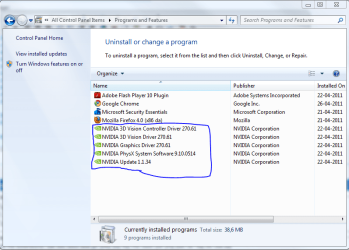
  • The Driver itself
  • PhysicX
  • Nvidia Control Panel
  • Nvidia Updater
  • 3D driver thing

Also, I reinstalled Windows 7 Enterprise 32-bit 3 times with my World of Warcraft installed on the other hard disk Windows isn't on. So the WoW folder has been through a lot.

I have tried to delete my Cache folders and my WTF folder. At the moment I have V-Sync enabled (if I disable it will lag), and triple buffering on.

My Nvidia Control panel is starting when Windows 7 is booting. Just a detail.
I was thinking that, in my Event Viewer, I had lots of errors. Maybe the errors cause the lag because they're "incomming" like each freaking second.
So main problem again; I jump to 58fps (lots of lag) :)

Hope I didn't made this too complicated
 

My Computer

Computer Manufacturer/Model Number
Brewed
OS
Microsoft Windows 7 Ultimate: x64 (SP1)
CPU
Intel® Core™ i5-2500K Processor
Motherboard
ASUS P8Z68-V PRO
Memory
Kingston DDR3 HyperX 1600MHz 8GB
Graphics Card(s)
ASUS GTX 560 TI DirectCU II 900MHz
Sound Card
Realtek® ALC892 8-Channel High Definition Audio CODEC
Monitor(s) Displays
ACER LCD P246HBD 1920x1080 (24") - Dell 1280x800
Screen Resolution
ACER LCD P246HBD ~ [1920X1080] - DELL ~ [1280x800]
Hard Drives
500 GB WD Caviar SE116 7200rpm SATA2
PSU
Corsair 750W Power Supply
Case
Coolermaster CM Scout
Cooling
Zalman FS-C77 Fatal1ty CPU Cooler
Keyboard
Logitech G15
Mouse
Coolermaster Sentinel Advanced
Internet Speed
[↓ 10 MB/s DL] [↑ 1 MB/s UL]
Other Info
- ROCCAT™ Kave – Solid 5.1 Surround Sound Gaming Headset
- Not overclocking
Are you using the 90 day trial of Windows 7 Enterprise ?
 

My Computer

Computer type
PC/Desktop
Computer Manufacturer/Model Number
Bruce ... somewhere in his 40's
OS
Windows 7 Ultimate 32bit SP1
CPU
Intel(R) Core(TM)2 Quad CPU @ 2.40GHz, 2400 MHz
Motherboard
INTEL/D975XBX2
Memory
4 GB
Graphics Card(s)
ATI Radeon HD 2600 Pro
Monitor(s) Displays
Samsung SyncMaster 914v
Screen Resolution
1280 x 1024
Hard Drives
2/500GB each ... ST3500630AS ATA Device.
One is not connected
PSU
Rocketfish 700 W
Case
G.Skill Gigabyte Chassis
Keyboard
Standard PS/2 Keyboard
Mouse
Microsoft PS/2 Mouse
Internet Speed
DSL
Antivirus
Avira Internet Security
Browser
IE 11
Other Info
ATI HDMI Audio

My Computer

Computer Manufacturer/Model Number
Brewed
OS
Microsoft Windows 7 Ultimate: x64 (SP1)
CPU
Intel® Core™ i5-2500K Processor
Motherboard
ASUS P8Z68-V PRO
Memory
Kingston DDR3 HyperX 1600MHz 8GB
Graphics Card(s)
ASUS GTX 560 TI DirectCU II 900MHz
Sound Card
Realtek® ALC892 8-Channel High Definition Audio CODEC
Monitor(s) Displays
ACER LCD P246HBD 1920x1080 (24") - Dell 1280x800
Screen Resolution
ACER LCD P246HBD ~ [1920X1080] - DELL ~ [1280x800]
Hard Drives
500 GB WD Caviar SE116 7200rpm SATA2
PSU
Corsair 750W Power Supply
Case
Coolermaster CM Scout
Cooling
Zalman FS-C77 Fatal1ty CPU Cooler
Keyboard
Logitech G15
Mouse
Coolermaster Sentinel Advanced
Internet Speed
[↓ 10 MB/s DL] [↑ 1 MB/s UL]
Other Info
- ROCCAT™ Kave – Solid 5.1 Surround Sound Gaming Headset
- Not overclocking

My Computer

Computer type
PC/Desktop
Computer Manufacturer/Model Number
Bruce ... somewhere in his 40's
OS
Windows 7 Ultimate 32bit SP1
CPU
Intel(R) Core(TM)2 Quad CPU @ 2.40GHz, 2400 MHz
Motherboard
INTEL/D975XBX2
Memory
4 GB
Graphics Card(s)
ATI Radeon HD 2600 Pro
Monitor(s) Displays
Samsung SyncMaster 914v
Screen Resolution
1280 x 1024
Hard Drives
2/500GB each ... ST3500630AS ATA Device.
One is not connected
PSU
Rocketfish 700 W
Case
G.Skill Gigabyte Chassis
Keyboard
Standard PS/2 Keyboard
Mouse
Microsoft PS/2 Mouse
Internet Speed
DSL
Antivirus
Avira Internet Security
Browser
IE 11
Other Info
ATI HDMI Audio

My Computer

Computer Manufacturer/Model Number
Brewed
OS
Microsoft Windows 7 Ultimate: x64 (SP1)
CPU
Intel® Core™ i5-2500K Processor
Motherboard
ASUS P8Z68-V PRO
Memory
Kingston DDR3 HyperX 1600MHz 8GB
Graphics Card(s)
ASUS GTX 560 TI DirectCU II 900MHz
Sound Card
Realtek® ALC892 8-Channel High Definition Audio CODEC
Monitor(s) Displays
ACER LCD P246HBD 1920x1080 (24") - Dell 1280x800
Screen Resolution
ACER LCD P246HBD ~ [1920X1080] - DELL ~ [1280x800]
Hard Drives
500 GB WD Caviar SE116 7200rpm SATA2
PSU
Corsair 750W Power Supply
Case
Coolermaster CM Scout
Cooling
Zalman FS-C77 Fatal1ty CPU Cooler
Keyboard
Logitech G15
Mouse
Coolermaster Sentinel Advanced
Internet Speed
[↓ 10 MB/s DL] [↑ 1 MB/s UL]
Other Info
- ROCCAT™ Kave – Solid 5.1 Surround Sound Gaming Headset
- Not overclocking
I think he's wondering how you're running Enterprise edition.

Open up task manager, arrange it by CPU %, leave it open while you run your game, and try to map the lag to a program or service that coincidentally jumps to the top of the list.
 

My Computer

OS
XP / Win7 x64 Pro
CPU
Intel Quad-Core Q9450 @ 3.2GHz
Motherboard
Asus P5-E
Memory
2x2GB GSkill DDR2
Graphics Card(s)
NVIDIA GeForce 8600 GTS (EVGA)
Monitor(s) Displays
Dell 2408WFP
Screen Resolution
1920x1200
I think he's wondering how you're running Enterprise edition.

Open up task manager, arrange it by CPU %, leave it open while you run your game, and try to map the lag to a program or service that coincidentally jumps to the top of the list.

Giving you results:
The Wow.exe hangs on those 12-14 in CPU, when it lags, it increases a little. Maybe it's just a random.
 

My Computer

Computer Manufacturer/Model Number
Brewed
OS
Microsoft Windows 7 Ultimate: x64 (SP1)
CPU
Intel® Core™ i5-2500K Processor
Motherboard
ASUS P8Z68-V PRO
Memory
Kingston DDR3 HyperX 1600MHz 8GB
Graphics Card(s)
ASUS GTX 560 TI DirectCU II 900MHz
Sound Card
Realtek® ALC892 8-Channel High Definition Audio CODEC
Monitor(s) Displays
ACER LCD P246HBD 1920x1080 (24") - Dell 1280x800
Screen Resolution
ACER LCD P246HBD ~ [1920X1080] - DELL ~ [1280x800]
Hard Drives
500 GB WD Caviar SE116 7200rpm SATA2
PSU
Corsair 750W Power Supply
Case
Coolermaster CM Scout
Cooling
Zalman FS-C77 Fatal1ty CPU Cooler
Keyboard
Logitech G15
Mouse
Coolermaster Sentinel Advanced
Internet Speed
[↓ 10 MB/s DL] [↑ 1 MB/s UL]
Other Info
- ROCCAT™ Kave – Solid 5.1 Surround Sound Gaming Headset
- Not overclocking
DISCOVERY

Ineterresting!

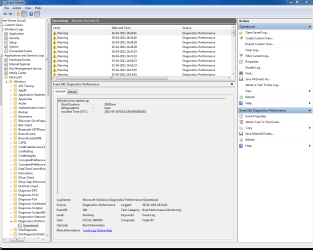
This is what Event Viewer gives me in Event Viewer > Microsoft > Windows >Diagnostics-Performance: (more warnings here)

1st warning:

Windows has started up:
Boot Duration : 39326ms
IsDegradation : false
Incident Time (UTC) : ‎2011‎-‎04‎-‎26T16:32:59.593600100Z

XML:
- <Event xmlns="http://schemas.microsoft.com/win/2004/08/events/event">
- <System>
<Provider Name="Microsoft-Windows-Diagnostics-Performance" Guid="{CFC18EC0-96B1-4EBA-961B-622CAEE05B0A}" />
<EventID>100</EventID>
<Version>2</Version>
<Level>3</Level>
<Task>4002</Task>
<Opcode>34</Opcode>
<Keywords>0x8000000000010000</Keywords>
<TimeCreated SystemTime="2011-04-26T16:34:41.081119200Z" />
<EventRecordID>52</EventRecordID>
<Correlation ActivityID="{851C8664-509F-0001-0983-EA9A2F04CC01}" />
<Execution ProcessID="1588" ThreadID="2136" />
<Channel>Microsoft-Windows-Diagnostics-Performance/Operational</Channel>
<Computer>Frede-PC</Computer>
<Security UserID="S-1-5-19" />
</System>
- <EventData>
<Data Name="BootTsVersion">2</Data>
<Data Name="BootStartTime">2011-04-26T16:32:59.593600100Z</Data>
<Data Name="BootEndTime">2011-04-26T16:34:39.755668500Z</Data>
<Data Name="SystemBootInstance">20</Data>
<Data Name="UserBootInstance">14</Data>
<Data Name="BootTime">39326</Data>
<Data Name="MainPathBootTime">11726</Data>
<Data Name="BootKernelInitTime">19</Data>
<Data Name="BootDriverInitTime">220</Data>
<Data Name="BootDevicesInitTime">3649</Data>
<Data Name="BootPrefetchInitTime">7557</Data>
<Data Name="BootPrefetchBytes">365801472</Data>
<Data Name="BootAutoChkTime">0</Data>
<Data Name="BootSmssInitTime">4172</Data>
<Data Name="BootCriticalServicesInitTime">277</Data>
<Data Name="BootUserProfileProcessingTime">71</Data>
<Data Name="BootMachineProfileProcessingTime">1</Data>
<Data Name="BootExplorerInitTime">2611</Data>
<Data Name="BootNumStartupApps">1</Data>
<Data Name="BootPostBootTime">27600</Data>
<Data Name="BootIsRebootAfterInstall">false</Data>
<Data Name="BootRootCauseStepImprovementBits">0</Data>
<Data Name="BootRootCauseGradualImprovementBits">0</Data>
<Data Name="BootRootCauseStepDegradationBits">0</Data>
<Data Name="BootRootCauseGradualDegradationBits">0</Data>
<Data Name="BootIsDegradation">false</Data>
<Data Name="BootIsStepDegradation">false</Data>
<Data Name="BootIsGradualDegradation">false</Data>
<Data Name="BootImprovementDelta">0</Data>
<Data Name="BootDegradationDelta">0</Data>
<Data Name="BootIsRootCauseIdentified">false</Data>
<Data Name="OSLoaderDuration">936</Data>
<Data Name="BootPNPInitStartTimeMS">19</Data>
<Data Name="BootPNPInitDuration">3671</Data>
<Data Name="OtherKernelInitDuration">452</Data>
<Data Name="SystemPNPInitStartTimeMS">4012</Data>
<Data Name="SystemPNPInitDuration">198</Data>
<Data Name="SessionInitStartTimeMS">4322</Data>
<Data Name="Session0InitDuration">2288</Data>
<Data Name="Session1InitDuration">506</Data>
<Data Name="SessionInitOtherDuration">1377</Data>
<Data Name="WinLogonStartTimeMS">8494</Data>
<Data Name="OtherLogonInitActivityDuration">548</Data>
<Data Name="UserLogonWaitDuration">366</Data>
</EventData>
</Event>

2nd warning:
Windows has shutdown:
Shutdown Duration : 14106ms
IsDegradation : false
Incident Time (UTC) : ‎2011‎-‎04‎-‎26T13:27:18.171905100Z
XML:
- <Event xmlns="http://schemas.microsoft.com/win/2004/08/events/event">
- <System>
<Provider Name="Microsoft-Windows-Diagnostics-Performance" Guid="{CFC18EC0-96B1-4EBA-961B-622CAEE05B0A}" />
<EventID>200</EventID>
<Version>1</Version>
<Level>3</Level>
<Task>4007</Task>
<Opcode>40</Opcode>
<Keywords>0x8000000000010000</Keywords>
<TimeCreated SystemTime="2011-04-26T16:34:40.782102100Z" />
<EventRecordID>51</EventRecordID>
<Correlation ActivityID="{851C9364-509F-0002-0383-EA9A2F04CC01}" />
<Execution ProcessID="1588" ThreadID="456" />
<Channel>Microsoft-Windows-Diagnostics-Performance/Operational</Channel>
<Computer>Frede-PC</Computer>
<Security UserID="S-1-5-19" />
</System>
- <EventData>
<Data Name="ShutdownTsVersion">1</Data>
<Data Name="ShutdownStartTime">2011-04-26T13:27:18.171905100Z</Data>
<Data Name="ShutdownEndTime">2011-04-26T13:27:32.278791100Z</Data>
<Data Name="ShutdownTime">14106</Data>
<Data Name="ShutdownUserSessionTime">2193</Data>
<Data Name="ShutdownUserPolicyTime">0</Data>
<Data Name="ShutdownUserProfilesTime">163</Data>
<Data Name="ShutdownSystemSessionsTime">5414</Data>
<Data Name="ShutdownPreShutdownNotificationsTime">339</Data>
<Data Name="ShutdownServicesTime">4994</Data>
<Data Name="ShutdownKernelTime">6498</Data>
<Data Name="ShutdownRootCauseStepImprovementBits">0</Data>
<Data Name="ShutdownRootCauseGradualImprovementBits">0</Data>
<Data Name="ShutdownRootCauseStepDegradationBits">0</Data>
<Data Name="ShutdownRootCauseGradualDegradationBits">0</Data>
<Data Name="ShutdownIsDegradation">false</Data>
<Data Name="ShutdownTimeChange">0</Data>
</EventData>
</Event>

3rd warning:
The Desktop Window Manager is experiencing heavy resource contention.
Scenario : The Desktop Window Manager responsiveness has degraded.
XML:
- <Event xmlns="http://schemas.microsoft.com/win/2004/08/events/event">
- <System>
<Provider Name="Microsoft-Windows-Diagnostics-Performance" Guid="{CFC18EC0-96B1-4EBA-961B-622CAEE05B0A}" />
<EventID>500</EventID>
<Version>1</Version>
<Level>3</Level>
<Task>4006</Task>
<Opcode>39</Opcode>
<Keywords>0x8000000000010000</Keywords>
<TimeCreated SystemTime="2011-04-26T12:28:29.239244700Z" />
<EventRecordID>49</EventRecordID>
<Correlation ActivityID="{00000000-BBA8-0000-A537-C23E0C04CC01}" />
<Execution ProcessID="1424" ThreadID="3620" />
<Channel>Microsoft-Windows-Diagnostics-Performance/Operational</Channel>
<Computer>Frede-PC</Computer>
<Security UserID="S-1-5-19" />
</System>
- <EventData>
<Data Name="DisplayDeviceFriendlyNameLength">23</Data>
<Data Name="DisplayDeviceFriendlyName">NVIDIA GeForce GTX 260</Data>
<Data Name="MemoryBandwidth">46657400</Data>
<Data Name="MemorySize">2397990912</Data>
<Data Name="Scenario">3</Data>
</EventData>
</Event>

And the most interesting one:
TEXT GENERAL:
The Desktop Window Manager is experiencing heavy resource contention.
Reason : Graphics subsystem resources are over-utilized.
Diagnosis : A consistent degradation in frame rate for the Desktop Window Manager was observed over a period of time.

XML:
- <Event xmlns="http://schemas.microsoft.com/win/2004/08/events/event">
- <System>
<Provider Name="Microsoft-Windows-Diagnostics-Performance" Guid="{CFC18EC0-96B1-4EBA-961B-622CAEE05B0A}" />
<EventID>501</EventID>
<Version>1</Version>
<Level>3</Level>
<Task>4006</Task>
<Opcode>42</Opcode>
<Keywords>0x8000000000010000</Keywords>
<TimeCreated SystemTime="2011-04-26T12:28:29.239244700Z" />
<EventRecordID>50</EventRecordID>
<Correlation ActivityID="{00000000-BBA8-0000-A537-C23E0C04CC01}" />
<Execution ProcessID="1424" ThreadID="3620" />
<Channel>Microsoft-Windows-Diagnostics-Performance/Operational</Channel>
<Computer>Frede-PC</Computer>
<Security UserID="S-1-5-19" />
</System>
- <EventData>
<Data Name="Reason">2</Data>
<Data Name="Diagnosis">1</Data>
</EventData>
</Event>

Did you notice it said "A consistent degradation in frame rate for the Desktop Window Manager was observed over a period of time." .. Framerate.. hmm.. Window.. hmm.. WoW? Does this cause my fps lag maybe?


What is all this? Indeed, it tells me my shutdowns/bootups is slower than expected. And my graphics- which might lead to my game!

This is my drivers- and my event viewer capture.
Drivers.PNG
Event Viewer.PNG
 

My Computer

Computer Manufacturer/Model Number
Brewed
OS
Microsoft Windows 7 Ultimate: x64 (SP1)
CPU
Intel® Core™ i5-2500K Processor
Motherboard
ASUS P8Z68-V PRO
Memory
Kingston DDR3 HyperX 1600MHz 8GB
Graphics Card(s)
ASUS GTX 560 TI DirectCU II 900MHz
Sound Card
Realtek® ALC892 8-Channel High Definition Audio CODEC
Monitor(s) Displays
ACER LCD P246HBD 1920x1080 (24") - Dell 1280x800
Screen Resolution
ACER LCD P246HBD ~ [1920X1080] - DELL ~ [1280x800]
Hard Drives
500 GB WD Caviar SE116 7200rpm SATA2
PSU
Corsair 750W Power Supply
Case
Coolermaster CM Scout
Cooling
Zalman FS-C77 Fatal1ty CPU Cooler
Keyboard
Logitech G15
Mouse
Coolermaster Sentinel Advanced
Internet Speed
[↓ 10 MB/s DL] [↑ 1 MB/s UL]
Other Info
- ROCCAT™ Kave – Solid 5.1 Surround Sound Gaming Headset
- Not overclocking
Did this only start happening recently (when you updated to the latest drivers)? If so, you might try a downgrade back to the previous drivers to see if that fixes it.
 

My Computer

OS
XP / Win7 x64 Pro
CPU
Intel Quad-Core Q9450 @ 3.2GHz
Motherboard
Asus P5-E
Memory
2x2GB GSkill DDR2
Graphics Card(s)
NVIDIA GeForce 8600 GTS (EVGA)
Monitor(s) Displays
Dell 2408WFP
Screen Resolution
1920x1200
Did this only start happening recently (when you updated to the latest drivers)? If so, you might try a downgrade back to the previous drivers to see if that fixes it.

The fps spikes was showing up after installing Windows 7 Enterprise, several of times. Also, the World of Warcraft folder, is extremely slow about recognizing the icon (looking up for the type of file, wow.exe has the own icon, .doc has another icon etc.). Again, all this came after installing Windows 7. All other games like LEGO Star Wars: The Clone Wars 3 ain't lagging at all.

It feels like the lag went bigger after installing all those tons of drivers for my graphic card. Have a look at those errors, it's like everyone of them is according my driver for graphic card, or just the graphic card itself.

Do I really need PhysicX, 3D controller driver, and that kind of stuff? It might also slow the shutdown, as you saw in the Event Viewer diagnostics.

Besides this, Windows is working fine.
 

My Computer

Computer Manufacturer/Model Number
Brewed
OS
Microsoft Windows 7 Ultimate: x64 (SP1)
CPU
Intel® Core™ i5-2500K Processor
Motherboard
ASUS P8Z68-V PRO
Memory
Kingston DDR3 HyperX 1600MHz 8GB
Graphics Card(s)
ASUS GTX 560 TI DirectCU II 900MHz
Sound Card
Realtek® ALC892 8-Channel High Definition Audio CODEC
Monitor(s) Displays
ACER LCD P246HBD 1920x1080 (24") - Dell 1280x800
Screen Resolution
ACER LCD P246HBD ~ [1920X1080] - DELL ~ [1280x800]
Hard Drives
500 GB WD Caviar SE116 7200rpm SATA2
PSU
Corsair 750W Power Supply
Case
Coolermaster CM Scout
Cooling
Zalman FS-C77 Fatal1ty CPU Cooler
Keyboard
Logitech G15
Mouse
Coolermaster Sentinel Advanced
Internet Speed
[↓ 10 MB/s DL] [↑ 1 MB/s UL]
Other Info
- ROCCAT™ Kave – Solid 5.1 Surround Sound Gaming Headset
- Not overclocking
Why did you install Enterprise and where did you get it from?
 

My Computer

OS
XP / Win7 x64 Pro
CPU
Intel Quad-Core Q9450 @ 3.2GHz
Motherboard
Asus P5-E
Memory
2x2GB GSkill DDR2
Graphics Card(s)
NVIDIA GeForce 8600 GTS (EVGA)
Monitor(s) Displays
Dell 2408WFP
Screen Resolution
1920x1200
Why did you install Enterprise and where did you get it from?

Basically, it's a DVD my brother gave me. Is Enterprise acting strange compared to Ultimate etc.?
 

My Computer

Computer Manufacturer/Model Number
Brewed
OS
Microsoft Windows 7 Ultimate: x64 (SP1)
CPU
Intel® Core™ i5-2500K Processor
Motherboard
ASUS P8Z68-V PRO
Memory
Kingston DDR3 HyperX 1600MHz 8GB
Graphics Card(s)
ASUS GTX 560 TI DirectCU II 900MHz
Sound Card
Realtek® ALC892 8-Channel High Definition Audio CODEC
Monitor(s) Displays
ACER LCD P246HBD 1920x1080 (24") - Dell 1280x800
Screen Resolution
ACER LCD P246HBD ~ [1920X1080] - DELL ~ [1280x800]
Hard Drives
500 GB WD Caviar SE116 7200rpm SATA2
PSU
Corsair 750W Power Supply
Case
Coolermaster CM Scout
Cooling
Zalman FS-C77 Fatal1ty CPU Cooler
Keyboard
Logitech G15
Mouse
Coolermaster Sentinel Advanced
Internet Speed
[↓ 10 MB/s DL] [↑ 1 MB/s UL]
Other Info
- ROCCAT™ Kave – Solid 5.1 Surround Sound Gaming Headset
- Not overclocking
There are no feature differences between Ultimate and Enterprise, which is why I'm wondering why you're running Enterprise outside of a Corporate environment since it utilizes volume licensing by the company. Is this a company computer?
 

My Computer

OS
XP / Win7 x64 Pro
CPU
Intel Quad-Core Q9450 @ 3.2GHz
Motherboard
Asus P5-E
Memory
2x2GB GSkill DDR2
Graphics Card(s)
NVIDIA GeForce 8600 GTS (EVGA)
Monitor(s) Displays
Dell 2408WFP
Screen Resolution
1920x1200
There are no feature differences between Ultimate and Enterprise, which is why I'm wondering why you're running Enterprise outside of a Corporate environment since it utilizes volume licensing by the company. Is this a company computer?

I builded it myself. I choose Enterprise because of the name indeed.
 

My Computer

Computer Manufacturer/Model Number
Brewed
OS
Microsoft Windows 7 Ultimate: x64 (SP1)
CPU
Intel® Core™ i5-2500K Processor
Motherboard
ASUS P8Z68-V PRO
Memory
Kingston DDR3 HyperX 1600MHz 8GB
Graphics Card(s)
ASUS GTX 560 TI DirectCU II 900MHz
Sound Card
Realtek® ALC892 8-Channel High Definition Audio CODEC
Monitor(s) Displays
ACER LCD P246HBD 1920x1080 (24") - Dell 1280x800
Screen Resolution
ACER LCD P246HBD ~ [1920X1080] - DELL ~ [1280x800]
Hard Drives
500 GB WD Caviar SE116 7200rpm SATA2
PSU
Corsair 750W Power Supply
Case
Coolermaster CM Scout
Cooling
Zalman FS-C77 Fatal1ty CPU Cooler
Keyboard
Logitech G15
Mouse
Coolermaster Sentinel Advanced
Internet Speed
[↓ 10 MB/s DL] [↑ 1 MB/s UL]
Other Info
- ROCCAT™ Kave – Solid 5.1 Surround Sound Gaming Headset
- Not overclocking
My point is, if you've legally acquired and licensed the computer, you should be getting support through the company for things like this. If you haven't, I suggest you install a more legally acquired and utilized version. We all like to help, but I'm not sure it's ok to do so on this forum (or anywhere else) if it's the former case.
 

My Computer

OS
XP / Win7 x64 Pro
CPU
Intel Quad-Core Q9450 @ 3.2GHz
Motherboard
Asus P5-E
Memory
2x2GB GSkill DDR2
Graphics Card(s)
NVIDIA GeForce 8600 GTS (EVGA)
Monitor(s) Displays
Dell 2408WFP
Screen Resolution
1920x1200
My point is, if you've legally acquired and licensed the computer, you should be getting support through the company for things like this. If you haven't, I suggest you install a more legally acquired and utilized version. We all like to help, but I'm not sure it's ok to do so on this forum (or anywhere else) if it's the former case.

But do you think the last warning I posted, has something to do with my fps lag?

Otherwise i'll try reinstalling the game.
My Windows is legally. These error just bothers me.
 
Last edited:

My Computer

Computer Manufacturer/Model Number
Brewed
OS
Microsoft Windows 7 Ultimate: x64 (SP1)
CPU
Intel® Core™ i5-2500K Processor
Motherboard
ASUS P8Z68-V PRO
Memory
Kingston DDR3 HyperX 1600MHz 8GB
Graphics Card(s)
ASUS GTX 560 TI DirectCU II 900MHz
Sound Card
Realtek® ALC892 8-Channel High Definition Audio CODEC
Monitor(s) Displays
ACER LCD P246HBD 1920x1080 (24") - Dell 1280x800
Screen Resolution
ACER LCD P246HBD ~ [1920X1080] - DELL ~ [1280x800]
Hard Drives
500 GB WD Caviar SE116 7200rpm SATA2
PSU
Corsair 750W Power Supply
Case
Coolermaster CM Scout
Cooling
Zalman FS-C77 Fatal1ty CPU Cooler
Keyboard
Logitech G15
Mouse
Coolermaster Sentinel Advanced
Internet Speed
[↓ 10 MB/s DL] [↑ 1 MB/s UL]
Other Info
- ROCCAT™ Kave – Solid 5.1 Surround Sound Gaming Headset
- Not overclocking
Desktop Window Manager is experiencing heavy resource contention

how many resources are necessary?
i've got 2 HD5770 on an E8600, so i should have to pci-e16 lanes, one for each card. i don't game, and am running 3x1920x1200 displays in extended desktop mode. if that's not enough for winows7, what is? i also get tons of info notices about 'eventid 62464, amdkmdag, DVD_OV, UVD Information'.

does anyone know anything about this?
 

My Computer

Computer Manufacturer/Model Number
custom
OS
win7
CPU
Intel e8400
Motherboard
Gigabyte GA-ep45-ud3p
Memory
8GB
Graphics Card(s)
HD5770x2, non crossfire.
Sound Card
none
Monitor(s) Displays
3x1920x1200
Hard Drives
intel SSD, 300GB Raptor
PSU
750W
Case
antec 900
Cooling
air copper fin thingy
Back
Top