Events Redflags

spyknee

Banned
Local time
4:03 PM
Messages
382
Location
NYC
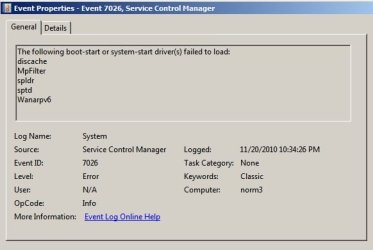
Getting this in event monitor.
I was able to disable sptd in reg but the others are a little more detailed. Googleing has yeilded little so far. Would like to know which software triggers event, is there a way to discover?
 

Attachments

  • events.jpg
    events.jpg
    21.3 KB · Views: 17

My Computer

Computer Manufacturer/Model Number
DIY #3, #2
OS
W7 Ulti/64, XP Pro/32
CPU
INTEL i7 920 DO, Core2 Duo 6400
Motherboard
GIGABYTE EX58 UD3R-SLI, EP45-UD3R
Memory
KINGSTON DDR3 1333MHz, CORSAIR DDR2 800MHz
Graphics Card(s)
EVGA GTX 260 x2, 8800 GTX
Sound Card
REALTEK HD onboard, ditto
Monitor(s) Displays
SONY 40" BRAVIA LCD
Screen Resolution
1360 X 768
Hard Drives
OCZ VERTEX/RAID0 -3, Vertex 30GB
PSU
COOLERMASTER 900W, ENERMAX 850W
Case
COOLERMASTER HAF 932 x2
Cooling
stock
Keyboard
MS
Mouse
MS
Internet Speed
ADSL 3MB/768KBs
Other Info
amateur enthusiast
Come on now, none of you software gurus has any thing to say?
 

My Computer

Computer Manufacturer/Model Number
DIY #3, #2
OS
W7 Ulti/64, XP Pro/32
CPU
INTEL i7 920 DO, Core2 Duo 6400
Motherboard
GIGABYTE EX58 UD3R-SLI, EP45-UD3R
Memory
KINGSTON DDR3 1333MHz, CORSAIR DDR2 800MHz
Graphics Card(s)
EVGA GTX 260 x2, 8800 GTX
Sound Card
REALTEK HD onboard, ditto
Monitor(s) Displays
SONY 40" BRAVIA LCD
Screen Resolution
1360 X 768
Hard Drives
OCZ VERTEX/RAID0 -3, Vertex 30GB
PSU
COOLERMASTER 900W, ENERMAX 850W
Case
COOLERMASTER HAF 932 x2
Cooling
stock
Keyboard
MS
Mouse
MS
Internet Speed
ADSL 3MB/768KBs
Other Info
amateur enthusiast
Google the abbreviated names and you may get some of them.
I haven't a clue otherwise. I'm not one of the software gurus your looking for.
Mike
 

My Computer

Computer Manufacturer/Model Number
Hopalong/ Godzilla
OS
Windows7 Pro 64bit SP-1; Windows XP Pro 32bit
CPU
Intel Core i7-870 Lynnfield 2.93GHz LGA 1156 95W Quad-Core
Motherboard
ASUS P7P55D-E PRO
Memory
8GB@1400MHz Crucial Ballistix DDR3-1600 4x2GB
Graphics Card(s)
ASUS ENGTX460 DirectCU/2DI/1GD5 1GB 256-bit GDDR5
Sound Card
VIA Onboard
Monitor(s) Displays
Asus VS248H-P 24"; Samsung SyncMaster 941BW 19"ws
Screen Resolution
1920x1080; 1440x900
Hard Drives
Samsung 830 120GB SSD
Intel 320 120GB SSD
Western Digital Caviar Black WD7501AALS 750GB 7200 RPM SATA 3.0Gb/s
Western Digital Caviar Black WD6401AALS 640GB 7200 RPM SATA 3.0Gb/s
PSU
COOLER MASTER Silent Pro RS850-AMBAJ3-US 850W Modular
Case
COOLER MASTER HAF 932 RC-932-KKN5-GP Black
Cooling
Scythe "Mugen-2 Rev.B" (2 ScytheKaze-Jyuni PWM fans)
Keyboard
Logitech K-320
Mouse
Kensington
Antivirus
Avast Inernet Suite
Browser
IE 9 ; Chrome
X,
I googled before posting. Had a couple of errors and fixed them. These are the ones info is tuff on, except stdp. Disabled that. No scsi here.
 

My Computer

Computer Manufacturer/Model Number
DIY #3, #2
OS
W7 Ulti/64, XP Pro/32
CPU
INTEL i7 920 DO, Core2 Duo 6400
Motherboard
GIGABYTE EX58 UD3R-SLI, EP45-UD3R
Memory
KINGSTON DDR3 1333MHz, CORSAIR DDR2 800MHz
Graphics Card(s)
EVGA GTX 260 x2, 8800 GTX
Sound Card
REALTEK HD onboard, ditto
Monitor(s) Displays
SONY 40" BRAVIA LCD
Screen Resolution
1360 X 768
Hard Drives
OCZ VERTEX/RAID0 -3, Vertex 30GB
PSU
COOLERMASTER 900W, ENERMAX 850W
Case
COOLERMASTER HAF 932 x2
Cooling
stock
Keyboard
MS
Mouse
MS
Internet Speed
ADSL 3MB/768KBs
Other Info
amateur enthusiast
Are your drivers up to date in Device Manager? Event ID 7026

As you likely already know, the correct way to troubleshoot these repeat errors is to google the text verbatim with the ID # to find how others have solved them.

If you have no performance issues from the error and drivers are up to date, you can likely ignore it as I read the results.

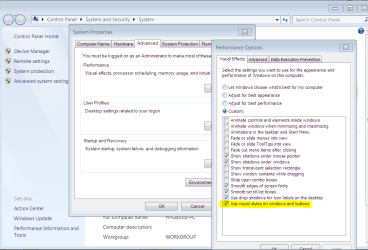
Aside: I wonder why you are running Windows 2000 graphics default on Win7. Rightclick the desktop to Personalize, set an Aero Theme, enjoy the elegant Win7 graphics if you can afford it. This sometimes happens if this box gets unchecked by accident:
 

Attachments

  • Capture.PNG
    Capture.PNG
    50.7 KB · Views: 7
The most obvious drivers are up to date. W7 is manually updated religiously. I would be most happy for a list of driver updates that are available for all that small, hard to know drivers that are in W7.

I will not use 3rd party driver finders now!

Its quite possible that these things are associated with services I have disabled, thats why I'm trying to run down what they are associated with in W7. They are not really a problem but................knowledge is better than Gold.

I have disabled all the gurly eye candy. LOL
Tried for lean an mean. Got it, I think.
Now if you can tell me that enabling AERO will give me a performance boost. That games will look and/or perform better. That webpages will be so utterly more real, yuk yuk.
ie: better 3DMark06 score
I'm listening, but the prevalent thought seems to say. "resource drain"

Greg, I was getting ready to PM your arse, glad you showed.
 

My Computer

Computer Manufacturer/Model Number
DIY #3, #2
OS
W7 Ulti/64, XP Pro/32
CPU
INTEL i7 920 DO, Core2 Duo 6400
Motherboard
GIGABYTE EX58 UD3R-SLI, EP45-UD3R
Memory
KINGSTON DDR3 1333MHz, CORSAIR DDR2 800MHz
Graphics Card(s)
EVGA GTX 260 x2, 8800 GTX
Sound Card
REALTEK HD onboard, ditto
Monitor(s) Displays
SONY 40" BRAVIA LCD
Screen Resolution
1360 X 768
Hard Drives
OCZ VERTEX/RAID0 -3, Vertex 30GB
PSU
COOLERMASTER 900W, ENERMAX 850W
Case
COOLERMASTER HAF 932 x2
Cooling
stock
Keyboard
MS
Mouse
MS
Internet Speed
ADSL 3MB/768KBs
Other Info
amateur enthusiast
I would not shut off Services, as any that are not needed in Win7 are already set on Manual with fast triggers which is part of the genius of Win7. Don't mess with Genius. This is not XP. ;)

I would just edit the graphics effects to rid of animations, fading and dragging intact - although even this isn't needed with correct hardware specs. I only have done so in the screenshot I posted above because this is my beach laptop which is an old HP 510 with a Celeron sub-2ghz and a gig of RAM - so the example doesn't count for average user.

If this doesn't gain back needed performance then you need to improve your hardware. If this is the rig in your specs, you have no need to tweak for performance on Win7.

You may have already gotten too tweaky on an OS that is already perfectly balanced and lean enough it doesn't need tweaking or optimization, only necessary hardware. If you suspect this, then before it is too late I'd System Restore to before you got tweaky and give the OS a chance to perform as it is intended, upgrade hardware where necessary, and leave behind the old rules with XP.
 
http://www.sevenforums.com/performance-maintenance/123802-how-sweet.html

Yes, the specs are the said rig.
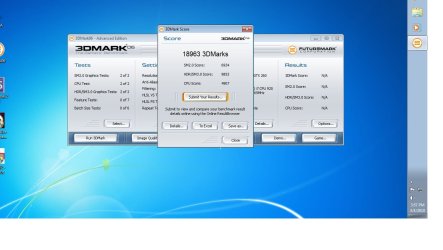
Too many tweaks, I think not. See the stats.
Just installed OS was(below), look at it now(above).
Now the biggest % of increase was due to OC'ing the hardware, but some tweaking of OS, has got it past OC numbers.
Sorry but I just can't follow the party line. LOL

W7 like all OS's are meant to cover a wide range of usage scenarios. I feel that streamlining an OS for specific usage is valid. In fact I would argue that MS should go the other way. That is release the OS with the minimal crap necessary active. Then allow the user to turn on what he needs to use. Put all the stuff in the install and then allow for specific user customization. Customization of the use of the
tool(the puter), not just the eye-candy.

my opnion
 

Attachments

  • 3DMark06.jpg
    3DMark06.jpg
    75 KB · Views: 8

My Computer

Computer Manufacturer/Model Number
DIY #3, #2
OS
W7 Ulti/64, XP Pro/32
CPU
INTEL i7 920 DO, Core2 Duo 6400
Motherboard
GIGABYTE EX58 UD3R-SLI, EP45-UD3R
Memory
KINGSTON DDR3 1333MHz, CORSAIR DDR2 800MHz
Graphics Card(s)
EVGA GTX 260 x2, 8800 GTX
Sound Card
REALTEK HD onboard, ditto
Monitor(s) Displays
SONY 40" BRAVIA LCD
Screen Resolution
1360 X 768
Hard Drives
OCZ VERTEX/RAID0 -3, Vertex 30GB
PSU
COOLERMASTER 900W, ENERMAX 850W
Case
COOLERMASTER HAF 932 x2
Cooling
stock
Keyboard
MS
Mouse
MS
Internet Speed
ADSL 3MB/768KBs
Other Info
amateur enthusiast
Then in your case with your specified needs, it looks like you're doing okay.

Do you really gain back that much performance with Aero turned off? I guess Windows2000 is a theme-of-sorts, kinda "retro utility box." ;)

Are there any performance problems, perhaps associated with the errors you've been studying?
 
I saw no need for services that I will never use. One of the car companies has an 8-cylinder engine where 2 cylinders will not fire for savings. I never understood this because altho there was a fuel savings, the friction of the 2 cylinders was still there. I associate many of MS's savings schemes and services to 2 dead dragging cylinders.

I do not know about AERO, turned off at begining. You seemed to intimate that AERO provided some type of experience. So I wanted to know if you knew of something specific about performance help.

No. But it is one of the recurring things in events. I was not able to find what things these drivers were associated with. This is how I've learned puters. Understanding one issue at a time. Google has been my classroom.
 

My Computer

Computer Manufacturer/Model Number
DIY #3, #2
OS
W7 Ulti/64, XP Pro/32
CPU
INTEL i7 920 DO, Core2 Duo 6400
Motherboard
GIGABYTE EX58 UD3R-SLI, EP45-UD3R
Memory
KINGSTON DDR3 1333MHz, CORSAIR DDR2 800MHz
Graphics Card(s)
EVGA GTX 260 x2, 8800 GTX
Sound Card
REALTEK HD onboard, ditto
Monitor(s) Displays
SONY 40" BRAVIA LCD
Screen Resolution
1360 X 768
Hard Drives
OCZ VERTEX/RAID0 -3, Vertex 30GB
PSU
COOLERMASTER 900W, ENERMAX 850W
Case
COOLERMASTER HAF 932 x2
Cooling
stock
Keyboard
MS
Mouse
MS
Internet Speed
ADSL 3MB/768KBs
Other Info
amateur enthusiast
Aero provides an easy-on-the-eyes User experience, very cool and relaxing but elegant in it's way. (This is borrowed from my brief career as a wine taster by the barrel.)

Using your car analogy, turning off Aero as you did by defaulting to Win2000 theme is like painting over a beautiful new ice-blue pro paint job with utility gray latex.
 
LMAO, quite true. But like any good transportation device, I'm on the inside looking out. Can't see nothing.
Most things I do are in full screen. How pretty can a web page border really be. I do not even use a desktop background anymore, its black. But then, I still read books.
LOL
 

My Computer

Computer Manufacturer/Model Number
DIY #3, #2
OS
W7 Ulti/64, XP Pro/32
CPU
INTEL i7 920 DO, Core2 Duo 6400
Motherboard
GIGABYTE EX58 UD3R-SLI, EP45-UD3R
Memory
KINGSTON DDR3 1333MHz, CORSAIR DDR2 800MHz
Graphics Card(s)
EVGA GTX 260 x2, 8800 GTX
Sound Card
REALTEK HD onboard, ditto
Monitor(s) Displays
SONY 40" BRAVIA LCD
Screen Resolution
1360 X 768
Hard Drives
OCZ VERTEX/RAID0 -3, Vertex 30GB
PSU
COOLERMASTER 900W, ENERMAX 850W
Case
COOLERMASTER HAF 932 x2
Cooling
stock
Keyboard
MS
Mouse
MS
Internet Speed
ADSL 3MB/768KBs
Other Info
amateur enthusiast
Back
Top