Every link in 'Programs' in ProgramData brings Security Warning Popup

KapaKai5O

New member
Member
Local time
8:17 AM
Messages
43
I've had this happen before when I customized the system's Start Menu.
To solve, I used the reset permissions context menu option. But this time it's different.
Different system. Everything else is working perfectly except this snafu.

Every program link including Administrative Tools links popup a security warning.
But only that folder's contents are doing this. This is the same thing that happened before.

For instance, I can copy & paste the Admin Tools folder into Start Menu folder and I can run everything
without the security warning. Same goes for any link in the Programs folder.

So I attempted to reset permissions as before (using the w/ pause reg file) but it doesn't even bring up the cmd prompt window, never mind 'pause'.
I've even took possession of the folder and still the same problem.

So if I can't solve what's happening there, I'm forced to deal with the permissions manually.
Well I did that but it seems I've truly made a mess of settings for that folder.
Nothing I do seems to remedy the problem. Again, all else on this system is AOK.

What I've done is a well known tweak to get the XP 'Programs' flyout.

I've done this on at least 5 systems and only once before I had this happen. This makes twice,
but I've run out of answers and am needing some help.

Thanks in advance.

P.S. Clean install of 7 Pro 32bit w/ NO AV or AM programs (Yet) to get in the way.
 

My Computer

Computer type
PC/Desktop
Computer Manufacturer/Model Number
ASUS - Home Built
OS
Win 7 Pro 32bit - XP & W2K3 Server - Linux
CPU
i7
Motherboard
Intel
Memory
16 GB
Graphics Card(s)
Radeon HD 7800 Series
Sound Card
Asus Xonar
Monitor(s) Displays
Asus
Hard Drives
SSD - Samsung EVO 1 TB + WD 2 TB x 4
PSU
EVGA G3 1000
Case
Thermaltake Level 10 GT
Cooling
Lots
Keyboard
Logitech
Mouse
MX Master 3
Internet Speed
1GB
Antivirus
Never
Browser
Pale Moon & Ungoogled Chromium, Brave etc.
Other Info
I thank you for this impressive forum
Do you mean program links in the Start Menu? You mentioned ProgramData. Are you trying to open that too? You do know you're not supposed to access that folder, don't you?
 

My Computer

Computer type
PC/Desktop
Computer Manufacturer/Model Number
HP p6-2020t
OS
Win 7 Ult 64-bit
CPU
G620 2.6GHZ Pentium R
Memory
6 GB
Monitor(s) Displays
25" HPLV2311
Screen Resolution
1920 x 1200
Hard Drives
1 SATA, 1 exterior SATA
Case
HP
Cooling
PSU
Antivirus
Glasswire
Browser
Waterfox; Firefox; Chrome for work
Other Info
Firewall--Glasswire
Similar specs in Gateway DX4200
Verizon FIOS Wired network

1 other Win7 computer-- has SSD
Please disregard.... SOLVED.
Had to actually replace the Programs folder (the one inside ProgramData which is basically the very same as the Programs folder in the All Users profile) with one from prior system. Problem solved.

It had to be a permissions thing but for some strange reason, I was unable to sort it out. So I simply replaced it.
Now all links in that folder work as they are supposed to.

As much success I've had with this tweak, I'm re-thinking it. I may switch it back to default (can't stand 7 Start menu tho).
And wondering if I shouldn't take a hard look at 'Classic Shell'.

Can anyone let me know if there is a thread on CS in these forums?
Is it worth messing with?

Thanks for the response rowin! :)
 

My Computer

Computer type
PC/Desktop
Computer Manufacturer/Model Number
ASUS - Home Built
OS
Win 7 Pro 32bit - XP & W2K3 Server - Linux
CPU
i7
Motherboard
Intel
Memory
16 GB
Graphics Card(s)
Radeon HD 7800 Series
Sound Card
Asus Xonar
Monitor(s) Displays
Asus
Hard Drives
SSD - Samsung EVO 1 TB + WD 2 TB x 4
PSU
EVGA G3 1000
Case
Thermaltake Level 10 GT
Cooling
Lots
Keyboard
Logitech
Mouse
MX Master 3
Internet Speed
1GB
Antivirus
Never
Browser
Pale Moon & Ungoogled Chromium, Brave etc.
Other Info
I thank you for this impressive forum

Attachments

  • Clipboard01.png
    Clipboard01.png
    126.5 KB · Views: 2

My Computer

Computer type
PC/Desktop
Computer Manufacturer/Model Number
diy
OS
Win7 pro x64
CPU
stock i7 7700k
Motherboard
Gigabyte Z270N-WIFI mini-ITX
Memory
Corsair Vengeance LPX 16GB (2x8GB) DDR4 @ 3200MHz
Graphics Card(s)
integrated Intel HD 630
Sound Card
onboard Realtek ALC1220
Monitor(s) Displays
two vertically mounted samsung 55" 4k un55mu8000
Screen Resolution
1920x1280
Hard Drives
256GB Samsung EVO 960 M.2 pci-e NVMe SSD
PSU
SilverStone Nightjar ST45NF 450Watt Fanless
Case
No case. Motherboard is mounted directly onto power supply
Cooling
Evercool low profile 815EP with Panaflow 12L fan at 7v
Keyboard
Ortek MCK-86 mini
Mouse
Belkin 5-button USB
Internet Speed
spectrum 400mbps

My Computer

Computer type
PC/Desktop
Computer Manufacturer/Model Number
HP p6-2020t
OS
Win 7 Ult 64-bit
CPU
G620 2.6GHZ Pentium R
Memory
6 GB
Monitor(s) Displays
25" HPLV2311
Screen Resolution
1920 x 1200
Hard Drives
1 SATA, 1 exterior SATA
Case
HP
Cooling
PSU
Antivirus
Glasswire
Browser
Waterfox; Firefox; Chrome for work
Other Info
Firewall--Glasswire
Similar specs in Gateway DX4200
Verizon FIOS Wired network

1 other Win7 computer-- has SSD
Don't access ProgramData again with any permissions you can possibly imagine. They're system folders and most are permanently forbidden.

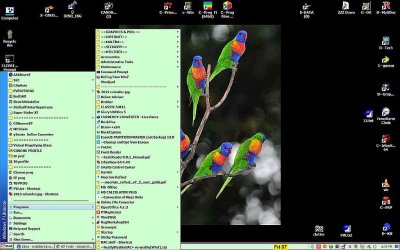
I have my machines set up to look like XP, which I had set up to resemble Win 98. A little ingenuity and lots of Classic Shell.

My most-used folders are linked to the desktop, 2nd most used above Programs in the Start Menu, least used ones are in the flyout (I like that word) from "Programs." All are a mixture of program links and links to important folders. You can put whatever you want above Programs, doesn't have to be the list MS starts you with.
 

Attachments

  • desktop 5-2019.jpg
    desktop 5-2019.jpg
    114.6 KB · Views: 5
Last edited:

My Computer

Computer type
PC/Desktop
Computer Manufacturer/Model Number
HP p6-2020t
OS
Win 7 Ult 64-bit
CPU
G620 2.6GHZ Pentium R
Memory
6 GB
Monitor(s) Displays
25" HPLV2311
Screen Resolution
1920 x 1200
Hard Drives
1 SATA, 1 exterior SATA
Case
HP
Cooling
PSU
Antivirus
Glasswire
Browser
Waterfox; Firefox; Chrome for work
Other Info
Firewall--Glasswire
Similar specs in Gateway DX4200
Verizon FIOS Wired network

1 other Win7 computer-- has SSD
RoWin - That is Awesome. It seems to be what I'm looking for.

Can I assume you didn't apply that tweak, because your Programs flyout is in a different location than ours.
Our Programs flyout is located in the right column under the profile logo and folders (Music, Downloads, Docs, etc.).

Yes, I know there's something up with that ProgramData folder. The more I looked into it the more it seemed like Voodoo ;)
This latest snafu only affected the Programs folder, not any of the parent folders.
The time I fixed it with a simple permissions reset, it was the entire Start Menu folder that gave me problems.

But if you could let me know what you did to get that effect, I would revert (remove) the tweak
and go forward with CS.

So I wonder how much was 'ingenuity' and how much CS?!

Got no problems with ingenuity. I've been tweaking windoze for decades with very few problems. :) D:
One more question:

Ever since W8 & 10, I've noticed that many programs and apps needed to be 'tweaked' for those newer OS's.
Which means latest isn't always the best. Is there an earlier version of CS that would be better for just Win7?

Thanks again for showing me this. Also thank's to johnhoh for responding! :)
 

My Computer

Computer type
PC/Desktop
Computer Manufacturer/Model Number
ASUS - Home Built
OS
Win 7 Pro 32bit - XP & W2K3 Server - Linux
CPU
i7
Motherboard
Intel
Memory
16 GB
Graphics Card(s)
Radeon HD 7800 Series
Sound Card
Asus Xonar
Monitor(s) Displays
Asus
Hard Drives
SSD - Samsung EVO 1 TB + WD 2 TB x 4
PSU
EVGA G3 1000
Case
Thermaltake Level 10 GT
Cooling
Lots
Keyboard
Logitech
Mouse
MX Master 3
Internet Speed
1GB
Antivirus
Never
Browser
Pale Moon & Ungoogled Chromium, Brave etc.
Other Info
I thank you for this impressive forum
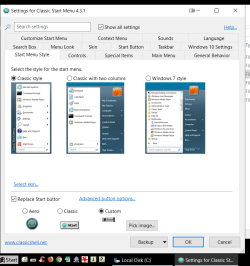
I will have to screenshot my settings. Will get back to you.
 

My Computer

Computer type
PC/Desktop
Computer Manufacturer/Model Number
HP p6-2020t
OS
Win 7 Ult 64-bit
CPU
G620 2.6GHZ Pentium R
Memory
6 GB
Monitor(s) Displays
25" HPLV2311
Screen Resolution
1920 x 1200
Hard Drives
1 SATA, 1 exterior SATA
Case
HP
Cooling
PSU
Antivirus
Glasswire
Browser
Waterfox; Firefox; Chrome for work
Other Info
Firewall--Glasswire
Similar specs in Gateway DX4200
Verizon FIOS Wired network

1 other Win7 computer-- has SSD
Back
Top