Solved Everyone Group can not be deleted from 'Security' tab

DextrousDave

New member
Member
VIP
Local time
10:22 PM
Messages
135
Hi All

I have created a folder(as the administrator) that I only want certain users to access. However, when I go to the 'Security' tab of the properties dialogue box, it shows the 'Everyone' group. I cannot delete it, it tells me that - "you can't remove everyone because this object is inheriting....blah blah"

So now all other users can view the content of that folder - I only want admin and one specific user to be able to access that folder.

Thanks
 

My Computer My Computer

At a glance

Windows 7 Ultimate x32Intel Core 2 Quad Q9400 @ 2.66GHz2048MBNVIDIA GeForce GTX 275
Computer Manufacturer/Model Number
MSI
OS
Windows 7 Ultimate x32
CPU
Intel Core 2 Quad Q9400 @ 2.66GHz
Motherboard
MSI
Memory
2048MB
Graphics Card(s)
NVIDIA GeForce GTX 275
Monitor(s) Displays
Generic PnP Monitor
Hard Drives
2x HDD Drives (ATA Devices) 140GB and 368GB
Cooling
Fans
Hi All

I have created a folder(as the administrator) that I only want certain users to access. However, when I go to the 'Security' tab of the properties dialogue box, it shows the 'Everyone' group. I cannot delete it, it tells me that - "you can't remove everyone because this object is inheriting....blah blah"

So now all other users can view the content of that folder - I only want admin and one specific user to be able to access that folder.

Thanks

If you are talking about the Everyone share at C:>Users security tab, it's there by default and needs to be there in order for anyone to share files. It's best not to mess with the Security tab at all.

As far as per machine sharing in a standard Workgroup goes, it's either shared with Everyone or it's not shared at all unless you set up a Homegroup where you have the trusted machine in the Homegroup and the less trusted machines in the Workgroup.

In your situation where you want just the admin and one specific user to have access to a certain Library but you don't want the other users in the network to have access, keep reading.

To set this up you would need to create a Homegroup on the Admin machine, then join that Homegroup from the machine with the specific user who requires access. Do not allow the other machines in the Workgroup to join this Homegroup, do not give out the special Homegroup password to anyone else other than the specific user who requires access.

Now you have two machines in this new Homegroup and all other machines are in the same Workgroup but not part of this Homegroup. So far so good.

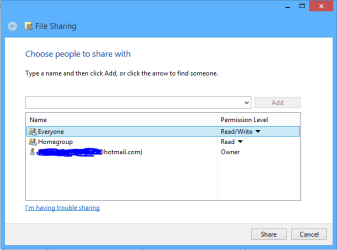
At this point only the specific user who joined the Homegroup will be able to access your Library's. The rest of the machines in the lowly Workgroup will not have access to any Library folders unless you share them with "Everyone" using the Homegroup style share settings: right click a specific Library, choose "Share With" then choose "specific people" then click the arrow for the drop down menu and choose "Everyone" and hit the "Add" button, add read/write access as desired. This will allow the Workgroup machines access to that particular Library and no others. The picture shows what I'm talking about. :)
 

Attachments

  • share with Everyone.PNG
    share with Everyone.PNG
    6.7 KB · Views: 4

My Computer My Computer

At a glance

Windows 7 Ult, Windows 8.1 Pro,Q9650-4.275GHz, E8600 4.5GHz, E6750-3.8GHzG.Skill PC2 9600 1200Mhz 5 5 5 15 2TGTX480
Computer type
PC/Desktop
Computer Manufacturer/Model Number
Home built
OS
Windows 7 Ult, Windows 8.1 Pro,
CPU
Q9650-4.275GHz, E8600 4.5GHz, E6750-3.8GHz
Motherboard
Evga 780i FTW
Memory
G.Skill PC2 9600 1200Mhz 5 5 5 15 2T
Graphics Card(s)
GTX480
Sound Card
Asus Xonar D2
Monitor(s) Displays
HannsG
Screen Resolution
1680X1050
Hard Drives
GSkill Phoenix Pro 120GB SSD
PSU
ThermalTake Toughpower 1000Watt modular
Case
ThermalTake XaserV
Cooling
Xigmatek S1283
Keyboard
Logitech G15
Mouse
Logitech G9
Internet Speed
T1
Cool thank you. So by default, no files will be shared by my PC (the one in the Homegroup) on the workgroup unless I explicitly do so. If I do want to share only certain libraries with another person in the WORKGROUP, I go to the homegroup style share settings and share my library with a specific person or persons...

So the admin PC, that is part of the homegroup, will be able to access ALL the libraries I put into the homegroup, by default, and anyone outside of the homegroup, I need to explicitly share specific libraries with them that is inside the homegroup?

Thanks
 

My Computer My Computer

At a glance

Windows 7 Ultimate x32Intel Core 2 Quad Q9400 @ 2.66GHz2048MBNVIDIA GeForce GTX 275
Computer Manufacturer/Model Number
MSI
OS
Windows 7 Ultimate x32
CPU
Intel Core 2 Quad Q9400 @ 2.66GHz
Motherboard
MSI
Memory
2048MB
Graphics Card(s)
NVIDIA GeForce GTX 275
Monitor(s) Displays
Generic PnP Monitor
Hard Drives
2x HDD Drives (ATA Devices) 140GB and 368GB
Cooling
Fans
Cool thank you. So by default, no files will be shared by my PC (the one in the Homegroup) on the workgroup unless I explicitly do so. If I do want to share only certain libraries with another person in the WORKGROUP, I go to the homegroup style share settings and share my library with a specific person or persons...

So the admin PC, that is part of the homegroup, will be able to access ALL the libraries I put into the homegroup, by default, and anyone outside of the homegroup, I need to explicitly share specific libraries with them that is inside the homegroup?

Thanks

All machines which are part of the Homegroup will have full access to all shared files and folders on all the other Homegroup machines. To unshared a folder or Library then choose the "Share With" > "Nobody" option, at that point none of the Homegroup or Workgroup machines will have access.

However, the specific person options are limited to a per machine basis, in other words, specific users are only sharable if they have an account on the same machine, it doesn't work like you think. You can't share with specific users on separate machines. This is why keeping some machines from joining the Homegroup works to keep certain shared folders or library's safe from anyone in the Workgroup.

The only share option that works here is the "Everyone" share, that's the one to use for sharing with other machines in the Workgroup. Once you share a Library with "Everyone" then everyone in the Homegroup AND the Workgroup will have access.

So if you want limited shares for a certain machine then don't allow them to join the Homegroup. You can also use the Public folders for sharing with the Workgroup machines. :)
 

My Computer My Computer

At a glance

Windows 7 Ult, Windows 8.1 Pro,Q9650-4.275GHz, E8600 4.5GHz, E6750-3.8GHzG.Skill PC2 9600 1200Mhz 5 5 5 15 2TGTX480
Computer type
PC/Desktop
Computer Manufacturer/Model Number
Home built
OS
Windows 7 Ult, Windows 8.1 Pro,
CPU
Q9650-4.275GHz, E8600 4.5GHz, E6750-3.8GHz
Motherboard
Evga 780i FTW
Memory
G.Skill PC2 9600 1200Mhz 5 5 5 15 2T
Graphics Card(s)
GTX480
Sound Card
Asus Xonar D2
Monitor(s) Displays
HannsG
Screen Resolution
1680X1050
Hard Drives
GSkill Phoenix Pro 120GB SSD
PSU
ThermalTake Toughpower 1000Watt modular
Case
ThermalTake XaserV
Cooling
Xigmatek S1283
Keyboard
Logitech G15
Mouse
Logitech G9
Internet Speed
T1
thank you chev65, appreciate your help
 

My Computer My Computer

At a glance

Windows 7 Ultimate x32Intel Core 2 Quad Q9400 @ 2.66GHz2048MBNVIDIA GeForce GTX 275
Computer Manufacturer/Model Number
MSI
OS
Windows 7 Ultimate x32
CPU
Intel Core 2 Quad Q9400 @ 2.66GHz
Motherboard
MSI
Memory
2048MB
Graphics Card(s)
NVIDIA GeForce GTX 275
Monitor(s) Displays
Generic PnP Monitor
Hard Drives
2x HDD Drives (ATA Devices) 140GB and 368GB
Cooling
Fans
Back
Top