Everything disconnected after leaving sleep mode

Frikster

New member
Member
VIP
Local time
4:19 AM
Messages
135
Location
Macedonia
Hi,

So i noticed this issue which started to annoy me more than the common issue i have of windows freezing when any download is occurring ( for which no one gave me a solution for )

After exiting sleep mode, my internet connection is disabled, keyboard does not work and my mouse does not work.
I have to wait some time for all the devices to become active by themselves.
i use an a4tech keyboard and mouse, of which the mouse is the newest addition to the set. I got it a week ago.
WHY could this be happening and what can i do to resolve the issue.
Thank you
 

My Computer My Computer

Computer type
PC/Desktop
OS
Windows 7 64bit
CPU
i5 6600 3.3 GHz
Motherboard
ASUS B150M-A
Memory
16gb HyperX Fury 2x8gb
Graphics Card(s)
Gigabyte G1 Gaming 1060
Monitor(s) Displays
Samsung SyncMaster B2330HD
Screen Resolution
1920 x 1080
Hard Drives
1tb Toshiba
PSU
Corsair builder VS550
Case
SAMA Assasin
Cooling
Stock
Keyboard
A4Tech KB-28G
Mouse
X7 X-710BK
Internet Speed
99 Mbps
Antivirus
Malwarebytes
Browser
Chrome
Other Info
Nothing at the moment
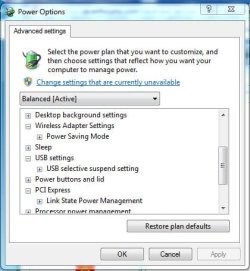
Check the settings in your power management to see what the are doing during sleep
USB selective suspend can be problematic for some machines and have a look at wireless and PCI depending on where your network is coming from
Capture.JPG
 

My Computer My Computer

Computer type
PC/Desktop
Computer Manufacturer/Model Number
Pauly Special
OS
Win7 Ultimate X64
CPU
Intel i5 3570K
Motherboard
Gigabyte Z77X-DS3H
Memory
8GB DDR3 1600
Graphics Card(s)
Onboard
Sound Card
Onboard
Screen Resolution
1280x1024
Hard Drives
Samsung 840 Evo SSD (OS)
1TB Spinner (Data)
PSU
800W Arctic
Case
Cooler Master
Cooling
3x120mm Fans
Keyboard
MS Wireless
Mouse
MS Wireless
Internet Speed
20M
Is this what you needed to know? I dont understand those settings
 

Attachments

  • picture shows.jpg
    picture shows.jpg
    187.1 KB · Views: 1

My Computer My Computer

Computer type
PC/Desktop
OS
Windows 7 64bit
CPU
i5 6600 3.3 GHz
Motherboard
ASUS B150M-A
Memory
16gb HyperX Fury 2x8gb
Graphics Card(s)
Gigabyte G1 Gaming 1060
Monitor(s) Displays
Samsung SyncMaster B2330HD
Screen Resolution
1920 x 1080
Hard Drives
1tb Toshiba
PSU
Corsair builder VS550
Case
SAMA Assasin
Cooling
Stock
Keyboard
A4Tech KB-28G
Mouse
X7 X-710BK
Internet Speed
99 Mbps
Antivirus
Malwarebytes
Browser
Chrome
Other Info
Nothing at the moment
Yes that is the settings but I see you are using max performance so they prob wont help
Make sure you have your mouse and keyboard plugged into usb sockets on the rear direct from mobo and not through any secondary ports or usb hub and use usb 2 not usb 3 if you have them
 

My Computer My Computer

Computer type
PC/Desktop
Computer Manufacturer/Model Number
Pauly Special
OS
Win7 Ultimate X64
CPU
Intel i5 3570K
Motherboard
Gigabyte Z77X-DS3H
Memory
8GB DDR3 1600
Graphics Card(s)
Onboard
Sound Card
Onboard
Screen Resolution
1280x1024
Hard Drives
Samsung 840 Evo SSD (OS)
1TB Spinner (Data)
PSU
800W Arctic
Case
Cooler Master
Cooling
3x120mm Fans
Keyboard
MS Wireless
Mouse
MS Wireless
Internet Speed
20M
I dont use, secondaries.
They have been plugged into those places since forever. Even if it was usb related, why would my connection take time to start up ( for the internet ). The pc is old, sure but i dont assume it is failing to do its job properly...
 

My Computer My Computer

Computer type
PC/Desktop
OS
Windows 7 64bit
CPU
i5 6600 3.3 GHz
Motherboard
ASUS B150M-A
Memory
16gb HyperX Fury 2x8gb
Graphics Card(s)
Gigabyte G1 Gaming 1060
Monitor(s) Displays
Samsung SyncMaster B2330HD
Screen Resolution
1920 x 1080
Hard Drives
1tb Toshiba
PSU
Corsair builder VS550
Case
SAMA Assasin
Cooling
Stock
Keyboard
A4Tech KB-28G
Mouse
X7 X-710BK
Internet Speed
99 Mbps
Antivirus
Malwarebytes
Browser
Chrome
Other Info
Nothing at the moment
Back
Top