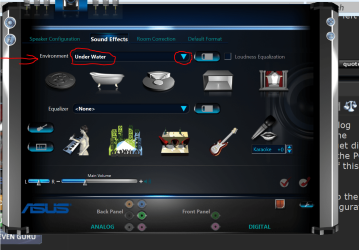
I've posted this elsewhere, but wanted to see if I could get some help here's what I've got so far...
I don't know how better to describe it than that. All audio on my computer, when played through a headset, sounds off. Either it has a faint "underwater" sound or some other distortions. Voices will be too quiet and echo, while background audio will be loud and jarring. I've used several different headsets, and tested them on different devices, and they seem to look fine. I've used them directly in the computer's audio out, which I thought was the problem, but I've also tried using USB headphones, and using my phone and it's USB as a third party. And even odder, things seem to sound fine when played through the computer's speakers. I could be wrong about that one and just not noticing, but it seems alright.
I'm on an Acer Aspire 7551, and this sound issue seems new. Like I said, I thought the issue was the port, and that could be an unrelated problem, but it's even giving me trouble through USB ports which are fine otherwise.
I have a temporary solution that I don't like, but maybe it will offer some insight for anyone who will know what my problem is?
Like I said, speakers work fine, no problem.
When using headphones, I can make it bearable by going into playback devices' options, and adjusting the balance left or right, and turning the other to zero. Regardless if I have it to left or right, there's no more echo or distortion. Obviously the downside here is that when sound is played through the channel that I have muted... I don't hear it. (ex. The Ultimate Headphones Test right now I'm set to 18 left, 0 right, so under the "Wiring" section on this page, I can't hear anything when the "right" button is pressed, and vice-versa 18 right/0 left has the respective effect).
Any help would be appreciated.
I don't know how better to describe it than that. All audio on my computer, when played through a headset, sounds off. Either it has a faint "underwater" sound or some other distortions. Voices will be too quiet and echo, while background audio will be loud and jarring. I've used several different headsets, and tested them on different devices, and they seem to look fine. I've used them directly in the computer's audio out, which I thought was the problem, but I've also tried using USB headphones, and using my phone and it's USB as a third party. And even odder, things seem to sound fine when played through the computer's speakers. I could be wrong about that one and just not noticing, but it seems alright.
I'm on an Acer Aspire 7551, and this sound issue seems new. Like I said, I thought the issue was the port, and that could be an unrelated problem, but it's even giving me trouble through USB ports which are fine otherwise.
I have a temporary solution that I don't like, but maybe it will offer some insight for anyone who will know what my problem is?
Like I said, speakers work fine, no problem.
When using headphones, I can make it bearable by going into playback devices' options, and adjusting the balance left or right, and turning the other to zero. Regardless if I have it to left or right, there's no more echo or distortion. Obviously the downside here is that when sound is played through the channel that I have muted... I don't hear it. (ex. The Ultimate Headphones Test right now I'm set to 18 left, 0 right, so under the "Wiring" section on this page, I can't hear anything when the "right" button is pressed, and vice-versa 18 right/0 left has the respective effect).
Any help would be appreciated.
My Computer
At a glance
Windows 7 Home Premium 64-bitAMD Phenom(tm) II N850 Triple-Core Processor4.00 GBATI Mobility Radeon HD 5650
- Computer type
- Laptop
- Computer Manufacturer/Model Number
- Acer
- OS
- Windows 7 Home Premium 64-bit
- CPU
- AMD Phenom(tm) II N850 Triple-Core Processor
- Motherboard
- Acer Aspire 7551
- Memory
- 4.00 GB
- Graphics Card(s)
- ATI Mobility Radeon HD 5650
- Sound Card
- Realtek High Definition Audio