

willene
New member
- Local time
- 2:42 AM
- Messages
- 3
I would like to know how I can get all of the sounds on my HP Compaq laptop to be played back through my earphones and not the built-in speakers.
Windows Media Player for instance works fine when I start it up after plugging in the earphones, but apps like Mozilla Fire Fox uses the HP built-in speakers.
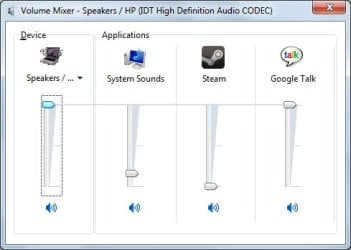
This is what the sound mixer for the built-in speakers look like when I've got the earphones plugged in:
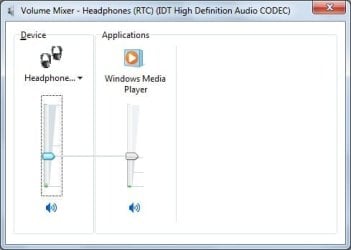
And the earphones:
:shock:
How do I get the other apps on the built-in speakers' mixer to be played by the earphones?
Windows Media Player for instance works fine when I start it up after plugging in the earphones, but apps like Mozilla Fire Fox uses the HP built-in speakers.
This is what the sound mixer for the built-in speakers look like when I've got the earphones plugged in:
And the earphones:
:shock:
How do I get the other apps on the built-in speakers' mixer to be played by the earphones?
My Computer
At a glance
Windows 7 Home Basic 32bit
- Computer Manufacturer/Model Number
- Hewlett-Packard
- OS
- Windows 7 Home Basic 32bit
 icnic:


