Excel 2010 not saving.

Derrickp

New member
Local time
11:16 AM
Messages
5
Location
Durban
Hi I have had office 2010 installed for about 2 months now but on a regular basis when I am working in Excel I am unable to save the document. When I select save or saveas nothing happens and when I close the document I am asked if I want to save and again if I select yes nothing happens. Currently my only workaround is to email the document to myself.

How can I go about reporting this to Microsoft or find a patch for this bug?

Regards,
DP
 

My Computer

Computer Manufacturer/Model Number
Acer TravelMate 6592
OS
Windows 7
CPU
Intel core 2 duo T7500
Motherboard
?
Memory
4GB DDR2
Graphics Card(s)
358MB Intel graphics X3100
Sound Card
yes ?
Monitor(s) Displays
LCD 15"
Hard Drives
250GB
PSU
?
Case
?
Cooling
?
Have you installed the latest updates for Office 2010?
 

My Computer

Computer Manufacturer/Model Number
Samsung NP530U4B-S02IN
OS
Windows® 8 Pro (64-bit)
CPU
Intel® Core™ i5 Processor 2467M (1.60GHz, 3MB L3 Cache)
Motherboard
Samsung Electronics
Memory
6GB DDR3 System Memory at 1,333MHz (on BD 4GB + 2GB x 1)
Graphics Card(s)
AMD Radeon™ HD7550M 1GB DDR3 (Ext. Graphic)
Sound Card
Realtek High Definition Audio
Monitor(s) Displays
35.56cm (14.0) SuperBright 300nit HD LED Display
Screen Resolution
1366x768
Hard Drives
1TB S-ATA II Hard Drive (5400RPM) with ExpressCache 16GB SSD
Internet Speed
sucks
Antivirus
Microsoft Security Essentials
Browser
Google Chrome (Sync enabled)
I am not sure where to find them. I have looked before. Any pointers?

Regards,
DP
 

My Computer

Computer Manufacturer/Model Number
Acer TravelMate 6592
OS
Windows 7
CPU
Intel core 2 duo T7500
Motherboard
?
Memory
4GB DDR2
Graphics Card(s)
358MB Intel graphics X3100
Sound Card
yes ?
Monitor(s) Displays
LCD 15"
Hard Drives
250GB
PSU
?
Case
?
Cooling
?
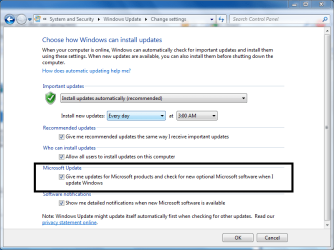
Yes there is. Go to Windows Updates and click Change Settings.

Select Microsoft Updates. Then check for updates.

Capture.PNG
 

My Computer

Computer Manufacturer/Model Number
Samsung NP530U4B-S02IN
OS
Windows® 8 Pro (64-bit)
CPU
Intel® Core™ i5 Processor 2467M (1.60GHz, 3MB L3 Cache)
Motherboard
Samsung Electronics
Memory
6GB DDR3 System Memory at 1,333MHz (on BD 4GB + 2GB x 1)
Graphics Card(s)
AMD Radeon™ HD7550M 1GB DDR3 (Ext. Graphic)
Sound Card
Realtek High Definition Audio
Monitor(s) Displays
35.56cm (14.0) SuperBright 300nit HD LED Display
Screen Resolution
1366x768
Hard Drives
1TB S-ATA II Hard Drive (5400RPM) with ExpressCache 16GB SSD
Internet Speed
sucks
Antivirus
Microsoft Security Essentials
Browser
Google Chrome (Sync enabled)

My Computer

Computer Manufacturer/Model Number
Too many to describe...
OS
Windows 7 x64 pro/ Windows 7 x86 Pro/ XP SP3 x86
Thanks for your help Dinesh. I have checked and my system is up to date but the problem still exists.
 

My Computer

Computer Manufacturer/Model Number
Acer TravelMate 6592
OS
Windows 7
CPU
Intel core 2 duo T7500
Motherboard
?
Memory
4GB DDR2
Graphics Card(s)
358MB Intel graphics X3100
Sound Card
yes ?
Monitor(s) Displays
LCD 15"
Hard Drives
250GB
PSU
?
Case
?
Cooling
?
Try reinstalling Office 2010. It must fix this issue.
 

My Computer

Computer Manufacturer/Model Number
Samsung NP530U4B-S02IN
OS
Windows® 8 Pro (64-bit)
CPU
Intel® Core™ i5 Processor 2467M (1.60GHz, 3MB L3 Cache)
Motherboard
Samsung Electronics
Memory
6GB DDR3 System Memory at 1,333MHz (on BD 4GB + 2GB x 1)
Graphics Card(s)
AMD Radeon™ HD7550M 1GB DDR3 (Ext. Graphic)
Sound Card
Realtek High Definition Audio
Monitor(s) Displays
35.56cm (14.0) SuperBright 300nit HD LED Display
Screen Resolution
1366x768
Hard Drives
1TB S-ATA II Hard Drive (5400RPM) with ExpressCache 16GB SSD
Internet Speed
sucks
Antivirus
Microsoft Security Essentials
Browser
Google Chrome (Sync enabled)
Thanks Dinesh I'll give it a go.
 

My Computer

Computer Manufacturer/Model Number
Acer TravelMate 6592
OS
Windows 7
CPU
Intel core 2 duo T7500
Motherboard
?
Memory
4GB DDR2
Graphics Card(s)
358MB Intel graphics X3100
Sound Card
yes ?
Monitor(s) Displays
LCD 15"
Hard Drives
250GB
PSU
?
Case
?
Cooling
?
Hi Dinesh,

I have uninstalled office and reinstalled twice and the problem still exists. It would appear to be more prevalent when the excel document originates from an email attachment. It is almost as if the document is flagged as read only. The system will not let me save or save as.

How do I log this as an issue with Microsoft?

Derrick
 

My Computer

Computer Manufacturer/Model Number
Acer TravelMate 6592
OS
Windows 7
CPU
Intel core 2 duo T7500
Motherboard
?
Memory
4GB DDR2
Graphics Card(s)
358MB Intel graphics X3100
Sound Card
yes ?
Monitor(s) Displays
LCD 15"
Hard Drives
250GB
PSU
?
Case
?
Cooling
?
Hi

Have you had a look at this - microsoft link?

Notes before you start to troubleshoot the issue

If you are currently experiencing this problem with a file that you have not yet saved successfully, see the Save your Excel file before you start to troubleshoot the issue section before you continue to troubleshoot this problem.

If you want to know more about how Excel saves files, see the Process for saving an Excel file section.

To troubleshoot an Excel save issue, follow these steps in the order that they appear until the problem is resolved.

Step 1: Try to save the Excel file to another location


If you can save the Excel file correctly when you save it to a local hard disk drive, to a network drive, or to a floppy drive, the following are possible causes for the issues that you are experiencing:
If you cannot save the Excel file correctly when you save it to a local hard disk drive, to a network drive, or to a floppy drive, the following are possible causes for the issues that you are experiencing:
If neither of these are the cause, try step 2.

Step 2: Try to save a new Excel file to the original location

To save a new Excel file to the original location, follow these steps:
  1. Create a new Excel workbook.
  2. On the File menu, click Save As.
  3. In the Save As dialog box, follow these steps:
    1. In the Save in box, click the location where your original Excel file is saved.
    2. In the File name box, type a new name for your new Excel file.
    3. Click Save.
If you can save a new Excel file to the original location, the following are possible causes:
If you cannot save a new Excel file to the original location, the following is a possible cause:
If you have sufficient drive space, try step 3.

Step 3: Try to save the Excel file in Microsoft Windows Safe Mode


If step 1 and step 2 has not resolved the issue, restart Windows in Safe Mode, and then try to save your Excel file to your local hard-disk drive.

Note If you use a network location to save your Excel files, try to restart Windows in Safe Mode with network support, and then try to save your Excel file.

For more information about how to start Windows in Safe Mode or about how to perform a clean boot, click the following article numbers to view the articles in the Microsoft Knowledge Base: 156126 (http://support.microsoft.com/kb/156126/ ) Troubleshooting Windows 95 using Safe Mode
192926 (http://support.microsoft.com/kb/192926/ ) How to perform clean-boot troubleshooting for Windows 98
267288 (http://support.microsoft.com/kb/267288/ ) How to perform a clean boot in Windows Millennium Edition
266169 (http://support.microsoft.com/kb/266169/ ) How to troubleshoot problems with Standby mode, Hibernate mode, and shutting down your computer in Windows 2000
281770 (http://support.microsoft.com/kb/281770/ ) How to perform clean-boot troubleshooting for Windows 2000

If the Excel file saves after you restart Windows in Safe Mode, try to resave the file again. To do so, click Save on the File menu.

If the Excel file does not save (or save again) after you restart Windows in Safe Mode, the following are possible causes:

 
Last edited:

My Computer

Computer Manufacturer/Model Number
Custom
OS
Win7 HP (x64)/Win7 Ultimate (x64)
CPU
Core i7 920
Motherboard
Intel X58
Memory
6 x 2GB Corsair XMS3
Graphics Card(s)
CF HD4890
Sound Card
Asus Xonar
Monitor(s) Displays
Dell 2408WFP
Screen Resolution
1920 x 1200
Hard Drives
2 x 150GB WDC Velociraptors (Raid 0)
1 x 1TB Seagate
1 x 1.5TB Seagate
PSU
Corsair HX1000W
Case
Antec 1200
Keyboard
Razer Lycosa/N52te
Mouse
Razer Lachesis
Hi Dinesh,

I have uninstalled office and reinstalled twice and the problem still exists. It would appear to be more prevalent when the excel document originates from an email attachment. It is almost as if the document is flagged as read only. The system will not let me save or save as.

How do I log this as an issue with Microsoft?

Derrick


What anti-virus software are you running?
 

My Computer

Computer Manufacturer/Model Number
Custom
OS
Win7 HP (x64)/Win7 Ultimate (x64)
CPU
Core i7 920
Motherboard
Intel X58
Memory
6 x 2GB Corsair XMS3
Graphics Card(s)
CF HD4890
Sound Card
Asus Xonar
Monitor(s) Displays
Dell 2408WFP
Screen Resolution
1920 x 1200
Hard Drives
2 x 150GB WDC Velociraptors (Raid 0)
1 x 1TB Seagate
1 x 1.5TB Seagate
PSU
Corsair HX1000W
Case
Antec 1200
Keyboard
Razer Lycosa/N52te
Mouse
Razer Lachesis
I am having this exact same issue. I'm curious if anyone has solved it?
 

My Computer

OS
Windows 7 64bit
Hi Dinesh,

I have uninstalled office and reinstalled twice and the problem still exists. It would appear to be more prevalent when the excel document originates from an email attachment. It is almost as if the document is flagged as read only. The system will not let me save or save as.
Derrick

Derrick - can you check to see if the attachment is saved as Read-Only? As you say, this would prevent you from making changes and saving.
 

My Computer

Computer type
PC/Desktop
Computer Manufacturer/Model Number
Golden Mk. I.4
OS
Windows 10 Pro x64 ; Xubuntu x64
CPU
Intel i7 860 @ 2.80 GHz O/C'ed to 4.0GHz
Motherboard
Gigabyte P55A-UD3R Rev.1. Award BIOS F13
Memory
16GB Corsair Vengance DDR3 @ 661 MHz Dual Channel (9-9-9-24)
Graphics Card(s)
EVGA NVidia GTX 560 1024MB
Sound Card
Realtek Integrated
Monitor(s) Displays
Dual Samsung SyncMaster 2494HS
Screen Resolution
1920*1080 and 1920*1080
Hard Drives
1*Samsung 840 EVO 120GB SSD;
1*OCZ Vertex 2 60GB SSD;
2*Samsung F3 SpinPoint 1TB in RAID0;
1*Samsung F1 SpinPoint 1TB;
2*Western Digital 1TB External USB 3.0
1*Western Digital 500GB External USB 3.0
1*Seagate 500GB External USB 2.0
PSU
Thermaltake ToughPower QFan 750W
Case
Thermaltake Element S VK60001W2Z
Cooling
Corsair H60 Water Cooling, 2*230mm and 2*80mm case fans
Keyboard
Logitech G110
Mouse
Logitech MX518
This is happening to me very randomly and not with files that are from an email attachment. It is happening most if I try to save more than once - either when saving portions of the sheet as pdf files or saving the excel file as a new name. The first time it will save, any other times it will not. This seems to be happening most often, if not exclusively, with .xlsx files. Again, the occurances are random, and aren't completely true to any particular trend.

My office programs were just installed yesterday, so they're up to date. I've tried everything I can think of and am at a loss.
 

My Computer

OS
Windows XP
I came across this when I started using 2010. Files as attachments must first be saved to your HDD. Once saved there, open excel and try a file save then.
 

My Computer

Computer type
PC/Desktop
Computer Manufacturer/Model Number
Self Build
OS
Windows 7 Professional X64 Service Pack 1
CPU
AMD Phenom II X4 955 3.20GHz
Motherboard
Gigabyte GA-MA790X-UD4P
Memory
8G
Graphics Card(s)
GX550 Ti
Sound Card
On board
Monitor(s) Displays
Asus VW246H & Syncmaster 2243swx
Screen Resolution
1920x1080 & 1920x1080
Hard Drives
M4-CT128 SSD2, Samsung 840 256GB, 1 WDC 1TB
PSU
Corsair TX750W-V2
Case
Antec
Cooling
2 120mm fan
Keyboard
Microsoft Wireless 3050
Mouse
Microsoft Wireless 5000
Internet Speed
72/6Mbs (Cable)
Other Info
Asus AC1900 router, 8 port Trendnet Switch - Logitech Webcam Pro 9000
Excel save problems

There appears to be 2 problems described in these posts
1) hitting Save or Save As and nothing happens
2) problems saving a document that has already been saved

#1 has happened to me when you open a document that somehow is in the 'protected' mode.
I have not found out how to turn that 'feature' off but if you do a copy all and pase into a new workbook it will save

#2 seems to happen when somehow Excel seems to lose the location of the file or you get the error message; "An unexpected error has occurred. AutoRecover has been disabled for the session." Then after a couple of clicks Excel asks if you want to overwrite the file and then freezes (timing circle goes on for ever). when you close Excel and it finds the file again it was to the last save version and not the latest version.
Any of the fixes from Microsoft do not seem to work, turning off Add-on's does not work and
 

My Computer

Computer Manufacturer/Model Number
acer
OS
Windows 7 Professional
Resolution for the Excel 2010 not-saving problem

FWIW, I resolved that problem on my Asus Eee PC running Windows 7 Pro and Office 2010 by uninstalling PowerPivot for Excel, then rebooting. Now, no Excel save or save-as issues, whether saving to HDD or USB. I can't guarantee it'll work for you, but if you're not using PowerPivot, it's worth a try.

To uninstall, go to Control Panel/Programs and Services and find the listing for PowerPivot for Excel in the grouping for Microsoft SQL Server. Click on it and click on 'uninstall' at the top of the frame.

--Quire
 
Last edited:

My Computer

Computer Manufacturer/Model Number
Asus Eee PC
OS
Windows 7 Professional 32-bit
Thanks Quire, this has resolved my issue for several users!

Will now look at re-installing the PowerPivot add-in however this has resolved the issue for now :D
 

My Computer

Computer type
Laptop
Computer Manufacturer/Model Number
Toshiba
OS
Microsoft Windows 7 Enterprise 32-bit 7601 Multiprocessor Free Service Pack 1
CPU
Intel(R) Core(TM) i7-4600U CPU @ 2.10GHz
Motherboard
TOSHIBA PORTEGE Z30-A
Memory
8.00 GB
Graphics Card(s)
Intel(R) HD Graphics Family
Sound Card
High Definition Audio Device
Screen Resolution
1366 x 768 x 32 bits (4294967296 colors) @ 60 Hz
Hard Drives
TOSHIBA THNSNJ256GMCU ATA Device
Keyboard
HP USB Standard Keyboard
Mouse
HP USB Standard Mouse
Antivirus
Microsoft Endpoint
Browser
IE 11
Back
Top