Excel 2010 Add forms / 2nd spreadsheet to a column
Hi all
I'm trying to add a little Calculator function to a Spreadsheet I use for trading shares.
I pull basic data from YAHOO finance and would like to have at the bottom of a spreadsheet a calculator which would allow me to enter Nr of shares bought, Price Paid and return things like Profit / Loss.
The advantage of having it on the spreadsheet is then it's all in the same place.
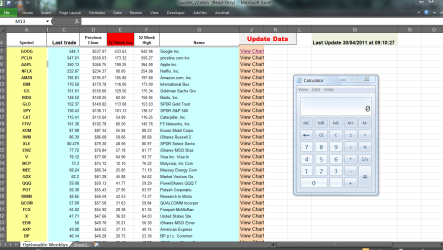
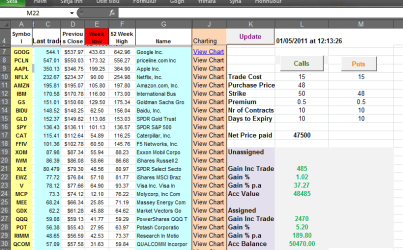
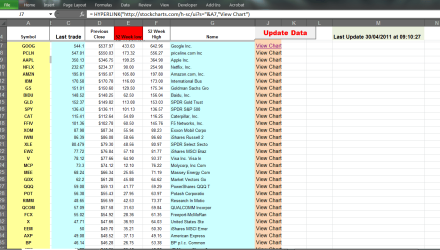
The spreadsheet looks something like this -- enclosed pic
I'd like to embed the calculator in column M say starting at Row 15-- I'm not sure whether this should be done with a FORM or embed another spreadsheet.
Any ideas / links --- all the googling I've done either quote examples that are so impossibly complicated or hard or just too basic.
Cheers
jimbo
Hi all
I'm trying to add a little Calculator function to a Spreadsheet I use for trading shares.
I pull basic data from YAHOO finance and would like to have at the bottom of a spreadsheet a calculator which would allow me to enter Nr of shares bought, Price Paid and return things like Profit / Loss.
The advantage of having it on the spreadsheet is then it's all in the same place.
The spreadsheet looks something like this -- enclosed pic
I'd like to embed the calculator in column M say starting at Row 15-- I'm not sure whether this should be done with a FORM or embed another spreadsheet.
Any ideas / links --- all the googling I've done either quote examples that are so impossibly complicated or hard or just too basic.
Cheers
jimbo
Attachments
My Computer
- Computer type
- PC/Desktop
- Computer Manufacturer/Model Number
- Custom built, several laptops HP/ASUS
- OS
- Linux CENTOS 7 / various Windows OS'es and servers
- CPU
- Intel i7 Intel i5
- Memory
- 8GB, 16GB
- Graphics Card(s)
- On Motherboard
- Sound Card
- Realtek HD audio
- Monitor(s) Displays
- Apple Cinema display, Samsung LCD
- Screen Resolution
- 1920 X 1080
- Hard Drives
- 4 X 1TB SATA
- Mouse
- Toshiba wireless laser
- Internet Speed
- > 20MB up