Solved Excel 2010

jimbo45

New member
Guru
Gold Member
VIP
Local time
3:43 PM
Messages
5,941
Location
Hafnarfjörður IS
Excel 2010 Add forms / 2nd spreadsheet to a column

Hi all
I'm trying to add a little Calculator function to a Spreadsheet I use for trading shares.

I pull basic data from YAHOO finance and would like to have at the bottom of a spreadsheet a calculator which would allow me to enter Nr of shares bought, Price Paid and return things like Profit / Loss.

The advantage of having it on the spreadsheet is then it's all in the same place.

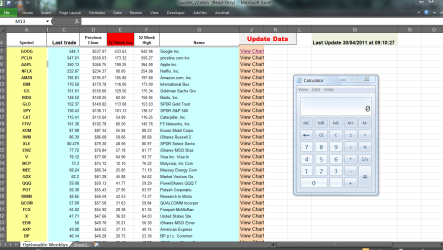
The spreadsheet looks something like this -- enclosed pic

I'd like to embed the calculator in column M say starting at Row 15-- I'm not sure whether this should be done with a FORM or embed another spreadsheet.

Any ideas / links --- all the googling I've done either quote examples that are so impossibly complicated or hard or just too basic.

Cheers

jimbo
 

Attachments
  • options.png
    options.png
    50.5 KB · Views: 21

My Computer

Computer type
PC/Desktop
Computer Manufacturer/Model Number
Custom built, several laptops HP/ASUS
OS
Linux CENTOS 7 / various Windows OS'es and servers
CPU
Intel i7 Intel i5
Memory
8GB, 16GB
Graphics Card(s)
On Motherboard
Sound Card
Realtek HD audio
Monitor(s) Displays
Apple Cinema display, Samsung LCD
Screen Resolution
1920 X 1080
Hard Drives
4 X 1TB SATA
Mouse
Toshiba wireless laser
Internet Speed
> 20MB up

My Computer

Computer type
PC/Desktop
Computer Manufacturer/Model Number
Packard Bell
OS
Windows 7 Home Premium 64bit
CPU
Intel(R) Core(TM) i3-2120 CPU @ 3.30GHz
Motherboard
Packard Bell IPISB-AG
Memory
3.00 GB
Graphics Card(s)
(1) Intel(R) HD Graphics (2) VNC Mirror Driver
Sound Card
Realtek High Definition Audio
Monitor(s) Displays
AIO LCD
Screen Resolution
1920 x 1080
Hard Drives
WDC WD10EADX-22TDHB0 ATA Device
Fixed hard disk media
4 partitions
931.51 GB
Keyboard
Wireless
Mouse
Wireless
Antivirus
Microsoft Security Essentials
Browser
IE; Firefox
Other Info
Also:
Samsung N220 Plus Netbook - Windows 7 Home
HP laptop
iPad 5
Hi there
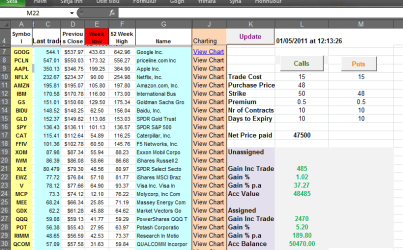
What I meant was to insert a form on the spreadsheet so the user could enter the relevant data and get the results the actual formulae themselves isn't a problem
but I'd like to have the calculator on the spreadsheet

For example using the standard windows calculator

cheers
jimbo
 

Attachments

  • options2.png
    options2.png
    82.6 KB · Views: 12

My Computer

Computer type
PC/Desktop
Computer Manufacturer/Model Number
Custom built, several laptops HP/ASUS
OS
Linux CENTOS 7 / various Windows OS'es and servers
CPU
Intel i7 Intel i5
Memory
8GB, 16GB
Graphics Card(s)
On Motherboard
Sound Card
Realtek HD audio
Monitor(s) Displays
Apple Cinema display, Samsung LCD
Screen Resolution
1920 X 1080
Hard Drives
4 X 1TB SATA
Mouse
Toshiba wireless laser
Internet Speed
> 20MB up
Hi there
What I meant was to insert a form on the spreadsheet so the user could enter the relevant data and get the results the actual formulae themselves isn't a problem
but I'd like to have the calculator on the spreadsheet

For example using the standard windows calculator
Ah, now I see what you mean. I'll put my thinking cap on.. :D
 

My Computer

Computer type
PC/Desktop
Computer Manufacturer/Model Number
Packard Bell
OS
Windows 7 Home Premium 64bit
CPU
Intel(R) Core(TM) i3-2120 CPU @ 3.30GHz
Motherboard
Packard Bell IPISB-AG
Memory
3.00 GB
Graphics Card(s)
(1) Intel(R) HD Graphics (2) VNC Mirror Driver
Sound Card
Realtek High Definition Audio
Monitor(s) Displays
AIO LCD
Screen Resolution
1920 x 1080
Hard Drives
WDC WD10EADX-22TDHB0 ATA Device
Fixed hard disk media
4 partitions
931.51 GB
Keyboard
Wireless
Mouse
Wireless
Antivirus
Microsoft Security Essentials
Browser
IE; Firefox
Other Info
Also:
Samsung N220 Plus Netbook - Windows 7 Home
HP laptop
iPad 5
Probably not exactly what you are looking for, but a small step nearer:
Add Calculator In Excel 2010


By default this feature is hidden.
To make it apparent, navigate to Quick Access toolbar options and click More Commands.

morecommands1.png

It will lead you to Excel Options dialog, under Choose commands, click drop-down button to select All Commands. Now scroll-down to find Calculator command and click Add >> to show it in Quick Access toolbar. Hit OK to continue.
excel.png

Click Calculator button in Quick Access toolbar to immediately open Calculator. Now you can use it for simple calculations
calculator.png
 

My Computer

Computer type
PC/Desktop
Computer Manufacturer/Model Number
Packard Bell
OS
Windows 7 Home Premium 64bit
CPU
Intel(R) Core(TM) i3-2120 CPU @ 3.30GHz
Motherboard
Packard Bell IPISB-AG
Memory
3.00 GB
Graphics Card(s)
(1) Intel(R) HD Graphics (2) VNC Mirror Driver
Sound Card
Realtek High Definition Audio
Monitor(s) Displays
AIO LCD
Screen Resolution
1920 x 1080
Hard Drives
WDC WD10EADX-22TDHB0 ATA Device
Fixed hard disk media
4 partitions
931.51 GB
Keyboard
Wireless
Mouse
Wireless
Antivirus
Microsoft Security Essentials
Browser
IE; Firefox
Other Info
Also:
Samsung N220 Plus Netbook - Windows 7 Home
HP laptop
iPad 5
Hi there
Thanks

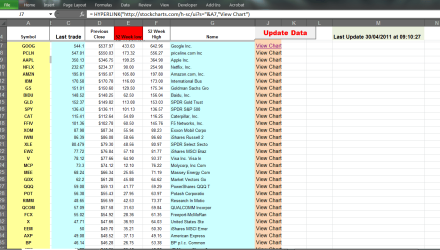
Great tip -- but I've finally found out what to do

Shown in the diagram

Thanks for the ideas anyway

Cheers
jimbo
 

Attachments

  • options_calc.png
    options_calc.png
    30.6 KB · Views: 18

My Computer

Computer type
PC/Desktop
Computer Manufacturer/Model Number
Custom built, several laptops HP/ASUS
OS
Linux CENTOS 7 / various Windows OS'es and servers
CPU
Intel i7 Intel i5
Memory
8GB, 16GB
Graphics Card(s)
On Motherboard
Sound Card
Realtek HD audio
Monitor(s) Displays
Apple Cinema display, Samsung LCD
Screen Resolution
1920 X 1080
Hard Drives
4 X 1TB SATA
Mouse
Toshiba wireless laser
Internet Speed
> 20MB up
You're welcome Jim. I just wish I could persuade our shares to yield more! :D
 

My Computer

Computer type
PC/Desktop
Computer Manufacturer/Model Number
Packard Bell
OS
Windows 7 Home Premium 64bit
CPU
Intel(R) Core(TM) i3-2120 CPU @ 3.30GHz
Motherboard
Packard Bell IPISB-AG
Memory
3.00 GB
Graphics Card(s)
(1) Intel(R) HD Graphics (2) VNC Mirror Driver
Sound Card
Realtek High Definition Audio
Monitor(s) Displays
AIO LCD
Screen Resolution
1920 x 1080
Hard Drives
WDC WD10EADX-22TDHB0 ATA Device
Fixed hard disk media
4 partitions
931.51 GB
Keyboard
Wireless
Mouse
Wireless
Antivirus
Microsoft Security Essentials
Browser
IE; Firefox
Other Info
Also:
Samsung N220 Plus Netbook - Windows 7 Home
HP laptop
iPad 5
Hi Irene

That's not my actual portfolio !! -- I'm just starting to look at OPTION TRADING (Weekly) -- The list of stocks is the available stocks for which Options trade WEEKLY.


The calculator was to calculate possible profit on a particular option at expiry -- and since weekly options expire every week the profit is per 7 days which can be HUGE since there are actually only 5 trading days where money is potentially at risk -- so if you have say a stock worth 20 USD and you SELL a CALL on it at a strike price of say 21 USD for a premium of 0.5 USD a share you've collected REGARDLESS of whatever happens to the stock 50 USD per contract (Options contracts are always per 100 shares)

So your Gain is 50/1950 * 100 % = 2.56%
-- Not bad for 5 days work. And you keep the stock-

- Don't forget that the amount of money at risk is NOT the 2000 the stock costs but LESS the 50 USD PREMIUM the you get for writing (i.e SELLING) the call. 99% of people forget this and get the %'s wrong since they use the original investment as the base - but that's clearly wrong --say the stock goes to ZERO you've still got the 50 USD so the MAX money at risk is obviously 2000 - 50.

If the stock RISES above the "Strike" price You will be "Called" i.e you HAVE to sell the stock at 21 USD -- so you've STILL made the 50 USD on the Call premium PLUS 1 USD profit on the stock per share = 100 USD so your profit % gain in the week is 250/1950 * 100% = 12.82%

For PUTS its the reverse -- people who are interested can google on selling CALLS and PUTS

(Note calculations are for SELLING options --around 90% expire without being Called or PUT so can be profitable if done carefully

Annualize that and quite decent profits can be made - makes the Banks with their paltry 3% A YEAR look stupid.

That was what I was trying to do on the spreadsheet

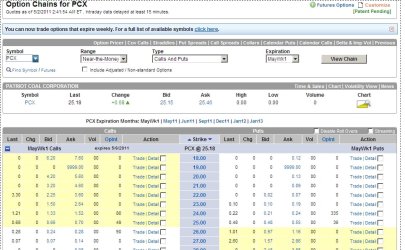
As an example Your trading screen will look something like this (screen attached) -- I use OptionsXpress but they are all roughly similar

Here's a list of the Option Chain for PCX for Week 1 of May -- expires on Friday 6 May.

For a STRIKE of 26 USD you can get nearly 50 Cents a share for selling the CALL option.

Anyway this is primarily a Windows Forum rather than a Stock exchange Forum but you can get the idea of some great things you can do in the newer versions of EXCEL which make things like getting data from the web a doddle.

Cheers

jimbo
 

Attachments

  • options3.jpg
    options3.jpg
    92.7 KB · Views: 11

My Computer

Computer type
PC/Desktop
Computer Manufacturer/Model Number
Custom built, several laptops HP/ASUS
OS
Linux CENTOS 7 / various Windows OS'es and servers
CPU
Intel i7 Intel i5
Memory
8GB, 16GB
Graphics Card(s)
On Motherboard
Sound Card
Realtek HD audio
Monitor(s) Displays
Apple Cinema display, Samsung LCD
Screen Resolution
1920 X 1080
Hard Drives
4 X 1TB SATA
Mouse
Toshiba wireless laser
Internet Speed
> 20MB up
I'll pass this on to my husband. ;) :D
 

My Computer

Computer type
PC/Desktop
Computer Manufacturer/Model Number
Packard Bell
OS
Windows 7 Home Premium 64bit
CPU
Intel(R) Core(TM) i3-2120 CPU @ 3.30GHz
Motherboard
Packard Bell IPISB-AG
Memory
3.00 GB
Graphics Card(s)
(1) Intel(R) HD Graphics (2) VNC Mirror Driver
Sound Card
Realtek High Definition Audio
Monitor(s) Displays
AIO LCD
Screen Resolution
1920 x 1080
Hard Drives
WDC WD10EADX-22TDHB0 ATA Device
Fixed hard disk media
4 partitions
931.51 GB
Keyboard
Wireless
Mouse
Wireless
Antivirus
Microsoft Security Essentials
Browser
IE; Firefox
Other Info
Also:
Samsung N220 Plus Netbook - Windows 7 Home
HP laptop
iPad 5
Hi Irene
I see you are in the UK -- for the examples I've quoted you have to trade the US market -- however OptionsXpress based in Amsterdam - Head office in Chicago- allows European residents to open accounts and deal on US markets -- you need to sign a declaration you aren't resident in the USA so are "Witholding Tax exempt" -- then its fine.

Great time in London during the wedding.

Back at work now -- not a holiday here.

Cheers
jimbo
 

My Computer

Computer type
PC/Desktop
Computer Manufacturer/Model Number
Custom built, several laptops HP/ASUS
OS
Linux CENTOS 7 / various Windows OS'es and servers
CPU
Intel i7 Intel i5
Memory
8GB, 16GB
Graphics Card(s)
On Motherboard
Sound Card
Realtek HD audio
Monitor(s) Displays
Apple Cinema display, Samsung LCD
Screen Resolution
1920 X 1080
Hard Drives
4 X 1TB SATA
Mouse
Toshiba wireless laser
Internet Speed
> 20MB up
Back
Top