
You are using an out of date browser. It may not display this or other websites correctly.
You should upgrade or use an alternative browser.
You should upgrade or use an alternative browser.
EXE file icon missing
- Thread starter shibu1981
- Start date

Try deleting the icon cache and rebooting. This will rebuild the cache. C:\Users\Username\AppData\Local\IconCache.db
More info here. http://www.vistax64.com/tutorials/117229-icon-cache-rebuild.html
Gary
More info here. http://www.vistax64.com/tutorials/117229-icon-cache-rebuild.html
Gary
My Computer
At a glance
Vista Ult 64 bit Seven Ult RTM x64Intel Core2 Quad Q6600 2.40 gigahertzCrucial Ballistix 4x2GB PC2 6400NVIDIA GeForce 8600 GTS 256 MB
- Computer Manufacturer/Model Number
- Dell XPS420
- OS
- Vista Ult 64 bit Seven Ult RTM x64
- CPU
- Intel Core2 Quad Q6600 2.40 gigahertz
- Memory
- Crucial Ballistix 4x2GB PC2 6400
- Graphics Card(s)
- NVIDIA GeForce 8600 GTS 256 MB
- Sound Card
- Creative SB X-Fi audio
- Monitor(s) Displays
- HP w2207 + HPvs15
- Screen Resolution
- 1680x1050 + 1024x768
- Hard Drives
- 2-WD5000AAKS-500 GB
WD5000AAV-500 GB external
- Keyboard
- Microsoft Comfort Curve
- Mouse
- MX Revolution
- Other Info
- Wacom Intuos 2 Graphics Tablet
Experience Index=5.5
Try deleting the icon cache and rebooting. This will rebuild the cache. C:\Users\Username\AppData\Local\IconCache.db
More info here. Icon Cache - Rebuild - Vista Forums
Gary
Sorry mate that didn't solve the problem.
My Computer
At a glance
Windows 7 Ultimate
- OS
- Windows 7 Ultimate

???? Do you mean the icon or the .exe extension on the file name?
I hate it when windows explorer does not show file extensions.
That IS an option under Folder Options.

I hate it when windows explorer does not show file extensions.
That IS an option under Folder Options.
My Computer
At a glance
Windows XP-Pro-SP3, Windows 7AMD, 2X, Dual Core 5200+6 gig DDR2, Super TalentWinfast
- Computer Manufacturer/Model Number
- Home Made
- OS
- Windows XP-Pro-SP3, Windows 7
- CPU
- AMD, 2X, Dual Core 5200+
- Motherboard
- MSI K9N Platinum
- Memory
- 6 gig DDR2, Super Talent
- Graphics Card(s)
- Winfast
- Sound Card
- On Board AC97
- Monitor(s) Displays
- 19" Envision LCD
- Screen Resolution
- 1024x768
- Hard Drives
- 3x , Maxtor/Seagate SATA2 (160, 160, 200gig)
- PSU
- Antec Earthwatts 650
- Case
- Pac Man Mid-Tower
- Cooling
- 11 fans
- Keyboard
- Generic
- Mouse
- MS digital
- Internet Speed
- 5 Meg Cable

I have a problem with some exe files icon. Some exe icons are missing. How can I solve this?
Since installing Win7 I had a higher occurrence of this problem, too. In looking at the shortcut icons on my desktop that had this problem I discovered they often referenced the installer EXE rather than the program itself. Not sure, though, if this is even your issue or not.
It might help for you to post a screenshot of the problem, which would clear up any ambiguity as to what the issue might be.
(note, in my case perhaps the tip from Gary about deleting/rebuilding the icon cache would have solved my particular problem - Coming from an XP background I wasn't aware of this tip so next time that will be what I try.)
My Computer
At a glance
Windows 7 Pro x643.00 GHz Intel Core2 Quad Q96504 GBATI Radeon HD 3400 Series
- Computer Manufacturer/Model Number
- Dell Vostro 420
- OS
- Windows 7 Pro x64
- CPU
- 3.00 GHz Intel Core2 Quad Q9650
- Memory
- 4 GB
- Graphics Card(s)
- ATI Radeon HD 3400 Series
- Monitor(s) Displays
- DELL 2405FPW
- Screen Resolution
- 1920x1200
- Hard Drives
- System: 80GB WDC WD800JD-22MSA1
Data: 500GB Hitachi HDP725050GLA360
- Internet Speed
- Verizon FiOS 20/5 mbps
- Other Info
- Computing is primarily business use with off-time troubleshooting practice: Remote desktop, scanning and producing invoices, some minor graphics work.
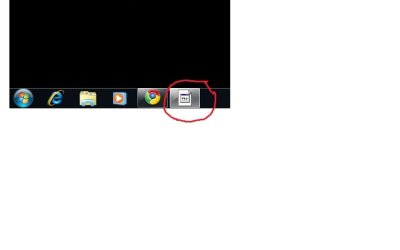
OK. This is the screenshot of what I got when I opened Gtalk.
Yep, this is exactly what I was seeing. Thanks for the screenshot.
I don't have a solution but if you locate that shortcut icon you used to launch that program, right click on it, choose Properties from the menu, click on the Shortcut tab, and click on the button at the bottom labeled, "Change Icon," are you seeing something similar to this path in the top?
%SystemRoot%\Installer\{CADD6FD0-1C07-4C22-B4F7-40ECE46546CC}\IconD7A33067.exe
Coming from the XP world I was always used to shortcut icons being pulled out of the EXE directly, not from the installer.
Of course, back in that properties tab you can change the icon to reference the program's EXE itself, but overall I am not sure why Win7 (and perhaps Vista?) uses the installer EXE?
My Computer
At a glance
Windows 7 Pro x643.00 GHz Intel Core2 Quad Q96504 GBATI Radeon HD 3400 Series
- Computer Manufacturer/Model Number
- Dell Vostro 420
- OS
- Windows 7 Pro x64
- CPU
- 3.00 GHz Intel Core2 Quad Q9650
- Memory
- 4 GB
- Graphics Card(s)
- ATI Radeon HD 3400 Series
- Monitor(s) Displays
- DELL 2405FPW
- Screen Resolution
- 1920x1200
- Hard Drives
- System: 80GB WDC WD800JD-22MSA1
Data: 500GB Hitachi HDP725050GLA360
- Internet Speed
- Verizon FiOS 20/5 mbps
- Other Info
- Computing is primarily business use with off-time troubleshooting practice: Remote desktop, scanning and producing invoices, some minor graphics work.
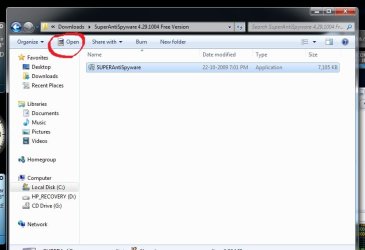
Thanks for the help mate. The problem is solved by the link given by garysgold. I had to delete the file 4-5 times and restarting the machine. But now another problem. When I select any Installation file the icon showed is as in the picture. Is this common or not?
Attachments
My Computer
At a glance
Windows 7 Ultimate
- OS
- Windows 7 Ultimate
I get the same icon for .exe files. Other files have the icon of the default program to open them.
My Computer
At a glance
Vista Ult 64 bit Seven Ult RTM x64Intel Core2 Quad Q6600 2.40 gigahertzCrucial Ballistix 4x2GB PC2 6400NVIDIA GeForce 8600 GTS 256 MB
- Computer Manufacturer/Model Number
- Dell XPS420
- OS
- Vista Ult 64 bit Seven Ult RTM x64
- CPU
- Intel Core2 Quad Q6600 2.40 gigahertz
- Memory
- Crucial Ballistix 4x2GB PC2 6400
- Graphics Card(s)
- NVIDIA GeForce 8600 GTS 256 MB
- Sound Card
- Creative SB X-Fi audio
- Monitor(s) Displays
- HP w2207 + HPvs15
- Screen Resolution
- 1680x1050 + 1024x768
- Hard Drives
- 2-WD5000AAKS-500 GB
WD5000AAV-500 GB external
- Keyboard
- Microsoft Comfort Curve
- Mouse
- MX Revolution
- Other Info
- Wacom Intuos 2 Graphics Tablet
Experience Index=5.5
Icon corruption is becoming a common problem in windows 7 it seems, shame there is not much information on it at the moment.
My Computer
At a glance
Windows 7 Professional 64-BitCore 2 Duo E6700 2.66GHz4GB OCZ DDR2EVGA Geforce 260 SSC
- Computer Manufacturer/Model Number
- Custom
- OS
- Windows 7 Professional 64-Bit
- CPU
- Core 2 Duo E6700 2.66GHz
- Motherboard
- Abit AW9D Max
- Memory
- 4GB OCZ DDR2
- Graphics Card(s)
- EVGA Geforce 260 SSC
Similar threads

- Replies
- 6
- Views
- 17K
- Replies
- 4
- Views
- 32K
- Replies
- 7
- Views
- 4K

