Solved Expanding partition into free space - but it's not letting me?

glyxom

New member
Local time
6:58 AM
Messages
12
In a stroke of genuine, so-real-it's-true, lovingly human idiocy, I allotted myself a measly 50 GB for my Windows installation and program files! Naturally I wanted to extend this, but right ahead of the Windows partition on the drive was an Ubuntu install which took up the entire rest of the drive.

So I set to work, spending over four hours for gparted running from an Ubuntu Live session to shrink the Ubuntu volume to about half the entire size of the disk, then moving it to the end of the disk so that I might have some room to extend the partition. And, lo and behold, it still would not let me expand the Windows part! The listed maximum of 50 GB refuses to budge.

I am pretty good with computing, but partition management is beyond the end of my wits. Can you tell me how to resolve this problem? I'll pay you with hearty thanks!
 

My Computer My Computer

At a glance

Win7 Ultimate x64 (with a side of Ubuntu)
OS
Win7 Ultimate x64 (with a side of Ubuntu)
Hello glyxom, welcome to Seven Forums!


Before we make any specific recommendations will you please post a snip/screen-shot of the entire Windows disk management drive map with a full description as to which drive/partition is which, so we can see what you have going on as there may be a fairly simple way to resolve the situation.

In the Windows start menu right click computer and click manage, in the left pane of the "Computer Management" window that opens click disk management and post a maximized snip of that.


My Computer My Computer

At a glance

W 7 64-bit UltimateIntel Q9550 Yorkfield8GB Dominator 8500C5DATI : XFX 5870
Computer Manufacturer/Model Number
* BFK Customs *
OS
W 7 64-bit Ultimate
CPU
Intel Q9550 Yorkfield
Motherboard
ASUS P5Q Pro
Memory
8GB Dominator 8500C5D
Graphics Card(s)
ATI : XFX 5870
Sound Card
Realtek HD Audio 7-1
Monitor(s) Displays
1x 47" LCD HDMI & 3x 26" LCD HDMI
Screen Resolution
1920x1080P & 1920x1200
Hard Drives
1x 80GB Intel X25-M G2 SSD : 1x 500GB & 1x 640GB WD Caviar Black(s)
PSU
Corsair 620HX
Case
Cooler Master RC-690
Cooling
Tuniq Tower 120, 2x 140mm and 3x 120mm case fans
Keyboard
Microsoft 500
Mouse
Razer Diamondback 3G
Internet Speed
14 Mb/s
Other Info
1x Koutech 3Gb/s SATA HDD Hot Swap Rack
With Disk Management, you can only extend a partition if the unallocated space is directly adjacent to the right of that partition.

The solution is to use the bootable CD of Partition Wizard (last entry on the webpage). But as a precaution, I would recommend to first image your partitions on the drive. If you make a false manipulation, you can loose those partitions.

Another option is to image the partition that is to the right of the C partition. Then delete that partition with Disk Management. Extend C and recreate a partition in the remaining unallocated space where you can dump the image.
 

My Computer My Computer

At a glance

Vista, Windows7, Mint Mate, Zorin, Windows 8from 1.6GHz Duo to i7
Computer Manufacturer/Model Number
HP, Dell, Gateway, Toshiba - 4 laptops and 2 desktops
OS
Vista, Windows7, Mint Mate, Zorin, Windows 8
CPU
from 1.6GHz Duo to i7
Monitor(s) Displays
2x HP w2207
Hard Drives
5x HDD, 7x SSD, 12x Externals
Keyboard
with trackball - no mices
Mouse
Trackball mice
Internet Speed
DSL 6000
Here we go!

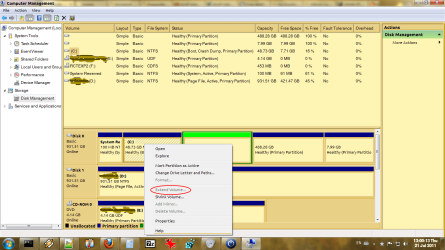
Disk 0 (C:) is clearly the bootdisk. The system reserved partition is in front claiming 100MB, then comes the Windows part. You can notice the green free space I created right after this part, as well as the grayed-out option to extend the volume. The next part is where I have Ubuntu installed.

Disk 1 (D:) is my personal documents, (E:) is a physical DVD drive, and (F:) is a virtual BD-ROM drive which is currently housing a CD ISO. I have no interest in manipulating either of them, but I can easily use D: to back up my current drive.

I will check out Partition Wizard and see if it can handle the job.
 

Attachments

  • diskpartscreencap.png
    diskpartscreencap.png
    65.9 KB · Views: 233

My Computer My Computer

At a glance

Win7 Ultimate x64 (with a side of Ubuntu)
OS
Win7 Ultimate x64 (with a side of Ubuntu)
As that "Free Space" is an Extended partition and you want to extend a Primary partition, they are not compatible; right click the Free Space and delete it then the C: should be able to be extended into the created unallocated space without issue.
 

My Computer My Computer

At a glance

W 7 64-bit UltimateIntel Q9550 Yorkfield8GB Dominator 8500C5DATI : XFX 5870
Computer Manufacturer/Model Number
* BFK Customs *
OS
W 7 64-bit Ultimate
CPU
Intel Q9550 Yorkfield
Motherboard
ASUS P5Q Pro
Memory
8GB Dominator 8500C5D
Graphics Card(s)
ATI : XFX 5870
Sound Card
Realtek HD Audio 7-1
Monitor(s) Displays
1x 47" LCD HDMI & 3x 26" LCD HDMI
Screen Resolution
1920x1080P & 1920x1200
Hard Drives
1x 80GB Intel X25-M G2 SSD : 1x 500GB & 1x 640GB WD Caviar Black(s)
PSU
Corsair 620HX
Case
Cooler Master RC-690
Cooling
Tuniq Tower 120, 2x 140mm and 3x 120mm case fans
Keyboard
Microsoft 500
Mouse
Razer Diamondback 3G
Internet Speed
14 Mb/s
Other Info
1x Koutech 3Gb/s SATA HDD Hot Swap Rack
I tried, but I'm getting a infobox which says the following:

---------------------------
Disk Management
---------------------------
There is not enough space available on the disk(s) to complete this operation.
---------------------------
OK
---------------------------
 

My Computer My Computer

At a glance

Win7 Ultimate x64 (with a side of Ubuntu)
OS
Win7 Ultimate x64 (with a side of Ubuntu)
Use the best partitioning tool for Win7, free Partition Wizard bootable CD, to Resize C into the space. The latest version of PW will allow you to resize into Unallocated (Primary) or Free (Logical) space interchangeably.
 
Your using Linux/GParted probably fouled everything up, I was concerned with that but it was worth a try, this may not be possible at all because if this.


Have a look at Option Three of this tutorial to first wipe and then delete the Extended partition Free Space so it will be converted into unallocated space that Windows can use.

First download the Partition Wizard Bootable Disk (PWBD) ISO file to the desktop, be sure to get the PWBD and not the installed version; scroll down to see the download link for the Bootable CD ISO file at this link below.
Then use ImgBurn to burn the ISO to a CD, at no greater than 4x speed with a verify; it was designed for use and works best from a CD rather than a DVD; then boot the created CD to make the changes, it doesn't take any input from the user to setup, just relax and let it load.
 

My Computer My Computer

At a glance

W 7 64-bit UltimateIntel Q9550 Yorkfield8GB Dominator 8500C5DATI : XFX 5870
Computer Manufacturer/Model Number
* BFK Customs *
OS
W 7 64-bit Ultimate
CPU
Intel Q9550 Yorkfield
Motherboard
ASUS P5Q Pro
Memory
8GB Dominator 8500C5D
Graphics Card(s)
ATI : XFX 5870
Sound Card
Realtek HD Audio 7-1
Monitor(s) Displays
1x 47" LCD HDMI & 3x 26" LCD HDMI
Screen Resolution
1920x1080P & 1920x1200
Hard Drives
1x 80GB Intel X25-M G2 SSD : 1x 500GB & 1x 640GB WD Caviar Black(s)
PSU
Corsair 620HX
Case
Cooler Master RC-690
Cooling
Tuniq Tower 120, 2x 140mm and 3x 120mm case fans
Keyboard
Microsoft 500
Mouse
Razer Diamondback 3G
Internet Speed
14 Mb/s
Other Info
1x Koutech 3Gb/s SATA HDD Hot Swap Rack
I am very eager to use Partition Wizard but all I have right now is a USB stick; is there any way I can make a bootable device from that? I just tried copying the files to the device and booting from it but the computer did not recognize its bootsect.
 

My Computer My Computer

At a glance

Win7 Ultimate x64 (with a side of Ubuntu)
OS
Win7 Ultimate x64 (with a side of Ubuntu)

My Computer My Computer

At a glance

Windows 7 Ultimate SP1 64-BitIntel Core i7 870 @ 2.93GHz8Gb Dual-Channel DDR3 @ 664MHznVidia GeForce GTX 460 1024MB dedicated RAM
Computer Manufacturer/Model Number
HP Pavilion Elite 495UK
OS
Windows 7 Ultimate SP1 64-Bit
CPU
Intel Core i7 870 @ 2.93GHz
Motherboard
MSI 2A9C (CPU1)
Memory
8Gb Dual-Channel DDR3 @ 664MHz
Graphics Card(s)
nVidia GeForce GTX 460 1024MB dedicated RAM
Sound Card
Realtek HD Audio
Monitor(s) Displays
HP2310i
Screen Resolution
1920 x 1080
Hard Drives
1x1954GB Hitachi HDS22020ALA 330 (RAID), 1x1954GB Hitachi External for backup and storage
PSU
460W
Case
HP Elite
Cooling
Air cooled
Keyboard
Logitech K750 solar-powered keyboard
Mouse
Logitech Wireless M180 mouse
Internet Speed
2Mb
Other Info
Pure Avanti Flow Internet Radio with iPod Dock, 64Gb iPod, HP USB Speakers, Sony MDR-V500 Headphones, Sony Vaio F-Series Laptop
Have a look at this to create a bootable stick.
I'm curious, how does Linux 'see' that Free Space, Fat32 or Ext2/3 something like that (that is what I was concerned about) I have almost no experience with Linux.
 

My Computer My Computer

At a glance

W 7 64-bit UltimateIntel Q9550 Yorkfield8GB Dominator 8500C5DATI : XFX 5870
Computer Manufacturer/Model Number
* BFK Customs *
OS
W 7 64-bit Ultimate
CPU
Intel Q9550 Yorkfield
Motherboard
ASUS P5Q Pro
Memory
8GB Dominator 8500C5D
Graphics Card(s)
ATI : XFX 5870
Sound Card
Realtek HD Audio 7-1
Monitor(s) Displays
1x 47" LCD HDMI & 3x 26" LCD HDMI
Screen Resolution
1920x1080P & 1920x1200
Hard Drives
1x 80GB Intel X25-M G2 SSD : 1x 500GB & 1x 640GB WD Caviar Black(s)
PSU
Corsair 620HX
Case
Cooler Master RC-690
Cooling
Tuniq Tower 120, 2x 140mm and 3x 120mm case fans
Keyboard
Microsoft 500
Mouse
Razer Diamondback 3G
Internet Speed
14 Mb/s
Other Info
1x Koutech 3Gb/s SATA HDD Hot Swap Rack
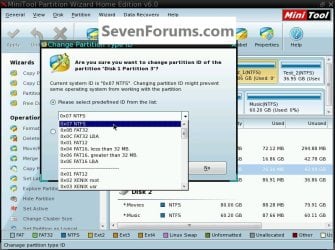
I've just been looking around in PW boot disk and I see these options.


click to enlarge
fat.jpg
 

My Computer My Computer

At a glance

W 7 64-bit UltimateIntel Q9550 Yorkfield8GB Dominator 8500C5DATI : XFX 5870
Computer Manufacturer/Model Number
* BFK Customs *
OS
W 7 64-bit Ultimate
CPU
Intel Q9550 Yorkfield
Motherboard
ASUS P5Q Pro
Memory
8GB Dominator 8500C5D
Graphics Card(s)
ATI : XFX 5870
Sound Card
Realtek HD Audio 7-1
Monitor(s) Displays
1x 47" LCD HDMI & 3x 26" LCD HDMI
Screen Resolution
1920x1080P & 1920x1200
Hard Drives
1x 80GB Intel X25-M G2 SSD : 1x 500GB & 1x 640GB WD Caviar Black(s)
PSU
Corsair 620HX
Case
Cooler Master RC-690
Cooling
Tuniq Tower 120, 2x 140mm and 3x 120mm case fans
Keyboard
Microsoft 500
Mouse
Razer Diamondback 3G
Internet Speed
14 Mb/s
Other Info
1x Koutech 3Gb/s SATA HDD Hot Swap Rack
That about sums up the failed procedure I used. I'll ask a friend if he's got a spare disc.
 

My Computer My Computer

At a glance

Win7 Ultimate x64 (with a side of Ubuntu)
OS
Win7 Ultimate x64 (with a side of Ubuntu)
Be sure to post back with an update.
 

My Computer My Computer

At a glance

W 7 64-bit UltimateIntel Q9550 Yorkfield8GB Dominator 8500C5DATI : XFX 5870
Computer Manufacturer/Model Number
* BFK Customs *
OS
W 7 64-bit Ultimate
CPU
Intel Q9550 Yorkfield
Motherboard
ASUS P5Q Pro
Memory
8GB Dominator 8500C5D
Graphics Card(s)
ATI : XFX 5870
Sound Card
Realtek HD Audio 7-1
Monitor(s) Displays
1x 47" LCD HDMI & 3x 26" LCD HDMI
Screen Resolution
1920x1080P & 1920x1200
Hard Drives
1x 80GB Intel X25-M G2 SSD : 1x 500GB & 1x 640GB WD Caviar Black(s)
PSU
Corsair 620HX
Case
Cooler Master RC-690
Cooling
Tuniq Tower 120, 2x 140mm and 3x 120mm case fans
Keyboard
Microsoft 500
Mouse
Razer Diamondback 3G
Internet Speed
14 Mb/s
Other Info
1x Koutech 3Gb/s SATA HDD Hot Swap Rack
That about sums up the failed procedure I used. I'll ask a friend if he's got a spare disc.
I forgot to note that this was in reference to creating the USB Partition Wizard boot disk using the diskpart command line interface, not the whole expansion procedure itself.

I ended up passing out last night and never got a chance to acquire a blank CD from my friend, who got in later than when I fell asleep, but word has it that he has "tons" of them, so I'm going to try again later today when he's back from work.

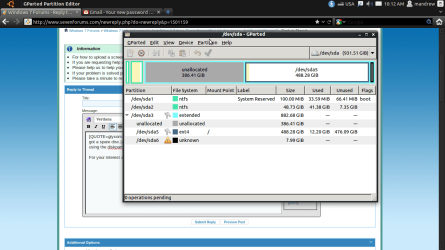
For your interest and curiosity, I have attached an image of what Ubuntu's gparted utility looks like, which as you can see shows the same configuration of partitions and free space (which it considers "unallocated"). It will also not let me expand the partition into that free space, particularly because this Ubuntu is running directly from my hard drive as opposed to being the "live" USB stick version.

Updates cannot come now but they will be forthcoming once the stars align.
 

Attachments

  • gparted.png
    gparted.png
    67.9 KB · Views: 16

My Computer My Computer

At a glance

Win7 Ultimate x64 (with a side of Ubuntu)
OS
Win7 Ultimate x64 (with a side of Ubuntu)

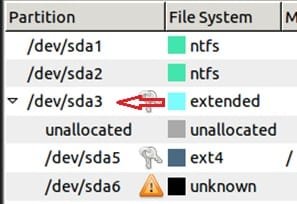
To me, I see (first) an Extended and then unallocated in GParted.

Can you use (is it possible) to use GParted to delete the Extended directly to the right of C:?


The first Extended to the right of C: is all part of the Linux partition structure, you may be SOL.

click to expand
ext.jpg
 

My Computer My Computer

At a glance

W 7 64-bit UltimateIntel Q9550 Yorkfield8GB Dominator 8500C5DATI : XFX 5870
Computer Manufacturer/Model Number
* BFK Customs *
OS
W 7 64-bit Ultimate
CPU
Intel Q9550 Yorkfield
Motherboard
ASUS P5Q Pro
Memory
8GB Dominator 8500C5D
Graphics Card(s)
ATI : XFX 5870
Sound Card
Realtek HD Audio 7-1
Monitor(s) Displays
1x 47" LCD HDMI & 3x 26" LCD HDMI
Screen Resolution
1920x1080P & 1920x1200
Hard Drives
1x 80GB Intel X25-M G2 SSD : 1x 500GB & 1x 640GB WD Caviar Black(s)
PSU
Corsair 620HX
Case
Cooler Master RC-690
Cooling
Tuniq Tower 120, 2x 140mm and 3x 120mm case fans
Keyboard
Microsoft 500
Mouse
Razer Diamondback 3G
Internet Speed
14 Mb/s
Other Info
1x Koutech 3Gb/s SATA HDD Hot Swap Rack
Is there a chance I could back up my current Windows partition, delete it, then use that roughly 500 GB of free space to create a new NTFS partition and upload my backed-up data onto that partition? Or just somehow unassign that space from the Linux partition using Partition Wizard or a Ubuntu Live gparted session?

My guess is no to both questions, but I'm still welcoming your input.
 

My Computer My Computer

At a glance

Win7 Ultimate x64 (with a side of Ubuntu)
OS
Win7 Ultimate x64 (with a side of Ubuntu)
I have about as much time with GParted as I do Linux.


Will GParted shrink/resize the left side of this partition to create unallocated space there?


ext2.jpg
 

My Computer My Computer

At a glance

W 7 64-bit UltimateIntel Q9550 Yorkfield8GB Dominator 8500C5DATI : XFX 5870
Computer Manufacturer/Model Number
* BFK Customs *
OS
W 7 64-bit Ultimate
CPU
Intel Q9550 Yorkfield
Motherboard
ASUS P5Q Pro
Memory
8GB Dominator 8500C5D
Graphics Card(s)
ATI : XFX 5870
Sound Card
Realtek HD Audio 7-1
Monitor(s) Displays
1x 47" LCD HDMI & 3x 26" LCD HDMI
Screen Resolution
1920x1080P & 1920x1200
Hard Drives
1x 80GB Intel X25-M G2 SSD : 1x 500GB & 1x 640GB WD Caviar Black(s)
PSU
Corsair 620HX
Case
Cooler Master RC-690
Cooling
Tuniq Tower 120, 2x 140mm and 3x 120mm case fans
Keyboard
Microsoft 500
Mouse
Razer Diamondback 3G
Internet Speed
14 Mb/s
Other Info
1x Koutech 3Gb/s SATA HDD Hot Swap Rack
Please post back a screenshot of Partition Wizard maximized drive map with listings. Tell us exactly what you want to do.
 
Back
Top