Experiencing a very slow computer

Estam

New member
Local time
12:54 PM
Messages
12
HP Pavilion Entertainment PC DV7 - VG420AV Win 7 64 bit

This is a fairly new problem and not having added any new programs or anything.

Just opening up Firefox takes nearly 20 seconds. I opened task manager to see if I could figure anything out and now seems after I open task manager everything runs fine. Shutting down the computer again and trying to open Firefox back to same problem, same with other programs, even WordPad takes nearly 10 second to open where it would normally take a couple.

Shutting down the computer and restarting it and then running Task Manager (ctrl+alt+del) Firefox will now open normally.

Any suggestions would be appreciated.
 

My Computer

Computer type
PC/Desktop
OS
Win 7
What is the exact serial number(S/N) and the exact product number(P/N) on your HP Pavilion DV7 series laptop?
 

My Computer

Computer type
PC/Desktop
Computer Manufacturer/Model Number
Dell OptiPlex 9020
OS
Windows 7 Professional SP1 64-bit
CPU
Intel Core i7-4790 3.60 GHz
Memory
32 GB DDR3-1600 MHz
Graphics Card(s)
Integrated Intel HD Graphics 4600
Monitor(s) Displays
Viewsonic 32" LCD
Hard Drives
Kingston SATA 3 240 GB SSD
Internet Speed
Spectrum Internet 1000 Mbps
S/N CNF0111WMC
Model # DV7-3100
Product # VG420AV

- - - Updated - - -

Starting and restarting the laptop have found that running the task manager doesn't make any difference to this problem of slowness.
Found opening f/fox at start up and waiting the 20 seconds closing it right away and restarting f/fox the laptop runs fine.
Any suggestions please.
 

My Computer

Computer type
PC/Desktop
OS
Win 7
S/N CNF0111WMC
Model # DV7-3100
Product # VG420AV

Your HP Pavilion DV7-3100 Series Entertainment Notebook PC is so old that HP no longer has a support site listed for it.

From what I can determine, they originally came with Windows 7 Home Premium or Professional 64-bit.

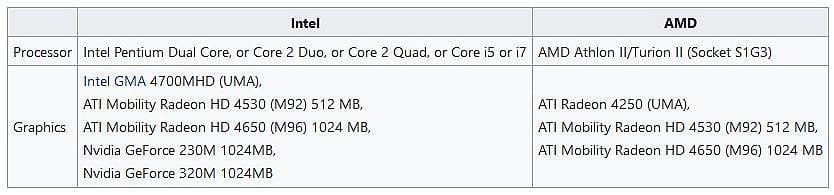
From what I can determine, they came with one of these processors and graphics devices.
(see image)

When was the last time a clean re-install and fresh start was done in yours?
 

Attachments

  • Capture.JPG
    Capture.JPG
    41.1 KB · Views: 0

My Computer

Computer type
PC/Desktop
Computer Manufacturer/Model Number
Dell OptiPlex 9020
OS
Windows 7 Professional SP1 64-bit
CPU
Intel Core i7-4790 3.60 GHz
Memory
32 GB DDR3-1600 MHz
Graphics Card(s)
Integrated Intel HD Graphics 4600
Monitor(s) Displays
Viewsonic 32" LCD
Hard Drives
Kingston SATA 3 240 GB SSD
Internet Speed
Spectrum Internet 1000 Mbps
Correct, it is an older computer and for the last twelve year has turned its self on in the morning and with the use of macros loads the required programs I need to trade the stock market. Few years back upgraded the CPU and maxed out the RAM, Purchased a later version of Win 7 Pro 64-bit and has worked flawlessly till last week where it has been giving me a headache.
Using Firefox as an example although it now takes nearly 20 seconds for it to load once loaded and then closed now only takes 2 seconds for it to open again. Suggesting that maybe it slowly loads a file it needs to run so running it a second time the file is there a nearly instantly opens.

All the programs I use all handle the same slow to open and reopen normally. I understand that files can get corrupted and have ran the installation dish and it has checked system file and are without error.

Any suggestions please...
 

My Computer

Computer type
PC/Desktop
OS
Win 7
Without being there to see how your laptop is set up and how many programs are running in the background and how well your laptop is maintained, it would be difficult to advise you what to do to improve speed and snappiness.

A clean re-install of Windows 7 Professional SP1 64-bit would wipe out all the issues and all the debris and give it a fresh start.
 

My Computer

Computer type
PC/Desktop
Computer Manufacturer/Model Number
Dell OptiPlex 9020
OS
Windows 7 Professional SP1 64-bit
CPU
Intel Core i7-4790 3.60 GHz
Memory
32 GB DDR3-1600 MHz
Graphics Card(s)
Integrated Intel HD Graphics 4600
Monitor(s) Displays
Viewsonic 32" LCD
Hard Drives
Kingston SATA 3 240 GB SSD
Internet Speed
Spectrum Internet 1000 Mbps
Thanks for that. There are no programs running in the back ground to my knowledge. Entering the "system config" under start up tab I have unchecked all the (3) programs, I have uninstalled them but continue to show on the list anyway. Any suggestions how to remove them from this start up list?

I have the original win 7 disk, is there anyway to replace the system files that are required that maybe corrupted for some reason that could slow down this process.
 

My Computer

Computer type
PC/Desktop
OS
Win 7
Is there anyway to replace the system files that are required that maybe are corrupted for some reason that could slow down this process.
 

My Computer

Computer type
PC/Desktop
OS
Win 7
If you believe there are corrupt or missing Windows 7 system files, do the following:

Load the command prompt window, then select to run it as Administrator.

Type in sfc /scannow and then press the Enter key.
(Note: make sure there is a single space between c and /)

Wait for the scanning process to complete.

After it finishes, a message will appear which will give the results of the scan.

Type in exit and then press the Enter key.
 

My Computer

Computer type
PC/Desktop
Computer Manufacturer/Model Number
Dell OptiPlex 9020
OS
Windows 7 Professional SP1 64-bit
CPU
Intel Core i7-4790 3.60 GHz
Memory
32 GB DDR3-1600 MHz
Graphics Card(s)
Integrated Intel HD Graphics 4600
Monitor(s) Displays
Viewsonic 32" LCD
Hard Drives
Kingston SATA 3 240 GB SSD
Internet Speed
Spectrum Internet 1000 Mbps
Please edit your profile with ALL your hardware specs. It will help us to help you
System Info - See Your System Specs


Open a CMD window as administrator and type:
chkdsk c: /f
It will say your disk is in use and ask if you want to schedule to next start = yes
Restart
Pay attention on the results, specially bad blocks, bad clusters, bad sectors etc
 

My Computers

System One System Two

  • Computer type
    PC/Desktop
    Computer Manufacturer/Model Number
    custom build
    OS
    Windows 7 HP 64
    CPU
    i5 6600K - 800MHz to 4200MHz
    Motherboard
    GA-Z170-HD3P
    Memory
    4+4G GSkill DDR4 3000
    Graphics Card(s)
    IG - Intel 530
    Monitor(s) Displays
    Samsung 226BW
    Screen Resolution
    1680x1050
    Hard Drives
    (1) -1 SM951 – 128GB M.2 AHCI PCIe SSD drive for Windows 7 and Lubuntu
    (2) -1 WD SATA 3 - 1T for Data
    (3) -1 WD SATA 3 - 1T for backup
    PSU
    Thermaltake 450W TR2 gold
    Keyboard
    Old and good Chicony mechanical keyboard
    Mouse
    Logitech mX performance - 9 buttons (had to disable some)
    Internet Speed
    500Mb/s
    Browser
    Firefox 64
    Other Info
    TinyWall firewall
  • Computer type
    Laptop
    System Manufacturer/Model Number
    Asus Q550LF
    OS
    Windows 7 Pro
    CPU
    i7-4500U 800MHz to 3.0GHz
    Motherboard
    Asus Q550LF
    Memory
    (4+4)G DDR3 1600
    Graphics Card(s)
    IG intel 4400 + NVIDIA GeForce GT 745M
    Sound Card
    Realtek
    Monitor(s) Displays
    LG Display LP156WF4-SPH1
    Screen Resolution
    1920 x 1080
    Hard Drives
    BX500 120G SSD for Windows and programs +
    1T HDD for data
    Internet Speed
    500 Mb/s
    Browser
    Firefox
    Other Info
    TinyWall firewall
Back
Top