Solved Very Slow Computer - Possible Virus?

jmrpjb

New member
Local time
12:50 PM
Messages
44
Location
Vancouver, Canada
My computer:Dell Inspiron ONE_2020,Intel(R) Pentium(R) CPU G620T 2 2.20 GHz, RAM: 4. GB, 64-bit OS

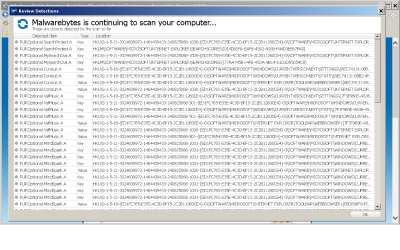
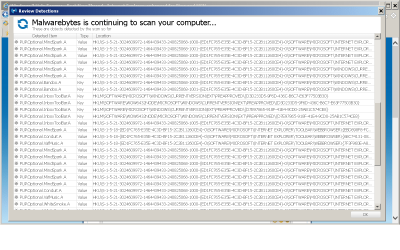
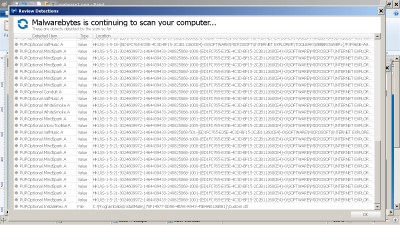
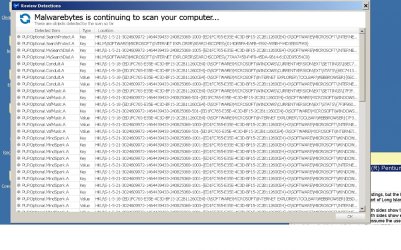
Has been very slow for the last few days and I'm wondering if I've picked up a virus. I cleaned and fixed as much as I could with JetClean and I'm now in the process of scanning it with Malwarebytes Anti-Malware. I've attached a screenshot of some of the items Malwarebytes has detected and I'm sure you'll need more information so just let me know.

There's nothing like a slow computer to drive a person to drink so if there's anyone out there who can help, I would be so grateful.
:party:

Thank you
 

Attachments

  • malware.png
    malware.png
    265.3 KB · Views: 1
  • malware1.png
    malware1.png
    73.8 KB · Views: 0
  • malware2.png
    malware2.png
    74.9 KB · Views: 0
  • malware.jpg
    malware.jpg
    477 KB · Views: 2

My Computer

Computer type
PC/Desktop
Computer Manufacturer/Model Number
Dell product #00359-OEM-8992687-00095
OS
Microsoft Windows 7 Home Premium 64-bit 7601 Multiprocessor Free Service Pack 1
CPU
Intel(R) Pentium(R) CPU G620T @ 2.20GHz
Motherboard
Dell Inc. 0MTFWP
Memory
4.00 GB
Graphics Card(s)
Intel(R) HD Graphics
Sound Card
(1) Realtek High Definition Audio (2) Bluetooth Audio Devi
Screen Resolution
1600 x 900 x 32 bits (4294967296 colors) @ 60 Hz
Hard Drives
(1) ST500DM002-1BD142 ATA Device (2) Multiple Card Reader USB Device
Hello jmrpjb,

Please carry out the steps below:

Run the System File Checker that scans the of all protected Windows 7 system files and replaces incorrect corrupted, changed/modified, or damaged versions with the correct versions if possible:
  • Click on the :orb:
  • Type CMD on Search
  • Left click and Run as Administrator
  • Type SFC /scannow
Full tutorial here:
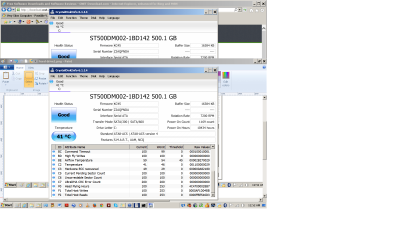
Upload a screenshot of your hard disk using CrystalDiskInfo:
Run Disk Check on your hard disk for file system errors and bad sectors on it:
Make scans with the following:

:ar: Kaspersky TDSSKiller:
:ar: ESET online scanner:
Keep us posted.
 

My Computer

Computer type
PC/Desktop
Computer Manufacturer/Model Number
Self assembled
OS
Windows 10 Home 64Bit
CPU
Intel Core i5 10400 @ 2.90GHz
Motherboard
Intel Corporation DG41WV (PROCESSOR)
Memory
8.00GB Single-Channel Unknown @ 1329MHz (16-20-20-38)
Sound Card
Realtek High Definition Audio
Monitor(s) Displays
DELL E170S
Screen Resolution
1280x1024 pixels
Hard Drives
931GB TOSHIBA DT01ACA100 (SATA)
238GB TEAM TM8PS7256G (SATA SSD)
Case
Nothing Fancy
Cooling
Fans
Keyboard
A4 Tech Co LTD
Mouse
A4 Tech Co Ltd/Logitech
Internet Speed
25 Mbps
Please read this entirely before we begin malware removal:


Before we start with malware assistance, I want to inform you of a few things:

1.) I am not a recognized malware removal expert. I do not have a certification from a malware removal school. Having said that, I have removed a lot of malware with PCs and have years of experience.
But just like no antivirus program is 100% effective, neither am I. My goal is to simply clean up your PC from any malware, and assist you in any way possible to help you secure your PC.

2.) Sevenforums (This forum)and I will NOT be held responsible for anything that might go wrong with your pc.

3.) You agree to follow all directions given, until I advise that your pc is clean and you are free of threats. You will not abandon the thread.

4.)

Do you agree to these terms?

If yes, reply with a Yes. If not, please state so and I will flag an official malware remover, or I will recommend another place for malware removal assistance.
 

My Computer

Computer type
PC/Desktop
Computer Manufacturer/Model Number
Custom Built
OS
Windows 10 Pro
CPU
AMD Ryzen 5 2400G Processor with Radeon RX Vega 11 Graphics
Motherboard
ASRock X470 Master SLI/AC AM4 AMD Promontory X470 SATA 6Gb/s
Memory
G.SKILL Ripjaws V Series 16GB (2 x 8GB) 288-Pin DDR4 SDRAM D
Graphics Card(s)
2047MB NVIDIA GeForce GTX 1060 6GB (EVGA)
Sound Card
Motherboard Built in
Monitor(s) Displays
Acer R240HY bidx 23.8-Inch IPS HDMI DVI VGA (1920 x 1080) Wi
Screen Resolution
1920 x 1080
Hard Drives
1TB Sandisk SSD PLUS (Main drive)
500 GB Seagate 7200 RPM (Games)
500 GB Western Digital 7200 RPM (Virtual Machines)
PSU
CORSAIR TX Series TX650M 650W 80+ Gold Modular Power Supply
Case
CORSAIR CARBIDE SPEC-02 Mid-Tower Gaming Case, Red LED Fan
Cooling
220mm, two 120mm, and four 60mm fans
Keyboard
Wired Dell keyboard
Mouse
Wireless Logitech mouse
Internet Speed
250mb down, 30mb up
Antivirus
Panda Cloud Antivirus
Browser
Chrome-ish x64
Other Info
Your awesome for reading this.
Very Slow Computer - Possible Virus

Thank you very much for your help. (I sure didn't have to wait long.) I followed your instructions and have attached screenshots of my hard disk after using CrystalDisk. It looks O.K. and things are running a lot faster. I performed all the scans (no threats were found) but I didn't do the last one, ESET online scanner because it would have conflicted with my current anti-virus: Microsoft Security Essentials.

At any rate, everything seems to be running smoothly so, again, thank you very much.
 

Attachments

  • hard drive.png
    hard drive.png
    104.1 KB · Views: 1
  • hard drive1.png
    hard drive1.png
    104.3 KB · Views: 1
  • hard drive2.png
    hard drive2.png
    150.3 KB · Views: 0

My Computer

Computer type
PC/Desktop
Computer Manufacturer/Model Number
Dell product #00359-OEM-8992687-00095
OS
Microsoft Windows 7 Home Premium 64-bit 7601 Multiprocessor Free Service Pack 1
CPU
Intel(R) Pentium(R) CPU G620T @ 2.20GHz
Motherboard
Dell Inc. 0MTFWP
Memory
4.00 GB
Graphics Card(s)
Intel(R) HD Graphics
Sound Card
(1) Realtek High Definition Audio (2) Bluetooth Audio Devi
Screen Resolution
1600 x 900 x 32 bits (4294967296 colors) @ 60 Hz
Hard Drives
(1) ST500DM002-1BD142 ATA Device (2) Multiple Card Reader USB Device
Back
Top