explorer.exe eating up resources

kwhunter

New member
Local time
1:01 PM
Messages
7
Explorer is eating up about 70% of my processor usage, all the time.
If I disable it through the task manager's resource monitor, the desktop is unusable.
What can I do to free more of my CPU when I need it?
I run Windows 7 on a Dell Precision T3500 workstation that is a little sluggish.
Thanks for your help
 

My Computer My Computer

At a glance

Win 7
OS
Win 7
Is this a new install? It may be indexing your drive(s) which can take a few hours if you have a lot of stuff, expeciall like videos and images, should go away on it's own after a bit...
 

My Computer My Computer

At a glance

Windows 7 x64 Ultimatei7 96012 Gig Corsair DominatorNvidia 480
Computer Manufacturer/Model Number
Scratch built
OS
Windows 7 x64 Ultimate
CPU
i7 960
Motherboard
Asus P6X58D
Memory
12 Gig Corsair Dominator
Graphics Card(s)
Nvidia 480
Sound Card
Maudio Delta 44 + breakout box
Monitor(s) Displays
Dell UltraSharp U2410 24in and Samsung 21 dual monitors
Screen Resolution
1920x1200 and 1280x1024
Hard Drives
Primary: Intel X-25M G2 160G SSD
Secondary: Segate baracuda 1.0 TB
HDs in AHCI mode.
PSU
Corasair TX850
Case
Cooler Master HAF
Cooling
Corsair H50
Keyboard
Logitech G15 + N52 game pad
Mouse
Logitech MX518
Internet Speed
15kbs down 4.5kbps up
Other Info
WEI 7.6
CPU & RAM 7.6
Graphics 7.9
Hard disk 7.7
No, it is not new but the initial installation year and a half old. It is something wrong with it and I wonder how can I restore the system to the original configuration?
Obviously I don't have the installation CD/DVD as I would format drive C: and do a clean install.
 

My Computer My Computer

At a glance

Win 7
OS
Win 7
Hi, welcome to the forums :)

You may want to perform a full system scan using MalwareBytes and see if it comes up with anything.

Alternatively if your machine came pre-installed with Windows 7 then you can run the manufacturers restore utility. Normally you will get a quick display message when the machine first boots up.
   Note
Most restore utilities offer the option of a non-destructive format which saves all your user files but please read any documentation/on-screen prompts you may have before proceeding


OS
 

My Computer My Computer

At a glance

Windows 7 Ultimate x64AMD Sempron Dual Core3GBNVIDIA GeForce 6150SE nForce 430
Computer Manufacturer/Model Number
Compaq Desktop
OS
Windows 7 Ultimate x64
CPU
AMD Sempron Dual Core
Memory
3GB
Graphics Card(s)
NVIDIA GeForce 6150SE nForce 430
Screen Resolution
1024x768
Hard Drives
150GB Sata
Thanks OS!
I actually ran restore but it went just a couple weeks back to a point where a major update was installed. And it did not fix my issue.
 

My Computer My Computer

At a glance

Win 7
OS
Win 7
What make and model is your machine?
 

My Computer My Computer

At a glance

Windows 7 Ultimate x64AMD Sempron Dual Core3GBNVIDIA GeForce 6150SE nForce 430
Computer Manufacturer/Model Number
Compaq Desktop
OS
Windows 7 Ultimate x64
CPU
AMD Sempron Dual Core
Memory
3GB
Graphics Card(s)
NVIDIA GeForce 6150SE nForce 430
Screen Resolution
1024x768
Hard Drives
150GB Sata
I ran Malwarebyte's and found just minimal problems that were removed, and explorer.exe still uses up to 70% of my processor's resources slowing down any application I run on the machine.
Any other ideas how to stop that?
Thanks
 

My Computer My Computer

At a glance

Win 7
OS
Win 7
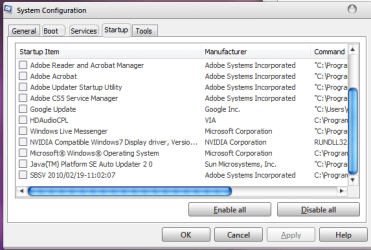
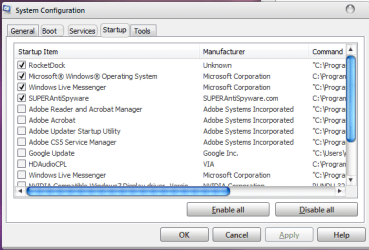
Launch msconfig, and on the startup tab, disable all, tehn apply, and reboot. See if it is any better. If it is you can one by one re-enable startup items. If not, then on the Services tab, check the "Hide all Microsoft Services" box, then select Disable all, then reboot. If still nothing, try downloading a trial version of System Mechanic and run a full scan. That is a great utility for finding hard to trace "weirdness" and slowness.
 

My Computer My Computer

At a glance

Windows 7i5-7504GB DDR3 1600GT220
OS
Windows 7
CPU
i5-750
Motherboard
Asus
Memory
4GB DDR3 1600
Graphics Card(s)
GT220
did that today not sure if theres somethink what should be enabled tho , only just installed anti spyware

dam rong section please remove and sorry lol
 

Attachments

  • Capture.PNG
    Capture.PNG
    15 KB · Views: 16
  • Capture1.PNG
    Capture1.PNG
    13.6 KB · Views: 15

My Computer My Computer

At a glance

windows 7 ultimate x64AMD Athlon II X3 445 Rana 45nm Technology8gbram32MB GeForce 7025 / nForce 630a (Biostar Micr...
Computer Manufacturer/Model Number
custom
OS
windows 7 ultimate x64
CPU
AMD Athlon II X3 445 Rana 45nm Technology
Motherboard
BIOSTAR Group N68S3B
Memory
8gbram
Graphics Card(s)
32MB GeForce 7025 / nForce 630a (Biostar Microtech Int'l)
Screen Resolution
1280x1024
Hard Drives
488GB Seagate ST350041 3AS SCSI Disk Device (ATA)
PSU
400w ?
Keyboard
usb
Mouse
usb
Launch msconfig, and on the startup tab, disable all, tehn apply, and reboot. See if it is any better. If it is you can one by one re-enable startup items. If not, then on the Services tab, check the "Hide all Microsoft Services" box, then select Disable all, then reboot. If still nothing, try downloading a trial version of System Mechanic and run a full scan. That is a great utility for finding hard to trace "weirdness" and slowness.

Thanks Desslok
I've done everything you suggested above, ran SM and fixed all issues and I still have the processor running 70% at all time.
The only way to stop it is to disable explorer.exe but then I cannot use the computer.
Maybe I should downgrade to XP?
What a @^%4<+- mess.
 

My Computer My Computer

At a glance

Win 7
OS
Win 7
[
Thanks Desslok
I've done everything you suggested above, ran SM and fixed all issues and I still have the processor running 70% at all time.
The only way to stop it is to disable explorer.exe but then I cannot use the computer.
Maybe I should downgrade to XP?
What a @^%4<+- mess.

Other things I have seen causing that same issue is the newer versions of Adaware, and also have seen it from having real time ad software running at the same time as antivirus, especially with newer versions of AVG. What AV and adblockers do you have installed?
 

My Computer My Computer

At a glance

Windows 7i5-7504GB DDR3 1600GT220
OS
Windows 7
CPU
i5-750
Motherboard
Asus
Memory
4GB DDR3 1600
Graphics Card(s)
GT220
[
Thanks Desslok
I've done everything you suggested above, ran SM and fixed all issues and I still have the processor running 70% at all time.
The only way to stop it is to disable explorer.exe but then I cannot use the computer.
Maybe I should downgrade to XP?
What a @^%4<+- mess.

Other things I have seen causing that same issue is the newer versions of Adaware, and also have seen it from having real time ad software running at the same time as antivirus, especially with newer versions of AVG. What AV and adblockers do you have installed?

I only have Symantec Endpoint protection, but the resources eater is explorer.exe, verified.
 

My Computer My Computer

At a glance

Win 7
OS
Win 7
[
Thanks Desslok
I've done everything you suggested above, ran SM and fixed all issues and I still have the processor running 70% at all time.
The only way to stop it is to disable explorer.exe but then I cannot use the computer.
Maybe I should downgrade to XP?
What a @^%4<+- mess.

Other things I have seen causing that same issue is the newer versions of Adaware, and also have seen it from having real time ad software running at the same time as antivirus, especially with newer versions of AVG. What AV and adblockers do you have installed?

I only have Symantec Endpoint protection, but the resources eater is explorer.exe, verified.
Do you have any codec packs installed? remove any if they are installed
 

My Computer My Computer

At a glance

Windows 10 Pro x64, Arch LinuxIntel Core 2 Quad Q8200 OC'd 3.08GHz8GB DDR2 900MhzMSI GT730 2GB GDDR5 (Kepler)
Computer type
PC/Desktop
Computer Manufacturer/Model Number
Custom Build
OS
Windows 10 Pro x64, Arch Linux
CPU
Intel Core 2 Quad Q8200 OC'd 3.08GHz
Motherboard
Asus Rampage formula LGA775
Memory
8GB DDR2 900Mhz
Graphics Card(s)
MSI GT730 2GB GDDR5 (Kepler)
Sound Card
Supreme FX2
Monitor(s) Displays
Samsung LS22F350 LED
Screen Resolution
1080P
Hard Drives
Kingston SSDNow UV400 120GB, 500GB Hitachi, 2TB Samsung, 500GB Seagate FreeAgent, 640GB Samsung, 160GB Toshiba (Arch)
PSU
AeroCool 500W Bronze
Cooling
Cooler Master V6 + 3X fans
Keyboard
Prolink keyboard
Mouse
Logitech M705
Internet Speed
1MiB/s
Browser
Chrome Beta
Yes but explorer is the shell and anything integrated into it runs under it. Look at all the DLLs loaded under "Explrer.exe" in the resource monitor. "Task Manager"->"Performance Tab"->"Resource Monitor"->"CPU tab", then fins and check the check box for "Exporer.exe".

If you want to see the list of things NOT installed by default Windows 7. Click on the "Version" column. Everything that does NOT say "6/1/7600.XXXX" is something that you (or someone) has installed on that machine. [edit] This would include installing other MS software such as DX9 etc) [/edit]

Tons of programs integrate themselves into the windows shell. It's very likely not any shipping part of Explorer that's doing this, it would be doing it for everyone. It's more likely something that you have installed that's not behaving well.
 
Last edited:

My Computer My Computer

At a glance

Windows 7 x64 Ultimatei7 96012 Gig Corsair DominatorNvidia 480
Computer Manufacturer/Model Number
Scratch built
OS
Windows 7 x64 Ultimate
CPU
i7 960
Motherboard
Asus P6X58D
Memory
12 Gig Corsair Dominator
Graphics Card(s)
Nvidia 480
Sound Card
Maudio Delta 44 + breakout box
Monitor(s) Displays
Dell UltraSharp U2410 24in and Samsung 21 dual monitors
Screen Resolution
1920x1200 and 1280x1024
Hard Drives
Primary: Intel X-25M G2 160G SSD
Secondary: Segate baracuda 1.0 TB
HDs in AHCI mode.
PSU
Corasair TX850
Case
Cooler Master HAF
Cooling
Corsair H50
Keyboard
Logitech G15 + N52 game pad
Mouse
Logitech MX518
Internet Speed
15kbs down 4.5kbps up
Other Info
WEI 7.6
CPU & RAM 7.6
Graphics 7.9
Hard disk 7.7
Back
Top