
SivanKooveri
New member
- Local time
- 12:43 PM
- Messages
- 1
Hi,
I am running a Win7 Ultimate 64bit, ver. 6.1(Build 7601 SP1). Recently updated from Build 7600 to SP1. The update was frustrating as it failed miserably for a lot of times reporting an unknown error(unfortunately i don't remember or have not recorded the error code for the same). As i browsed through the forum i was adviced to download Windows6.1-KB947821-v34-x64.msu and windows 7 upgrade advisor which i did and was helpful. After another two or three attempts i rectified some application and driver compatibility issues and the update was through and succesful. Then i updated my avast program and installed ie11, skype and Adobe Photoshop CC. Now i tried to refresh the windows experience index, which was unsuccesful after some time and returned an error(again i am sorry, i don't remember the specifics)about video playback and the system froze for 2 mins or so. I restarted the system normally but the system was ill performing after the startup.
From that time onwards, System started slowing down abnormally. Taskmanager showed no unusual process usage but the physical memory usage was always too high like 80 to 100 percent. At times it just froze for a few moments.
Then on a couple of times, on shutdown, system was configuring updates and took too long, failed and started reverting the updates.
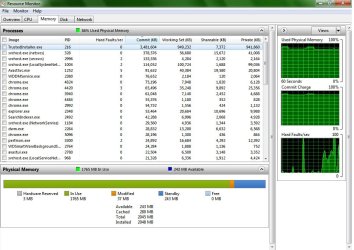
Anyway the system is still taking up a lot of physical memory than usually it did. I am running on a 2GB RAM at the time. My resource monitor shows a process 'TrustedInstaller.exe' taking up more than 950,000kb, which is i know is responsible for WinUpdate.
I am attaching screenshots of both resourcemonitor and task manager(they were taken a couple of mins apart).
Please suggest me a solution.
PS:I am no advanced user, bear with me.
I am running a Win7 Ultimate 64bit, ver. 6.1(Build 7601 SP1). Recently updated from Build 7600 to SP1. The update was frustrating as it failed miserably for a lot of times reporting an unknown error(unfortunately i don't remember or have not recorded the error code for the same). As i browsed through the forum i was adviced to download Windows6.1-KB947821-v34-x64.msu and windows 7 upgrade advisor which i did and was helpful. After another two or three attempts i rectified some application and driver compatibility issues and the update was through and succesful. Then i updated my avast program and installed ie11, skype and Adobe Photoshop CC. Now i tried to refresh the windows experience index, which was unsuccesful after some time and returned an error(again i am sorry, i don't remember the specifics)about video playback and the system froze for 2 mins or so. I restarted the system normally but the system was ill performing after the startup.
From that time onwards, System started slowing down abnormally. Taskmanager showed no unusual process usage but the physical memory usage was always too high like 80 to 100 percent. At times it just froze for a few moments.
Then on a couple of times, on shutdown, system was configuring updates and took too long, failed and started reverting the updates.
Anyway the system is still taking up a lot of physical memory than usually it did. I am running on a 2GB RAM at the time. My resource monitor shows a process 'TrustedInstaller.exe' taking up more than 950,000kb, which is i know is responsible for WinUpdate.
I am attaching screenshots of both resourcemonitor and task manager(they were taken a couple of mins apart).
Please suggest me a solution.
PS:I am no advanced user, bear with me.
Attachments

Last edited:
My Computer
- Computer type
- PC/Desktop
- Computer Manufacturer/Model Number
- Custom Build
- OS
- Windows 7 Ultimate x64
- CPU
- Intel Q9600
- Motherboard
- Intel DP35DP
- Memory
- 2 GB
- Graphics Card(s)
- Nvidia Geforce 210
- Hard Drives
- 500 GB
- Antivirus
- Avast
- Browser
- Chrome

