Explorer.exe - Kill all processes at once

How to Kill all Explorer.exe Instances with One Move

   Information
This tutorial will show you how to kill all running explorer.exe (windows explorer) windows at once in Vista and Windows 7. (in cases of crashes or debugging reasons)

   Note
The usual way of killing explorer.exe process is by opening Task Manager, going to the Processes tab , right clicking the explorer.exe instance and clicking "End Process".


Here's How:

1. Click on Start to open the Start Menu. Now while holding down the Ctrl+Shift key, right click on the power button, and click on Exit Explorer.
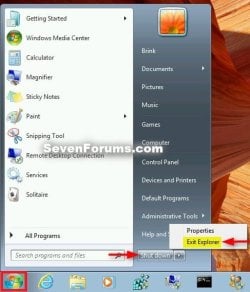
Start_Menu_Exit_Explorer.jpg


That's it. If you need to start explorer again though, the only way is to open task manager (Ctrl+Shift+Esc) and goto File-> New task (run) and type explorer.exe {enter}
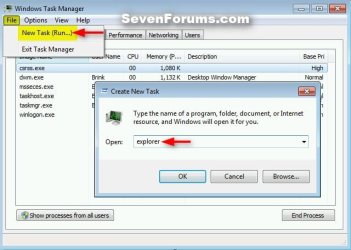
Run_Explorer_Task_Manager-2.jpg


Limneos


Last edited by a moderator:
Thanks limneos. Nice find.

Gary
 

My Computer

Computer Manufacturer/Model Number
Dell XPS420
OS
Vista Ult 64 bit Seven Ult RTM x64
CPU
Intel Core2 Quad Q6600 2.40 gigahertz
Memory
Crucial Ballistix 4x2GB PC2 6400
Graphics Card(s)
NVIDIA GeForce 8600 GTS 256 MB
Sound Card
Creative SB X-Fi audio
Monitor(s) Displays
HP w2207 + HPvs15
Screen Resolution
1680x1050 + 1024x768
Hard Drives
2-WD5000AAKS-500 GB
WD5000AAV-500 GB external
Keyboard
Microsoft Comfort Curve
Mouse
MX Revolution
Other Info
Wacom Intuos 2 Graphics Tablet
Experience Index=5.5
Not sure if it's just me but when I did this and exited explorer, not only did it exit my explorer windows, it also completely closed out my taskbar, and made it a blank blue box. I was able to get it back by re-opening explorer as it said later in the tutorial.
 

My Computer

Computer Manufacturer/Model Number
HP dv7
OS
Windows 7 Home Premium x64
CPU
Intel Core i5
Memory
6 GB
Graphics Card(s)
AMD Radeon HD 6370
Is this how I delete IE 32 bit version or inactivate it?? I am running windows 7 ultimate 64 bit and I noticed there are 2 browsers. A 32 bit and 64 bit (which is located in all programs). The default when I click on the "E" 32 bit IE automatically pops up. My real question is: Should I be using 64bit IE all the time as my default since I am using 64 bit windows 7 ?? I found out which version I was using by clicking on the "Help" tab in the upper right hand corner of explorere then clicking on "About Internet Explorer" if no version is displayed than you are using the 32 bit version if using 64 bit then 64 bit version will be displayed. Does it really matter which version is used?? Shouldn't the 64 bit version be the default in Windows 7 64 bit?? Thanks in advance.

Timewarpone
 

My Computer

Computer Manufacturer/Model Number
Custom Built
OS
Windows 7 Ultimate x64
CPU
Intel E8400
Motherboard
ASUS P5Q SE PLUS
Memory
4GB Kingston HyperX (4x1gb) 1066Mhz Model# KHX8500D2K2/2GN
Graphics Card(s)
Galaxy GTS 450
Sound Card
Stock
Monitor(s) Displays
Dell 1908FP, SONY TV KDS-60A3000 via HDMI Cable
Screen Resolution
1280x1024 (Native), TV (1080p) 1920x1080 (Recommended)
Hard Drives
WD3000HLFS 300GB SATA VelociRaptor,
WD3200AAKS SATA HDD
PSU
Antec TP-650 (650 watts)
Case
Antec 300
Cooling
7-120mm case fans
Keyboard
Logitech Wired Slim Keyboard
Mouse
Gigabyte Wired Advanced Wheel Mouse
Internet Speed
DSL
Other Info
Installed 120mm heatsink over CPU with a 120mm case fan using Artic Silver 5 thermal paste. I downloaded and installed the Win 7 Graphics Driver From The Nvidia web site.
I would like to ask if this is helpful/necessary before I do it ? Thanks ?
 

My Computer

Computer Manufacturer/Model Number
Asus N53v-DH 72
OS
windows 7 home premium 64bit
CPU
Intel(R) Core(TM) i7-2670QM CPU @ 2.20GHz
Motherboard
ASUSTeK Computer Inc
Memory
6049 MB
Graphics Card(s)
NVIDIA GeForce GT 540M (1024 MB)
Monitor(s) Displays
15.6
Screen Resolution
1920-1080
Hard Drives
ST9750420AS (698 GB, IDE)

C: (NTFS) 293.0 GB (229.9 GB free)
D: (NTFS) 380.6 GB (380.5 GB free)
Total Size 673.6 GB (610.4 GB free)
Keyboard
Standard
Mouse
Optical
Internet Speed
D-12877kbps U-370kbps
Barabarossa,

It's really only helpful in cases of when explorer.exe crashes, or for debugging reasons. Otherwise, there's really no need to.
 

My Computer

Computer type
PC/Desktop
Computer Manufacturer/Model Number
Self built custom
OS
64-bit Windows 11 Pro for Workstations
CPU
Intel i7-8700K OC'd to 5 GHz
Motherboard
ASUS ROG Maximus XI Formula Z390
Memory
64 GB (4x16GB) G.SKILL TridentZ RGB DDR4 3600 MHz
Graphics Card(s)
ASUS ROG-STRIX-GTX1080TI-O11G-GAMING
Sound Card
Integrated
Monitor(s) Displays
2 x Samsung Odyssey G7 27"
Screen Resolution
2560x1440
Hard Drives
1TB Samsung 990 PRO M.2,
4TB Samsung 990 PRO PRO M.2,
TerraMaster F8 SSD Plus NAS
PSU
Seasonic Prime Titanium 850W
Case
Thermaltake Core P3
Cooling
Corsair Hydro H115i
Keyboard
Logitech wireless K800
Mouse
Logitech MX Master 4
Internet Speed
2 Gb/s Download and 100 Mb/s Upload
Antivirus
Malwarebyte Anti-Malware Premium
Browser
Google Chrome
Other Info
Logitech Z625 speaker system,
Logitech BRIO 4K Pro webcam,
HP Color LaserJet Pro MFP M477fdn,
APC SMART-UPS RT 1000 XL - SURT1000XLI,
Galaxy S23 Plus phone
Barabarossa,

It's really only helpful in cases of when explorer.exe crashes, or for debugging reasons. Otherwise, there's really no need to.

Did it but can enable it anytime. Thanks again Brink.
 

My Computer

Computer Manufacturer/Model Number
Asus N53v-DH 72
OS
windows 7 home premium 64bit
CPU
Intel(R) Core(TM) i7-2670QM CPU @ 2.20GHz
Motherboard
ASUSTeK Computer Inc
Memory
6049 MB
Graphics Card(s)
NVIDIA GeForce GT 540M (1024 MB)
Monitor(s) Displays
15.6
Screen Resolution
1920-1080
Hard Drives
ST9750420AS (698 GB, IDE)

C: (NTFS) 293.0 GB (229.9 GB free)
D: (NTFS) 380.6 GB (380.5 GB free)
Total Size 673.6 GB (610.4 GB free)
Keyboard
Standard
Mouse
Optical
Internet Speed
D-12877kbps U-370kbps
Nice trick ...... :thumbsup:
 

My Computer

Computer Manufacturer/Model Number
Custom self assembled
OS
Windows 7 Ultimate x64
CPU
Intel Core i7 930
Motherboard
Gigabyte GA X58A UD7
Memory
Gskill 2x3 GB Ram
Graphics Card(s)
Sapphire ATI Radeon HD 5870
Monitor(s) Displays
LG 24MP88 24" LED Monitor
Screen Resolution
1920 X 1080
Hard Drives
Seagate barracuda 1 TB
PSU
Corsair GS 600W
Case
Cooler Master 690 II Plus
Cooling
Cooler Master Hyper 212X
Keyboard
Logitech G15 Gaming keyboard
Mouse
Logitech MX518 Gaming Mouse
Internet Speed
Broadband 50 Mbps speed [Hathway]
Other Info
Xbox 360 Wired Controller (x2)
AverMedia TV tuner Card [Internal]
Logitech HD C110 Web Camera
Netgear WGR614 Wireless-N 150 Router
Razer Goliathus Fragged Alpha Control Edition Mouse Pad
11 Years later!

Thanks
Often when booting one or more notification icons don't show, usually just reboot.
Never pursued before but tired of having to reboot just to see an icon.
Followed above instructions (kill and restart explorer) and icons pop back up-nice!


One difference- I use Classic Start menu so requires holding control/shift while LEFT clicking start button to have 7 menu open with "Shut down" tab and then while still holding control/shift right click shut down tab to get the "Exit explorer" option.


Then tried from Task manager as mentioned- open T/M, right click on explorer.exe and select "End process". then click the File tab, select "New task/run" type in explorer.exe to restart -wala
Seems simpler as need to open task manger anyway. But either way re-inits notification icons. Wrote a simple txt file to desktop to remember sequence.

Then found a bat file by Brink that auto does this
sevenforums.com/tutorials/179436-explorer-add-restart-explorer-desktop-context-menu.html
Add Restart Explorer to Desktop Context Menu
 

My Computer

Computer type
PC/Desktop
Computer Manufacturer/Model Number
Dell
OS
Win 7 64 Pro
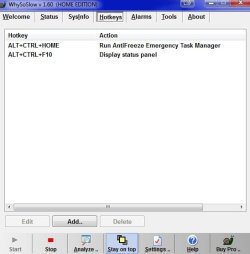
On a related note, there's a program called AntiFreeze which can bring up a Task Manger in case the Windows built-in version doesn't work in case of a total crash or what ever. Resplendence Software - Free Downloads

I'm sure its executable could be given a keyboard shortcut. Just right click the shortcut on your desktop and chose properties. From withen there you can set a shortcut key combination.

Edit-

As of this post the download link to AntiFreeze is for WhySoSlow. I contacted them now to have that fixed. Will update if fixed.

Oh for God sakes. It says right there, "Now included with WhySoSlow." LOL!

Edit 2-

And now I see this in the image, but the keyboard shortcut will only run if WhySoSlow is running. So I gave the WhySoSlow shortcut a shortcut key.
 

Attachments

  • nmghj.jpg
    nmghj.jpg
    24 KB · Views: 65

My Computer

Computer type
PC/Desktop
OS
Windows 7 Ultimate x64
Back
Top