Solved Explorer (Not Responding) When Selecting Photos

bgluckma

New member
Local time
3:04 PM
Messages
8
Starting just a few days ago, every time I select a photo in Windows Explorer, Explorer goes into "(Not Responding)" mode. I've tried all kinds of things to fix this ("SpeedUpMyPC", restores, update video drivers, install latest Windows updates, etc.), but nothing has worked and it's very frustrating. Any suggestions as to what the fix to this could be?
 
Last edited:

My Computer

Computer type
PC/Desktop
Computer Manufacturer/Model Number
Unknown
OS
Windows 7 64 bit
Could be lots of things

There are many possiblities. Try downloading this file and save to your desktop:

Download : Registry Fix

Then check that Windows Error Reporting is enabled:

Start> Run then type

services.msc

Press Enter

Find Windows Error Reporting Service and make sure that it's enabled and running.

Then double click the file that you downloaded.

Reboot.

Try to re-create the problem and if Explorer crashes (not responding) restart explorer and check for dump files here:

C:\LocalDumps

If you see a dump file - zip it and attach it to your next post.
 

My Computer

Computer type
Laptop
Computer Manufacturer/Model Number
ASUS
OS
Microsoft Windows 7 Home Premium 64-bit 7601 Multiprocessor Free Service Pack 1
CPU
AMD C-60 APU with Radeon(tm) HD Graphics
Motherboard
ASUSTeK COMPUTER INC. X501U
Memory
4.00 GB
Graphics Card(s)
AMD Radeon HD 6290 Graphics
Sound Card
(1) AMD High Definition Audio Device (2) Realtek High Defi
Screen Resolution
1366 x 768 x 32 bits (4294967296 colors) @ 60 Hz
Hard Drives
Hitachi HTS545050A7E380 SATA Disk Device
Antivirus
Comodo CIS & FW, SecureAplus App Whitelisting, Threatfire
Browser
Cyberfox 64bit, Opera 64bit, Airfox
Other Info
Spy-The-Spy, HitmanPro.Alert, Norton Connect Safe, MJRegWatcher, BitDefender TrafficLight, Voodoo Shield, Zemana AntiMalware
Thanks for your reply. I started the error logging (and changed it from manual to automatic), ran the downloaded program and rebooted the machine and attempted to open a photo file in Explorer. Unfortunately, thes ame problem, and I don't find any logged errors in a file in the directory location that you provided (C:\LocalDumps).
 
Last edited:

My Computer

Computer type
PC/Desktop
Computer Manufacturer/Model Number
Unknown
OS
Windows 7 64 bit
WER

Well done for enabling Windows Error Reporting!

Perhaps you could check to see if the file you downloaded and ran manged to change the required registry settings?

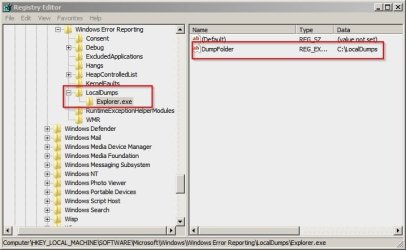
Your registry should look like this:

Registry Editor.jpg

To check: Start> Run then type

regedit

Press Enter.

Navigate to: HKEY_LOCAL_MACHINE\SOFTWARE\Microsoft\Windows\Windows Error Reporting

Look for a subkey named LocalDumps

If it's not present try this:

Right click the file you downloaded to your desktop (WER_Explorer.reg) and choose Merge

Then reboot and check again to see if it worked. If you see those registry entries try to crash explorer and check for a dump file.
 

My Computer

Computer type
Laptop
Computer Manufacturer/Model Number
ASUS
OS
Microsoft Windows 7 Home Premium 64-bit 7601 Multiprocessor Free Service Pack 1
CPU
AMD C-60 APU with Radeon(tm) HD Graphics
Motherboard
ASUSTeK COMPUTER INC. X501U
Memory
4.00 GB
Graphics Card(s)
AMD Radeon HD 6290 Graphics
Sound Card
(1) AMD High Definition Audio Device (2) Realtek High Defi
Screen Resolution
1366 x 768 x 32 bits (4294967296 colors) @ 60 Hz
Hard Drives
Hitachi HTS545050A7E380 SATA Disk Device
Antivirus
Comodo CIS & FW, SecureAplus App Whitelisting, Threatfire
Browser
Cyberfox 64bit, Opera 64bit, Airfox
Other Info
Spy-The-Spy, HitmanPro.Alert, Norton Connect Safe, MJRegWatcher, BitDefender TrafficLight, Voodoo Shield, Zemana AntiMalware
Thanks again for your help. I was able to go into regedit and found the (default) and DumpFolder entries under Explorer.exe under LocalDumps.

I then tried to open a photo in Explorer and got the same problem (locking up, Not Responding). However, I didn't see any new entries in the register after trying to open a photo.

Am I looking in the correct place to see a dump? (the location at the bottom of my machine is identical to the one you kindly included in your screen print)
 

My Computer

Computer type
PC/Desktop
Computer Manufacturer/Model Number
Unknown
OS
Windows 7 64 bit
LocalDumps

The location for Explorer Crash Dumps after running through those steps is:

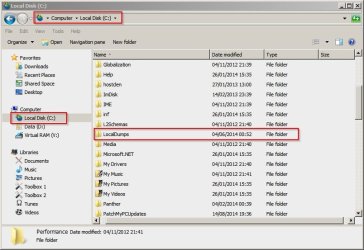
C:\LocalDumps

The folder looks like this:

Local Disk (C_)_LocalDumps.jpg

If you're not seeing dumps I have a couple of questions. What do you do when you get the Explorer Not Responding message? Do you attempt to restart Explorer - or something else?

Would you also check the following?

Start> right-click "My Computer" (or "Computer")

Choose "Properties"

Choose "Advanced system settings"

Find the "Advanced" tab and then click the "Startup and recovery" tab Settings.

Tick "Write an event to the system log" under "System failure"

Under "Write debugging information" choose "Kernel Memory dump" and click "Okay"

If choosing "Kernel Memory Dump" gives you an error message choose "Small Memory Dump" instead.

Another reboot is needed after that I'm afraid!

Try crashing Explorer again and look for dumps. If they're still not present i have other suggestions.
 

My Computer

Computer type
Laptop
Computer Manufacturer/Model Number
ASUS
OS
Microsoft Windows 7 Home Premium 64-bit 7601 Multiprocessor Free Service Pack 1
CPU
AMD C-60 APU with Radeon(tm) HD Graphics
Motherboard
ASUSTeK COMPUTER INC. X501U
Memory
4.00 GB
Graphics Card(s)
AMD Radeon HD 6290 Graphics
Sound Card
(1) AMD High Definition Audio Device (2) Realtek High Defi
Screen Resolution
1366 x 768 x 32 bits (4294967296 colors) @ 60 Hz
Hard Drives
Hitachi HTS545050A7E380 SATA Disk Device
Antivirus
Comodo CIS & FW, SecureAplus App Whitelisting, Threatfire
Browser
Cyberfox 64bit, Opera 64bit, Airfox
Other Info
Spy-The-Spy, HitmanPro.Alert, Norton Connect Safe, MJRegWatcher, BitDefender TrafficLight, Voodoo Shield, Zemana AntiMalware
Dump Created!

When I get the (Not Responding) message, I wait about two minutes, become impatient and click on the Explorer window to close it.

So, in summary, the reason why I'm not getting dumps is because I've been too impatient to wait for Explorer to generate an error.

I tried to open a photo about 4 minutes ago, and the "Windows Explorer has stopped working" window popped up after about 4 1/2 minutes of waiting. NOW, I get an entry into the LocalDumps directory.

I've tried to attach the dump for you to review, but I don't think it's uploading because the .dmp extension isn't in the acceptable file extensions in this forum. How can I get the dump to you to review?

Thanks again for your help!!!
 
Last edited:

My Computer

Computer type
PC/Desktop
Computer Manufacturer/Model Number
Unknown
OS
Windows 7 64 bit
Dump Attached!

OK, I see that zip files are OK for uploading, so I've zipped the dump into the attached zip file. Hopefully that will help!
 

Attachments

My Computer

Computer type
PC/Desktop
Computer Manufacturer/Model Number
Unknown
OS
Windows 7 64 bit
Upload Dump files

Hi again. Well it seems to be working now!

Use the tutorial here to zip your dump file and upload it:

http://www.sevenforums.com/tutorials/179397-dump-files-upload-sevenforums.html

In Step 1 of the tutorial replace:

1. Copy any dmp files from C:\Windows\Minidump onto the desktop.

with - Copy any dmp files from C:\LocalDumps onto the desktop.

EDIT I've got your dump file and will look at it then post back here.
 
Last edited:

My Computer

Computer type
Laptop
Computer Manufacturer/Model Number
ASUS
OS
Microsoft Windows 7 Home Premium 64-bit 7601 Multiprocessor Free Service Pack 1
CPU
AMD C-60 APU with Radeon(tm) HD Graphics
Motherboard
ASUSTeK COMPUTER INC. X501U
Memory
4.00 GB
Graphics Card(s)
AMD Radeon HD 6290 Graphics
Sound Card
(1) AMD High Definition Audio Device (2) Realtek High Defi
Screen Resolution
1366 x 768 x 32 bits (4294967296 colors) @ 60 Hz
Hard Drives
Hitachi HTS545050A7E380 SATA Disk Device
Antivirus
Comodo CIS & FW, SecureAplus App Whitelisting, Threatfire
Browser
Cyberfox 64bit, Opera 64bit, Airfox
Other Info
Spy-The-Spy, HitmanPro.Alert, Norton Connect Safe, MJRegWatcher, BitDefender TrafficLight, Voodoo Shield, Zemana AntiMalware
Something to try

Okay well the dump file doesn't provide the information that I'd oped for but maybe another member will take a look at it to see if i missed something.

In the meantime could I ask you to try disabling your Dropbox shell extension?

If you download this to your desktop: ShellExView - Shell Extension Manager For Windows

The download link is near the bottom of the page and you want this link: Download ShellExView for x64

If you download to your desktop and extract the files to another folder on your desktop - open the folder - it should be named shexview-x64

Find the file named shexview.exe and right-click it then choose "Run as administrator"

In the window that opens find the filename column and check for DropboxExt64.24.dll in the file path or anything Dropbox related.

Highlight the row then click the little red button near the top left of the window to disable it. Then exit the program and reboot.

Any improvement?

Don't panic if the problem remains. There's still other possibilities.
 

My Computer

Computer type
Laptop
Computer Manufacturer/Model Number
ASUS
OS
Microsoft Windows 7 Home Premium 64-bit 7601 Multiprocessor Free Service Pack 1
CPU
AMD C-60 APU with Radeon(tm) HD Graphics
Motherboard
ASUSTeK COMPUTER INC. X501U
Memory
4.00 GB
Graphics Card(s)
AMD Radeon HD 6290 Graphics
Sound Card
(1) AMD High Definition Audio Device (2) Realtek High Defi
Screen Resolution
1366 x 768 x 32 bits (4294967296 colors) @ 60 Hz
Hard Drives
Hitachi HTS545050A7E380 SATA Disk Device
Antivirus
Comodo CIS & FW, SecureAplus App Whitelisting, Threatfire
Browser
Cyberfox 64bit, Opera 64bit, Airfox
Other Info
Spy-The-Spy, HitmanPro.Alert, Norton Connect Safe, MJRegWatcher, BitDefender TrafficLight, Voodoo Shield, Zemana AntiMalware
Here you go. The zip file containing the .dmp file should be attached.

Regards,

Ben
 

Attachments

My Computer

Computer type
PC/Desktop
Computer Manufacturer/Model Number
Unknown
OS
Windows 7 64 bit
Did you see anything in the dump that would explain the problem?
 

My Computer

Computer type
PC/Desktop
Computer Manufacturer/Model Number
Unknown
OS
Windows 7 64 bit
Shell Extension

I didn't see anything definitive but I'm good at reading those dump files in order to spot problems with shell extensions. There's a lot of other information that is pretty meaningless to me.

Did you spot my post about Dropbox shell extension?

The reason that it just might be a problem is that I see the following error:

hardware_disk!Unknown

I see that you use Dropbox.

So it looks like a network drive or disk disappeared but I know nothing much about Dropbox as I've never used it. Is it possible that you're syncing something like a folder to a Dropbox drive or Dropbox network drive that isn't actually connected?
 

My Computer

Computer type
Laptop
Computer Manufacturer/Model Number
ASUS
OS
Microsoft Windows 7 Home Premium 64-bit 7601 Multiprocessor Free Service Pack 1
CPU
AMD C-60 APU with Radeon(tm) HD Graphics
Motherboard
ASUSTeK COMPUTER INC. X501U
Memory
4.00 GB
Graphics Card(s)
AMD Radeon HD 6290 Graphics
Sound Card
(1) AMD High Definition Audio Device (2) Realtek High Defi
Screen Resolution
1366 x 768 x 32 bits (4294967296 colors) @ 60 Hz
Hard Drives
Hitachi HTS545050A7E380 SATA Disk Device
Antivirus
Comodo CIS & FW, SecureAplus App Whitelisting, Threatfire
Browser
Cyberfox 64bit, Opera 64bit, Airfox
Other Info
Spy-The-Spy, HitmanPro.Alert, Norton Connect Safe, MJRegWatcher, BitDefender TrafficLight, Voodoo Shield, Zemana AntiMalware
Drives?

Also have a think about any other drive that you've connected in the past and think about anything that could have integrated with Explorer shell that might be looking for files on a drive that's not currently connected.
 

My Computer

Computer type
Laptop
Computer Manufacturer/Model Number
ASUS
OS
Microsoft Windows 7 Home Premium 64-bit 7601 Multiprocessor Free Service Pack 1
CPU
AMD C-60 APU with Radeon(tm) HD Graphics
Motherboard
ASUSTeK COMPUTER INC. X501U
Memory
4.00 GB
Graphics Card(s)
AMD Radeon HD 6290 Graphics
Sound Card
(1) AMD High Definition Audio Device (2) Realtek High Defi
Screen Resolution
1366 x 768 x 32 bits (4294967296 colors) @ 60 Hz
Hard Drives
Hitachi HTS545050A7E380 SATA Disk Device
Antivirus
Comodo CIS & FW, SecureAplus App Whitelisting, Threatfire
Browser
Cyberfox 64bit, Opera 64bit, Airfox
Other Info
Spy-The-Spy, HitmanPro.Alert, Norton Connect Safe, MJRegWatcher, BitDefender TrafficLight, Voodoo Shield, Zemana AntiMalware
Off topic: Let me first state that "Common Sense is not so common" is a great signature. Fully agree!

Back on topic: I do use Dropbox, but I don't sync folders to it. I use Carbonite, so maybe that could be the cause. I've had no known drops from Carbonite. I don't think the CD drive works any longer, so that could also be a culprit. But if any of these could be the causes, I'm wondering what would have been the trigger (around 8/10/2014) to stop Explorer from opening jpg files.

As I stated earlier, I'm now using Explorer++ as a workaround.

Thanks so much for your help.

Regards,

Ben
 

My Computer

Computer type
PC/Desktop
Computer Manufacturer/Model Number
Unknown
OS
Windows 7 64 bit
Explorer++

I also use Explorer++ sometimes. It can be pretty handy.

Here are some thoughts:

You could try temporarily disabling all non-Microsoft shell extensions to see if you can then open a photo without problems. If it works - it means that third party software is to blame but tracking down the culprit would involve re-enabling those shell extensions in small groups until the issue is reproduced so it's time consuming.

Software needed:

ShellExView

Also it's just possible that you have corrupt media files (photo or movie) that Explorer can't read and could be causing problems.
 

My Computer

Computer type
Laptop
Computer Manufacturer/Model Number
ASUS
OS
Microsoft Windows 7 Home Premium 64-bit 7601 Multiprocessor Free Service Pack 1
CPU
AMD C-60 APU with Radeon(tm) HD Graphics
Motherboard
ASUSTeK COMPUTER INC. X501U
Memory
4.00 GB
Graphics Card(s)
AMD Radeon HD 6290 Graphics
Sound Card
(1) AMD High Definition Audio Device (2) Realtek High Defi
Screen Resolution
1366 x 768 x 32 bits (4294967296 colors) @ 60 Hz
Hard Drives
Hitachi HTS545050A7E380 SATA Disk Device
Antivirus
Comodo CIS & FW, SecureAplus App Whitelisting, Threatfire
Browser
Cyberfox 64bit, Opera 64bit, Airfox
Other Info
Spy-The-Spy, HitmanPro.Alert, Norton Connect Safe, MJRegWatcher, BitDefender TrafficLight, Voodoo Shield, Zemana AntiMalware
More thoughts

If you no longer use Dropbox but still have it installed - check for and install any updates. Same goes for Carbonite.

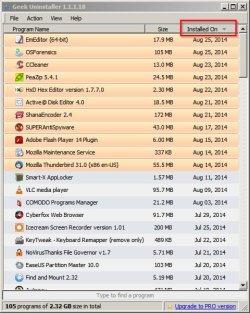
Also if you've got software that can list any programs that were installed on or just before that date take a look and see what was installed.

Example sorted by install date:

Geek Uninstalle.jpg
 

My Computer

Computer type
Laptop
Computer Manufacturer/Model Number
ASUS
OS
Microsoft Windows 7 Home Premium 64-bit 7601 Multiprocessor Free Service Pack 1
CPU
AMD C-60 APU with Radeon(tm) HD Graphics
Motherboard
ASUSTeK COMPUTER INC. X501U
Memory
4.00 GB
Graphics Card(s)
AMD Radeon HD 6290 Graphics
Sound Card
(1) AMD High Definition Audio Device (2) Realtek High Defi
Screen Resolution
1366 x 768 x 32 bits (4294967296 colors) @ 60 Hz
Hard Drives
Hitachi HTS545050A7E380 SATA Disk Device
Antivirus
Comodo CIS & FW, SecureAplus App Whitelisting, Threatfire
Browser
Cyberfox 64bit, Opera 64bit, Airfox
Other Info
Spy-The-Spy, HitmanPro.Alert, Norton Connect Safe, MJRegWatcher, BitDefender TrafficLight, Voodoo Shield, Zemana AntiMalware
Back
Top