Hey guys plz help
My internet explorer tabs keep on refreshing...I use IE that came with win7, so I installed firefox....funny enough a few days later the same happend to firefox...What the hell......really not cool...
Appreciate any help related to this problem...tnx a mil
Know Its not that...Two days after my IE started doing it I bought a new mouse and keyboard...a few days later firefox started doing it....
have now idea whats going on.....
I can't help you with IE, but to stop Firefox reloading/refreshing pages automatically, do the following:
Open Firefox browser
Head to Tools >> Options >> Advanced >> General >> Accessibility
Tick the option next to Warn me when web sites try to redirect or reload the page
Save your changes.
Checking the above option means you have manually selected not to allow Firefox to automatically reload web pages by adding accessibility.blockautorefresh code to the about:config parameters. Now all your auto page refresh or auto page reload requests by web sites will be ignored by Firefox and you will enjoy an uninterrupted browsing.
Hope this helps.
.
My Computer
Computer Manufacturer/Model Number
Samsung R60 Plus
OS
Operating System Microsoft Windows 7 Ultimate Build 7600
CPU
Mobile DualCore Intel Core 2 Duo T5550, 1833 MHz (1
To do the same for Internet Explorer, do the following :
Step 1: In Internet Explorer go to Tools –> Internet Options and click on the security tab.
Step 2: In the security tab click on the Custom level button towards the bottom.
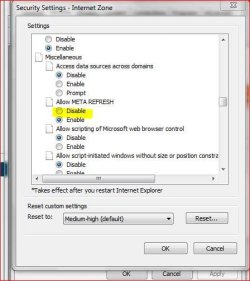
Step 3: In the security settings window, scroll down till you come across the Miscellaneous group and select disable in Allow META REFRESH option and click on Ok.
That’s it the auto-refreshing of the page won’t happen once you make this change.
Sorry for the delay in posting this.
Hope this helps.
.
My Computer
Computer Manufacturer/Model Number
Samsung R60 Plus
OS
Operating System Microsoft Windows 7 Ultimate Build 7600
CPU
Mobile DualCore Intel Core 2 Duo T5550, 1833 MHz (1