Explorer Tabs Refreshes

stomper

New member
Hey guys plz help
My internet explorer tabs keep on refreshing...I use IE that came with win7, so I installed firefox....funny enough a few days later the same happend to firefox...What the hell......really not cool...
Appreciate any help related to this problem...tnx a mil
 

My Computer

Computer Manufacturer/Model Number
-ME-
OS
Windows 7 Ultimate 64 bit
CPU
INTEL sandybridge i7 2600 @ 3,4ghz
Motherboard
Asus p8p67 REV 3.1
Memory
Corsiar 1333mhz 4x2gig DDR3, total 8gig
Graphics Card(s)
MSI GTX560 ti Twin Frozer II 1gb 256bit GDDR5
Monitor(s) Displays
Samsung B2330 23" , LG 22" Flatron W2242S
Screen Resolution
1920x1080p , 1680 x 1050
Hard Drives
250 gig WD : System,
1TB Seagate Barraguda 7200rpm,
2TB Seagate Barraguda 7200rpm,
1TB Seagate Barraguda 7200rpm external
2TB WD Elements External
PSU
Corsair TX750w
Case
Cooler Master 690 ii Advance Side Window
Cooling
CPU: CM Hyper 212 Plus with 2 Blue LED 120mm CM fans
Keyboard
Microsoft Sidewinder 4
Mouse
Saitec CYBORG R.A.T.5 Lazer gaming mouse
is your keyboard damaged, particularly the "F5" key try a different keyboard if possible.
 

My Computer

Computer Manufacturer/Model Number
Custom
OS
Windows 7 Ultimate Signature Edition
CPU
Intel Core i7 Extreme 3.33GHz
Motherboard
EVGA X-58 SLI Classified
Memory
12GB DDR3
Graphics Card(s)
2x EVGA 285 2GB in SLI
Sound Card
Creative Labs X-Fi ExtremeGamer
Monitor(s) Displays
30" Viewsonic
Hard Drives
2x1TB Western Digital 7200RPM in RAID 0/1TB WD My Book External HDD
PSU
Thermaltake 1000w supporting quad SLI
Case
Thermaltake Armor Full Tower
Cooling
Thermaltake V1 CPU+DIY Liquid cooling
Know Its not that...Two days after my IE started doing it I bought a new mouse and keyboard...a few days later firefox started doing it....
have now idea whats going on.....
 

My Computer

Computer Manufacturer/Model Number
-ME-
OS
Windows 7 Ultimate 64 bit
CPU
INTEL sandybridge i7 2600 @ 3,4ghz
Motherboard
Asus p8p67 REV 3.1
Memory
Corsiar 1333mhz 4x2gig DDR3, total 8gig
Graphics Card(s)
MSI GTX560 ti Twin Frozer II 1gb 256bit GDDR5
Monitor(s) Displays
Samsung B2330 23" , LG 22" Flatron W2242S
Screen Resolution
1920x1080p , 1680 x 1050
Hard Drives
250 gig WD : System,
1TB Seagate Barraguda 7200rpm,
2TB Seagate Barraguda 7200rpm,
1TB Seagate Barraguda 7200rpm external
2TB WD Elements External
PSU
Corsair TX750w
Case
Cooler Master 690 ii Advance Side Window
Cooling
CPU: CM Hyper 212 Plus with 2 Blue LED 120mm CM fans
Keyboard
Microsoft Sidewinder 4
Mouse
Saitec CYBORG R.A.T.5 Lazer gaming mouse
Hi stomper! Welcome to SevenForums:)

I can't help you with IE, but to stop Firefox reloading/refreshing pages automatically, do the following:


  1. Open Firefox browser
  2. Head to Tools >> Options >> Advanced >> General >> Accessibility
  3. Tick the option next to Warn me when web sites try to redirect or reload the page
ff3.JPG

Save your changes.

Checking the above option means you have manually selected not to allow Firefox to automatically reload web pages by adding accessibility.blockautorefresh code to the about:config parameters. Now all your auto page refresh or auto page reload requests by web sites will be ignored by Firefox and you will enjoy an uninterrupted browsing.

Hope this helps.;)


.
 

My Computer

Computer Manufacturer/Model Number
Samsung R60 Plus
OS
Operating System Microsoft Windows 7 Ultimate Build 7600
CPU
Mobile DualCore Intel Core 2 Duo T5550, 1833 MHz (1
Motherboard
ATI Radeon Xpress 1100/1250
Memory
2GB (DDR2-667 DDR2 SDRAM)
Graphics Card(s)
ATI Radeon Xpress 1200 Series (256 MB)
Sound Card
Realtek ALC262 @ ATI SB600 - High Definition
Monitor(s) Displays
Samsung LTN154X3-L01 [15.4" LCD]
Screen Resolution
1280x800
PSU
na
Case
na
Cooling
na
Keyboard
na
hey tnx man.....
THIS ACTUALLY WORKS....so what if my IE doesn't work....
Tnx a mil.... =)
 

My Computer

Computer Manufacturer/Model Number
-ME-
OS
Windows 7 Ultimate 64 bit
CPU
INTEL sandybridge i7 2600 @ 3,4ghz
Motherboard
Asus p8p67 REV 3.1
Memory
Corsiar 1333mhz 4x2gig DDR3, total 8gig
Graphics Card(s)
MSI GTX560 ti Twin Frozer II 1gb 256bit GDDR5
Monitor(s) Displays
Samsung B2330 23" , LG 22" Flatron W2242S
Screen Resolution
1920x1080p , 1680 x 1050
Hard Drives
250 gig WD : System,
1TB Seagate Barraguda 7200rpm,
2TB Seagate Barraguda 7200rpm,
1TB Seagate Barraguda 7200rpm external
2TB WD Elements External
PSU
Corsair TX750w
Case
Cooler Master 690 ii Advance Side Window
Cooling
CPU: CM Hyper 212 Plus with 2 Blue LED 120mm CM fans
Keyboard
Microsoft Sidewinder 4
Mouse
Saitec CYBORG R.A.T.5 Lazer gaming mouse
Hi Stomper,

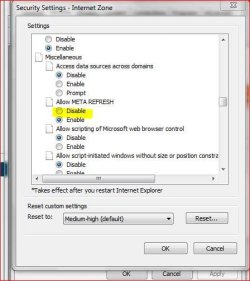
To do the same for Internet Explorer, do the following :

Step 1: In Internet Explorer go to Tools –> Internet Options and click on the security tab.


Step 2: In the security tab click on the Custom level button towards the bottom.

ie.JPG

Step 3: In the security settings window, scroll down till you come across the Miscellaneous group and select disable in Allow META REFRESH option and click on Ok.


That’s it the auto-refreshing of the page won’t happen once you make this change.

Sorry for the delay in posting this.:)

Hope this helps.;)


.
 

My Computer

Computer Manufacturer/Model Number
Samsung R60 Plus
OS
Operating System Microsoft Windows 7 Ultimate Build 7600
CPU
Mobile DualCore Intel Core 2 Duo T5550, 1833 MHz (1
Motherboard
ATI Radeon Xpress 1100/1250
Memory
2GB (DDR2-667 DDR2 SDRAM)
Graphics Card(s)
ATI Radeon Xpress 1200 Series (256 MB)
Sound Card
Realtek ALC262 @ ATI SB600 - High Definition
Monitor(s) Displays
Samsung LTN154X3-L01 [15.4" LCD]
Screen Resolution
1280x800
PSU
na
Case
na
Cooling
na
Keyboard
na
Back
Top