JavaScript is disabled. For a better experience, please enable JavaScript in your browser before proceeding.
You are using an out of date browser. It may not display this or other websites correctly.
You should upgrade or use an
alternative browser .
Solved explorer's address bar dropdown menu (like in XP)
sorry for my Eng ^^
Member
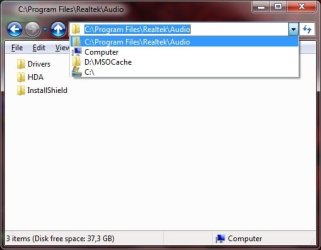
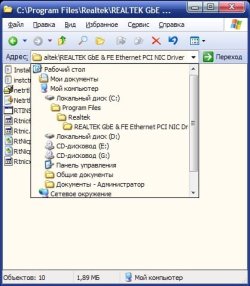
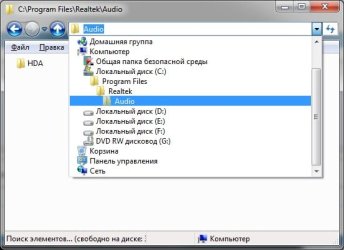
when i clicking drop down arrow at the end of the adress bar all i get is completely blank drop-down, with nothing in it at all. in XP clicking that arrow showed a drive/folder list. i need it in '7..
OS windows7 ultimate x32 CPU DualCore Intel Core 2 Duo E8400, 3000 MHz (9 x 333) Motherboard ASRock 4Core1333-GLAN (3 PCI,1 PCI-E x16,4 DDR2 DIMM...) Memory 4Gb (1x4 DDR2-800 DDR2 SDRAM) Graphics Card(s) NVIDIA GeForce 9600 GT (512 mb) Sound Card onboard Monitor(s) Displays lg flatron w2242t Screen Resolution 1680 x 1050 Hard Drives WDC WD5000AAJS-00YFA0 ATA Device PSU - Case - Cooling - Other Info d-link dir100
Administrator
Staff member
Computer type PC/Desktop Computer Manufacturer/Model Number Self built custom OS 64-bit Windows 11 Pro for Workstations CPU Intel i7-8700K OC'd to 5 GHz Motherboard ASUS ROG Maximus XI Formula Z390 Memory 64 GB (4x16GB) G.SKILL TridentZ RGB DDR4 3600 MHz Graphics Card(s) ASUS ROG-STRIX-GTX1080TI-O11G-GAMING Sound Card Integrated Monitor(s) Displays 2 x Samsung Odyssey G7 27" Screen Resolution 2560x1440 Hard Drives 1TB Samsung 990 PRO M.2, PSU Seasonic Prime Titanium 850W Case Thermaltake Core P3 Cooling Corsair Hydro H115i Keyboard Logitech wireless K800 Mouse Logitech MX Master 4 Internet Speed 2 Gb/s Download and 100 Mb/s Upload Antivirus Malwarebyte Anti-Malware Premium Browser Google Chrome Other Info Logitech Z625 speaker system,
sorry for my Eng ^^
Member
Thread Starter
it's not Auto Suggest
i have
i want
OS windows7 ultimate x32 CPU DualCore Intel Core 2 Duo E8400, 3000 MHz (9 x 333) Motherboard ASRock 4Core1333-GLAN (3 PCI,1 PCI-E x16,4 DDR2 DIMM...) Memory 4Gb (1x4 DDR2-800 DDR2 SDRAM) Graphics Card(s) NVIDIA GeForce 9600 GT (512 mb) Sound Card onboard Monitor(s) Displays lg flatron w2242t Screen Resolution 1680 x 1050 Hard Drives WDC WD5000AAJS-00YFA0 ATA Device PSU - Case - Cooling - Other Info d-link dir100
The Contemplator, (1963-2013)
Guru
Gold Member
Hi nalbe,
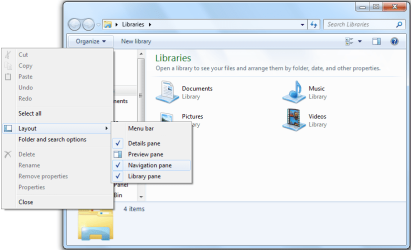
Click on
Organize and mouse over
Layout . In the pop-up that appears, click on
Navigation pane to tick (select) it, as shown below.
Computer type PC/Desktop Computer Manufacturer/Model Number Dwarf Dwf/11/2012 r09/2013 OS Windows 8.1 Pro RTM x64 CPU Intel Core-i5-3570K 4-core @ 3.4GHz (Ivy Bridge) (OC 4.4GHz) Motherboard ASRock Z77 Extreme4-M Memory 4 x 4GB DDR3-1600 Corsair Vengeance CMZ8GX3M2A1600C9B (16GB) Graphics Card(s) MSI GeForce GTX770 Gaming OC 2GB Sound Card Realtek High Definition on board solution (ALC 898) Monitor(s) Displays ViewSonic VA1912w Widescreen (VGA) Screen Resolution 1440x900 Hard Drives OCZ Agility 3 SSD 120GB SATA III x2 (RAID 0) PSU XFX Pro Series 850W Semi-Modular Case Gigabyte IF233 Cooling 1 x 120mm Front Inlet 1 x 120mm Rear Exhaust Keyboard Microsoft Comfort Curve Keyboard 3000 (USB) Mouse Microsoft Comfort Mouse 3000 for Business (USB) Internet Speed NetGear DG834Gv3 ADSL Modem/Router (Ethernet) ~4.0 Mb/s (O2) Antivirus Avast! 8.0.1497 Browser IE 11 Other Info Optical Drive: HL-DT-ST BD-RE BH10LS30 SATA Bluray
Administrator
Staff member
Ah, I see.
You would need to
turn on the navigation pane (left pane in screenshot below) to be able to navigate through the folder like that now instead.
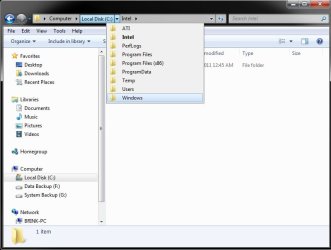
You can also click on the "bread crumb" arrows in the address bar as below to navigate as well.
EDIT:
LOL, Dwarf beat me.
Computer type PC/Desktop Computer Manufacturer/Model Number Self built custom OS 64-bit Windows 11 Pro for Workstations CPU Intel i7-8700K OC'd to 5 GHz Motherboard ASUS ROG Maximus XI Formula Z390 Memory 64 GB (4x16GB) G.SKILL TridentZ RGB DDR4 3600 MHz Graphics Card(s) ASUS ROG-STRIX-GTX1080TI-O11G-GAMING Sound Card Integrated Monitor(s) Displays 2 x Samsung Odyssey G7 27" Screen Resolution 2560x1440 Hard Drives 1TB Samsung 990 PRO M.2, PSU Seasonic Prime Titanium 850W Case Thermaltake Core P3 Cooling Corsair Hydro H115i Keyboard Logitech wireless K800 Mouse Logitech MX Master 4 Internet Speed 2 Gb/s Download and 100 Mb/s Upload Antivirus Malwarebyte Anti-Malware Premium Browser Google Chrome Other Info Logitech Z625 speaker system,
sorry for my Eng ^^
Member
Thread Starter
i don't know English so well, but how i can't explain better than screenshots =)
OS windows7 ultimate x32 CPU DualCore Intel Core 2 Duo E8400, 3000 MHz (9 x 333) Motherboard ASRock 4Core1333-GLAN (3 PCI,1 PCI-E x16,4 DDR2 DIMM...) Memory 4Gb (1x4 DDR2-800 DDR2 SDRAM) Graphics Card(s) NVIDIA GeForce 9600 GT (512 mb) Sound Card onboard Monitor(s) Displays lg flatron w2242t Screen Resolution 1680 x 1050 Hard Drives WDC WD5000AAJS-00YFA0 ATA Device PSU - Case - Cooling - Other Info d-link dir100
Administrator
Staff member
By default, that is the only option in Windows 7.
However, you might see if you may like using the free programs
Explorer++ instead of Windows Explorer, or
Classic Shell for this.
Computer type PC/Desktop Computer Manufacturer/Model Number Self built custom OS 64-bit Windows 11 Pro for Workstations CPU Intel i7-8700K OC'd to 5 GHz Motherboard ASUS ROG Maximus XI Formula Z390 Memory 64 GB (4x16GB) G.SKILL TridentZ RGB DDR4 3600 MHz Graphics Card(s) ASUS ROG-STRIX-GTX1080TI-O11G-GAMING Sound Card Integrated Monitor(s) Displays 2 x Samsung Odyssey G7 27" Screen Resolution 2560x1440 Hard Drives 1TB Samsung 990 PRO M.2, PSU Seasonic Prime Titanium 850W Case Thermaltake Core P3 Cooling Corsair Hydro H115i Keyboard Logitech wireless K800 Mouse Logitech MX Master 4 Internet Speed 2 Gb/s Download and 100 Mb/s Upload Antivirus Malwarebyte Anti-Malware Premium Browser Google Chrome Other Info Logitech Z625 speaker system,
sorry for my Eng ^^
Member
Thread Starter
found this option in ClassicShell 3.0 --> explorer settings - title bar - address bar history - extended path
OS windows7 ultimate x32 CPU DualCore Intel Core 2 Duo E8400, 3000 MHz (9 x 333) Motherboard ASRock 4Core1333-GLAN (3 PCI,1 PCI-E x16,4 DDR2 DIMM...) Memory 4Gb (1x4 DDR2-800 DDR2 SDRAM) Graphics Card(s) NVIDIA GeForce 9600 GT (512 mb) Sound Card onboard Monitor(s) Displays lg flatron w2242t Screen Resolution 1680 x 1050 Hard Drives WDC WD5000AAJS-00YFA0 ATA Device PSU - Case - Cooling - Other Info d-link dir100
Administrator
Staff member
That's great news Nalbe.
Computer type PC/Desktop Computer Manufacturer/Model Number Self built custom OS 64-bit Windows 11 Pro for Workstations CPU Intel i7-8700K OC'd to 5 GHz Motherboard ASUS ROG Maximus XI Formula Z390 Memory 64 GB (4x16GB) G.SKILL TridentZ RGB DDR4 3600 MHz Graphics Card(s) ASUS ROG-STRIX-GTX1080TI-O11G-GAMING Sound Card Integrated Monitor(s) Displays 2 x Samsung Odyssey G7 27" Screen Resolution 2560x1440 Hard Drives 1TB Samsung 990 PRO M.2, PSU Seasonic Prime Titanium 850W Case Thermaltake Core P3 Cooling Corsair Hydro H115i Keyboard Logitech wireless K800 Mouse Logitech MX Master 4 Internet Speed 2 Gb/s Download and 100 Mb/s Upload Antivirus Malwarebyte Anti-Malware Premium Browser Google Chrome Other Info Logitech Z625 speaker system,