

chamlin
New member
- Local time
- 5:19 PM
- Messages
- 97
Ext. USB Drive (netwkd) Replaced — Now Doesn't Show Up
Win 7 Pro system. Have 2 external USB drives, both networked.
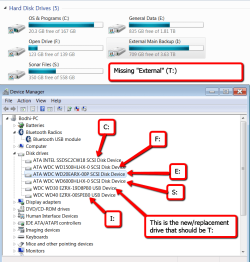
Just replace an hdd that was still working fine with a larger drive. Upon turning it on, the driver installed successfully, and the drive shows up in Device Manager, but the drive doesn't show up as a Networked Drive in My Computer like the one it replaced. In my ignorance, I thought it would show up like always.
Attached is a screenshot of what I can see. Can anyone guide me as to what needs to be done here? Thanks.
Win 7 Pro system. Have 2 external USB drives, both networked.
Just replace an hdd that was still working fine with a larger drive. Upon turning it on, the driver installed successfully, and the drive shows up in Device Manager, but the drive doesn't show up as a Networked Drive in My Computer like the one it replaced. In my ignorance, I thought it would show up like always.
Attached is a screenshot of what I can see. Can anyone guide me as to what needs to be done here? Thanks.
Attachments
My Computer
At a glance
Windows 7 Professional 64-bitIntel Core i5-4670K Haswell 3.4GHz Quad-Core ...16GB (2 x 8GB) Kingston DDR3 1600FANLESS ASUS Radeon HD 6450 1GB
- Computer type
- PC/Desktop
- Computer Manufacturer/Model Number
- Custom Build
- OS
- Windows 7 Professional 64-bit
- CPU
- Intel Core i5-4670K Haswell 3.4GHz Quad-Core 84w CPU
- Motherboard
- ASUS Z87 Deluxe 1150 Intel Z87 Motherboard
- Memory
- 16GB (2 x 8GB) Kingston DDR3 1600
- Graphics Card(s)
- FANLESS ASUS Radeon HD 6450 1GB
- Hard Drives
- c: SSD Intel 520 Series 180GB SATA III (for OS/programs)
e: WD 2TB Green (general data)
f: WD 600 GB Velociraptor (audio recording data)
g: WD 150 GB Velociraptor (open)
- Antivirus
- Emsisoft Internet Security (AV/Firewall)
- Browser
- Firefox


