
Hi guys
I have read quite a few forums to try and find an answer to my problem, however everything I have found and tried has not worked. Please read bellow and see of anything pops into mind to help.
Problems:
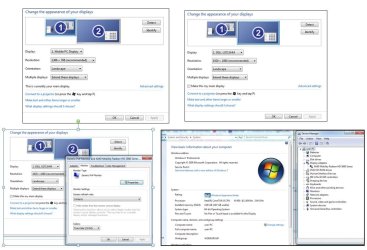
I am extending my display to a Dell monitor and the screen wont fit the monitor exactly. I have tried all possible resolution options as well as going into the Advanced settings for the monitors display settings with no success (changing the monitors screen refresh rate - only the 24Hz option works). I have not tried to alter any graphic card options etc and took a screen shot of what I think the graphics card is, just in case it helps.
Another issue which I have noticed is that when moving my mouse left and right from display to display, it gets "caught" at the bottom of the screen but not at the top. I know its from the positions that are set for display 1 and 2 in the display options menu - as in the screen shot. Is there anyway to overcome this? Because when I move the screens around it still gets caught because of the different sizes of the screens.
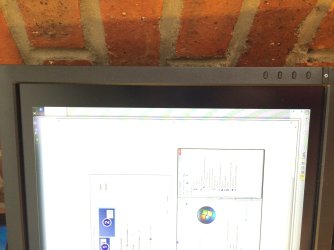
I have attached an image with a few screen shots of all settings I have been playing with as well as a picture of the problem (Screen2).
Components:
I am using a Acer TravelMate 5740G laptop and have attached image (Screen1) showing the graphics properties.
Dell 26" monitor
Could someone please assist in getting my screen to fit the monitor exactly?
I have read quite a few forums to try and find an answer to my problem, however everything I have found and tried has not worked. Please read bellow and see of anything pops into mind to help.
Problems:
I am extending my display to a Dell monitor and the screen wont fit the monitor exactly. I have tried all possible resolution options as well as going into the Advanced settings for the monitors display settings with no success (changing the monitors screen refresh rate - only the 24Hz option works). I have not tried to alter any graphic card options etc and took a screen shot of what I think the graphics card is, just in case it helps.
Another issue which I have noticed is that when moving my mouse left and right from display to display, it gets "caught" at the bottom of the screen but not at the top. I know its from the positions that are set for display 1 and 2 in the display options menu - as in the screen shot. Is there anyway to overcome this? Because when I move the screens around it still gets caught because of the different sizes of the screens.
I have attached an image with a few screen shots of all settings I have been playing with as well as a picture of the problem (Screen2).
Components:
I am using a Acer TravelMate 5740G laptop and have attached image (Screen1) showing the graphics properties.
Dell 26" monitor
Could someone please assist in getting my screen to fit the monitor exactly?
Attachments
My Computer
At a glance
Windows 7 Professional 64bitIntel Core i5-450M4GB DDR3
- Computer type
- PC/Desktop
- Computer Manufacturer/Model Number
- Acer TravelMate 5740G
- OS
- Windows 7 Professional 64bit
- CPU
- Intel Core i5-450M
- Memory
- 4GB DDR3

